Solved no video when connecting to an amp

razy60

New member
Power User
Local time
12:42 AM
Messages
187
Hi, I have just reinstalled win7 on my pc after all the updates and driver installation,(took hours:cry:) I have discovered I can only use my amp if i disconnect my TV input, switch the amp input on(via its remote) and switch to the amp via (tv remote) all this whilst the PC is rebooting:confused:.
Before the reinstall i could have both switched on and choose which output to watch or have both on and choose which audio to listen too. I have uninstalled, reinstalled and tried old new and some really weird drivers, cleaned the system with various cleaners and sweepers but nothing works, I thought that maybe my card was failing due to power problems but it works fine when i connect to another monitor, at the i am using the reboot so i can watch hidef stuff but its a pain:mad:

Anyone any ideas. Cheers


Raz
 

My Computer My Computer

Computer Manufacturer/Model Number
home built PC. Laptop studio1557
OS
windows 7 64 bit and dual boot Pinguyos
CPU
PC, intel i7 920 2.7ghz, laptop i7 720
Motherboard
PC, Asus P6t .laptop probably rubbish from dell
Memory
PC 6GB, laptop 2GB, me 2 seconds after 6 pints
Graphics Card(s)
PC Asus eah5870,laptop, ati hd 4580
Monitor(s) Displays
Sharp 42" HD TV using HDMI + HDMI to onkyo surround amp
Screen Resolution
1920x1080
Hard Drives
1x ssd OCZ 60GB, 2x250GB raid0, 2x1TB (storage),2TB
PSU
OCZ 700w
Case
antec 902
Cooling
antec khuler h20 920
Keyboard
logitek wave
Mouse
x8 sidewinder
Internet Speed
dog slow
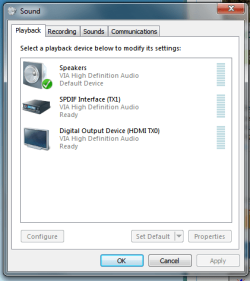
You need to change the default audio output when switching from HDMI to the TV (this will use the graphics card to output audio) and the sound card connected to the amp.
playback.png
 

My Computer My Computer

Computer type
PC/Desktop
Computer Manufacturer/Model Number
Self Build
OS
Windows 7 Ultimate x64
CPU
Intel Core2 Quad Q8300 2.5Ghz
Motherboard
Asus P5QD Turbo
Memory
Kingston HyperX 4x1GB DDR2 1066Mhz
Graphics Card(s)
Asus/Nvidia 9500GT 1GB
Sound Card
On-Board HD
Monitor(s) Displays
22" Widescreen TFT
Screen Resolution
1920x1080
Hard Drives
2x 320Gb Seagate SATAII RAID 0
2x 80Gb Seagate SATAII RAID 0
1x 1tb hybrid (8gb ssd)
PSU
650w
Case
ATX
Cooling
140mm front, 120mm Rear, 80mm Chipset + stock CPU and GPU
Keyboard
Plastic one
Mouse
Plastic one
Internet Speed
4Mbps
Other Info
Laptop: HP Elitebook 2560p
i5 @2.7Ghz 4GB DDR3
That is too weird. What version of the ati drivers were you using before the reinstall? Are they the same as now?
 

My Computer My Computer

OS
Windows 7 Professional 32
@sub styler; trouble is if i switch the amp whilst using the tv as a display all i get is a black screen, i then have to reboot to get desktop back.:(

@Cubicsilver: 11.11 before, tried some even older drivers and waited or update but no go thing is i was using 11.11 for BF3 before with no problems.:confused:

cheers

Raz
 

My Computer My Computer

Computer Manufacturer/Model Number
home built PC. Laptop studio1557
OS
windows 7 64 bit and dual boot Pinguyos
CPU
PC, intel i7 920 2.7ghz, laptop i7 720
Motherboard
PC, Asus P6t .laptop probably rubbish from dell
Memory
PC 6GB, laptop 2GB, me 2 seconds after 6 pints
Graphics Card(s)
PC Asus eah5870,laptop, ati hd 4580
Monitor(s) Displays
Sharp 42" HD TV using HDMI + HDMI to onkyo surround amp
Screen Resolution
1920x1080
Hard Drives
1x ssd OCZ 60GB, 2x250GB raid0, 2x1TB (storage),2TB
PSU
OCZ 700w
Case
antec 902
Cooling
antec khuler h20 920
Keyboard
logitek wave
Mouse
x8 sidewinder
Internet Speed
dog slow
I use a similar setup. One time my picture went all wonky after I connected a different computer to my amp and when I connected the original computer, it woudn't return to normal. I tried all sorts of things. Eventually I ended up unplugging my hdmi cables and unplugging the power to the amp and tv for a couple of hours. When I plugged it back in, it worked again. The second time it happened I went into the amp's menu (LG) and did a reset. It worked.

Maybe worth a try?
 

My Computer My Computer

OS
Windows 7 Professional 32
yeah, will give that a go.
after much thought the one thing i did different on this install is have the graphics card connected to both sources instead of just 1, don't think it should have made a difference but you never know so if your suggestion doesn't work i may go for a reinstall as it has very little on at the moment:rolleyes:
Nice spot on the other post:D

Raz
 

My Computer My Computer

Computer Manufacturer/Model Number
home built PC. Laptop studio1557
OS
windows 7 64 bit and dual boot Pinguyos
CPU
PC, intel i7 920 2.7ghz, laptop i7 720
Motherboard
PC, Asus P6t .laptop probably rubbish from dell
Memory
PC 6GB, laptop 2GB, me 2 seconds after 6 pints
Graphics Card(s)
PC Asus eah5870,laptop, ati hd 4580
Monitor(s) Displays
Sharp 42" HD TV using HDMI + HDMI to onkyo surround amp
Screen Resolution
1920x1080
Hard Drives
1x ssd OCZ 60GB, 2x250GB raid0, 2x1TB (storage),2TB
PSU
OCZ 700w
Case
antec 902
Cooling
antec khuler h20 920
Keyboard
logitek wave
Mouse
x8 sidewinder
Internet Speed
dog slow
Just as an update, After trying various methods to fix the problem I eventually reinstalled win7, but only had 1 video output connected, since then all is good in the land of HiDef:D
 

My Computer My Computer

Computer Manufacturer/Model Number
home built PC. Laptop studio1557
OS
windows 7 64 bit and dual boot Pinguyos
CPU
PC, intel i7 920 2.7ghz, laptop i7 720
Motherboard
PC, Asus P6t .laptop probably rubbish from dell
Memory
PC 6GB, laptop 2GB, me 2 seconds after 6 pints
Graphics Card(s)
PC Asus eah5870,laptop, ati hd 4580
Monitor(s) Displays
Sharp 42" HD TV using HDMI + HDMI to onkyo surround amp
Screen Resolution
1920x1080
Hard Drives
1x ssd OCZ 60GB, 2x250GB raid0, 2x1TB (storage),2TB
PSU
OCZ 700w
Case
antec 902
Cooling
antec khuler h20 920
Keyboard
logitek wave
Mouse
x8 sidewinder
Internet Speed
dog slow
Back
Top