No Windows 7 SP1 backup files

squid13

New member
Member
VIP
Local time
1:04 PM
Messages
215
Location
Cantonment, Florida
I installed SP1 and it went very smooth and it installed successfully and all is running OK. I did a disk cleanup just to see how big the backup files were for the service pack and it said O bytes. I thought it saved them. I haven't deleted any files so I wonder what happened to them.
 

My Computer My Computer

At a glance

Windows 7 Professional SP1 64 bitIntel(R)Core(TM)2Quad procQ9550(2.83GHZ)8 GB768MB NVIDIA GEFORCE GT610
Computer type
PC/Desktop
Computer Manufacturer/Model Number
HP Pavilion Elite d5200t ATX PC
OS
Windows 7 Professional SP1 64 bit
CPU
Intel(R)Core(TM)2Quad procQ9550(2.83GHZ)
Motherboard
Pegatron
Memory
8 GB
Graphics Card(s)
768MB NVIDIA GEFORCE GT610
Sound Card
Creative Sound Blaster X-Fi Xtreme
Monitor(s) Displays
Samsung S24D300
Screen Resolution
1440x900
Hard Drives
640GB 7200RPM Sata 3Gb/s
PSU
HP
Case
HP
Cooling
2 Fans
Keyboard
Microsoft Internet Keyboard
Mouse
MicroSoft IntelliMouse Optical
Internet Speed
Cox Cable
Antivirus
Norton
Browser
FireFox
Yes, where are the backup files stored? Are they in one folder - I can't find any reference to them either, though I know they are there somewhere (my disk cleanup shows 920MB, not sure why yours would say zero - sounds a bit ominous!). No luck Googling this either so far.

I'd rather move them off my C drive and archive them elsewhere. Presumably returning them to their original location would enable me to remove SP1 if necessary.

Martin
 

My Computer My Computer

At a glance

Windows 7 Home Premium SP1 64-bitIntel Core i7-4790K CPU @ 4.5GHz16GB KINGSTON HYPER-X FURY DUAL-DDR3 1600MHz8GB NVIDIA GEFORCE GTX 1070
Computer type
PC/Desktop
Computer Manufacturer/Model Number
Custom Build
OS
Windows 7 Home Premium SP1 64-bit
CPU
Intel Core i7-4790K CPU @ 4.5GHz
Motherboard
Asus H97I-PLUS
Memory
16GB KINGSTON HYPER-X FURY DUAL-DDR3 1600MHz
Graphics Card(s)
8GB NVIDIA GEFORCE GTX 1070
Monitor(s) Displays
HannsG 28" & Dell 24"
Screen Resolution
1920x1200
Hard Drives
1 x 2TB Samsung Evo 860 SSD
2 x 500GB Samsung Evo 850 SSD
PSU
CORSAIR 650W CS SERIES
Case
Thermaltake Core V1 Mini ITX Cube
Cooling
NOCTUA NH-L12
Browser
Firefox
Other Info
Custom PC used for X-Plane 11
Squid and Martinlest

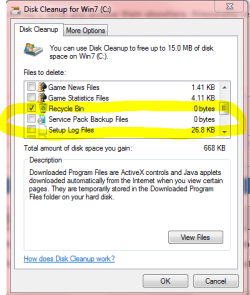
You will need to right click and run Windows Disk Cleanup as Administrator or open regularly and click "Clean up System Files" in left bottom corner.

I had to run it twice as Admin. The first time it didn't detect the SP1 backups. Have no idea why.
Now there is a listing that has to be check marked. Yellow outlined in Snip.

Cleanup has to be run as Admin. or it won't show up. :D
Mike
 

Attachments

  • Cleanup SP.PNG
    Cleanup SP.PNG
    16.7 KB · Views: 14

My Computer My Computer

At a glance

Windows7 Pro 64bit SP-1; Windows XP Pro 32bitIntel Core i7-870 Lynnfield 2.93GHz LGA 1156 ...8GB@1400MHz Crucial Ballistix DDR3-1600 4x2GBASUS ENGTX460 DirectCU/2DI/1GD5 1GB 256-bit G...
Computer Manufacturer/Model Number
Hopalong/ Godzilla
OS
Windows7 Pro 64bit SP-1; Windows XP Pro 32bit
CPU
Intel Core i7-870 Lynnfield 2.93GHz LGA 1156 95W Quad-Core
Motherboard
ASUS P7P55D-E PRO
Memory
8GB@1400MHz Crucial Ballistix DDR3-1600 4x2GB
Graphics Card(s)
ASUS ENGTX460 DirectCU/2DI/1GD5 1GB 256-bit GDDR5
Sound Card
VIA Onboard
Monitor(s) Displays
Asus VS248H-P 24"; Samsung SyncMaster 941BW 19"ws
Screen Resolution
1920x1080; 1440x900
Hard Drives
Samsung 830 120GB SSD
Intel 320 120GB SSD
Western Digital Caviar Black WD7501AALS 750GB 7200 RPM SATA 3.0Gb/s
Western Digital Caviar Black WD6401AALS 640GB 7200 RPM SATA 3.0Gb/s
PSU
COOLER MASTER Silent Pro RS850-AMBAJ3-US 850W Modular
Case
COOLER MASTER HAF 932 RC-932-KKN5-GP Black
Cooling
Scythe "Mugen-2 Rev.B" (2 ScytheKaze-Jyuni PWM fans)
Keyboard
Logitech K-320
Mouse
Kensington
Antivirus
Avast Inernet Suite
Browser
IE 9 ; Chrome
Yours is also 0 bytes, why would you clean it up when there's nothing there ?
I've not come across this issue elsewhere.
 

My Computer My Computer

At a glance

Windows 7 home premium x64AMD FX-4100 AM3+ 3.6GHz 12MB Black EditionCrsair vengeance 12Gb DDR3 1600MHz CL9Asus GTX 560 1GB
Computer Manufacturer/Model Number
DIY
OS
Windows 7 home premium x64
CPU
AMD FX-4100 AM3+ 3.6GHz 12MB Black Edition
Motherboard
Asus M5A97 Pro
Memory
Crsair vengeance 12Gb DDR3 1600MHz CL9
Graphics Card(s)
Asus GTX 560 1GB
Sound Card
Realtek onboard
Monitor(s) Displays
Hanns G 1680x1050 native
Hard Drives
OCZ 128Gb Petrol ssd
2x500 Gb Samsung
PSU
OCZ StealthXstream II 500W
Internet Speed
8Mb or better
I ran disk clean up 3 times as Administrator and it comes up 0 bytes. My computer says SP1 is installed so what happened to the backup files. It looks like if I wanted to remove it I wouldn't be able to cause there are no backup files. Is there a Command line that will remove them? Where are they at in the computer and I can see if there here?
 

My Computer My Computer

At a glance

Windows 7 Professional SP1 64 bitIntel(R)Core(TM)2Quad procQ9550(2.83GHZ)8 GB768MB NVIDIA GEFORCE GT610
Computer type
PC/Desktop
Computer Manufacturer/Model Number
HP Pavilion Elite d5200t ATX PC
OS
Windows 7 Professional SP1 64 bit
CPU
Intel(R)Core(TM)2Quad procQ9550(2.83GHZ)
Motherboard
Pegatron
Memory
8 GB
Graphics Card(s)
768MB NVIDIA GEFORCE GT610
Sound Card
Creative Sound Blaster X-Fi Xtreme
Monitor(s) Displays
Samsung S24D300
Screen Resolution
1440x900
Hard Drives
640GB 7200RPM Sata 3Gb/s
PSU
HP
Case
HP
Cooling
2 Fans
Keyboard
Microsoft Internet Keyboard
Mouse
MicroSoft IntelliMouse Optical
Internet Speed
Cox Cable
Antivirus
Norton
Browser
FireFox
Mine still says 920MBs, but can anyone please tell me where these files are stored?

M.
 

My Computer My Computer

At a glance

Windows 7 Home Premium SP1 64-bitIntel Core i7-4790K CPU @ 4.5GHz16GB KINGSTON HYPER-X FURY DUAL-DDR3 1600MHz8GB NVIDIA GEFORCE GTX 1070
Computer type
PC/Desktop
Computer Manufacturer/Model Number
Custom Build
OS
Windows 7 Home Premium SP1 64-bit
CPU
Intel Core i7-4790K CPU @ 4.5GHz
Motherboard
Asus H97I-PLUS
Memory
16GB KINGSTON HYPER-X FURY DUAL-DDR3 1600MHz
Graphics Card(s)
8GB NVIDIA GEFORCE GTX 1070
Monitor(s) Displays
HannsG 28" & Dell 24"
Screen Resolution
1920x1200
Hard Drives
1 x 2TB Samsung Evo 860 SSD
2 x 500GB Samsung Evo 850 SSD
PSU
CORSAIR 650W CS SERIES
Case
Thermaltake Core V1 Mini ITX Cube
Cooling
NOCTUA NH-L12
Browser
Firefox
Other Info
Custom PC used for X-Plane 11
Open an elevated command prompt (click on the start orb, All Programs > Accessories, right-click on Command Prompt and select Run as Admin). Type the following at the prompt, then hit Enter.

dism /online /cleanup-image /spsuperseded
 

My Computer My Computer

At a glance

Windows 7 x64 pro/ Windows 7 x86 Pro/ XP SP3 x86
Computer Manufacturer/Model Number
Too many to describe...
OS
Windows 7 x64 pro/ Windows 7 x86 Pro/ XP SP3 x86
Sorry, I am not sure who is answering who now. I don't want to clean up the files, I just need to know where they are so I can archive them. Thanks
 

My Computer My Computer

At a glance

Windows 7 Home Premium SP1 64-bitIntel Core i7-4790K CPU @ 4.5GHz16GB KINGSTON HYPER-X FURY DUAL-DDR3 1600MHz8GB NVIDIA GEFORCE GTX 1070
Computer type
PC/Desktop
Computer Manufacturer/Model Number
Custom Build
OS
Windows 7 Home Premium SP1 64-bit
CPU
Intel Core i7-4790K CPU @ 4.5GHz
Motherboard
Asus H97I-PLUS
Memory
16GB KINGSTON HYPER-X FURY DUAL-DDR3 1600MHz
Graphics Card(s)
8GB NVIDIA GEFORCE GTX 1070
Monitor(s) Displays
HannsG 28" & Dell 24"
Screen Resolution
1920x1200
Hard Drives
1 x 2TB Samsung Evo 860 SSD
2 x 500GB Samsung Evo 850 SSD
PSU
CORSAIR 650W CS SERIES
Case
Thermaltake Core V1 Mini ITX Cube
Cooling
NOCTUA NH-L12
Browser
Firefox
Other Info
Custom PC used for X-Plane 11
Sorry, I am not sure who is answering who now. I don't want to clean up the files, I just need to know where they are so I can archive them. Thanks
The reply was for the OP.

As for your question, all OS files reside in the winsxs folder so all files superseded by SP1 would also be there. However, given the enormous no. of files in that folder and the fact that it stores multiple versions of the same file (hence the name side by side sxs), I would advise you not to go fishing there. Superseded files obviously get flagged so they are removed by the DISM command.

And why exactly do you want to archive them?
 

My Computer My Computer

At a glance

Windows 7 x64 pro/ Windows 7 x86 Pro/ XP SP3 x86
Computer Manufacturer/Model Number
Too many to describe...
OS
Windows 7 x64 pro/ Windows 7 x86 Pro/ XP SP3 x86
If SP1 is working with no problems there is no need to ever remove it, your os is updated to the best version so now make a backup of the os so you can get back to this point whenever needed.
 

My Computer My Computer

At a glance

Windows 7 Home Premium 64 bitIntel Core 2 quad Extreme Q9770 @ 3.2 GHz4x2 GB Muskin 1600 MHz ramNVidia GTX 250
Computer Manufacturer/Model Number
Dell XPS 730
OS
Windows 7 Home Premium 64 bit
CPU
Intel Core 2 quad Extreme Q9770 @ 3.2 GHz
Memory
4x2 GB Muskin 1600 MHz ram
Graphics Card(s)
NVidia GTX 250
Sound Card
Soundblaster X-Fi Fatality Champion
Monitor(s) Displays
2 Dell 2007WFP Ultrascans
Screen Resolution
3360 x 1050
Hard Drives
WD Black 1TB sata, 2-WD Black 500 sata, 2-Seagate 500 Go external
PSU
1000 Watt
Cooling
air
Keyboard
MS Natrual Keyboard Pro
Mouse
Logitech Wireless Trackball
Internet Speed
DSL Elite
OK, I'll leave the files where they are - was trying to save some space on C drive, but it was only 'cosmetic' - I have enough space there for now. Thanks.

M.
 

My Computer My Computer

At a glance

Windows 7 Home Premium SP1 64-bitIntel Core i7-4790K CPU @ 4.5GHz16GB KINGSTON HYPER-X FURY DUAL-DDR3 1600MHz8GB NVIDIA GEFORCE GTX 1070
Computer type
PC/Desktop
Computer Manufacturer/Model Number
Custom Build
OS
Windows 7 Home Premium SP1 64-bit
CPU
Intel Core i7-4790K CPU @ 4.5GHz
Motherboard
Asus H97I-PLUS
Memory
16GB KINGSTON HYPER-X FURY DUAL-DDR3 1600MHz
Graphics Card(s)
8GB NVIDIA GEFORCE GTX 1070
Monitor(s) Displays
HannsG 28" & Dell 24"
Screen Resolution
1920x1200
Hard Drives
1 x 2TB Samsung Evo 860 SSD
2 x 500GB Samsung Evo 850 SSD
PSU
CORSAIR 650W CS SERIES
Case
Thermaltake Core V1 Mini ITX Cube
Cooling
NOCTUA NH-L12
Browser
Firefox
Other Info
Custom PC used for X-Plane 11
Back
Top