Solved No Windows Update notifications

Shanester

New member
Local time
9:25 AM
Messages
36
Location
Canada
Greetings,

I'm not getting notified of new updates. It is set to "Check for updates", and in Control Panel > System and Security > Turn automatic updating on or off, all options are checked.

svchost.exe (netsvcs) -> wuauserv is also using all of my CPU.

I ran the System Update Readiness Tool.

System File Checker said "Windows Resource Protection did not find any integrity violations."

CBS.zip is 350 MB, so I uploaded it to OneDrive instead.

I've asked this question in Microsoft Answers, and was asked to provide system information. I was hoping to get further here.

Thanks,
Shane.
 

My Computer

Computer Manufacturer/Model Number
HP Pavilion dv7-4180us
OS
Windows 7 Home Premium SP1 64-bit
CPU
Intel i5
Memory
4 GB
Graphics Card(s)
ATI Mobility
Screen Resolution
1600 x 900
Internet Speed
10 Mbps
just download the Windows 10 ISO from Microsoft website and start your upgrade. it works the same. why bother waiting for the notification?
 

My Computer

Computer type
PC/Desktop
OS
Windows 10 32bit
Sorry, what I mean is that I'm not receiving updates for Windows 7, which are usually released on Tuesdays.

I already have the "Get Windows 10" icon in the notification area. It's not part of the Action Center.

Thanks,
Shane.
 

My Computer

Computer Manufacturer/Model Number
HP Pavilion dv7-4180us
OS
Windows 7 Home Premium SP1 64-bit
CPU
Intel i5
Memory
4 GB
Graphics Card(s)
ATI Mobility
Screen Resolution
1600 x 900
Internet Speed
10 Mbps
I inadvertently installed the first few W10 prep updates and then uninstalled them and then hid all of the W10 prep updates. Ever since the first of the W10 updates were installed on my system, I have not seen an update notification for W7 updates. If I go to the Windows Update page, the notification will be there, but I have not seen the update shield notification show up on the system tray since the W10 updates began being delivered. I have update set to check for updates, but let me choose to download and install them.
 
Last edited:

My Computer

Computer type
PC/Desktop
Computer Manufacturer/Model Number
ASUS
OS
Windows 7 Home Premium 64 bit SP1
CPU
i5-2320 @3.00 GHz
Memory
6GB
Graphics Card(s)
NVIDIA GeForce 7300 LE
Monitor(s) Displays
Acer S200HQL 19.5 LED
Screen Resolution
1280 x 800 (1900 x 900 max)
Hard Drives
Drive 1: 1 TB SATA internal: C drive
Drive 2: 250 GB SATA internal: User Data Backup
Drive 3: 500 GB SATA USB: Full System Backup 1, Father
Drive 4: 500 GB SATA USB: Full System Backup 2, Son
Drive 5: 40 GB IDE USB: Kindle, ASUS Tabl
Keyboard
ASUS KB34211
Mouse
Logitech m325 cordless
Internet Speed
27Mb down, 3 Mb up cable modem w/Netgear R6400 WiFi
Antivirus
NIS, Spybot S&D, CCleaner, Malwarebytes, MSERT, MRT
Browser
FF v44.0.2;IE11 v11.0.9600.18015,uv11.0.23;Chrome v44.0.2403
Other Info
FF has AdBlockPlus and Ghostery plugins,
Hi:

AFAIK If you have hidden or uninstalled some/all of the Win7 telemetry patches (to prevent upgrading to Win10), you will no longer see the Windows Update icon in the system tray.

However, Windows Update should still be honoring your settings (e.g. "check for updates and notify when updates are available"). IOW it ought to still be phoning home to check for updates, if you have it configured to do so.

There are a few workarounds to check it.
For example:
One may either manually open the Windows Update applet from the Control Panel or from the Windows start menu from time to time to check to see if there are available updates**, or one may wish to create desktop shortcut to the Windows Update applet.

**To open the applet from the start menu one can pin Windows Update there: Windows Update pinned there. (Click Start, type "Windows Update" and let the search results appear. Press and hold the SHIFT key down, right-click on "Windows Update" (in Search results) and select "Pin to Start Menu". Note that the Pin... option doesn't appear if the SHIFT key is not depressed.)

HTH,

MM
 

My Computer

Computer type
PC/Desktop
Computer Manufacturer/Model Number
Dell Studio XPS 8500
OS
OEM Windows 7 Ult (x64) SP1
CPU
Intel Core-i7 3770 @ 3.4 GHz
Motherboard
"Dell" branded
Memory
16 GB DDR3 SDRAM @ 1333 MHz
Graphics Card(s)
NVidia GeForce GT620 1 GB
Sound Card
THX TruStudio PC
Monitor(s) Displays
Dell U2410 Full HD
Hard Drives
2.0 TB SATA2 @ 7200 RPM
PSU
350W
Keyboard
MS 4000 Ergon - Wired
Mouse
Logitech Anywhere MX
Internet Speed
Cable HSI w/Turbo (router)
Antivirus
KIS-MBAM Premium-MBAE Premium
Browser
Fx (current version); IE
Other Info
And a Win7/64 Pro laptop; And a Win10/64 Pro desktop.
I don't think Shane is necessarily talking about the
Windows 10 upgrade, but update notifications in general.
You should still get update notifications even with Windows 10 updates removed, as long as it's set to "Check for updates but let me choose".

Have you tried resetting the Windows update components?

https://support.microsoft.com/en-gb/kb/971058

I would create a backup/image before running any fixes.
 

My Computer

Computer type
PC/Desktop
Computer Manufacturer/Model Number
Custom Build
OS
Win 7 Ultimate, Win 8.1 Pro, Linux Mint 19 Cinnamon (All 64-Bit)
CPU
Intel i5 4690K
Motherboard
Gigabyte Z97X-UD3H
Memory
Corsair Vengeance LP 32GB DDR3
Graphics Card(s)
MSI GTX 1060 GAMING X 6GB
Sound Card
Onboard
Hard Drives
Samsung 850 EVO 250GB SSD (x2)
Samsung 860 EVO 1TB SSD (x2)
Crucial MX300 525GB SSD
WD Blue 2TB 5400rpm Intellipark Disabled (x2)
PSU
Corsair HX750i
Case
Phanteks Enthoo Pro
Cooling
CM Hyper 212 EVO on CPU, Noctua Redux NF-P14S 1500rpm (x6)
Keyboard
Corsair K70 RGB LUX
Mouse
Corsair Sabre RGB
Antivirus
Avast Free, MalwareBytes, SAS & CryptoPrevent
Browser
Chrome
Other Info
StarTech PEXESAT322I 2 Port PCI-E SATA Card
ASUS PCE-AC56 Dual-band AC1300 Wireless Card
Akasa FC.Six Manual Fan Controller
And a Partridge in a Pear Tree!
I don't think Shane is necessarily talking about the
Windows 10 upgrade, but update notifications in general.

Agree.:D

You should still get update notifications even with Windows 10 updates removed, as long as it's set to "Check for updates but let me choose".

Agree, except that -- with the telemetry patches hidden -- the old Win7 system tray icon notifying the Win7 user that updates are available no longer appears.
Windows Updates itself works fine and checks for updates, as configured.
If one opens the applet, it will, indeed, say whether or not there are updates available.
IOW, it's a "cosmetic" issue with the loss of the system tray notification icon.

Multiple threads here and elsewhere about this.

YMMV, but that's what I've seen reported and on my own Win7 rigs.

Cheers,

MM
 

My Computer

Computer type
PC/Desktop
Computer Manufacturer/Model Number
Dell Studio XPS 8500
OS
OEM Windows 7 Ult (x64) SP1
CPU
Intel Core-i7 3770 @ 3.4 GHz
Motherboard
"Dell" branded
Memory
16 GB DDR3 SDRAM @ 1333 MHz
Graphics Card(s)
NVidia GeForce GT620 1 GB
Sound Card
THX TruStudio PC
Monitor(s) Displays
Dell U2410 Full HD
Hard Drives
2.0 TB SATA2 @ 7200 RPM
PSU
350W
Keyboard
MS 4000 Ergon - Wired
Mouse
Logitech Anywhere MX
Internet Speed
Cable HSI w/Turbo (router)
Antivirus
KIS-MBAM Premium-MBAE Premium
Browser
Fx (current version); IE
Other Info
And a Win7/64 Pro laptop; And a Win10/64 Pro desktop.
so nice if that little WU tray icon could come back! but i'm giving up hope...
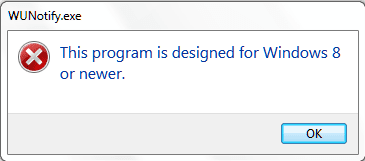
so i just installed WUNotifier (https://wun.codeplex.com) - let's see...
ps : WUN does work with win7 unlike the one from https://www.quppa.net/wunotify

wF9bky0WTwVIQAAAABJRU5ErkJggg==
 

Attachments

  • Capture.PNG
    Capture.PNG
    10.4 KB · Views: 63

My Computer

Computer type
Laptop
Computer Manufacturer/Model Number
Dell Latitude E7240
OS
Microsoft Windows 7 Professionnel 64 bits 7601 Multiprocessor Free Service Pack 1
CPU
Intel(R) Core(TM) i5-4310U CPU @ 2.00GHz
Motherboard
Dell Inc. 08YF01
Memory
8,00 GB
Graphics Card(s)
Intel(R) HD Graphics Family
Sound Card
(1) Bluetooth Audio (2) Périphérique High Definition Audio
Monitor(s) Displays
Mobile Intel 965
Screen Resolution
1366 x 768 x 32 bits (4294967296 colors) @ 59 Hz
Hard Drives
SK hynix SH920 mSATA 128
I don't have any hidden updates, and I've never uninstalled an update.
Windows Update is not honouring my settings.
I know that I can manually check for an update. However, this is only part of the problem. The other part is that svchost.exe (netsvcs) -> wuauserv is also using all of my CPU.

I reset Windows Update. It found:

"Service registration is missing or corrupt: Reset service registration.
Problems installing recent updates: Repair Windows Update services and dependencies."

Hopefully it's fixed.

Shane.
 

My Computer

Computer Manufacturer/Model Number
HP Pavilion dv7-4180us
OS
Windows 7 Home Premium SP1 64-bit
CPU
Intel i5
Memory
4 GB
Graphics Card(s)
ATI Mobility
Screen Resolution
1600 x 900
Internet Speed
10 Mbps
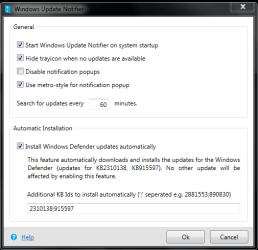
so i just installed WUNotifier (https://wun.codeplex.com) - let's see...

well, it doesnt work even tho setup looks ok (see screenshot) - got no notification since that time and, sure enough, when i opened wu today 19 updates were waiting to be installed...
... including KB3035583, the one that puts the win10 installation icon in the tray even tho it was supposed to be hidden...
anyway, i dont understand what's going on as i had seen in the news that ms doesnt support 7 anymore - how come there are still updates?
 

Attachments

  • Capture.PNG
    Capture.PNG
    41.6 KB · Views: 42

My Computer

Computer type
Laptop
Computer Manufacturer/Model Number
Dell Latitude E7240
OS
Microsoft Windows 7 Professionnel 64 bits 7601 Multiprocessor Free Service Pack 1
CPU
Intel(R) Core(TM) i5-4310U CPU @ 2.00GHz
Motherboard
Dell Inc. 08YF01
Memory
8,00 GB
Graphics Card(s)
Intel(R) HD Graphics Family
Sound Card
(1) Bluetooth Audio (2) Périphérique High Definition Audio
Monitor(s) Displays
Mobile Intel 965
Screen Resolution
1366 x 768 x 32 bits (4294967296 colors) @ 59 Hz
Hard Drives
SK hynix SH920 mSATA 128
Hopefully it's fixed.

It's not fixed. I didn't get notified of an update that was released today. Also, svchost.exe -> netsvcs -> wuauserv is using all of my CPU again.

Shane.
 

My Computer

Computer Manufacturer/Model Number
HP Pavilion dv7-4180us
OS
Windows 7 Home Premium SP1 64-bit
CPU
Intel i5
Memory
4 GB
Graphics Card(s)
ATI Mobility
Screen Resolution
1600 x 900
Internet Speed
10 Mbps
Does anyone using WUNotifier (https://wun.codeplex.com) know why MS Windows Update lags behind it?
Details: contrary to my previous post here, il seems WUNotifier sort of works, as it now automatically finds new updates. However, when it pops up with new updates, launching MS WU shows none and when running a search, it either hangs of finds nothing, and it'll take 2-3 days for updates to show up in MS WU. Meanwhile, I get the same issue as Shanester, i.e. cpu overuse by svchost.exe. After updates have been installed, svchost turns quiet again.
Any hint?
 

My Computer

Computer type
Laptop
Computer Manufacturer/Model Number
Dell Latitude E7240
OS
Microsoft Windows 7 Professionnel 64 bits 7601 Multiprocessor Free Service Pack 1
CPU
Intel(R) Core(TM) i5-4310U CPU @ 2.00GHz
Motherboard
Dell Inc. 08YF01
Memory
8,00 GB
Graphics Card(s)
Intel(R) HD Graphics Family
Sound Card
(1) Bluetooth Audio (2) Périphérique High Definition Audio
Monitor(s) Displays
Mobile Intel 965
Screen Resolution
1366 x 768 x 32 bits (4294967296 colors) @ 59 Hz
Hard Drives
SK hynix SH920 mSATA 128
I got notified of new updates today. Hopefully it's working again.

Shane.
 

My Computer

Computer Manufacturer/Model Number
HP Pavilion dv7-4180us
OS
Windows 7 Home Premium SP1 64-bit
CPU
Intel i5
Memory
4 GB
Graphics Card(s)
ATI Mobility
Screen Resolution
1600 x 900
Internet Speed
10 Mbps
so did i - halleluya!
 

My Computer

Computer type
Laptop
Computer Manufacturer/Model Number
Dell Latitude E7240
OS
Microsoft Windows 7 Professionnel 64 bits 7601 Multiprocessor Free Service Pack 1
CPU
Intel(R) Core(TM) i5-4310U CPU @ 2.00GHz
Motherboard
Dell Inc. 08YF01
Memory
8,00 GB
Graphics Card(s)
Intel(R) HD Graphics Family
Sound Card
(1) Bluetooth Audio (2) Périphérique High Definition Audio
Monitor(s) Displays
Mobile Intel 965
Screen Resolution
1366 x 768 x 32 bits (4294967296 colors) @ 59 Hz
Hard Drives
SK hynix SH920 mSATA 128

My Computer

Computer type
Laptop
Computer Manufacturer/Model Number
HP
OS
windows 8.1 Pro
Browser
Chrome
It seems to be working again. Although I'm getting notified of updates for Project 2010, which I don't have. But that's a separate problem.

Thanks,
Shane.
 

My Computer

Computer Manufacturer/Model Number
HP Pavilion dv7-4180us
OS
Windows 7 Home Premium SP1 64-bit
CPU
Intel i5
Memory
4 GB
Graphics Card(s)
ATI Mobility
Screen Resolution
1600 x 900
Internet Speed
10 Mbps
Back
Top