No wireless icon connection ?

Sp1t0nTh3Gr0und

New member
Local time
3:53 PM
Messages
44
Hello everyone.
Im running a Windows 7 Ultimate 32 bit computer without a wireless icon?
I would like to change my lan connection to wireless so i can move our modern to the living room.
But before i can do this i need to test the wireless connection, but i noticed i didnt have any Wireless connection icon?
So, how can i find the Wireless icon on my computer? We are currently 3 computers at home 2 of em is connected to the wireless modern and this one is connected via lan cable.
We got all 3 different versions of windows.. (Xp, Vista & 7)
PS: I upgraded this computer from XP to windows7 with a installation disc.
Sorry for danish picture but yeah ... Im running the danish version of windows7
Image preview :
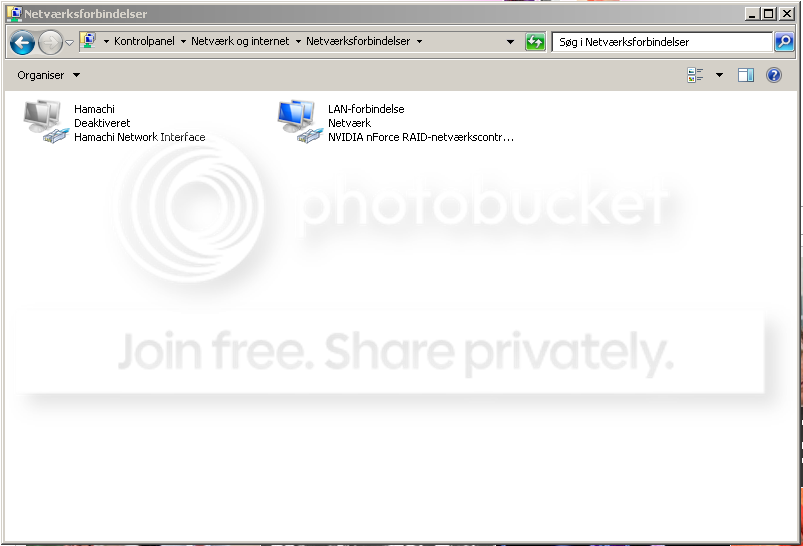
Udklip-2.png
 

My Computer

OS
Windows 7
You don't have the wireless icon because you have not used a wireless connection; you are connected by Ethernet. Open Network and Sharing Center, click on Connect to a network and see if it shows your wireless. If not, click on Set up a new connection or network.
 

My Computer

Computer Manufacturer/Model Number
Home built
OS
Windows 7 Ultimate 32 bit
CPU
Intel(R) Pentium(R) 4 CPU 3.00GHz
Motherboard
ASUS P4P800-VM Motherboard Chipset: Intel 865G + ICH5
Memory
2.50 GB RAM
Graphics Card(s)
NVIDIA GeForce 7600 GS
Sound Card
SoundMax Integrated Digital Audio (Chip)
Monitor(s) Displays
ViewSonic VX 1962 wm
Screen Resolution
1680 X 1050
Hard Drives
Seagate Barracuda 7200.10 80 GB
ST380215A ATA Device 18.6 GB
Western Digital "My Book" external hard drive 750 GB
Cooling
Fan based
Keyboard
Microsoft Comfort Curve Keyboard 2000 v10 USB
Mouse
Logitec optic USB
Internet Speed
3.01 Mb/s download 0.64 Mb/s upload
What Carl said :D
 

My Computer

Computer Manufacturer/Model Number
Proline
OS
Windows 7 Pro 64 bit
CPU
Intel(R) Core(TM) i7 CPU 870 @ 2.93GHz
Motherboard
H55-G43(MS-7638)
Memory
4GB
Graphics Card(s)
NVIDIA GeForce GTX 470
Sound Card
Onboard
Monitor(s) Displays
Proline LCD 19 inch
Screen Resolution
1280 x 1024
Hard Drives
2 x SATA 250 Gig 1 x External 2TB
PSU
RX 730 SS
Case
Proline
Cooling
Standard
Keyboard
PS2
Mouse
PS2
Internet Speed
To embarrassed to tell lol
Okay thank you guys, but im kind of retarded and need help lolz.
Im on a danish version like you should know.
Im in "Network and Sharing Center" and clicked the "Connect to a network" it tells me im connected to lan.. I tried clicking the "Connect to a or new network" and choose "Connect connection to the internet" --> its tells me im already connected so i decided to click "Setup up a new connection anyways" Now... Its asks me for a "PPPoE Connection" or "a phone connection or something" ... Sorry for bad spelling lol, this is kind of confusing me :P
 

My Computer

OS
Windows 7
Under Connect to the internet, do you have the option for wireless? If not, do you have a wireless adapter installed? If you are on a laptop, is your wireless adapter turned on?
 

My Computer

Computer Manufacturer/Model Number
Home built
OS
Windows 7 Ultimate 32 bit
CPU
Intel(R) Pentium(R) 4 CPU 3.00GHz
Motherboard
ASUS P4P800-VM Motherboard Chipset: Intel 865G + ICH5
Memory
2.50 GB RAM
Graphics Card(s)
NVIDIA GeForce 7600 GS
Sound Card
SoundMax Integrated Digital Audio (Chip)
Monitor(s) Displays
ViewSonic VX 1962 wm
Screen Resolution
1680 X 1050
Hard Drives
Seagate Barracuda 7200.10 80 GB
ST380215A ATA Device 18.6 GB
Western Digital "My Book" external hard drive 750 GB
Cooling
Fan based
Keyboard
Microsoft Comfort Curve Keyboard 2000 v10 USB
Mouse
Logitec optic USB
Internet Speed
3.01 Mb/s download 0.64 Mb/s upload
Ok I assume you have a wireless card in that PC right :D If so I would disconnect the LAN cable first and then setup a new network. You can either use "Connect to the Internet" or "Set up a new network" depending on how you connect to the internet (Router mode or Bridge mode) I would go for the "Connect to the Internet" option first
 

My Computer

Computer Manufacturer/Model Number
Proline
OS
Windows 7 Pro 64 bit
CPU
Intel(R) Core(TM) i7 CPU 870 @ 2.93GHz
Motherboard
H55-G43(MS-7638)
Memory
4GB
Graphics Card(s)
NVIDIA GeForce GTX 470
Sound Card
Onboard
Monitor(s) Displays
Proline LCD 19 inch
Screen Resolution
1280 x 1024
Hard Drives
2 x SATA 250 Gig 1 x External 2TB
PSU
RX 730 SS
Case
Proline
Cooling
Standard
Keyboard
PS2
Mouse
PS2
Internet Speed
To embarrassed to tell lol

My Computer

Computer Manufacturer/Model Number
Home built
OS
Windows 7 Ultimate 32 bit
CPU
Intel(R) Pentium(R) 4 CPU 3.00GHz
Motherboard
ASUS P4P800-VM Motherboard Chipset: Intel 865G + ICH5
Memory
2.50 GB RAM
Graphics Card(s)
NVIDIA GeForce 7600 GS
Sound Card
SoundMax Integrated Digital Audio (Chip)
Monitor(s) Displays
ViewSonic VX 1962 wm
Screen Resolution
1680 X 1050
Hard Drives
Seagate Barracuda 7200.10 80 GB
ST380215A ATA Device 18.6 GB
Western Digital "My Book" external hard drive 750 GB
Cooling
Fan based
Keyboard
Microsoft Comfort Curve Keyboard 2000 v10 USB
Mouse
Logitec optic USB
Internet Speed
3.01 Mb/s download 0.64 Mb/s upload
:D :D
 

My Computer

Computer Manufacturer/Model Number
Proline
OS
Windows 7 Pro 64 bit
CPU
Intel(R) Core(TM) i7 CPU 870 @ 2.93GHz
Motherboard
H55-G43(MS-7638)
Memory
4GB
Graphics Card(s)
NVIDIA GeForce GTX 470
Sound Card
Onboard
Monitor(s) Displays
Proline LCD 19 inch
Screen Resolution
1280 x 1024
Hard Drives
2 x SATA 250 Gig 1 x External 2TB
PSU
RX 730 SS
Case
Proline
Cooling
Standard
Keyboard
PS2
Mouse
PS2
Internet Speed
To embarrassed to tell lol
Thinking about this a bit more if you have a laptop then your wireless is normally build in and you should just switch it on. Once on you should see a wireless connection in the right of your task bar showing you the strength of the signal. By just clicking on this it should take you through the steps of setting up the connection. You will need to key from the router depending on the router. You may also have an option in the router to accept the MAC address of the PC.

If you have a separate wireless card that you have installed then I would say you need to check the software of this and drivers to make sure they are Win7 comparable and working 100%. Maybe give us a bit more details on the PC you want to connect
 

My Computer

Computer Manufacturer/Model Number
Proline
OS
Windows 7 Pro 64 bit
CPU
Intel(R) Core(TM) i7 CPU 870 @ 2.93GHz
Motherboard
H55-G43(MS-7638)
Memory
4GB
Graphics Card(s)
NVIDIA GeForce GTX 470
Sound Card
Onboard
Monitor(s) Displays
Proline LCD 19 inch
Screen Resolution
1280 x 1024
Hard Drives
2 x SATA 250 Gig 1 x External 2TB
PSU
RX 730 SS
Case
Proline
Cooling
Standard
Keyboard
PS2
Mouse
PS2
Internet Speed
To embarrassed to tell lol
Okay what i did was ...
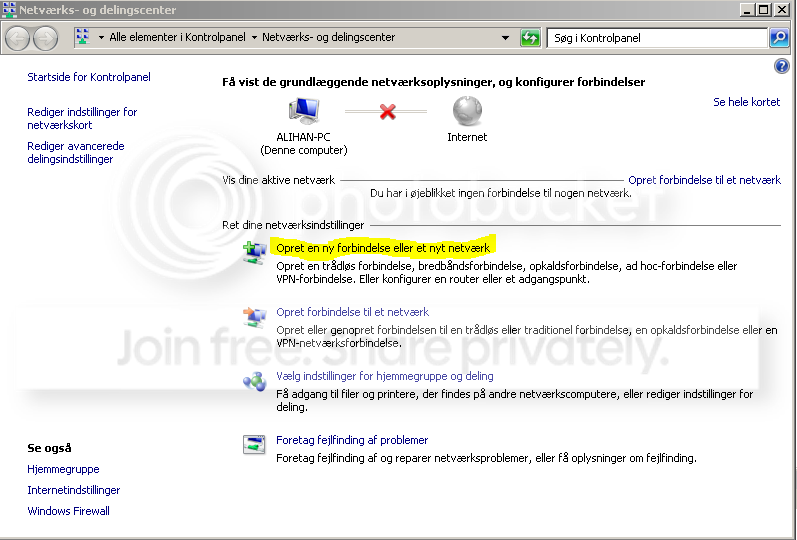
I plugged out the LAN Cable first of all, and then clicked the "Create a new connection or a new network" button:
image1.png

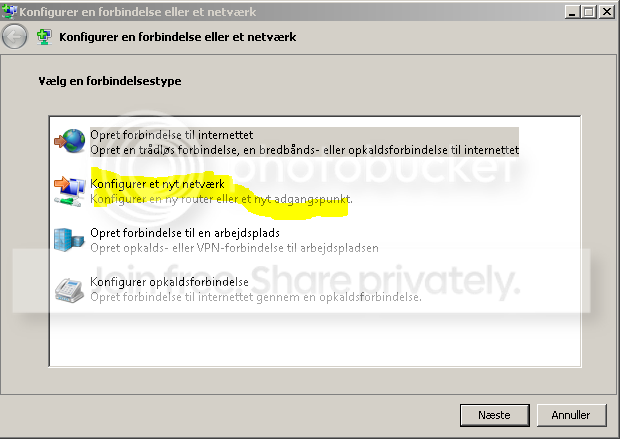
Then i tried start by choose the "Configure a new network"
image2.png

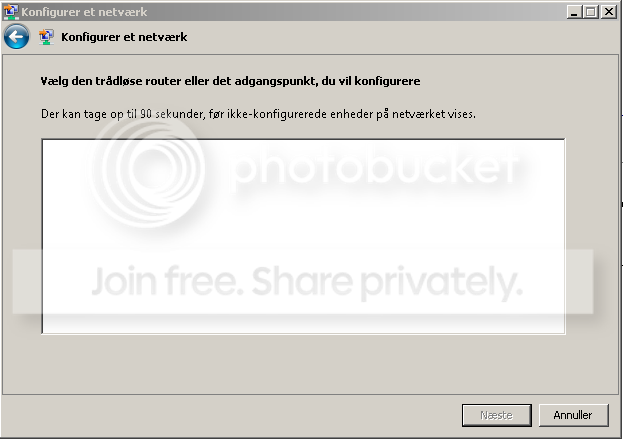
Well, all went blank now... I waited about 5 min on this.. But nothing changed at all.
image3.png

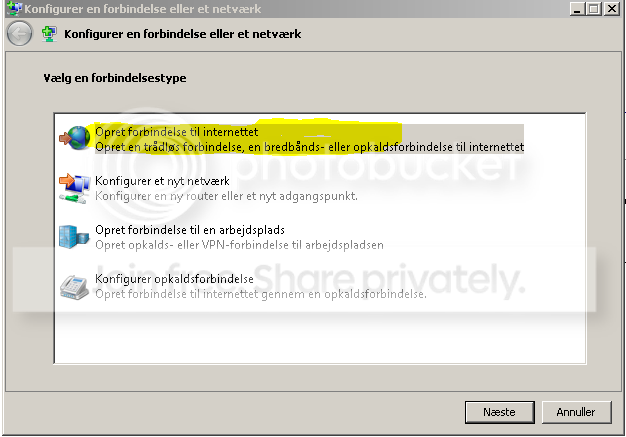
So i decided to go back and choose "Connect to the internet" this time..
image4.png

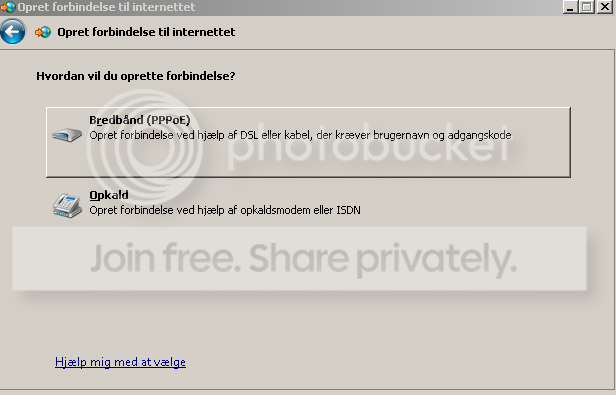
Now i had 2 options.. "Breedband (PPPoE)(Driver Icon) or Opkald(Phone icon)"
Image5.png

And from here i dont know what to do.. Any help please?(:
PS: Im not on a laptop(;
 

My Computer

OS
Windows 7
Ok how do you connect to the internet on your XP PC's. DO you have a dial up icon or do you just connect always. Looking at this it seems you are picking up two ISP connections. I would say the PPPoE would be the one to select. Not sure what the other says :D
 

My Computer

Computer Manufacturer/Model Number
Proline
OS
Windows 7 Pro 64 bit
CPU
Intel(R) Core(TM) i7 CPU 870 @ 2.93GHz
Motherboard
H55-G43(MS-7638)
Memory
4GB
Graphics Card(s)
NVIDIA GeForce GTX 470
Sound Card
Onboard
Monitor(s) Displays
Proline LCD 19 inch
Screen Resolution
1280 x 1024
Hard Drives
2 x SATA 250 Gig 1 x External 2TB
PSU
RX 730 SS
Case
Proline
Cooling
Standard
Keyboard
PS2
Mouse
PS2
Internet Speed
To embarrassed to tell lol
Ok how do you connect to the internet on your XP PC's. DO you have a dial up icon or do you just connect always. Looking at this it seems you are picking up two ISP connections. I would say the PPPoE would be the one to select. Not sure what the other says :D
Well the other XP pc, had wireless connection from the start... (HP Mini)
 

My Computer

OS
Windows 7
Ok then just use the PPPoE connection and follow the prompts. I will wait here for you if you need more help :D
 

My Computer

Computer Manufacturer/Model Number
Proline
OS
Windows 7 Pro 64 bit
CPU
Intel(R) Core(TM) i7 CPU 870 @ 2.93GHz
Motherboard
H55-G43(MS-7638)
Memory
4GB
Graphics Card(s)
NVIDIA GeForce GTX 470
Sound Card
Onboard
Monitor(s) Displays
Proline LCD 19 inch
Screen Resolution
1280 x 1024
Hard Drives
2 x SATA 250 Gig 1 x External 2TB
PSU
RX 730 SS
Case
Proline
Cooling
Standard
Keyboard
PS2
Mouse
PS2
Internet Speed
To embarrassed to tell lol
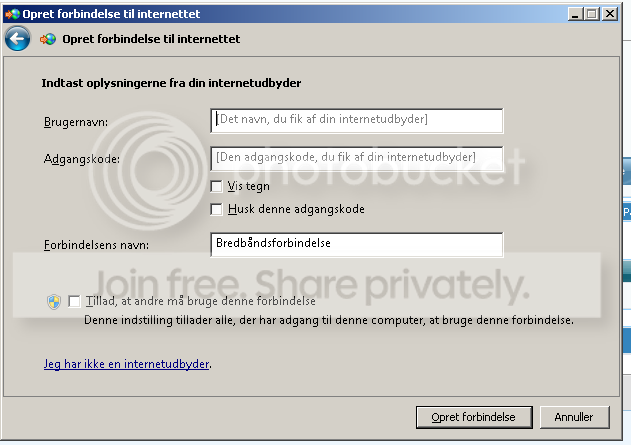
Well, its asking me for .. A username, password & a connection name.?
Image6.png
 

My Computer

OS
Windows 7
The user name and password would be your ISP user name and password. The bottom one is just the name of the connection it can be anything you want.
 

My Computer

Computer Manufacturer/Model Number
Proline
OS
Windows 7 Pro 64 bit
CPU
Intel(R) Core(TM) i7 CPU 870 @ 2.93GHz
Motherboard
H55-G43(MS-7638)
Memory
4GB
Graphics Card(s)
NVIDIA GeForce GTX 470
Sound Card
Onboard
Monitor(s) Displays
Proline LCD 19 inch
Screen Resolution
1280 x 1024
Hard Drives
2 x SATA 250 Gig 1 x External 2TB
PSU
RX 730 SS
Case
Proline
Cooling
Standard
Keyboard
PS2
Mouse
PS2
Internet Speed
To embarrassed to tell lol
Well, is the ISP information then this :
Username : Fido [Thats the network name]
Password : I wont tell you the network password.. But, is it that? ^^
 

My Computer

OS
Windows 7
yes that does sound like it, you should be able to log into your ISP control panel and check what it is if you are not sure
 

My Computer

Computer Manufacturer/Model Number
Proline
OS
Windows 7 Pro 64 bit
CPU
Intel(R) Core(TM) i7 CPU 870 @ 2.93GHz
Motherboard
H55-G43(MS-7638)
Memory
4GB
Graphics Card(s)
NVIDIA GeForce GTX 470
Sound Card
Onboard
Monitor(s) Displays
Proline LCD 19 inch
Screen Resolution
1280 x 1024
Hard Drives
2 x SATA 250 Gig 1 x External 2TB
PSU
RX 730 SS
Case
Proline
Cooling
Standard
Keyboard
PS2
Mouse
PS2
Internet Speed
To embarrassed to tell lol
Well you should have your ISP information some place. I am not sure how it works your side but this side I can log into my account of my ISP and it shows it to me there. Then again if you can log into your account you would most likely use the same info to connect anyway
 

My Computer

Computer Manufacturer/Model Number
Proline
OS
Windows 7 Pro 64 bit
CPU
Intel(R) Core(TM) i7 CPU 870 @ 2.93GHz
Motherboard
H55-G43(MS-7638)
Memory
4GB
Graphics Card(s)
NVIDIA GeForce GTX 470
Sound Card
Onboard
Monitor(s) Displays
Proline LCD 19 inch
Screen Resolution
1280 x 1024
Hard Drives
2 x SATA 250 Gig 1 x External 2TB
PSU
RX 730 SS
Case
Proline
Cooling
Standard
Keyboard
PS2
Mouse
PS2
Internet Speed
To embarrassed to tell lol
Im really confused... Okay when i try use my connection informations on the login page.. its gives me this error:
"It didnt sucess the connection when error:
The modern (or another connections-unit) has reported a error/fault."
Now i can either click :
Try again.
Connect anyways
 

My Computer

OS
Windows 7
Back
Top