Non-cloud free anti-virus programs?

vomacka

New member
Member
Local time
2:24 PM
Messages
9
I am looking for a free, non-cloud based AV free for my winXP and Win7 systems. Here is what I need:

1) FREE.
2) NOT cloud based.
3) Manual updates. (NOT automatic) The system uses a dial-up modem only. No high speed internet available.
4) No extra programs (BLOATWARE). Just a plain AV program.
5) No ads.

Is there a AV program that fits these criteria?

Thanks for your help.

Scott
 

My Computer

Computer Manufacturer/Model Number
Custom Build
OS
Windows 7 64bit
CPU
AMD AthlonII X3 Triple-Core 3.3GHz
Motherboard
ASUS M4A87T AM3 AMD 870
Memory
Kingston 4GB (4x 1GB) Value Ram DDR3 1333MHz
Graphics Card(s)
ASUS ENGT430/DI/1GD3(LP) 1GB DDR3 1600MHz
Sound Card
On board audio
Monitor(s) Displays
ACER V173 17"
Hard Drives
WD 1TB Caviar Blue
PSU
Enermax 500w
Case
HEC Black Mid-Tower ATX
Internet Speed
56Lbs
Re:anti-virus

Vomacka,
I have noticed that pretty much all the free anti-virus programs contain adds. I personally only use Microsoft Essentials. It is free and works great.
 

My Computer

OS
windows 7 64 bit
From my experience, and unless suddenly something somewhere has changed -- free and ad-free are mutually exclusive when it comes to 3rd party AV programs.
 

My Computer

Computer type
PC/Desktop
Computer Manufacturer/Model Number
Antec desktop; Acer Aspire laptops
OS
Windows 7 Professional 64-bit
CPU
Desktop i5; Acers i5 & i7
Memory
desktop 16GB; 1 Acer 8GB & 1 Acer 16GB
Hard Drives
1TB split into 2 equal partitions [OS and data] usable by RJS
Internet Speed
AT&T DSL
Browser
FF, GChrome, msIE
Other Info
Windows 7 Firewall, Emsisoft AM/AV, MSE [scan-only], SpywareBlaster, Ruiware/BillP combine
I just noticed you're using Windows 7; Windows Defender will be ok, however, MSE is probably more robust. Windows Firewall is probably all you need for a firewall. Later on, you might need more powerful 3rd party stuff....
This is only a starting point! I do not mean to imply that you stop with WD or MSE. As other followup posters have indicated - a more robust AV is needed and a more robust AM is needed.

Addendum: Due to excellent followup posts, I amended the above; "aok" changed to so-so "ok"]
 
Last edited:

My Computer

Computer type
PC/Desktop
Computer Manufacturer/Model Number
Antec desktop; Acer Aspire laptops
OS
Windows 7 Professional 64-bit
CPU
Desktop i5; Acers i5 & i7
Memory
desktop 16GB; 1 Acer 8GB & 1 Acer 16GB
Hard Drives
1TB split into 2 equal partitions [OS and data] usable by RJS
Internet Speed
AT&T DSL
Browser
FF, GChrome, msIE
Other Info
Windows 7 Firewall, Emsisoft AM/AV, MSE [scan-only], SpywareBlaster, Ruiware/BillP combine
What about the "no cloud" part?

I want to do all my updates manually and not have the software "call home" to update.

Scott
 

My Computer

Computer Manufacturer/Model Number
Custom Build
OS
Windows 7 64bit
CPU
AMD AthlonII X3 Triple-Core 3.3GHz
Motherboard
ASUS M4A87T AM3 AMD 870
Memory
Kingston 4GB (4x 1GB) Value Ram DDR3 1333MHz
Graphics Card(s)
ASUS ENGT430/DI/1GD3(LP) 1GB DDR3 1600MHz
Sound Card
On board audio
Monitor(s) Displays
ACER V173 17"
Hard Drives
WD 1TB Caviar Blue
PSU
Enermax 500w
Case
HEC Black Mid-Tower ATX
Internet Speed
56Lbs
Hi:

I just noticed you're using Windows 7; Windows Defender will be aok, however, MSE is probably more robust.

Windows Defender in Win7 is NOT an anti-virus.
It is only a weak anti-spyware/anti-malware application.

For Win7, the comparable, free, MS product is Microsoft Security Essentials.

MSE has both fans and detractors.
It is probably "as good" as any other "free" AV, is relatively easy to use and it does not include ads.

But all of the "free" AVs suffer from hidden costs, such as weak protection, ads, popups, toolbars/PUPs, reduced features and/or reduced support.
Developing and supporting robust security applications costs money.
Most (all, except MSE) "free" AVs are really more of a marketing tool for the vendor than anything else.

The cost of a robust security program works out to pennies a day and is $ well-spent.
There are many options to suit different computers and users.
But no AV or suite of products will protect 100% of computers from 100% of malware 100% of the time.
The most important security component is the part between the chair and the keyboard.
The next most important component is regular practice of backing up data and system images.

Cheers,
MM
 

My Computer

Computer type
PC/Desktop
Computer Manufacturer/Model Number
Dell Studio XPS 8500
OS
OEM Windows 7 Ult (x64) SP1
CPU
Intel Core-i7 3770 @ 3.4 GHz
Motherboard
"Dell" branded
Memory
16 GB DDR3 SDRAM @ 1333 MHz
Graphics Card(s)
NVidia GeForce GT620 1 GB
Sound Card
THX TruStudio PC
Monitor(s) Displays
Dell U2410 Full HD
Hard Drives
2.0 TB SATA2 @ 7200 RPM
PSU
350W
Keyboard
MS 4000 Ergon - Wired
Mouse
Logitech Anywhere MX
Internet Speed
Cable HSI w/Turbo (router)
Antivirus
KIS-MBAM Premium-MBAE Premium
Browser
Fx (current version); IE
Other Info
And a Win7/64 Pro laptop; And a Win10/64 Pro desktop.
What about the "no cloud" part?

I want to do all my updates manually and not have the software "call home" to update.

Scott

There are 2 types of updates. Program updates and virus/malware definition updates.
Do you want no auto updates, including the definition updates, or just no auto update for Program updates ?
 

My Computer

Computer type
PC/Desktop
Computer Manufacturer/Model Number
home built
OS
Multi-Boot W7_Pro_x64 W8.1_Pro_x64 W10_Pro_x64 +Linux_VMs +Chromium_VM
CPU
AMD Athlon II x4 620
Motherboard
Gigabyte GA-MA785G-UD3H
Memory
6GB GSkill DDR2 800
Graphics Card(s)
AMD 4670 GPU + AMD 4200 IGP
Sound Card
on board Realtek ALC889A
Monitor(s) Displays
RCA 40" LCD TV, Insignia 32" LCD TV, HP 15" LCD monitor
Screen Resolution
1680 x 1050
Hard Drives
OCZ Vertex 3 120GB,
Samsung F3 1TB (3),
Several others - WD, Seagate, Hitachi, ...
PSU
Corsair 500 W
Case
Rosewill mid tower
Cooling
CM 90mm rifle
Keyboard
Gyration wireless, Logitech wireless, Dell USB wired
Mouse
Gyration wireless, Logitech wireless, V7 USB wired
Internet Speed
Spectrum - 100Mbps D / 10Mbps U
Antivirus
Avast, MBAM3, EMET, WinPatrol
Browser
Pale Moon, Firefox, IE
Other Info
2 multi-boot PC's
Mainly HTPC/Office/Gen purpose (no gaming).
Trendnet USB KVM.
LG DVD burner/Blue Ray Player.
Tray system for removable SATA backup drives.

Not currently OCd, under-volted.
I use Hybrid sleep, rarely re-boot or shutdown.

Hauppauge HD-PVR, Avermedia PCIe TV Tuner, Hauppauge PCI TV Tuner.
There are 2 types of updates. Program updates and virus/malware definition updates.
Do you want no auto updates, including the definition updates, or just no auto update for Program updates ?

Excellent point.
There's more to real-time protection these days than just signatures and databases.

Running an outdated security app -- free or paid -- because one does not enable real-time updates is not much better than none at all.
By the time one is infected with some of today's zero-day and zero-hour threats, especially ransomware, it would be too late.
Most popular AVs provide a means to disable automatic MAJOR program updates (e.g. from version 2016 to 2017).
But few, if any, will run for long in real time with any sort of updating capability (for program updates and especially for "databases") fully disabled.
That would be something more akin to a manual, on-demand, second-opinion scanner, not a real-time AV or security program/suite.

I'm not sure the list of criteria presented can be satisfied AND still provide sufficient protection.

MM
 

My Computer

Computer type
PC/Desktop
Computer Manufacturer/Model Number
Dell Studio XPS 8500
OS
OEM Windows 7 Ult (x64) SP1
CPU
Intel Core-i7 3770 @ 3.4 GHz
Motherboard
"Dell" branded
Memory
16 GB DDR3 SDRAM @ 1333 MHz
Graphics Card(s)
NVidia GeForce GT620 1 GB
Sound Card
THX TruStudio PC
Monitor(s) Displays
Dell U2410 Full HD
Hard Drives
2.0 TB SATA2 @ 7200 RPM
PSU
350W
Keyboard
MS 4000 Ergon - Wired
Mouse
Logitech Anywhere MX
Internet Speed
Cable HSI w/Turbo (router)
Antivirus
KIS-MBAM Premium-MBAE Premium
Browser
Fx (current version); IE
Other Info
And a Win7/64 Pro laptop; And a Win10/64 Pro desktop.
I use
Avast free on Win 7
Avira free on Win 8.1
Panda free on Win 10 (RTM)
Windows Defender on Win 10 (Insider)

Panda:
If news is turned off i get no popups, not even if a new program version is available.
I don't know of a way to stop definition updates (synchronized with the cloud).

Avira:
As far as i know it will eventually auto update to a new program version.
They throttle the auto program update, so it does take quite a while to get it that way.
I get an ad popup when i startup 8.1.

Avast:
auto Program updates can be turned off.
I can't remember the last time i got an ad popup.
I'm not sure what happens if i disable auto definition updates, i never tried that.
Have to be careful installing/updating the program, so bloat doesn't get installed.

MSE/WD
That's up to whatever MS does, updates can come in via Windows Update.
no ad popups.

Personally i want auto updates for definition updates, and to be alerted when a new program update is available.
 
Last edited:

My Computer

Computer type
PC/Desktop
Computer Manufacturer/Model Number
home built
OS
Multi-Boot W7_Pro_x64 W8.1_Pro_x64 W10_Pro_x64 +Linux_VMs +Chromium_VM
CPU
AMD Athlon II x4 620
Motherboard
Gigabyte GA-MA785G-UD3H
Memory
6GB GSkill DDR2 800
Graphics Card(s)
AMD 4670 GPU + AMD 4200 IGP
Sound Card
on board Realtek ALC889A
Monitor(s) Displays
RCA 40" LCD TV, Insignia 32" LCD TV, HP 15" LCD monitor
Screen Resolution
1680 x 1050
Hard Drives
OCZ Vertex 3 120GB,
Samsung F3 1TB (3),
Several others - WD, Seagate, Hitachi, ...
PSU
Corsair 500 W
Case
Rosewill mid tower
Cooling
CM 90mm rifle
Keyboard
Gyration wireless, Logitech wireless, Dell USB wired
Mouse
Gyration wireless, Logitech wireless, V7 USB wired
Internet Speed
Spectrum - 100Mbps D / 10Mbps U
Antivirus
Avast, MBAM3, EMET, WinPatrol
Browser
Pale Moon, Firefox, IE
Other Info
2 multi-boot PC's
Mainly HTPC/Office/Gen purpose (no gaming).
Trendnet USB KVM.
LG DVD burner/Blue Ray Player.
Tray system for removable SATA backup drives.

Not currently OCd, under-volted.
I use Hybrid sleep, rarely re-boot or shutdown.

Hauppauge HD-PVR, Avermedia PCIe TV Tuner, Hauppauge PCI TV Tuner.
MM! Thanks for helping :) I only mentioned Windows Defender and MSE as a starting point. I did not mean to imply thread starter should stop there. Many rely on Windows Firewall and either WD or MSE - I would rather, like you, have more robust AV and AM -- like the ones you mentioned.
 

My Computer

Computer type
PC/Desktop
Computer Manufacturer/Model Number
Antec desktop; Acer Aspire laptops
OS
Windows 7 Professional 64-bit
CPU
Desktop i5; Acers i5 & i7
Memory
desktop 16GB; 1 Acer 8GB & 1 Acer 16GB
Hard Drives
1TB split into 2 equal partitions [OS and data] usable by RJS
Internet Speed
AT&T DSL
Browser
FF, GChrome, msIE
Other Info
Windows 7 Firewall, Emsisoft AM/AV, MSE [scan-only], SpywareBlaster, Ruiware/BillP combine
Hi, RolandJS:

I mean no disrespect and do not care to nit-pick.
But your reply about WD being "aok" in response to the OP's question about an AV could be misconstrued.

To reiterate, WD under Win7 is NOT an AV.
So, it would not be "aok" to run only WD, without a real AV.
At a MINIMUM, MSE or another free or paid AV would need to be added.

I merely sought to clarify the wording, both for the OP and for anyone else who might read the thread.

Cheers,
MM
 

My Computer

Computer type
PC/Desktop
Computer Manufacturer/Model Number
Dell Studio XPS 8500
OS
OEM Windows 7 Ult (x64) SP1
CPU
Intel Core-i7 3770 @ 3.4 GHz
Motherboard
"Dell" branded
Memory
16 GB DDR3 SDRAM @ 1333 MHz
Graphics Card(s)
NVidia GeForce GT620 1 GB
Sound Card
THX TruStudio PC
Monitor(s) Displays
Dell U2410 Full HD
Hard Drives
2.0 TB SATA2 @ 7200 RPM
PSU
350W
Keyboard
MS 4000 Ergon - Wired
Mouse
Logitech Anywhere MX
Internet Speed
Cable HSI w/Turbo (router)
Antivirus
KIS-MBAM Premium-MBAE Premium
Browser
Fx (current version); IE
Other Info
And a Win7/64 Pro laptop; And a Win10/64 Pro desktop.
There are 2 types of updates. Program updates and virus/malware definition updates.
Do you want no auto updates, including the definition updates, or just no auto update for Program updates ?

Excellent point.
There's more to real-time protection these days than just signatures and databases.

Running an outdated security app -- free or paid -- because one does not enable real-time updates is not much better than none at all.
By the time one is infected with some of today's zero-day and zero-hour threats, especially ransomware, it would be too late.
Most popular AVs provide a means to disable automatic MAJOR program updates (e.g. from version 2016 to 2017).
But few, if any, will run for long in real time with any sort of updating capability (for program updates and especially for "databases") fully disabled.
That would be something more akin to a manual, on-demand, second-opinion scanner, not a real-time AV or security program/suite.

I'm not sure the list of criteria presented can be satisfied AND still provide sufficient protection.

MM


OP did not include real time as in the list.


1) FREE.
2) NOT cloud based.
3) Manual updates. (NOT automatic) The system uses a dial-up modem only. No high speed internet available.
4) No extra programs (BLOATWARE). Just a plain AV program.
5) No ads


3. Manual updates is acceptable, as can be updated anytime.

4. As for Bloatware, in some free AV program, it is an option before the installation start.
 

My Computer

Computer type
Laptop
Computer Manufacturer/Model Number
Toshiba L630 and L735
OS
Windows 7 x64
Hard Drives
240 GB SSD
^^ Not sure what you mean.... ^^

If it's an anti-virus, then, yes it would run in real-time and provide real-time protection.
Otherwise, it's just a manual, on-demand malware scanner.

I guess that we won't know for sure what the OP had in mind unless/until he returns.

As for updates, ummm, yes, with a real-time AV providing real-time, active protection, it would be important to take real-time database updates to stay abreast of new threats.
Otherwise, running with outdated definitions could lead to both false-positives and false-negatives.
I agree with DavidE that (at least major) PROGRAM updates ought to be configured to notify, rather than to silently install.
Most manual, on-demand malware scanners will automatically check for updates before the scan.

As for bloatware, most of the "Free" AVs contain something. In many cases, it is not possible to opt-out during install. That is one of the disadvantages to some/many of the free AVs.

MM
 

My Computer

Computer type
PC/Desktop
Computer Manufacturer/Model Number
Dell Studio XPS 8500
OS
OEM Windows 7 Ult (x64) SP1
CPU
Intel Core-i7 3770 @ 3.4 GHz
Motherboard
"Dell" branded
Memory
16 GB DDR3 SDRAM @ 1333 MHz
Graphics Card(s)
NVidia GeForce GT620 1 GB
Sound Card
THX TruStudio PC
Monitor(s) Displays
Dell U2410 Full HD
Hard Drives
2.0 TB SATA2 @ 7200 RPM
PSU
350W
Keyboard
MS 4000 Ergon - Wired
Mouse
Logitech Anywhere MX
Internet Speed
Cable HSI w/Turbo (router)
Antivirus
KIS-MBAM Premium-MBAE Premium
Browser
Fx (current version); IE
Other Info
And a Win7/64 Pro laptop; And a Win10/64 Pro desktop.
I'm a simple bear so I will keep it simple.

Defender in Windows 7 at best is junk.

I use MSE.
One must keep their security programs update, what ever their internet speed is.
Window 7 built in firewall is all I use and so far it works just fine on two systems.

Of course MSE is active and so is the Malwarebytes Anti Malware Premium.
Their is a free version of Malwarebytes one can use (on demand).

So in a nutshell.

Microsoft Security Essentials (free)
Windows 7 built in Firewall (free)
Malwarebytes Anti Malware Premium (not free)

I update everything on my systems manually.

Jack
 

My Computer

Computer type
PC/Desktop
Computer Manufacturer/Model Number
Home made Desktop
OS
Windows 10 Pro. 64/ version 1709 Windows 7 Pro/64
CPU
Intel i7-6800K @ 4.3
Motherboard
ASUS X-99 Deluxe II
Memory
Corsair Platinum 16 gig @2400
Graphics Card(s)
EVGA GTX 1070 OC
Monitor(s) Displays
Asus 27" LED LCD/VE278Q
Screen Resolution
1920-1080 or 1280-720 HDMI
Hard Drives
INTEL SSD 730-240 Gb Sata 3.0/
PSU
EVGA Platium 1200W
Case
Phanteks Luxe Tempered Glass 8 fans/ one radiator
Cooling
XSPC/ Water Cooled CPU
Keyboard
Das 4 Professional
Mouse
Logitech M705/MX Anywhere 2-S
Internet Speed
100 mbits
Antivirus
Microsoft Security Essentials/ Malwarebytes Premium 3.0/ SAS
Browser
I.E. 11 default/Firefox/ ISP Time Warner Cable/Spectrum
Other Info
LG BluRay Burner/
Sound system-KLipsch-THX/
Icy Dock ssd Hot Swap bays.
Thanks guys..

Thanks guys for the info. It is very helpful.

What I don't need is a AV program that automatically downloads/installs apps/programs that I don't need or asked for. (I had this happen with AVG free. It automatically downloaded and installed ZEN and I did not want it or asked for it)

I would like to manually update both program and definitions so I can control what goes on my system. This way I can see if the AV is trying to download/install a app that I do not want. (I manually update my AVG free three times a day)

I also understand that most/all free AV's do have some sort of ads. Perhaps I should have asked for one where the ads are not to "obnoxious"?

Now about the cloud issue. My systems is using dial-up (High speed internet is not available) my speeds are 5-6Kbs download. (pathetic, I know) So I don't know if a cloud based AV would even work with such low download speeds?

Oh, one more thing. I DO NOT use windows updates. (The last time I used it, the system crashed with NO recovery. I lost everything) I am also using Zone-Alarm firewall and have windows FW deactivated.

Can MSE be updated manually without using Windows Updates?

Scott
 

My Computer

Computer Manufacturer/Model Number
Custom Build
OS
Windows 7 64bit
CPU
AMD AthlonII X3 Triple-Core 3.3GHz
Motherboard
ASUS M4A87T AM3 AMD 870
Memory
Kingston 4GB (4x 1GB) Value Ram DDR3 1333MHz
Graphics Card(s)
ASUS ENGT430/DI/1GD3(LP) 1GB DDR3 1600MHz
Sound Card
On board audio
Monitor(s) Displays
ACER V173 17"
Hard Drives
WD 1TB Caviar Blue
PSU
Enermax 500w
Case
HEC Black Mid-Tower ATX
Internet Speed
56Lbs
Oh, one more thing. I DO NOT use windows updates.

Then it probably does not matter what anti-virus or security-suite you install.
Even with a robust AV/IS, such as Kaspersky, it will be akin to bolting the front door and leaving the rear door and all the windows open.

(The last time I used it, the system crashed with NO recovery. I lost everything) I am also using Zone-Alarm firewall and have windows FW deactivated.
If you are months or more out of date with critical and important security updates, then it's really moot which AV you choose.
The solution to issues with WU is to resolve the underlying cause, not to stop using it.
I might suggest looking into getting your OS updated and (if need be) repaired.
If you have also been running without an AV or any other real-time protection, then you may already be infected.

You may or may not even be able to install or run any AV, including MSE, until you get Windows updated and repaired.


Can MSE be updated manually without using Windows Updates?

Scott
MSE is probably as good as any other "free" AV. But there are better choices.

@LayBackBear can answer that direct question, but all AVs I am familiar with have the ability to manually check for updates.
But that is only for "just in time" or specific circumstances.
The whole point of real-time protection is to have it up to date with current databases and definitions and features. Your AV needs to be updating at least definitions (if not program updates) "silently" and "automatically".

If you only plan to update a real-time AV "manually" or "on-demand", then it's not much better than having no AV at all (for reasons already disscussed).
And, as mentioned, if you have not installed critical and important security patches for Windows, .NET Framework, MS Office and other MS applications, then it probably doesn't matter which AV you choose.

NO AV or other security software can protect 100% of computers from 100% of malware 100% of the time. But "unsafe hex" -- such as not keeping one's OS up to date with security patches -- will undermine even the best available software.

Sorry to sound harsh -- but it's a bit of "tough love" to save you time and trouble canoing upstream without a paddle.:)

Thanks,
MM
 

My Computer

Computer type
PC/Desktop
Computer Manufacturer/Model Number
Dell Studio XPS 8500
OS
OEM Windows 7 Ult (x64) SP1
CPU
Intel Core-i7 3770 @ 3.4 GHz
Motherboard
"Dell" branded
Memory
16 GB DDR3 SDRAM @ 1333 MHz
Graphics Card(s)
NVidia GeForce GT620 1 GB
Sound Card
THX TruStudio PC
Monitor(s) Displays
Dell U2410 Full HD
Hard Drives
2.0 TB SATA2 @ 7200 RPM
PSU
350W
Keyboard
MS 4000 Ergon - Wired
Mouse
Logitech Anywhere MX
Internet Speed
Cable HSI w/Turbo (router)
Antivirus
KIS-MBAM Premium-MBAE Premium
Browser
Fx (current version); IE
Other Info
And a Win7/64 Pro laptop; And a Win10/64 Pro desktop.
Hi, again...

...Sorry, I was multi-tasking earlier and posted without suggesting a strategy.

First and foremost, we need to know if you have SP1 installed (you didn't mention it and it's not in your specs). Without SP1, you will unable to proceed with most of the other steps, including running Windows Update properly or at all. {Perhaps you did mention it and I missed it???}

>>If you are not sure if you have SP1, then type "winver" (no quotes) in the Windows search box and tell us what it says or post a screen shot of the window that appears.
>>Or, for more helpful data, type "msinfo32" (no quotes), then click on "msinfo32.exe" and then, when the window opens, click "file" > "export" and save the log as a *.txt file and attach it here. See HERE.

We will go from there.

Assuming you are not already infected and if you do have SP1, then it might be good to start with a system file checker run or 2, and then a chkdsk.
If your OS and/or disk is seriously damaged, those problems will need priority attention.
Sometimes, if the OS is too badly corrupted or damaged, it's best to start over with a fresh Windows install.

But let's get the "SP1" question answered first.:D

Thanks,

MM
 
Last edited:

My Computer

Computer type
PC/Desktop
Computer Manufacturer/Model Number
Dell Studio XPS 8500
OS
OEM Windows 7 Ult (x64) SP1
CPU
Intel Core-i7 3770 @ 3.4 GHz
Motherboard
"Dell" branded
Memory
16 GB DDR3 SDRAM @ 1333 MHz
Graphics Card(s)
NVidia GeForce GT620 1 GB
Sound Card
THX TruStudio PC
Monitor(s) Displays
Dell U2410 Full HD
Hard Drives
2.0 TB SATA2 @ 7200 RPM
PSU
350W
Keyboard
MS 4000 Ergon - Wired
Mouse
Logitech Anywhere MX
Internet Speed
Cable HSI w/Turbo (router)
Antivirus
KIS-MBAM Premium-MBAE Premium
Browser
Fx (current version); IE
Other Info
And a Win7/64 Pro laptop; And a Win10/64 Pro desktop.
Well my thoughts are:

Virus database definitions would often seem to take be days weeks or months to catch up with some currently circulating malware. So on that basis it's not critical to have an auto updating AV that updates as often as possible.

I use Zemana AntiMalware - it updates definitions every 5 minutes.
Also Comodo CIS (older version) where the user can choose how often to check for updates or disable auto updates and run manual checks.
VoodooShield Pro - no update checks needed but does scan new files by uploading them to VirusTotal and blocks anything suspicious until user approved.
Threatfire - no longer supported
Spy The Spy - executable file monitor
EMET
MJ RegWatcher - realtime registry monitor


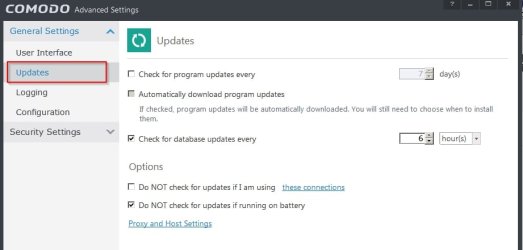
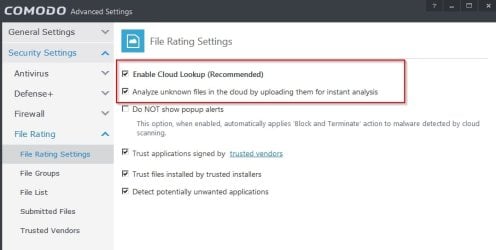
Screenshots from Comodo Internet Security Premium 8.2.0.4508

If scheduled updates are disabled you can still update manually.

Comodo Updates.jpg

COMODO Advanced Settings.jpg

Old version is here:
Download Comodo Internet Security 8.2.0.4508 - FileHippo.com

Installation Guide:
How to Install Comodo Firewall | Gizmo's Freeware

Note: I don't recommend installing unless you are an advanced user who can get to grips with configuration and settings. Also there is no dedicated uninstaller or removal tool to fully remove this product.

Also note: I do have a few other security softwares installed.
 

My Computer

Computer type
Laptop
Computer Manufacturer/Model Number
ASUS
OS
Microsoft Windows 7 Home Premium 64-bit 7601 Multiprocessor Free Service Pack 1
CPU
AMD C-60 APU with Radeon(tm) HD Graphics
Motherboard
ASUSTeK COMPUTER INC. X501U
Memory
4.00 GB
Graphics Card(s)
AMD Radeon HD 6290 Graphics
Sound Card
(1) AMD High Definition Audio Device (2) Realtek High Defi
Screen Resolution
1366 x 768 x 32 bits (4294967296 colors) @ 60 Hz
Hard Drives
Hitachi HTS545050A7E380 SATA Disk Device
Antivirus
Comodo CIS & FW, SecureAplus App Whitelisting, Threatfire
Browser
Cyberfox 64bit, Opera 64bit, Airfox
Other Info
Spy-The-Spy, HitmanPro.Alert, Norton Connect Safe, MJRegWatcher, BitDefender TrafficLight, Voodoo Shield, Zemana AntiMalware
^^ Excellent advice, Callender. ^^

While every-5-minute updating for zero-day/zero-hour malware may be a bit over-the-top, I agree that a layered approach that adds specific anti-malware to a baseline AV is a good idea.
Ditto for a decent firewall.

For the moment, I was trying to back up the discussion a bit to the basics, until we can determine what kind of shape the system is in (hardware and OS), whether it's infected, why WU is not working, etc.
I have a feeling that the system is months out of date with security updates, may have been running without any robust realtime protection (nothing listed in the specs) and therefore might possibly be infected.

Selection of a security software approach (AV + AM + AE + firewall, etc.) would seem to be a secondary consideration (even though it was, of course the OP's original question)?

Anyway, being a bit data-driven, I would hope to see a bit of minimal information about the system in order to better guide the OP's choice...

That's just me.:D

Cheers,
MM
 

My Computer

Computer type
PC/Desktop
Computer Manufacturer/Model Number
Dell Studio XPS 8500
OS
OEM Windows 7 Ult (x64) SP1
CPU
Intel Core-i7 3770 @ 3.4 GHz
Motherboard
"Dell" branded
Memory
16 GB DDR3 SDRAM @ 1333 MHz
Graphics Card(s)
NVidia GeForce GT620 1 GB
Sound Card
THX TruStudio PC
Monitor(s) Displays
Dell U2410 Full HD
Hard Drives
2.0 TB SATA2 @ 7200 RPM
PSU
350W
Keyboard
MS 4000 Ergon - Wired
Mouse
Logitech Anywhere MX
Internet Speed
Cable HSI w/Turbo (router)
Antivirus
KIS-MBAM Premium-MBAE Premium
Browser
Fx (current version); IE
Other Info
And a Win7/64 Pro laptop; And a Win10/64 Pro desktop.
Back
Top