Non-loading updates interfere with shutting down or going to Sleep?

flycaster

New member
Member
VIP
Local time
7:42 AM
Messages
472
Location
Boynton Beach, FL
There are two new updates (one for Skype desktop and one for Windows Framework 4.5.2 (KB2901983) - 4.5.1 is already on the computer) that will not load. Of course, i'd like help with getting them to load, but until that time, the problem is that every time I go to put the computer to Sleep, I don't get Sleep in the field of "What do you want your computer to do," instead I get "Install Updates and Shut Down." Until these updates appeared, the field would always self-select Sleep. How can I hide or get rid of these updates (until I learn how to load them) so that I can go directly to Sleep and not have to scroll the field to Sleep?

EDIT:
Got answer on how to hide unwanted or unloadable updates:

When you open Windows Updates and download them, let it download the updates it won't install, then right click each each update and select "Hide Update," it should look like this:

http://www.sevenforums.com/attachme...-update-hide-restore-hidden-updates-step2.jpg

I've got Skype Portable on my desktop (couldn't get the desktop version to work) and the Skype update (KB2876229) for Skype 7 won't load because it is probably for the desktop version of Skype?
 
Last edited:

My Computer My Computer

At a glance

Windows 7 HP 64-bit4GB/4GB
Computer Manufacturer/Model Number
Gateway DX4720-03/HP Pavilion dv6
OS
Windows 7 HP 64-bit
Memory
4GB/4GB
Antivirus
Avast Pro
Browser
Firefox, the latest

My Computer My Computer

At a glance

Win 7 x64 Home Premium (and x86 VirtualBox VM...i3 370M/i7 6500U8GB - finally :)/8GBit's an i3, dude!/dual Intel&nVidia
Computer type
Laptop
Computer Manufacturer/Model Number
Asus K52F or Lenovo B51-80
OS
Win 7 x64 Home Premium (and x86 VirtualBox VM)/Win10
CPU
i3 370M/i7 6500U
Motherboard
Asus/Lenovo
Memory
8GB - finally :)/8GB
Graphics Card(s)
it's an i3, dude!/dual Intel&nVidia
Sound Card
onboard
Monitor(s) Displays
15.6" built-in
Screen Resolution
1366x768/1920x1080
Hard Drives
750GB Seagate internal
Sundry external drives attached to other computers on the local network
1TB SSD on the Lenovo
PSU
n/a
Internet Speed
as much as I can get - usually on a dongle/phone, so <1MB/s
Antivirus
MSE/Defender
Browser
IE11/12/Edge/Chrome/FF(if I must)
The Skype one isn't an update - it's offered to everyone whether they have Skype or not. If you hide it, it will re-appear the next time the change the version number - so be prepared to keep hiding it every couple of months.
 

My Computer My Computer

At a glance

Win 7 x64 Home Premium (and x86 VirtualBox VM...i3 370M/i7 6500U8GB - finally :)/8GBit's an i3, dude!/dual Intel&nVidia
Computer type
Laptop
Computer Manufacturer/Model Number
Asus K52F or Lenovo B51-80
OS
Win 7 x64 Home Premium (and x86 VirtualBox VM)/Win10
CPU
i3 370M/i7 6500U
Motherboard
Asus/Lenovo
Memory
8GB - finally :)/8GB
Graphics Card(s)
it's an i3, dude!/dual Intel&nVidia
Sound Card
onboard
Monitor(s) Displays
15.6" built-in
Screen Resolution
1366x768/1920x1080
Hard Drives
750GB Seagate internal
Sundry external drives attached to other computers on the local network
1TB SSD on the Lenovo
PSU
n/a
Internet Speed
as much as I can get - usually on a dongle/phone, so <1MB/s
Antivirus
MSE/Defender
Browser
IE11/12/Edge/Chrome/FF(if I must)
As far as .NET is concerned, your best bet is probably to remove the existing installations completely first using Aaron Stebner's Cleanup tool, then install the 4.5.2 version with a clean base.
.NET Framework Cleanup Tool User's Guide - Aaron Stebner's WebLog - Site Home - MSDN Blogs

I understand what you are suggesting, Noel, but let me ask will removing 4.5.1 cause any problems before I am able to dl 4.5.2? What's the possibility that I won't be able to load on 4.5.2 and then not be able to load back 4.5.1?
 

My Computer My Computer

At a glance

Windows 7 HP 64-bit4GB/4GB
Computer Manufacturer/Model Number
Gateway DX4720-03/HP Pavilion dv6
OS
Windows 7 HP 64-bit
Memory
4GB/4GB
Antivirus
Avast Pro
Browser
Firefox, the latest
4.5.2 is effectively Service Pack 2 of 4.5 You can download the full installer for offline install (which may be a good idea) from here...
Download Microsoft .NET Framework 4.5.2 (Offline Installer) for Windows Vista SP2, Windows 7 SP1, Windows 8, Windows 8.1, Windows Server 2008 SP2, Windows Server 2008 R2 SP1, Windows Server 2012 and Windows Server 2012 R2 from Official Microsoft Down

I have to admit to not having noticed any difference between the two - but then I tend not to be using applications that require either.
 

My Computer My Computer

At a glance

Win 7 x64 Home Premium (and x86 VirtualBox VM...i3 370M/i7 6500U8GB - finally :)/8GBit's an i3, dude!/dual Intel&nVidia
Computer type
Laptop
Computer Manufacturer/Model Number
Asus K52F or Lenovo B51-80
OS
Win 7 x64 Home Premium (and x86 VirtualBox VM)/Win10
CPU
i3 370M/i7 6500U
Motherboard
Asus/Lenovo
Memory
8GB - finally :)/8GB
Graphics Card(s)
it's an i3, dude!/dual Intel&nVidia
Sound Card
onboard
Monitor(s) Displays
15.6" built-in
Screen Resolution
1366x768/1920x1080
Hard Drives
750GB Seagate internal
Sundry external drives attached to other computers on the local network
1TB SSD on the Lenovo
PSU
n/a
Internet Speed
as much as I can get - usually on a dongle/phone, so <1MB/s
Antivirus
MSE/Defender
Browser
IE11/12/Edge/Chrome/FF(if I must)
DL'd the suggested file,closed all apps and tried installing while offline...failed. Attached is the log
 

Attachments

My Computer My Computer

At a glance

Windows 7 HP 64-bit4GB/4GB
Computer Manufacturer/Model Number
Gateway DX4720-03/HP Pavilion dv6
OS
Windows 7 HP 64-bit
Memory
4GB/4GB
Antivirus
Avast Pro
Browser
Firefox, the latest
Please upload the following file...
Microsoft .NET Framework 4.5.2 Setup_20150420_182859718-MSI_netfx_Full_GDR_x64.msi.txt
 

My Computer My Computer

At a glance

Win 7 x64 Home Premium (and x86 VirtualBox VM...i3 370M/i7 6500U8GB - finally :)/8GBit's an i3, dude!/dual Intel&nVidia
Computer type
Laptop
Computer Manufacturer/Model Number
Asus K52F or Lenovo B51-80
OS
Win 7 x64 Home Premium (and x86 VirtualBox VM)/Win10
CPU
i3 370M/i7 6500U
Motherboard
Asus/Lenovo
Memory
8GB - finally :)/8GB
Graphics Card(s)
it's an i3, dude!/dual Intel&nVidia
Sound Card
onboard
Monitor(s) Displays
15.6" built-in
Screen Resolution
1366x768/1920x1080
Hard Drives
750GB Seagate internal
Sundry external drives attached to other computers on the local network
1TB SSD on the Lenovo
PSU
n/a
Internet Speed
as much as I can get - usually on a dongle/phone, so <1MB/s
Antivirus
MSE/Defender
Browser
IE11/12/Edge/Chrome/FF(if I must)
I'd like to upload the file, but it is way too long...1108308 characters, only 20000 characters can be copied, and as for attachment, the file is over twice as big as can be attached. Suggestions?
 

My Computer My Computer

At a glance

Windows 7 HP 64-bit4GB/4GB
Computer Manufacturer/Model Number
Gateway DX4720-03/HP Pavilion dv6
OS
Windows 7 HP 64-bit
Memory
4GB/4GB
Antivirus
Avast Pro
Browser
Firefox, the latest
compress it before upload. right-click on it and select Send To...> Compressed Folder
 

My Computer My Computer

At a glance

Win 7 x64 Home Premium (and x86 VirtualBox VM...i3 370M/i7 6500U8GB - finally :)/8GBit's an i3, dude!/dual Intel&nVidia
Computer type
Laptop
Computer Manufacturer/Model Number
Asus K52F or Lenovo B51-80
OS
Win 7 x64 Home Premium (and x86 VirtualBox VM)/Win10
CPU
i3 370M/i7 6500U
Motherboard
Asus/Lenovo
Memory
8GB - finally :)/8GB
Graphics Card(s)
it's an i3, dude!/dual Intel&nVidia
Sound Card
onboard
Monitor(s) Displays
15.6" built-in
Screen Resolution
1366x768/1920x1080
Hard Drives
750GB Seagate internal
Sundry external drives attached to other computers on the local network
1TB SSD on the Lenovo
PSU
n/a
Internet Speed
as much as I can get - usually on a dongle/phone, so <1MB/s
Antivirus
MSE/Defender
Browser
IE11/12/Edge/Chrome/FF(if I must)
Never compressed a file before, but here goes using WinZip7...

EDIT
OK, the first try didn't work because managed attachments can't handle *.7zip. I am now trying to compress the file with Windows7 compression app as described here: https://askleo.com/should_i_use_windows_file_compression/

Upload didn't work with the Win7 compression app. Can't figure why not as although the original file was 2.21MB, the compressed size on disk (as shown in properties of this file) is 560KB. Looks like the forum's app can't read the window's compression??? I'm going to see if I can DL a trial of winzip..... or, maybe you have another suggestion on how to get the file to you? I could email the 7zip file to you... BTW, in "Send to" there is no selection for compression?

EDIT2:
When installing WinZip I keep getting Error 1303 saying that I meed to install as an Administrator. But I am logged on as the Administrator and the install file's properties/security does list full permissions.
 
Last edited:

My Computer My Computer

At a glance

Windows 7 HP 64-bit4GB/4GB
Computer Manufacturer/Model Number
Gateway DX4720-03/HP Pavilion dv6
OS
Windows 7 HP 64-bit
Memory
4GB/4GB
Antivirus
Avast Pro
Browser
Firefox, the latest
Here's another try:
Ah, I see I finally got WZ7 to work. Had to add associate wz7 with *.zip
 

Attachments

My Computer My Computer

At a glance

Windows 7 HP 64-bit4GB/4GB
Computer Manufacturer/Model Number
Gateway DX4720-03/HP Pavilion dv6
OS
Windows 7 HP 64-bit
Memory
4GB/4GB
Antivirus
Avast Pro
Browser
Firefox, the latest
Well done!
(If you'd followed the instructions as posted, they should have worked first time. Windows has a very effective built-in compression ability.... back to topic!)

The critical error appears to be this...
Code:
[FONT="Times New Roman"]04/20/15 18:31:14 DDSet_Status: Reserving disk space by 15782880 in %windir%
04/20/15 18:31:14 DDSet_Warning: MsiViewExecute failed

[/FONT] .
This could mean a number of things - one of which is that there's no space on the disk for the install. It requires at least 1.5GB free disk space.

one other thing could be a corrupt registry.
Please open an Elevated Command Prompt, and run the following commands

REG QUERY HKEY_LOCAL_MACHINE\SYSTEM\CurrentControlSet\services\msiserver
REG QUERY HKLM\Software\Microsoft\Windows\CurrentVersion\Installer

Post the results,

Then do a full reset of Windows Update - see here https://support.microsoft.com/en-gb/kb/971058

please don't try installing the update until I get a look at the results of the registry checks.
 

My Computer My Computer

At a glance

Win 7 x64 Home Premium (and x86 VirtualBox VM...i3 370M/i7 6500U8GB - finally :)/8GBit's an i3, dude!/dual Intel&nVidia
Computer type
Laptop
Computer Manufacturer/Model Number
Asus K52F or Lenovo B51-80
OS
Win 7 x64 Home Premium (and x86 VirtualBox VM)/Win10
CPU
i3 370M/i7 6500U
Motherboard
Asus/Lenovo
Memory
8GB - finally :)/8GB
Graphics Card(s)
it's an i3, dude!/dual Intel&nVidia
Sound Card
onboard
Monitor(s) Displays
15.6" built-in
Screen Resolution
1366x768/1920x1080
Hard Drives
750GB Seagate internal
Sundry external drives attached to other computers on the local network
1TB SSD on the Lenovo
PSU
n/a
Internet Speed
as much as I can get - usually on a dongle/phone, so <1MB/s
Antivirus
MSE/Defender
Browser
IE11/12/Edge/Chrome/FF(if I must)
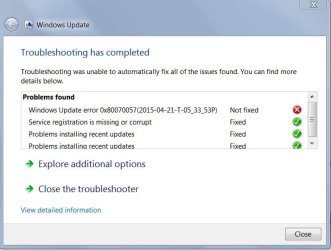
OK, here's the report on the two reg files you asked for. I also then ran the windows reset update. Interestingly, initial report showed several problems that were Fixed; however, the following was reported as Not Fixed: Windows update error: 0x80070057(2015-04-21-T-12_13_37P). But when I selected View Detail Info, the error was reported as Fixed???
 

Attachments

My Computer My Computer

At a glance

Windows 7 HP 64-bit4GB/4GB
Computer Manufacturer/Model Number
Gateway DX4720-03/HP Pavilion dv6
OS
Windows 7 HP 64-bit
Memory
4GB/4GB
Antivirus
Avast Pro
Browser
Firefox, the latest
The registry output looks normal to me.
How is WIndows Update functioning now?
Do a Check for Updates, then try installing ONLY the oldest found update - post the error message (if any) and the new C:\Windows\windowsupdate.log file
 

My Computer My Computer

At a glance

Win 7 x64 Home Premium (and x86 VirtualBox VM...i3 370M/i7 6500U8GB - finally :)/8GBit's an i3, dude!/dual Intel&nVidia
Computer type
Laptop
Computer Manufacturer/Model Number
Asus K52F or Lenovo B51-80
OS
Win 7 x64 Home Premium (and x86 VirtualBox VM)/Win10
CPU
i3 370M/i7 6500U
Motherboard
Asus/Lenovo
Memory
8GB - finally :)/8GB
Graphics Card(s)
it's an i3, dude!/dual Intel&nVidia
Sound Card
onboard
Monitor(s) Displays
15.6" built-in
Screen Resolution
1366x768/1920x1080
Hard Drives
750GB Seagate internal
Sundry external drives attached to other computers on the local network
1TB SSD on the Lenovo
PSU
n/a
Internet Speed
as much as I can get - usually on a dongle/phone, so <1MB/s
Antivirus
MSE/Defender
Browser
IE11/12/Edge/Chrome/FF(if I must)
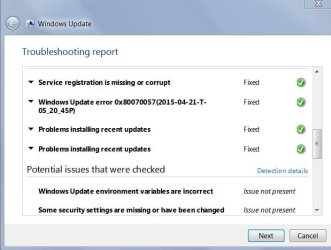
Hate to say this, Noel, but things aren't getting any better. I didn't really understand doing "Only the oldest update," so when I did Check for Updates, 4 new option updates were downloaded and I tried installing one of them. This was a failure with the error code 800F0104.However, I did run the Diagnostics Troubleshooting Wizard that was able to fix most problems, but again it first showed that 0x80070057(2015-04-21-T-5_20_45P) couldn't be fixed and View Details then showed that this was fixed??? Here are some shots of the Diagnostics report. The W7Transfer was also listed in the Wizard and refers to something about Windows transferring...I don't remember, but hope you recognize it.
 

Attachments

  • W7Transfer.jpg
    W7Transfer.jpg
    36.7 KB · Views: 1
  • W7UpdateTrouble.jpg
    W7UpdateTrouble.jpg
    36.6 KB · Views: 1
  • W7UpdateTroublRegFix.jpg
    W7UpdateTroublRegFix.jpg
    37.5 KB · Views: 2
  • WindowsUpdate.zip
    WindowsUpdate.zip
    22 bytes · Views: 1
Last edited:

My Computer My Computer

At a glance

Windows 7 HP 64-bit4GB/4GB
Computer Manufacturer/Model Number
Gateway DX4720-03/HP Pavilion dv6
OS
Windows 7 HP 64-bit
Memory
4GB/4GB
Antivirus
Avast Pro
Browser
Firefox, the latest
You posted an empty file?
 

My Computer My Computer

At a glance

Win 7 x64 Home Premium (and x86 VirtualBox VM...i3 370M/i7 6500U8GB - finally :)/8GBit's an i3, dude!/dual Intel&nVidia
Computer type
Laptop
Computer Manufacturer/Model Number
Asus K52F or Lenovo B51-80
OS
Win 7 x64 Home Premium (and x86 VirtualBox VM)/Win10
CPU
i3 370M/i7 6500U
Motherboard
Asus/Lenovo
Memory
8GB - finally :)/8GB
Graphics Card(s)
it's an i3, dude!/dual Intel&nVidia
Sound Card
onboard
Monitor(s) Displays
15.6" built-in
Screen Resolution
1366x768/1920x1080
Hard Drives
750GB Seagate internal
Sundry external drives attached to other computers on the local network
1TB SSD on the Lenovo
PSU
n/a
Internet Speed
as much as I can get - usually on a dongle/phone, so <1MB/s
Antivirus
MSE/Defender
Browser
IE11/12/Edge/Chrome/FF(if I must)
WinZip7 keeps alerting me that the file is being used by another process and can't be compressed. Probably didn't see this alert when I zipped the file and sent it out. I can't figure out where else this file is being used???
 

My Computer My Computer

At a glance

Windows 7 HP 64-bit4GB/4GB
Computer Manufacturer/Model Number
Gateway DX4720-03/HP Pavilion dv6
OS
Windows 7 HP 64-bit
Memory
4GB/4GB
Antivirus
Avast Pro
Browser
Firefox, the latest
OK, here's the file. Didn't realize that it was small enough for site to zip and send...
 

My Computer My Computer

At a glance

Windows 7 HP 64-bit4GB/4GB
Computer Manufacturer/Model Number
Gateway DX4720-03/HP Pavilion dv6
OS
Windows 7 HP 64-bit
Memory
4GB/4GB
Antivirus
Avast Pro
Browser
Firefox, the latest
... usually, if the file is in use, you can still copy it elsewhere, and then compress the copy.(max size for the windowsupdate.log file is ~2MB anyhow)

Some interesting results in what you uploaded - but there's just the two obvious patching failures...
Code:
 Line 12672: 2015-04-21 17:18:55:450  376 161c Report REPORT EVENT: {74B2DCDD-5AD2-44E6-AB96-E76618180EA7} 2015-04-21 17:17:29:293-0400 1 182 101 {7F0C2BAC-713E-43CE-9D51-772DA66E3436} 200 800f0104 AutomaticUpdates Failure Content Install Installation Failure: Windows failed to install the following update with error 0x800f0104: nVidia - Graphics Adapter WDDM1.1, Other hardware - NVIDIA GeForce 7100 / NVIDIA nForce 630i.
 Line 13409: 2015-04-21 18:18:02:937  544 8ac Report REPORT EVENT: {B1C9FE5A-0BDD-4DF3-96DA-8654BBD61D28} 2015-04-21 18:17:33:785-0400 1 182 101 {74256EC4-CE5C-46AE-B60F-7BB99C5B0C7D} 200 80070643 AutomaticUpdates Failure Content Install Installation Failure: Windows failed to install the following update with error 0x80070643: Microsoft .NET Framework 4.5.2 for Windows 7 x64-based Systems (KB2901983).

I'd hide the NVidia update, and if necessary install updated drivers from the manufacturer's website.


If we look at the detail of the .NET install attempt we get
Code:
2015-04-21 18:16:10:434 2440 cbc Handler   : Updates to install = 1
2015-04-21 18:16:14:726  544 8ac Report REPORT EVENT: {84A43E4B-C579-4EE7-8CC5-5573BE6E4273} 2015-04-21 18:16:09:720-0400 1 181 101 {74256EC4-CE5C-46AE-B60F-7BB99C5B0C7D} 200 0 AutomaticUpdates Success Content Install Installation Started: Windows successfully started the following update: Microsoft .NET Framework 4.5.2 for Windows 7 x64-based Systems (KB2901983)
2015-04-21 18:17:33:783 2440 cbc Handler   : WARNING: Command line install completed. Return code = 0x00000643, Result = Failed, Reboot required = false
2015-04-21 18:17:33:784  544 e7c AU >>##  RESUMED  ## AU: Installing update [UpdateId = {74256EC4-CE5C-46AE-B60F-7BB99C5B0C7D}]
2015-04-21 18:17:33:784  544 e7c AU   # WARNING: Install failed, error = 0x80070643 / 0x00000643
2015-04-21 18:17:33:784 2440 cbc Handler   : WARNING: Exit code = 0x8024200B
2015-04-21 18:17:33:784 2440 cbc Handler :::::::::
2015-04-21 18:17:33:784 2440 cbc Handler ::  END  ::  Handler: Command Line Install
2015-04-21 18:17:33:784 2440 cbc Handler :::::::::::::
2015-04-21 18:17:33:785  544 1050 Agent LogHistory called. idUpdate={74256EC4-CE5C-46AE-B60F-7BB99C5B0C7D}.200, resultMapped=80070643, resultUnMapped=643
2015-04-21 18:17:33:909  544 1050 Agent *********

This article and fixit may help.
https://support.microsoft.com/en-us/kb/976982
 

My Computer My Computer

At a glance

Win 7 x64 Home Premium (and x86 VirtualBox VM...i3 370M/i7 6500U8GB - finally :)/8GBit's an i3, dude!/dual Intel&nVidia
Computer type
Laptop
Computer Manufacturer/Model Number
Asus K52F or Lenovo B51-80
OS
Win 7 x64 Home Premium (and x86 VirtualBox VM)/Win10
CPU
i3 370M/i7 6500U
Motherboard
Asus/Lenovo
Memory
8GB - finally :)/8GB
Graphics Card(s)
it's an i3, dude!/dual Intel&nVidia
Sound Card
onboard
Monitor(s) Displays
15.6" built-in
Screen Resolution
1366x768/1920x1080
Hard Drives
750GB Seagate internal
Sundry external drives attached to other computers on the local network
1TB SSD on the Lenovo
PSU
n/a
Internet Speed
as much as I can get - usually on a dongle/phone, so <1MB/s
Antivirus
MSE/Defender
Browser
IE11/12/Edge/Chrome/FF(if I must)
Followed your suggested help link. Did the Fitit and the recommendation was to fix 4.5.1 (which is onboard) using a MS NET fixer. It didn't work. I was starting to think that my update installer was completely on the fritz because nothing has been updated since 4/15. But then I saw that Windows Defender was updated on 4/21. This was the only update that was successful since 4/15. OK, what happened on 4/15...don't know. Doubt whether I can get back to restore point prior to 4/15 as since I've we've been trying to fix this mess, many, many restore points were done...erasing the previous ones, I believe. Damn, what's next? Anything?

EDIT:
As it seems that 4.5.1 may need some fixing also, and it also seems that I am having problems - in general - with installing updates, I have fears about deleting 4.5.1 and then reinstalling a new 4.5.1...as it may not install. One thought I have around this potential problem is to rename 4.5.1 and then try to install a new 4.5.1. If the new 4.5.1 doesn't install, I can at least bring back the original 4.5.1.
 
Last edited:

My Computer My Computer

At a glance

Windows 7 HP 64-bit4GB/4GB
Computer Manufacturer/Model Number
Gateway DX4720-03/HP Pavilion dv6
OS
Windows 7 HP 64-bit
Memory
4GB/4GB
Antivirus
Avast Pro
Browser
Firefox, the latest
Back
Top