Solved Non repairable files

Britton30

R.I.P. 7/09/2014
Guru
VIP
Local time
3:39 PM
Messages
22,813
Location
Mt. Crumpit/Whoville
I just did a fresh install because I had corrupt files sfc could not fix. I have corrupt non fixable files again, 2 days after the install. I have no idea what the cbs.log means, can someone shed some light on what is wrong?

I should note I did install a custom boot animation and wondered if the file checker sees that as corrupt?

View attachment 246587

Here is the only symptom I have discovered....so far.

Search.jpg
 
Last edited:

My Computer

Computer type
PC/Desktop
Computer Manufacturer/Model Number
Home Built Desktop By DataTech
OS
Windows 7 Ultimate X64 SP1
CPU
Intel i5-2550K, Differing ~4.4-4.8GHz No built in GPU
Motherboard
ASUS P8Z68-V PRO/GEN3
Memory
16GB G.Skill Sniper 1866MHz @ 2133MHz 2x8GB
Graphics Card(s)
ASUS GTX650TIB-DC2OC-2GD5, (650TI Boost)
Sound Card
Onboard Realtek 5-1
Monitor(s) Displays
Samsung P2570HD
Screen Resolution
1920x1080
Hard Drives
Samsung 840 Pro 256GB SSD for OS, 500GB Seagate Constellation (Enterprise drive) for Data
PSU
Corsair HX650W
Case
Inwin Dragon Rider
Cooling
Hyper 212 EVO w/two Noctua fans, push-pull, @1300 RPM
Keyboard
E-Z Eyes, bright yellow keys with large characters
Mouse
steelseries SENSEI Laser Pro Gaming
Internet Speed
48-51Mbs Mbs down, 11 Mbs up Xfinity Cable
Antivirus
Norton Internet Security 2013
Browser
IE 10, Opera, Pale Moon if needed
Other Info
4 case fans, LG BluRay-RE, ASUS DVD-RW, Mr. Fusion power supply, 1.21 gigawatts.
Hi Britton

Looking at the cbs.log does say that winload.exe and winresume.exe have mismatched hash or corrupted. This are system critical files. I presume this was why you did a clean install ??

In an case could you provide the below.

1. Could you post the SMART value of your HDD / SSD.

2. Could you also post the System as well as Application logs from the system event viewer.
 

My Computer

Computer Manufacturer/Model Number
Nothing specific....what ever the clients provide for Repair
OS
Windows 7 ultimate x64

My Computer

Computer type
PC/Desktop
Computer Manufacturer/Model Number
Home Built Desktop By DataTech
OS
Windows 7 Ultimate X64 SP1
CPU
Intel i5-2550K, Differing ~4.4-4.8GHz No built in GPU
Motherboard
ASUS P8Z68-V PRO/GEN3
Memory
16GB G.Skill Sniper 1866MHz @ 2133MHz 2x8GB
Graphics Card(s)
ASUS GTX650TIB-DC2OC-2GD5, (650TI Boost)
Sound Card
Onboard Realtek 5-1
Monitor(s) Displays
Samsung P2570HD
Screen Resolution
1920x1080
Hard Drives
Samsung 840 Pro 256GB SSD for OS, 500GB Seagate Constellation (Enterprise drive) for Data
PSU
Corsair HX650W
Case
Inwin Dragon Rider
Cooling
Hyper 212 EVO w/two Noctua fans, push-pull, @1300 RPM
Keyboard
E-Z Eyes, bright yellow keys with large characters
Mouse
steelseries SENSEI Laser Pro Gaming
Internet Speed
48-51Mbs Mbs down, 11 Mbs up Xfinity Cable
Antivirus
Norton Internet Security 2013
Browser
IE 10, Opera, Pale Moon if needed
Other Info
4 case fans, LG BluRay-RE, ASUS DVD-RW, Mr. Fusion power supply, 1.21 gigawatts.
Well first as per the logs your system has shutdown due to high temp...as per ACPI its critical temp and passive temps were at 375K ie; 101 degC... i would suggest you clean the fans..

Secondly... i would suggest you do the sfc scan in offline mode... ie; via the Windows 7 DVD rather than doing the SFC while in windows.

Let me know your feedback once you have done these.
 

My Computer

Computer Manufacturer/Model Number
Nothing specific....what ever the clients provide for Repair
OS
Windows 7 ultimate x64
I haven't had a shutdown as yet, just the corrupt files. I keep all 6 of my fans and vents clean all the time. What part was at 101C, and what is ACPI?:confused:

I'll have to look up a tut for the offline sfc scan.

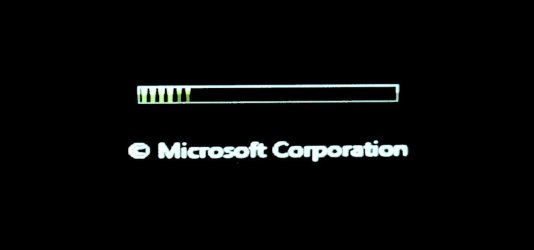
Oh, I get this boot animation on every reboot or cold start.

P1020807.JPG
 

My Computer

Computer type
PC/Desktop
Computer Manufacturer/Model Number
Home Built Desktop By DataTech
OS
Windows 7 Ultimate X64 SP1
CPU
Intel i5-2550K, Differing ~4.4-4.8GHz No built in GPU
Motherboard
ASUS P8Z68-V PRO/GEN3
Memory
16GB G.Skill Sniper 1866MHz @ 2133MHz 2x8GB
Graphics Card(s)
ASUS GTX650TIB-DC2OC-2GD5, (650TI Boost)
Sound Card
Onboard Realtek 5-1
Monitor(s) Displays
Samsung P2570HD
Screen Resolution
1920x1080
Hard Drives
Samsung 840 Pro 256GB SSD for OS, 500GB Seagate Constellation (Enterprise drive) for Data
PSU
Corsair HX650W
Case
Inwin Dragon Rider
Cooling
Hyper 212 EVO w/two Noctua fans, push-pull, @1300 RPM
Keyboard
E-Z Eyes, bright yellow keys with large characters
Mouse
steelseries SENSEI Laser Pro Gaming
Internet Speed
48-51Mbs Mbs down, 11 Mbs up Xfinity Cable
Antivirus
Norton Internet Security 2013
Browser
IE 10, Opera, Pale Moon if needed
Other Info
4 case fans, LG BluRay-RE, ASUS DVD-RW, Mr. Fusion power supply, 1.21 gigawatts.
Seems that the custom boot animation bollixed your bcd file which governs the animation. The standard fix is here: Windows 7 Boot screen displays Vista Green Loading Bar - Microsoft Community.

I should tell you that most of the time this has happened I have had to reinstall.

However maybe proceeding to fix the custom animation you want will resolve it, if you still want it anyway.

Otherwise you can try System Restore to before you ran it.
 
Hi Britton

To use SFC in offline mode you do the following

  1. Boot from your Windows 7 DVD
  2. On the first screen of Setup choose Next
  3. In the lower left of the screen choose "repair your computer"
  4. On the System Recovery Options screen choose your installation of Windows and then click next
  5. Click "Command prompt"
  6. Type in the following command: SFC.EXE /scannow /offbootdir:c:\ /offwindir=c:\windows
  7. When complete type in exit to see if Windows starts up now.

Ps: Before doing this .. do check the drive mount points using the command "diskpart" and "list volume"... to confirm the exact drive letter where your windows resides..


Advanced Configuration and Power Interface (ACPI) specification provides an open standard for device configuration and power management by the operating system.

These are taken from the system logs... these are the latest that had happened... The first one below shows the thermal zone TZ00 which is the area where the CPU resides.

Log Name: System
Source: Microsoft-Windows-Kernel-Power
Date: 22/12/2012 7:10:35 AM
Event ID: 89
Task Category: (86)
Level: Information
Keywords: (32)
User: SYSTEM
Computer: DataTechV
Description:
ACPI thermal zone ACPI\ThermalZone\TZ00 has been enumerated.
_PSV = 0K
_TC1 = 0
_TC2 = 0
_TSP = 0ms
_AC0 = 353K
_AC1 = 328K
_AC2 = 273K
_AC3 = 273K
_AC4 = 273K
_AC5 = 0K
_AC6 = 0K
_AC7 = 0K
_AC8 = 0K
_AC9 = 0K
_CRT = 375K
_HOT = 0K
_PSL - see event data.


The second one below shows the thermal zone TZ01 which is the area where the GPU (Graphics card) resides.


Log Name: System
Source: Microsoft-Windows-Kernel-Power
Date: 22/12/2012 7:10:35 AM
Event ID: 89
Task Category: (86)
Level: Information
Keywords: (32)
User: SYSTEM
Computer: DataTechV
Description:
ACPI thermal zone ACPI\ThermalZone\TZ01 has been enumerated.
_PSV = 375K
_TC1 = 1
_TC2 = 5
_TSP = 1000ms
_AC0 = 0K
_AC1 = 0K
_AC2 = 0K
_AC3 = 0K
_AC4 = 0K
_AC5 = 0K
_AC6 = 0K
_AC7 = 0K
_AC8 = 0K
_AC9 = 0K
_CRT = 375K
_HOT = 0K
_PSL - see event data.


Ofcourse these maybe isolated incident ...could have happened when you would be running CPU/GPU intensive games or likes.. This maynot be of concern ...if your cleaning the fans ... regularly... just wanted to point out something that was in the logs for your information.
 

My Computer

Computer Manufacturer/Model Number
Nothing specific....what ever the clients provide for Repair
OS
Windows 7 ultimate x64
Greg, the green boot animation started after I ran sfc. I did however have another custom boot animation installed, but I haven't seen it since running sfc. I tried the commands in the link you gave me and like the others it didn't work. Damnedest thing, I did a restore to the day after the new install and the original boot animation is back and sfc now says no integrity violations. Windows search still give the same error as I posted earlier though. It is set as a Startup and enabled to Auto start.

Centaur, maybe you have misunderstood me. I have had no shut downs nor difficulty in booting, I just wanted to know if the cbs.log gave a specific file(s) that were corrupted. Also I don't know why there is a high temp reading, it may be a fluke. I don't game harder than Solitaire. My temp monitors give me no indication of overheating in the CPU nor GPU.

Thanks both of you!
 

My Computer

Computer type
PC/Desktop
Computer Manufacturer/Model Number
Home Built Desktop By DataTech
OS
Windows 7 Ultimate X64 SP1
CPU
Intel i5-2550K, Differing ~4.4-4.8GHz No built in GPU
Motherboard
ASUS P8Z68-V PRO/GEN3
Memory
16GB G.Skill Sniper 1866MHz @ 2133MHz 2x8GB
Graphics Card(s)
ASUS GTX650TIB-DC2OC-2GD5, (650TI Boost)
Sound Card
Onboard Realtek 5-1
Monitor(s) Displays
Samsung P2570HD
Screen Resolution
1920x1080
Hard Drives
Samsung 840 Pro 256GB SSD for OS, 500GB Seagate Constellation (Enterprise drive) for Data
PSU
Corsair HX650W
Case
Inwin Dragon Rider
Cooling
Hyper 212 EVO w/two Noctua fans, push-pull, @1300 RPM
Keyboard
E-Z Eyes, bright yellow keys with large characters
Mouse
steelseries SENSEI Laser Pro Gaming
Internet Speed
48-51Mbs Mbs down, 11 Mbs up Xfinity Cable
Antivirus
Norton Internet Security 2013
Browser
IE 10, Opera, Pale Moon if needed
Other Info
4 case fans, LG BluRay-RE, ASUS DVD-RW, Mr. Fusion power supply, 1.21 gigawatts.
Hi britton

I have understood you clearly ...

The CBS logs have shows two files as corrupted .... winload.exe and winresume.exe..... which was repaired ... and then as per your last comments you did a SFC again which could have replaced the boot animation to the original.. hence my advice to do the sfc in offline mode ... do the repair and then you can get back to putting your custom animation.

0: Create File: File = [l:262{131}]"\SystemRoot\WinSxS\amd64_microsoft-windows-b..vironment-os-loader_31bf3856ad364e35_6.1.7601.17556_none_b923808583650cfb\winload.exe", Attributes = 00000080
1: Move File: Source = [l:166{83}]"\SystemRoot\WinSxS\Temp\PendingRenames\961a4096ccdfcd01cd3700000404fc06.winload.exe", Destination = [l:262{131}]"\SystemRoot\WinSxS\amd64_microsoft-windows-b..vironment-os-loader_31bf3856ad364e35_6.1.7601.17556_none_b923808583650cfb\winload.exe"
2: Create File: File = [l:266{133}]"\SystemRoot\WinSxS\amd64_microsoft-windows-b..vironment-os-loader_31bf3856ad364e35_6.1.7601.17556_none_b923808583650cfb\winresume.exe", Attributes = 00000080
3: Move File: Source = [l:170{85}]"\SystemRoot\WinSxS\Temp\PendingRenames\961a4096ccdfcd01ce3700000404fc06.winresume.exe", Destination = [l:266{133}]"\SystemRoot\WinSxS\amd64_microsoft-windows-b..vironment-os-loader_31bf3856ad364e35_6.1.7601.17556_none_b923808583650cfb\winresume.exe"
4: Hard Link File: Source = [l:262{131}]"\SystemRoot\WinSxS\amd64_microsoft-windows-b..vironment-os-loader_31bf3856ad364e35_6.1.7601.17556_none_b923808583650cfb\winload.exe", Destination = [l:70{35}]"\??\C:\Windows\System32\winload.exe"
5: Hard Link File: Source = [l:266{133}]"\SystemRoot\WinSxS\amd64_microsoft-windows-b..vironment-os-loader_31bf3856ad364e35_6.1.7601.17556_none_b923808583650cfb\winresume.exe", Destination = [l:74{37}]"\??\C:\Windows\System32\winresume.exe"
6: Checkpoint
7: Move File: Source = [l:192{96}]"\SystemRoot\WinSxS\Temp\PendingRenames\b73e4796ccdfcd01cf3700000404fc06._0000000000000000.cdf-ms", Destination = [l:104{52}]"\SystemRoot\WinSxS\FileMaps\_0000000000000000.cdf-ms"
8: Move File: Source = [l:162{81}]"\SystemRoot\WinSxS\Temp\PendingRenames\b73e4796ccdfcd01d03700000404fc06.$$.cdf-ms", Destination = [l:74{37}]"\SystemRoot\WinSxS\FileMaps\$$.cdf-ms"
9: Move File: Source = [l:214{107}]"\SystemRoot\WinSxS\Temp\PendingRenames\78014c96ccdfcd01d13700000404fc0
2012-12-21 17:43:25, Info CSI 6.$$_system32_21f9a9c4a2f8b514.cdf-ms", Destination = [l:126{63}]"\SystemRoot\WinSxS\FileMaps\$$_system32_21f9a9c4a2f8b514.cdf-ms"
10: Create File: File = [l:272{136}]"\SystemRoot\WinSxS\amd64_microsoft-windows-b..os-loader.resources_31bf3856ad364e35_6.1.7600.16385_en-us_d28dabacfdb4dd1a\winload.exe.mui", Attributes = 00000080
11: Move File: Source = [l:174{87}]"\SystemRoot\WinSxS\Temp\PendingRenames\78014c96ccdfcd01d23700000404fc06.winload.exe.mui", Destination = [l:272{136}]"\SystemRoot\WinSxS\amd64_microsoft-windows-b..os-loader.resources_31bf3856ad364e35_6.1.7600.16385_en-us_d28dabacfdb4dd1a\winload.exe.mui"
12: Create File: File = [l:276{138}]"\SystemRoot\WinSxS\amd64_microsoft-windows-b..os-loader.resources_31bf3856ad364e35_6.1.7600.16385_en-us_d28dabacfdb4dd1a\winresume.exe.mui", Attributes = 00000080
13: Move File: Source = [l:178{89}]"\SystemRoot\WinSxS\Temp\PendingRenames\78014c96ccdfcd01d33700000404fc06.winresume.exe.mui", Destination = [l:276{138}]"\SystemRoot\WinSxS\amd64_microsoft-windows-b..os-loader.resources_31bf3856ad364e35_6.1.7600.16385_en-us_d28dabacfdb4dd1a\winresume.exe.mui"
14: Move File: Source = [l:226{113}]"\SystemRoot\WinSxS\Temp\PendingRenames\f9865596ccdfcd01d43700000404fc06.$$_system32_en-us_429cd25484dc6f94.cdf-ms", Destination = [l:138{69}]"\SystemRoot\WinSxS\FileMaps\$$_system32_en-us_429cd25484dc6f94.cdf-ms"
15: Hard Link File: Source = [l:276{138}]"\SystemRoot\WinSxS\amd64_microsoft-windows-b..os-loader.resources_31bf3856ad364e35_6.1.7600.16385_en-us_d28dabacfdb4dd1a\winresume.exe.mui", Destination = [l:94{47}]"\??\C:\Windows\System32\en-US\winresume.exe.mui"
16: Hard Link File: Source = [l:272{136}]"\SystemRoot\WinSxS\amd64_microsoft-windows-b..os-loader.resources_31bf3856ad364e35_6.1.7600.16385_en-us_d28dabacfdb4dd1a\winload.exe.mui", Destination = [l:90{45}]"\??\C:\Windows\System32\en-US\winload.exe.mui"

POQ 126 ends.
2012-12-21 17:43:25, Info CSI 0000034e [SR] Repair complete
2012-12-21 17:43:25, Info CSI 0000034f Creating NT transaction (seq 2), objectname [6]"(null)"
2012-12-21 17:43:25, Info CSI 00000350 Created NT transaction (seq 2) result 0x00000000, handle @0x1228
2012-12-21 17:43:25, Info CSI 00000351@2012/12/21:22:43:25.243 CSI perf trace:
CSIPERF:TXCOMMIT;28693
2012-12-21 17:43:25, Info CBS Reboot mark refs incremented to: 1

Second for Windows search ... follow this link. Though this is not completely related to the error you are having... this method should resolve the access denied error.

Third for the temps like i said.. there were almost 4 to 5 entries in the system logs..this maynot be important.. just thought i would inform you. And like you said.. its just an isolated case..
 

My Computer

Computer Manufacturer/Model Number
Nothing specific....what ever the clients provide for Repair
OS
Windows 7 ultimate x64
Britton

On second thought.... For your Windows Search error... try this step...

1. Check your Permissions for Progam Data folder, microsoft folder and the search folder... It should have System or Administrators atleast... if not go to the next step
2. Delete the whole search folder
3. Open properties of the Program Data folder, security tab than click on Advanced. Click on change permissions and then check the box of "include inheritable permissions from this objects parent". This restores all the permissions. Repeat this for the "microsoft" folder too.
4.After that windows search will recreate the search folder with correct permissions.
 

My Computer

Computer Manufacturer/Model Number
Nothing specific....what ever the clients provide for Repair
OS
Windows 7 ultimate x64

My Computer

Computer type
PC/Desktop
OS
Windows 10 Home x64
CPU
INTEL Core i5-750 Quad-Core 3.37GHz
Motherboard
ASUS P7P55D
Memory
HyperX Fury Black Series 8GB (2 x 4GB) 1866Mhz
Graphics Card(s)
EVGA GeForce GTX 750 Superclocked 1GB 128-Bit GDDR5
Monitor(s) Displays
LG 32MA68HY 32" IPS
Screen Resolution
1920 x 1080
Hard Drives
Samsung 840 Evo 120GB, SEAGATE 500GB Barracuda® 7200.12, SATA 3 Gb/s, 7200 RPM, 16MB cache
PSU
ANTEC TruePower New TP-550, 80 PLUS, 550W
Case
ANTEC Three Hundred Illusion
Cooling
COOLER MASTER Hyper 212 Plus, 4 x 120mm 1 x 140mm Noctua's
Internet Speed
85 + Mbps
Antivirus
Avast
Browser
Vivaldi
Britton

On second thought.... For your Windows Search error... try this step...

1. Check your Permissions for Progam Data folder, microsoft folder and the search folder... It should have System or Administrators atleast... if not go to the next step
2. Delete the whole search folder
3. Open properties of the Program Data folder, security tab than click on Advanced. Click on change permissions and then check the box of "include inheritable permissions from this objects parent". This restores all the permissions. Repeat this for the "microsoft" folder too.
4.After that windows search will recreate the search folder with correct permissions.
I found them all except the Search folder, where is it? Permissions are as you stae here for the others.

NOTE: the cbs.log I included in 1st post was after run number 7 of sfc and was still showing corrupt files, I can't read it. One should highlight the areas involved so I, or any OP knows what to look at.

Anyway, after the system restore I mentioned, the normal boot animation came back, BEFORE is did the sfc which had no violations. The reg hack didn't work for Windows search service, it just won't start, I have not been denied access to it.

My search is working anyway though, without windows Search running, so I'm marking this solved.
Thanks to all of ya's!

That's the same as in the link Greg posted Bill, didn't work, but thanks for helping.
 

My Computer

Computer type
PC/Desktop
Computer Manufacturer/Model Number
Home Built Desktop By DataTech
OS
Windows 7 Ultimate X64 SP1
CPU
Intel i5-2550K, Differing ~4.4-4.8GHz No built in GPU
Motherboard
ASUS P8Z68-V PRO/GEN3
Memory
16GB G.Skill Sniper 1866MHz @ 2133MHz 2x8GB
Graphics Card(s)
ASUS GTX650TIB-DC2OC-2GD5, (650TI Boost)
Sound Card
Onboard Realtek 5-1
Monitor(s) Displays
Samsung P2570HD
Screen Resolution
1920x1080
Hard Drives
Samsung 840 Pro 256GB SSD for OS, 500GB Seagate Constellation (Enterprise drive) for Data
PSU
Corsair HX650W
Case
Inwin Dragon Rider
Cooling
Hyper 212 EVO w/two Noctua fans, push-pull, @1300 RPM
Keyboard
E-Z Eyes, bright yellow keys with large characters
Mouse
steelseries SENSEI Laser Pro Gaming
Internet Speed
48-51Mbs Mbs down, 11 Mbs up Xfinity Cable
Antivirus
Norton Internet Security 2013
Browser
IE 10, Opera, Pale Moon if needed
Other Info
4 case fans, LG BluRay-RE, ASUS DVD-RW, Mr. Fusion power supply, 1.21 gigawatts.

My Computer

Computer type
PC/Desktop
OS
Windows 10 Home x64
CPU
INTEL Core i5-750 Quad-Core 3.37GHz
Motherboard
ASUS P7P55D
Memory
HyperX Fury Black Series 8GB (2 x 4GB) 1866Mhz
Graphics Card(s)
EVGA GeForce GTX 750 Superclocked 1GB 128-Bit GDDR5
Monitor(s) Displays
LG 32MA68HY 32" IPS
Screen Resolution
1920 x 1080
Hard Drives
Samsung 840 Evo 120GB, SEAGATE 500GB Barracuda® 7200.12, SATA 3 Gb/s, 7200 RPM, 16MB cache
PSU
ANTEC TruePower New TP-550, 80 PLUS, 550W
Case
ANTEC Three Hundred Illusion
Cooling
COOLER MASTER Hyper 212 Plus, 4 x 120mm 1 x 140mm Noctua's
Internet Speed
85 + Mbps
Antivirus
Avast
Browser
Vivaldi
Back
Top