
Hallo,
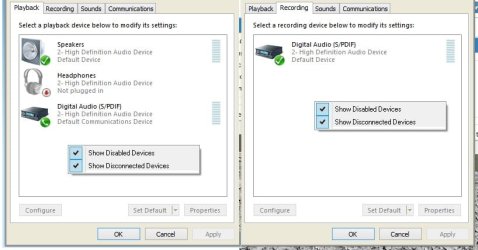
The microphone on this non-brand headset isn't working due to the microphone not showing up under the recording devices. Audio is working for the headset (and anything else that I plug in ), but not the microphone. The green bars do not go up in the audio manager either when I test the microphone. I'd like to use this for teamspeak, but there doesn't seem to be anything that I have found on google to solve this so far, or anything that I've figured out on my end. I have attached a screenshot of what is happening in my audio manager. When any headphones/earphones are plugged into the green jack, they work and sound is audible, however in the audio manager it still says that no headset is plugged in even with them plugged in & working.
Any help is appreciated, thanks. =)
The microphone on this non-brand headset isn't working due to the microphone not showing up under the recording devices. Audio is working for the headset (and anything else that I plug in ), but not the microphone. The green bars do not go up in the audio manager either when I test the microphone. I'd like to use this for teamspeak, but there doesn't seem to be anything that I have found on google to solve this so far, or anything that I've figured out on my end. I have attached a screenshot of what is happening in my audio manager. When any headphones/earphones are plugged into the green jack, they work and sound is audible, however in the audio manager it still says that no headset is plugged in even with them plugged in & working.
Any help is appreciated, thanks. =)
Attachments
Last edited:
My Computer
- Computer Manufacturer/Model Number
- ASUS N53SV
- OS
- Windows 7...Ultimate x64
- CPU
- Intel Core i7 2630QM
- Motherboard
- ASUS
- Memory
- 4 GB DDR3
- Graphics Card(s)
- NVidea GeForce 540M
- Hard Drives
- 750GB SATA
- Cooling
- Only CPU cooling, none for graphics. Always cool though.

