normal resource usage?

jaypels

New member
Power User
Local time
9:51 PM
Messages
162
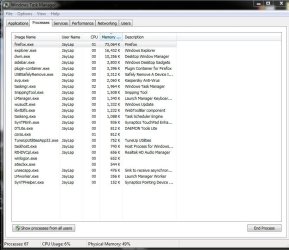
when on standby, my windows gadget shows my resources are at 46% to 50%. is this normal? i have an acer aspire 4745g laptop. processor is an i5 with 2gb of ddr3 ram and 512mb radeon hd 5470.. i've attached a snip of my task manager. firefox shows that i have a 73064k even if i only have 2 tabs open. one for my yahoomail and one for seven forums. is this normal? :)
 

Attachments

  • for seven forums.JPG
    for seven forums.JPG
    78.2 KB · Views: 20

My Computer

Computer Manufacturer/Model Number
Desktop is a DIY and laptop is an Acer Aspire 4745
OS
7 all the way!
CPU
core 2 duo (desktop) i5 (laptop)
Motherboard
asus for desktop
Memory
2gb for both machines
Graphics Card(s)
nvidia 512mb GS for desktop; hd 5470 for laptop
Monitor(s) Displays
19" AOC 913fw
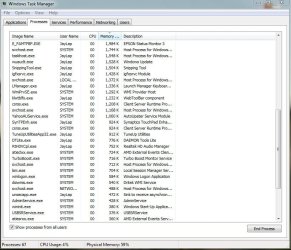
Click the button at the bottom labeled "Show processes from all users" and post another screenshot. Most laptops come loaded with all sorts of unnecessary stuff.

How much RAM do you have?
 

My Computer

Computer Manufacturer/Model Number
Self
OS
Main - Windows 7 Pro SP1 64-Bit; 2nd - Windows Server 2008 R2
CPU
Main - Core i7 2600K; 2nd - Core i7 920
Motherboard
Main - Asus P8Z68-V Pro/Gen3; 2nd - Gigabyte GA-EX58-UDR3
Memory
Main - 16GB Corsair Vengeance; 2nd - 12GB Corsair Vengeance
Graphics Card(s)
Main - XFX Radeon 6870 1GB; 2nd - XFX Radeon 4870 1GB
Sound Card
Both: Onboard Realtek Azalia
Monitor(s) Displays
Main - Hann 25" + I-INC 25" + Acer 23"; 2nd - Upgrading Soon
Screen Resolution
Main - 1920x1080 (All Three Monitors); 2nd - Upgrading Soon
Hard Drives
Main - (1) Crucial M4 128GB (Boot)
Main - (1) Seagate 2TB 64MB Cache (Data)
Main - (1) Seagate 2TB 64MB Cache (Data Backup)
2nd - (1) Intel X25-M SSD 80GB (Boot)
2nd - (3) Seagate 1TB 32MB Cache (Data Backup)
2nd - (1) Seagate 320GB (Because)
PSU
Main - OCZ 600W Modular; 2nd - OCZ 600W
Case
Main - Thermaltake Element G; 2nd - NZXT something or other
Cooling
Main - Corsair H80; 2nd - Prolimatech Megahalems
Keyboard
Main - Razer Reclusa; 2nd - Old MS Keyboard
Mouse
Main - Logitech MX Revolution; 2nd - Old MS Mouse
Internet Speed
20Mbps Time-Warner Cable
i could not fit all the processes in one snip. i'll upload it in three files. i have 2gb of ddr3 ram..
 

Attachments

  • for 7.JPG
    for 7.JPG
    100.4 KB · Views: 11
  • for 7_2.JPG
    for 7_2.JPG
    94.5 KB · Views: 14
  • for 7_3.JPG
    for 7_3.JPG
    40.5 KB · Views: 6

My Computer

Computer Manufacturer/Model Number
Desktop is a DIY and laptop is an Acer Aspire 4745
OS
7 all the way!
CPU
core 2 duo (desktop) i5 (laptop)
Motherboard
asus for desktop
Memory
2gb for both machines
Graphics Card(s)
nvidia 512mb GS for desktop; hd 5470 for laptop
Monitor(s) Displays
19" AOC 913fw
It is fine. Until you have a high level of Page Faults (viewable in Resource Monitor) you do not need to worry about memory.
 

My Computer

Computer type
PC/Desktop
Computer Manufacturer/Model Number
Alienware Aurora ALX R4
OS
Windows 10 Pro (x64)
CPU
Intel Core i7-3930K (3.2GHz - 4.5GHz)
Motherboard
Alienware Aurora-R4 x79
Memory
4x Samsung 4GB PC3-12800 DDR3 (16GB 1600MHz)
Graphics Card(s)
Nvidia Geforce GTX 690
Sound Card
SteelSeries Siberia Elite
Monitor(s) Displays
Dell UltraSharp U3011
Screen Resolution
2560x1600
Hard Drives
Samsung 850 Pro 256 GB, Seagate 1TB Desktop Hybrid HDD, 2x Western Digital 4TB Green HDD
PSU
875W Some Dell PSU <.<
Case
Alienware Aurora ALX
Cooling
Custom Liquid Cooling (EK CPU & GPU blocks) dual EK 480RAD
Keyboard
Logitech G710+ Mechanical
Mouse
Logitech G700s
Internet Speed
Verizon Fios (50 mbps average)
Other Info
Server: Intel NUC D54250WYK: i5-4250U, 16GB, 256 GB mSATA, Windows Server 2012 R2
i see.. i was just curious because my i5 with 2gb ddr3 ram laptop shows the same standby resource usage as my core2duo with 2gb ddr2 ram desktop.

@logicearth i found the resource monitor button but not the page fault tab. where do i find it and what is my indicator that it is not ok?
 

My Computer

Computer Manufacturer/Model Number
Desktop is a DIY and laptop is an Acer Aspire 4745
OS
7 all the way!
CPU
core 2 duo (desktop) i5 (laptop)
Motherboard
asus for desktop
Memory
2gb for both machines
Graphics Card(s)
nvidia 512mb GS for desktop; hd 5470 for laptop
Monitor(s) Displays
19" AOC 913fw
@logicearth i found the resource monitor button but not the page fault tab. where do i find it and what is my indicator that it is not ok?

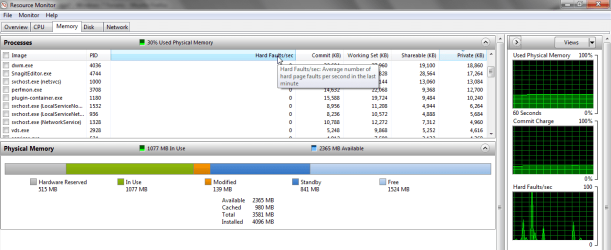
Memory tab, then one of the graphs on the far right should have that information for you.
It will be labeled "Hard Faults"
 

My Computer

Computer type
PC/Desktop
Computer Manufacturer/Model Number
Alienware Aurora ALX R4
OS
Windows 10 Pro (x64)
CPU
Intel Core i7-3930K (3.2GHz - 4.5GHz)
Motherboard
Alienware Aurora-R4 x79
Memory
4x Samsung 4GB PC3-12800 DDR3 (16GB 1600MHz)
Graphics Card(s)
Nvidia Geforce GTX 690
Sound Card
SteelSeries Siberia Elite
Monitor(s) Displays
Dell UltraSharp U3011
Screen Resolution
2560x1600
Hard Drives
Samsung 850 Pro 256 GB, Seagate 1TB Desktop Hybrid HDD, 2x Western Digital 4TB Green HDD
PSU
875W Some Dell PSU <.<
Case
Alienware Aurora ALX
Cooling
Custom Liquid Cooling (EK CPU & GPU blocks) dual EK 480RAD
Keyboard
Logitech G710+ Mechanical
Mouse
Logitech G700s
Internet Speed
Verizon Fios (50 mbps average)
Other Info
Server: Intel NUC D54250WYK: i5-4250U, 16GB, 256 GB mSATA, Windows Server 2012 R2
i see.. i was just curious because my i5 with 2gb ddr3 ram laptop shows the same standby resource usage as my core2duo with 2gb ddr2 ram desktop.

@logicearth i found the resource monitor button but not the page fault tab. where do i find it and what is my indicator that it is not ok?

Resource Monitor Memory tab look in the hard faults column

memoryresourcmonitor.png
 

My Computer

Computer Manufacturer/Model Number
Toshiba Satellite S875D-S7239 laptop
OS
MS Windows 7 Ultimate SP1 64-bit
CPU
AMD A10-4600M
Motherboard
AMD Pumori (Socket FT1)
Memory
6.00 GB Dual-Channel DDR3 @ 798MHz (11-11-12-28)
Graphics Card(s)
AMD Radeon HD 7660G
Sound Card
High Definition Audio Device
Monitor(s) Displays
Generic PnP Monitor (1600x900@60Hz)
Screen Resolution
1600x900@60Hz
Hard Drives
SSD 119GB Corsair CSSD-V128GB2 ATA Device
Keyboard
Standard PS/2 Keyboard
Mouse
HP Wireless Optical Mobile Mouse Model FHA-3410
Internet Speed
What the local pub, local coffee shop offers.
Other Info
Optical Drive:MATSHITA BD-CMB UJ160B ATA Device


Also have an Asus ha1002xp netbook with Win 7 Ultimate installed.
With 2Gb of RAM that seems about right. One thing that took me some getting used to was that Win7 likes to have your RAM actually doing something. The old mindset with previous Windows versions was that you wanted to have a lot of memory available. Win7 manages it better and will free up resources as you need them. Another way of looking at it is that having a bunch of free RAM doesn't do a thing to boost performance. Since RAM is faster than the page file on your hard drive, why not put it to good use? :)
 

My Computer

Computer Manufacturer/Model Number
Self
OS
Main - Windows 7 Pro SP1 64-Bit; 2nd - Windows Server 2008 R2
CPU
Main - Core i7 2600K; 2nd - Core i7 920
Motherboard
Main - Asus P8Z68-V Pro/Gen3; 2nd - Gigabyte GA-EX58-UDR3
Memory
Main - 16GB Corsair Vengeance; 2nd - 12GB Corsair Vengeance
Graphics Card(s)
Main - XFX Radeon 6870 1GB; 2nd - XFX Radeon 4870 1GB
Sound Card
Both: Onboard Realtek Azalia
Monitor(s) Displays
Main - Hann 25" + I-INC 25" + Acer 23"; 2nd - Upgrading Soon
Screen Resolution
Main - 1920x1080 (All Three Monitors); 2nd - Upgrading Soon
Hard Drives
Main - (1) Crucial M4 128GB (Boot)
Main - (1) Seagate 2TB 64MB Cache (Data)
Main - (1) Seagate 2TB 64MB Cache (Data Backup)
2nd - (1) Intel X25-M SSD 80GB (Boot)
2nd - (3) Seagate 1TB 32MB Cache (Data Backup)
2nd - (1) Seagate 320GB (Because)
PSU
Main - OCZ 600W Modular; 2nd - OCZ 600W
Case
Main - Thermaltake Element G; 2nd - NZXT something or other
Cooling
Main - Corsair H80; 2nd - Prolimatech Megahalems
Keyboard
Main - Razer Reclusa; 2nd - Old MS Keyboard
Mouse
Main - Logitech MX Revolution; 2nd - Old MS Mouse
Internet Speed
20Mbps Time-Warner Cable
With 2Gb of RAM that seems about right. One thing that took me some getting used to was that Win7 likes to have your RAM actually doing something. The old mindset with previous Windows versions was that you wanted to have a lot of memory available. Win7 manages it better and will free up resources as you need them. Another way of looking at it is that having a bunch of free RAM doesn't do a thing to boost performance. Since RAM is faster than the page file on your hard drive, why not put it to good use? :)

i see.. i am enlightened a bit. thanks everyone for the info! thank you for the quick reply and a big thank you to profdlp for the impressive explanation. :party::party:
 

My Computer

Computer Manufacturer/Model Number
Desktop is a DIY and laptop is an Acer Aspire 4745
OS
7 all the way!
CPU
core 2 duo (desktop) i5 (laptop)
Motherboard
asus for desktop
Memory
2gb for both machines
Graphics Card(s)
nvidia 512mb GS for desktop; hd 5470 for laptop
Monitor(s) Displays
19" AOC 913fw
Back
Top