Norton Back Up and General Back Up - and good bye

Melissa

New member
Power User
Local time
12:49 PM
Messages
394
Dear Forum,

I wish to thank you for the links to assist me in different modules and help links. I have learnt a lot in the past few weeks.

I know where not to go and I guess some people wish to tell me where to go.

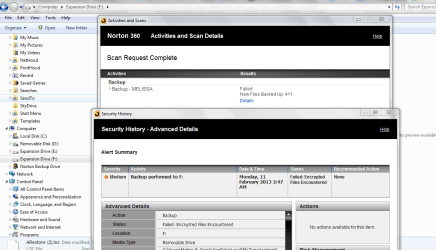
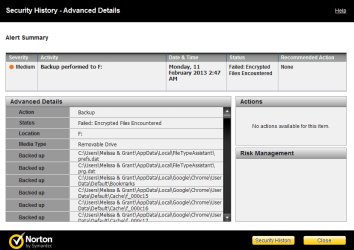
I have in the meantime noted that Norton back Up was not working - I just assumed that it was backing up all my data.

I then had a session as the last back up was encrypted. The remote assistance tech - went through and troubleshooted. Looked at the location of my backup and said that they had a bug in the previous version and I would have to upgrade software and therefore loose my backup.

So I agreed to let him delete the back up as I wished to have a clean operating system.

I am sorry for the vague posts or any tired messages of frustration.

This will be one of my last posts and I will just look at tutorials.

Thanks for all the kind offers - this is the best forum I have been involved in

:zip:

As you all know it is difficult to diagnose without knowing the mindset of the person.

I have thousand of hours of work that I am afraid to loose.

I recently followed a forum and lost all my data from my mobile - that hurt. Hence my reluctance.

All the best forum.
 

Attachments
  • back up problem 3.PNG
    back up problem 3.PNG
    17 KB · Views: 10
  • back up problem.PNG
    back up problem.PNG
    58.6 KB · Views: 10
  • back up problem1.PNG
    back up problem1.PNG
    10.8 KB · Views: 7
  • Live Chat.docx
    Live Chat.docx
    11.2 KB · Views: 2
  • Okay.doc
    Okay.doc
    26 KB · Views: 1

My Computer My Computer

At a glance

Windows 7 Home Premium 64bitWindows 7 Service Pack 1 x86 NTFS4 GB
Computer type
Laptop
Computer Manufacturer/Model Number
Sony VAIO / E Series VPCEB46FG
OS
Windows 7 Home Premium 64bit
CPU
Windows 7 Service Pack 1 x86 NTFS
Motherboard
AMD E-350 Processor
Memory
4 GB
Hard Drives
500GB
Other Info
1.6GHz
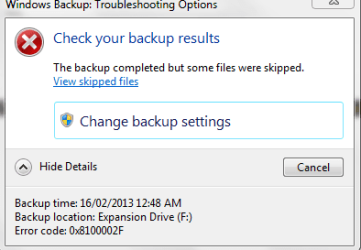
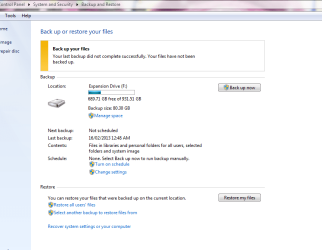
Here is some additional shots of the error I get from Windows
 

Attachments

  • back up error1.PNG
    back up error1.PNG
    19.9 KB · Views: 8
  • back up error.PNG
    back up error.PNG
    10.1 KB · Views: 2

My Computer My Computer

At a glance

Windows 7 Home Premium 64bitWindows 7 Service Pack 1 x86 NTFS4 GB
Computer type
Laptop
Computer Manufacturer/Model Number
Sony VAIO / E Series VPCEB46FG
OS
Windows 7 Home Premium 64bit
CPU
Windows 7 Service Pack 1 x86 NTFS
Motherboard
AMD E-350 Processor
Memory
4 GB
Hard Drives
500GB
Other Info
1.6GHz
Have you done the Clean Reinstall yet? If you want to use Windows Backup it should work better once you finish that. I would also only include your active User folders and image.

You never want to reimport old settings in hidden user AppData folders as they are a corruption path.

You are much better off just dragging your active User folders to external, or scheduling SyncToys to do it for you which is easy and fun: Schedule SyncToy to Run Automatically With Task Scheduler in Windows 7 - How-To Geek
 
Last edited:
Backup your files manually, there is no need for Norton.
 

My Computer My Computer

At a glance

Windows 10 Pro x64Intel Core i7 6700KGSkill TridentZ RGB 16GB 3600 16-16-16-36EVGA GTX 980 Ti SC x2
Computer type
PC/Desktop
Computer Manufacturer/Model Number
Skylake Special #666
OS
Windows 10 Pro x64
CPU
Intel Core i7 6700K
Motherboard
Asus Sabertooth Z170 Mark 1
Memory
GSkill TridentZ RGB 16GB 3600 16-16-16-36
Graphics Card(s)
EVGA GTX 980 Ti SC x2
Sound Card
Realtek High Definition
Monitor(s) Displays
AOC G2460PG
Screen Resolution
1920 x 1080 144Hz
Hard Drives
Samsung 860 Pro 256GB, Seagate Barracuda 4TB x2
PSU
EVGA 1000 P2, EVGA White Custom Braided Cables
Case
Corsair Vengeance C70 Gunmetal Black
Cooling
Corsair H100i v2, Corsair ML120 x2, Thermal Grizzly Kryonaut
Keyboard
Logitech G910 Orion Spectrum
Mouse
Logitech G700s
Internet Speed
Verizon Fios Quantum Gateway 75/75
Antivirus
Windows Defender, Malwarebytes Free 3.8.3
Browser
Chrome
Other Info
Corsair SP120 x4, LG Blu-ray Drive, Durabrand HT-395 100 Watt Dolby Digital Amp, Corsair H2100 Wireless 7.1 Headset
I have always been under the impression that it is good to do a back up just in case you miss something straight from Windows.

But as stated, I am not confident. I am feeling like I will make a mistake and loose my data. Then have no data at all.

I also understand about that there is no need for Norton, but when the facility is there - why not?

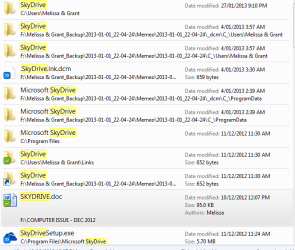
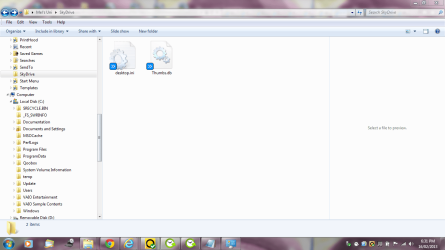
I am trying again - last time it just came up with an error regarding my Skydrive. I am not too sure.

It is hard to convey the way that I feel about doing the clean install. I appreciate the offer and assistance by all forum members. But having so much data tat I have worked on - which after loosing important data the other day which was important - I am hesitant. My friend also said they would feel the same way.

I will keep you updated and then leave the forum. I am not rude and I thoroughly appreciate any one that posts back. I read each one.

Me - I do not know even what my VIAO update is doing and how to see the history on my back up's.

I know not to mess up with the restore function after reading a small chapter.

I am tired and stressed - have to look after myself.

Please all look after you and your loved ones. Data is just data. :sick:

I am literally crying because I may have caused all this. I do not wish to be personal on here.
 

Attachments

  • back up in progress again.PNG
    back up in progress again.PNG
    16.7 KB · Views: 4
  • back up in progress skydrive.PNG
    back up in progress skydrive.PNG
    16.4 KB · Views: 8

My Computer My Computer

At a glance

Windows 7 Home Premium 64bitWindows 7 Service Pack 1 x86 NTFS4 GB
Computer type
Laptop
Computer Manufacturer/Model Number
Sony VAIO / E Series VPCEB46FG
OS
Windows 7 Home Premium 64bit
CPU
Windows 7 Service Pack 1 x86 NTFS
Motherboard
AMD E-350 Processor
Memory
4 GB
Hard Drives
500GB
Other Info
1.6GHz
Why all the fuss, Melissa? No one here is upset with you at all or has shown any impatience with you. We understand your situation and only want to help. But the constant fretting and worry gets in your way from processing the simple solutions and steps we give you.

Instead of reading into our comments things which are not there, focus on the steps we are suggesting. Then ask back any questions you have about their efficacy or how to do them.

You mention you have Skydrive. If you have that then you have an excellent way to keep your files backed up to the cloud. Read and try to process the steps here to Sync, Backup and Store your Files to the Cloud with Skydrive - Windows 7 Forums. I have already suggested it to you once but never heard back.
 
Hello People,

Thank you again.

I know that you have offered me the option of the cloud method.

I did not know that I had a few documents that I attached and shared where located there.

With regards to the back up - it did the back up - but skipped some file and I have attached the log.

If you could please assist so then I can feel a bit more confident in doing my clean install.

I am so sorry that I tend to look at things and think that you all may think that I am so silly.

:o
 

Attachments

My Computer My Computer

At a glance

Windows 7 Home Premium 64bitWindows 7 Service Pack 1 x86 NTFS4 GB
Computer type
Laptop
Computer Manufacturer/Model Number
Sony VAIO / E Series VPCEB46FG
OS
Windows 7 Home Premium 64bit
CPU
Windows 7 Service Pack 1 x86 NTFS
Motherboard
AMD E-350 Processor
Memory
4 GB
Hard Drives
500GB
Other Info
1.6GHz
Here is the drop down of the other error for the back up if required.

I am not going to get any assistance. I get upset easily. I can not tell you the severity of my health issues. But it affects me a lot.

My cognitive functions and also thinking.

I know that the world is not going to end - and this forum is not for me to go on about my health issues - so again - please accept my apologies.
 

My Computer My Computer

At a glance

Windows 7 Home Premium 64bitWindows 7 Service Pack 1 x86 NTFS4 GB
Computer type
Laptop
Computer Manufacturer/Model Number
Sony VAIO / E Series VPCEB46FG
OS
Windows 7 Home Premium 64bit
CPU
Windows 7 Service Pack 1 x86 NTFS
Motherboard
AMD E-350 Processor
Memory
4 GB
Hard Drives
500GB
Other Info
1.6GHz
Sorry neglected to add the file
 

Attachments

  • skipped files - drop down.PNG
    skipped files - drop down.PNG
    8.7 KB · Views: 1

My Computer My Computer

At a glance

Windows 7 Home Premium 64bitWindows 7 Service Pack 1 x86 NTFS4 GB
Computer type
Laptop
Computer Manufacturer/Model Number
Sony VAIO / E Series VPCEB46FG
OS
Windows 7 Home Premium 64bit
CPU
Windows 7 Service Pack 1 x86 NTFS
Motherboard
AMD E-350 Processor
Memory
4 GB
Hard Drives
500GB
Other Info
1.6GHz
I am also wondering - I saved the log file.

I did a 'save as' for the text file so that I could show you the skipped file. Would that save in the original location so that I can delete the file as soon as I am finished with it.

Will it cause any issues?
 

My Computer My Computer

At a glance

Windows 7 Home Premium 64bitWindows 7 Service Pack 1 x86 NTFS4 GB
Computer type
Laptop
Computer Manufacturer/Model Number
Sony VAIO / E Series VPCEB46FG
OS
Windows 7 Home Premium 64bit
CPU
Windows 7 Service Pack 1 x86 NTFS
Motherboard
AMD E-350 Processor
Memory
4 GB
Hard Drives
500GB
Other Info
1.6GHz
Please sort all of your files in to the standard User folders: Documents, Pictures, Music, Downloads, Favorites (these are populated by Internet Explorer Favorites), Desktop.

Once you do that, drag each of those folders from C:Win7/Users/Melissa to the external.

Now open the original folder on C on the left and the backed up copy from external on right and compare that all of the files are copied for each User folder.

Once you've done that you're ready to go with the Clean Reinstall.

If you'd like for me to help I might have some time while I am at the MS MVP Global Summit 2013 in Seattle starting Sunday through Thursday but it would be better to wait for my return. I am still willing to connect via TeamViewer to set up a perfect install after you do the initial install and get online.
 
So I do not get a message again, I would like to know how to get rid of this error.

I will look at the internet to see if there is a fix for this error.

Thank you for your offer and have fun at the summit.
 

My Computer My Computer

At a glance

Windows 7 Home Premium 64bitWindows 7 Service Pack 1 x86 NTFS4 GB
Computer type
Laptop
Computer Manufacturer/Model Number
Sony VAIO / E Series VPCEB46FG
OS
Windows 7 Home Premium 64bit
CPU
Windows 7 Service Pack 1 x86 NTFS
Motherboard
AMD E-350 Processor
Memory
4 GB
Hard Drives
500GB
Other Info
1.6GHz
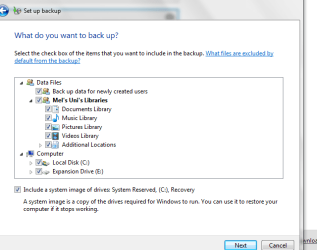
This is what I am facing now - can someone please talk me through what I can do.

I know that Greg has offered assistance - I just wish to fix the library
 

Attachments

  • back up 16-02-13.PNG
    back up 16-02-13.PNG
    28.6 KB · Views: 6
  • back up libary.PNG
    back up libary.PNG
    16 KB · Views: 5

My Computer My Computer

At a glance

Windows 7 Home Premium 64bitWindows 7 Service Pack 1 x86 NTFS4 GB
Computer type
Laptop
Computer Manufacturer/Model Number
Sony VAIO / E Series VPCEB46FG
OS
Windows 7 Home Premium 64bit
CPU
Windows 7 Service Pack 1 x86 NTFS
Motherboard
AMD E-350 Processor
Memory
4 GB
Hard Drives
500GB
Other Info
1.6GHz
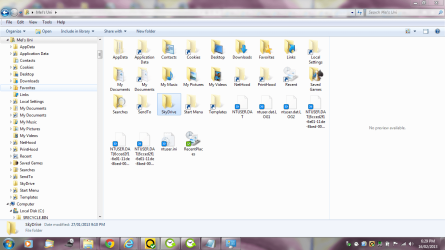
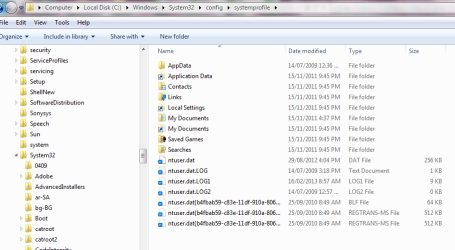
I am wondering if I should delete the file or I copy and paste the file to that location just to fix this issue.
 

My Computer My Computer

At a glance

Windows 7 Home Premium 64bitWindows 7 Service Pack 1 x86 NTFS4 GB
Computer type
Laptop
Computer Manufacturer/Model Number
Sony VAIO / E Series VPCEB46FG
OS
Windows 7 Home Premium 64bit
CPU
Windows 7 Service Pack 1 x86 NTFS
Motherboard
AMD E-350 Processor
Memory
4 GB
Hard Drives
500GB
Other Info
1.6GHz
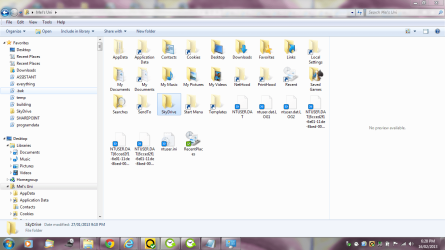
I hope you understand what I am saying regarding the missing file.

I want to may sure everything is backed up.
 

Attachments

  • libararies 3.PNG
    libararies 3.PNG
    73.7 KB · Views: 0
  • libararies 2.PNG
    libararies 2.PNG
    95.2 KB · Views: 1
  • libararies 1.PNG
    libararies 1.PNG
    93.1 KB · Views: 0
  • back up libary.PNG
    back up libary.PNG
    16 KB · Views: 1
  • back up 16-02-13.PNG
    back up 16-02-13.PNG
    28.6 KB · Views: 0
  • location of sky drive - do I copy.PNG
    location of sky drive - do I copy.PNG
    27.7 KB · Views: 0

My Computer My Computer

At a glance

Windows 7 Home Premium 64bitWindows 7 Service Pack 1 x86 NTFS4 GB
Computer type
Laptop
Computer Manufacturer/Model Number
Sony VAIO / E Series VPCEB46FG
OS
Windows 7 Home Premium 64bit
CPU
Windows 7 Service Pack 1 x86 NTFS
Motherboard
AMD E-350 Processor
Memory
4 GB
Hard Drives
500GB
Other Info
1.6GHz
I gave you the simplest method to back up. Why did you just ignore it?

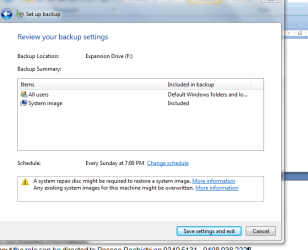
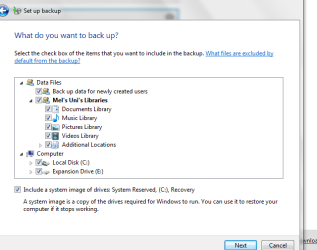
If you insist on using Windows Backup which can lose your files, then do not include the entire C and External drives for File Backup. You should not back up the drive you're backing up upon. Just back up your currently-used User folders.
 
I see that I am not the only person that receives this error message on Windows - which makes me feel better.

I guess I do not also wish to make you off side with me. I am getting advised several different things and being sick - it is confusing. People saying that I am not as smart as I used to be. People saying that I may loose everything.

I have no doubt in your abilities and your offer is perhaps too good to refuse. You have been nothing short of being patient and I am very sorry if I see very obstinant.

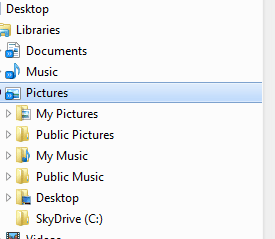
I have perhaps seen the issue with the Skydrive. When I was sick - I rearranged all my files and some got copied and pasted and they are all over the place. No wonder I am having such trouble.

I will take you up on the Team Viewer and then you will be able to see what a silly mess I have created.

I am most ashamed.
 

Attachments

  • skydrive C.PNG
    skydrive C.PNG
    3.8 KB · Views: 16

My Computer My Computer

At a glance

Windows 7 Home Premium 64bitWindows 7 Service Pack 1 x86 NTFS4 GB
Computer type
Laptop
Computer Manufacturer/Model Number
Sony VAIO / E Series VPCEB46FG
OS
Windows 7 Home Premium 64bit
CPU
Windows 7 Service Pack 1 x86 NTFS
Motherboard
AMD E-350 Processor
Memory
4 GB
Hard Drives
500GB
Other Info
1.6GHz
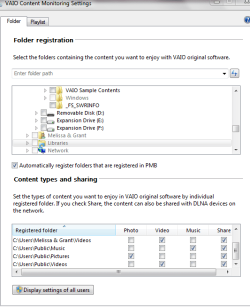
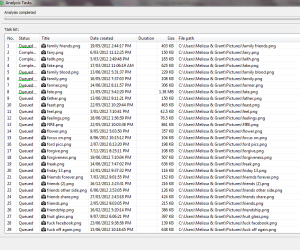
I also have these screen dumps that may assist on what is on my system.

I just want a clean slate and I also wished to show you that I have a program on my computer that I may have altered the settings - thinking it was the 'smart' way to set it up.

Thank you
 

Attachments

  • vaio pictures settings.PNG
    vaio pictures settings.PNG
    18.7 KB · Views: 2
  • vaio pictures.PNG
    vaio pictures.PNG
    26 KB · Views: 2

My Computer My Computer

At a glance

Windows 7 Home Premium 64bitWindows 7 Service Pack 1 x86 NTFS4 GB
Computer type
Laptop
Computer Manufacturer/Model Number
Sony VAIO / E Series VPCEB46FG
OS
Windows 7 Home Premium 64bit
CPU
Windows 7 Service Pack 1 x86 NTFS
Motherboard
AMD E-350 Processor
Memory
4 GB
Hard Drives
500GB
Other Info
1.6GHz
Back
Top