Norton renewed for 731 days...huh what?

kuliddar

New member
Member
Local time
7:39 AM
Messages
49
Hey guys,

So I bought NIS 2011 the other day and waited out for my current subscription of Norton AV 2010 to run out before installing the new software as well as my new key.

Today was to be the day for this. To make sure on how many days left I had I check on the main UI panel at the bottom right and instead of saying 1 or 2 days left it now says 731 days left. Just the other day it reminded me again that I only had a few days left to renew before I would stop getting updates.

I checked on our second computer and the same thing happened (it was installed at the same time when we bought a 3users key package).

Hence I'm kinda confused here as to what is going on. Is the software bugged at the end of subscription like this? Did Norton renew my subscription for some unknown reason? Anything else?

Any ideas as to why I just jump from 1-2 days left to 731? Remember my Norton IS 2011 is not yet installed nor is the latest key submitted either.

:confused:
 

My Computer My Computer

At a glance

Windows 7 Home Premium x86Duo Core 6600E 2.4ghz4gbNvidia GT630 2GB DDR3
Computer type
PC/Desktop
Computer Manufacturer/Model Number
Dell Dimension 9200
OS
Windows 7 Home Premium x86
CPU
Duo Core 6600E 2.4ghz
Memory
4gb
Graphics Card(s)
Nvidia GT630 2GB DDR3
Monitor(s) Displays
Samsung Syncmaster 932BF (4:3)
Screen Resolution
1280x1024
Hard Drives
500gb
PSU
375w
Keyboard
Microsoft Digital Media Pro
Mouse
Logitech LX8 Cordless Laser Mouse
Hope they do not have your CC number, sounds like you have been renewed with a charge to your CC. Many companies do this. In small print it says automatic renewal.
Call your cc company if a charge disupte it now. Thats just 2 years with leap year.
 

My Computer My Computer

At a glance

Windows 10, Home Clean InstallIntel Core2 processsor Q8200(2.33Ghz 1333FSB)...6 gbATI Radeon 256MB HD3650
Computer type
PC/Desktop
Computer Manufacturer/Model Number
Dell XPS 420
OS
Windows 10, Home Clean Install
CPU
Intel Core2 processsor Q8200(2.33Ghz 1333FSB) Quad Core Tech
Motherboard
Dell
Memory
6 gb
Graphics Card(s)
ATI Radeon 256MB HD3650
Sound Card
Intergrated 7.1 Channel Audio
Monitor(s) Displays
Dell SP2009W 20"
Hard Drives
640 GB Serial ATA Hard drive
Cooling
Fan
Keyboard
Dell USB Keyboard
Mouse
Dell Premium Optical USB
Internet Speed
DSL 2.85
Im a bit confused.

You have a Subscription to Norton 2010 curerently which about to expire correct?
You want to upgrade to NIS 2011 once it does?
You do not need to buy a new Norton package to do this.

With a Norton subscription, you are entitled to upgrades free of charge.
So upgrading from 2010 to the newest 2011 version costs absolutely nothing. The only requirement is that you need a valid subscription.


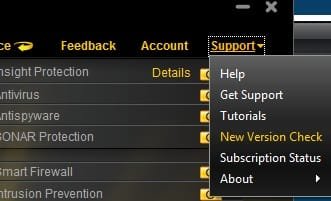
To do this, look in the support section of the main Norton window, and choose "Check for New version" as seen in my snip below.
Norton will handle the upgrade for you.


--> Now, as far as renewing your subscription, there is a option for "Auto" renewal.
This is the option I personally use.

Typically, Norton starts sending you emails a week- 2 weeks ahead of time saying something along the lines of:
Your subscription is about to expire. if Auto Renewal was selected you will be billed soon please make sure funds are available .. or something along that line.


It sounds as if you originally had a 2 year subscription, and they renewed it as a 2 year.


If you purchased a complete new package, and was unaware of all of this I would suggest contacting customer support.
If you have purchased a complete other package, plus been billed for your current sub, they can help refund one.

As far as upgrading, I would just go ahead and upgrade the current subscription.
 

Attachments

  • Untitled.jpg
    Untitled.jpg
    11.9 KB · Views: 4

My Computer My Computer

At a glance

Windows 7 Home Premium 64bitIntel Core i7 2700k8GB Mushkin Redline Ridgebacks @1866EVGA GTX570 SC
Computer Manufacturer/Model Number
Custom (Self Build)
OS
Windows 7 Home Premium 64bit
CPU
Intel Core i7 2700k
Motherboard
eVGA P67 SLI
Memory
8GB Mushkin Redline Ridgebacks @1866
Graphics Card(s)
EVGA GTX570 SC
Sound Card
XiFi Titanium HD
Monitor(s) Displays
LG W2453V
Screen Resolution
1920x1080
Hard Drives
Intel 320 80GB -- Intel X25-V 40GB --WD Black 1TB x2 -- WD Blue 640GB
PSU
Seasonic x750
Case
Corsair 600T SE White
Cooling
eVGA Superclocked CPU Cooler
Keyboard
Saitek Cyborg
Antivirus
Kaspersky
Browser
IE
Other Info
LG BD/DVD
I checked just to make sure but my account had an old expired CC from 2007 so there's no way they could of charged me for it.
 

My Computer My Computer

At a glance

Windows 7 Home Premium x86Duo Core 6600E 2.4ghz4gbNvidia GT630 2GB DDR3
Computer type
PC/Desktop
Computer Manufacturer/Model Number
Dell Dimension 9200
OS
Windows 7 Home Premium x86
CPU
Duo Core 6600E 2.4ghz
Memory
4gb
Graphics Card(s)
Nvidia GT630 2GB DDR3
Monitor(s) Displays
Samsung Syncmaster 932BF (4:3)
Screen Resolution
1280x1024
Hard Drives
500gb
PSU
375w
Keyboard
Microsoft Digital Media Pro
Mouse
Logitech LX8 Cordless Laser Mouse
Im a bit confused.

You have a Subscription to Norton 2010 curerently which about to expire correct?
You want to upgrade to NIS 2011 once it does?
You do not need to buy a new Norton package to do this.

With a Norton subscription, you are entitled to upgrades free of charge.
So upgrading from 2010 to the newest 2011 version costs absolutely nothing. The only requirement is that you need a valid subscription.


To do this, look in the support section of the main Norton window, and choose "Check for New version" as seen in my snip below.
Norton will handle the upgrade for you.


--> Now, as far as renewing your subscription, there is a option for "Auto" renewal.
This is the option I personally use.

Typically, Norton starts sending you emails a week- 2 weeks ahead of time saying something along the lines of:
Your subscription is about to expire. if Auto Renewal was selected you will be billed soon please make sure funds are available .. or something along that line.


It sounds as if you originally had a 2 year subscription, and they renewed it as a 2 year.


If you purchased a complete new package, and was unaware of all of this I would suggest contacting customer support.
If you have purchased a complete other package, plus been billed for your current sub, they can help refund one.

As far as upgrading, I would just go ahead and upgrade the current subscription.

Yes I know you can upgrade but they issue was always the yearly renewal which, through Symantec's site is always more expensive than just buying the latest software when it's on sale. I bought NIS 2011 3PC for 34$CAN at Futureshop last week; Symantec's charges me 50$CAN for 1 PC.

I got no emails as I did not opt for automatic renewal because of the reason above. The only warning was the one from the software itself telling me that my subscription is going to end soon. That started 15 days ago and it did ask me if I wanted to renew the subscription which I clicked "no".
 

My Computer My Computer

At a glance

Windows 7 Home Premium x86Duo Core 6600E 2.4ghz4gbNvidia GT630 2GB DDR3
Computer type
PC/Desktop
Computer Manufacturer/Model Number
Dell Dimension 9200
OS
Windows 7 Home Premium x86
CPU
Duo Core 6600E 2.4ghz
Memory
4gb
Graphics Card(s)
Nvidia GT630 2GB DDR3
Monitor(s) Displays
Samsung Syncmaster 932BF (4:3)
Screen Resolution
1280x1024
Hard Drives
500gb
PSU
375w
Keyboard
Microsoft Digital Media Pro
Mouse
Logitech LX8 Cordless Laser Mouse
Ah OK, I see.

If they charged you, perhaps contact them for a refund.
Maybe check to see if theres a hold on your CC.

If not ... well that is certainly odd. Not sure why it extended the renewal time otherwise :confused:
 

My Computer My Computer

At a glance

Windows 7 Home Premium 64bitIntel Core i7 2700k8GB Mushkin Redline Ridgebacks @1866EVGA GTX570 SC
Computer Manufacturer/Model Number
Custom (Self Build)
OS
Windows 7 Home Premium 64bit
CPU
Intel Core i7 2700k
Motherboard
eVGA P67 SLI
Memory
8GB Mushkin Redline Ridgebacks @1866
Graphics Card(s)
EVGA GTX570 SC
Sound Card
XiFi Titanium HD
Monitor(s) Displays
LG W2453V
Screen Resolution
1920x1080
Hard Drives
Intel 320 80GB -- Intel X25-V 40GB --WD Black 1TB x2 -- WD Blue 640GB
PSU
Seasonic x750
Case
Corsair 600T SE White
Cooling
eVGA Superclocked CPU Cooler
Keyboard
Saitek Cyborg
Antivirus
Kaspersky
Browser
IE
Other Info
LG BD/DVD
I chatted online with a rep later in the evening. I think they are kinda baffled cause he pretty much went through the same path you just told me lol. The CC I have on file is an old CC so they could not charge it. Then I found out that originally, NAV 2010 was registered under my wife's email so I checked her account online and there are no CC even registered there. To be safe, on my end I still called the CC compagny with the old card number asking if there was anyway one could charge for this with either a bad number or the wrong expiry date and customer service said there is no way unless they try random numbers which I doubt Symantec has time to do nor is it legal anyways.

Hence I don't know what the heck is going on. I'll let it as it for now...as long as it still updates. I'll put away my NIS2011 and use it when those days expires I guess.

Kinda reminds me that a few years ago (maybe 4 or 5) I had NAV installed and happened to do my yearly reformating near the end of the subscription date. When everything was re-installed, including NAV, I had a fresh 365 days again. Guess, we take them when can lol.
 
Last edited:

My Computer My Computer

At a glance

Windows 7 Home Premium x86Duo Core 6600E 2.4ghz4gbNvidia GT630 2GB DDR3
Computer type
PC/Desktop
Computer Manufacturer/Model Number
Dell Dimension 9200
OS
Windows 7 Home Premium x86
CPU
Duo Core 6600E 2.4ghz
Memory
4gb
Graphics Card(s)
Nvidia GT630 2GB DDR3
Monitor(s) Displays
Samsung Syncmaster 932BF (4:3)
Screen Resolution
1280x1024
Hard Drives
500gb
PSU
375w
Keyboard
Microsoft Digital Media Pro
Mouse
Logitech LX8 Cordless Laser Mouse
If you are not charged, forget about it. Uninstall if you like and install the AV that you want.
 

My Computer My Computer

At a glance

Windows 10, Home Clean InstallIntel Core2 processsor Q8200(2.33Ghz 1333FSB)...6 gbATI Radeon 256MB HD3650
Computer type
PC/Desktop
Computer Manufacturer/Model Number
Dell XPS 420
OS
Windows 10, Home Clean Install
CPU
Intel Core2 processsor Q8200(2.33Ghz 1333FSB) Quad Core Tech
Motherboard
Dell
Memory
6 gb
Graphics Card(s)
ATI Radeon 256MB HD3650
Sound Card
Intergrated 7.1 Channel Audio
Monitor(s) Displays
Dell SP2009W 20"
Hard Drives
640 GB Serial ATA Hard drive
Cooling
Fan
Keyboard
Dell USB Keyboard
Mouse
Dell Premium Optical USB
Internet Speed
DSL 2.85
Hey guys,

Today was to be the day for this. To make sure on how many days left I had I check on the main UI panel at the bottom right and instead of saying 1 or 2 days left it now says 731 days left. Just the other day it reminded me again that I only had a few days left to renew before I would stop getting updates.


:confused:

You could log in to your Norton Account and see what the license status is there. The number of days suggests they renewed your subscription for two years.
 

My Computer My Computer

At a glance

Windows 7 x64Intel Core2 Extreme Q6850 3.00GHz8 GBRadeon R7 260X
Computer type
PC/Desktop
OS
Windows 7 x64
CPU
Intel Core2 Extreme Q6850 3.00GHz
Motherboard
EVGA 132-CK-NF79
Memory
8 GB
Graphics Card(s)
Radeon R7 260X
Sound Card
Xonar DS
Hard Drives
Hitachi Deskstar 1 tb
Back
Top