Nostromo n52

kaci

New member
Local time
1:46 AM
Messages
32
I have a Nostromo n52 and generally its working just fine. The only issue I have is when my pc goes into sleep or hybernate mode and I start it back up its dropped out the Nostromo. If I reboot it's fine. Any suggestions as to how to restart it without a reboot? I've checked the usual places i.e. startup, services and boot portions of Win7 but I don't see anything that relates to the Nostromo.
 

My Computer

Computer Manufacturer/Model Number
Built
OS
Window 7 Home Premium
CPU
I7 920
Motherboard
Gigabyte gaex58updp4p
Memory
6 GB
Graphics Card(s)
Twin Nivida GTS 250 SLI
Sound Card
Realtec onboard
Monitor(s) Displays
Plasma
Screen Resolution
1920 x 1080
Hard Drives
ESata
PSU
700 watt
Cooling
processor and 4 case fans
Mouse
Logitech
Internet Speed
10 mbits
Hi Kaci,
I have been using the N52 in Win7 and have noticed the same problem.
Unfortunately I do not have a solution for you (I disabled both Sleep and Hibernation mode to prevent this problem for occurring).
Evidently there is a problem with the drivers (or specific service) being restarted when Windows resumes from Hibernation. I have heard of this problem occuring with other programs..and because there is no actual Windows7 driver for the N52, I do not expect the problem to be solved anytime soon.

I am hoping that someone else here can help with the "driver not working after Hibernation mode" problem. If there is a way to restart the driver/service then someone here will no doubt know how to do it.
 

My Computer

Computer Manufacturer/Model Number
Custom Built and Maintained...by Me
OS
Windows 7 Ultimate x64
CPU
AMD Phenome x4 965 Black Ed (Lovingly OverClocked.a tad)
Motherboard
Gigabyte GA 890GPA-UD3H
Memory
6 Gb (3 x 2 Gb GSKILL 16000CL9 )
Graphics Card(s)
ASUS EAH5850/2DIS/1GD5 Radeon HD 5850 1GB
Sound Card
Creative SB X-Fi
Monitor(s) Displays
Dual 24" Samsung Wide-Sceens
Screen Resolution
Good Enough.
Hard Drives
5x SATA Seagates (in assorted sizes, shapes, and colors--Variety is the spice of Life)
PSU
790 Watt Enermax Modular
Case
Lian-Li Black Mesh (Love that Mesh !!)
Cooling
Pure Air Baby..Flowin Freely
Keyboard
Microsoft 4000 Natural Ergonomic
Mouse
Multiple Logitech Laser mice....each has its specific use
Internet Speed
Not Fast Enough, it's probably never going to be fast enough
Other Info
This Computer building crap started out years ago as a simple hobby..that has now gotten completely out of hand !!
(It does come in handy though, when everyone in the family wants their own computer)
At least it works. I guess a restart isn't too high a price to pay once in awhile.
 

My Computer

Computer Manufacturer/Model Number
Built
OS
Window 7 Home Premium
CPU
I7 920
Motherboard
Gigabyte gaex58updp4p
Memory
6 GB
Graphics Card(s)
Twin Nivida GTS 250 SLI
Sound Card
Realtec onboard
Monitor(s) Displays
Plasma
Screen Resolution
1920 x 1080
Hard Drives
ESata
PSU
700 watt
Cooling
processor and 4 case fans
Mouse
Logitech
Internet Speed
10 mbits
If I find a solution I will let you know.
 

My Computer

Computer Manufacturer/Model Number
Custom Built and Maintained...by Me
OS
Windows 7 Ultimate x64
CPU
AMD Phenome x4 965 Black Ed (Lovingly OverClocked.a tad)
Motherboard
Gigabyte GA 890GPA-UD3H
Memory
6 Gb (3 x 2 Gb GSKILL 16000CL9 )
Graphics Card(s)
ASUS EAH5850/2DIS/1GD5 Radeon HD 5850 1GB
Sound Card
Creative SB X-Fi
Monitor(s) Displays
Dual 24" Samsung Wide-Sceens
Screen Resolution
Good Enough.
Hard Drives
5x SATA Seagates (in assorted sizes, shapes, and colors--Variety is the spice of Life)
PSU
790 Watt Enermax Modular
Case
Lian-Li Black Mesh (Love that Mesh !!)
Cooling
Pure Air Baby..Flowin Freely
Keyboard
Microsoft 4000 Natural Ergonomic
Mouse
Multiple Logitech Laser mice....each has its specific use
Internet Speed
Not Fast Enough, it's probably never going to be fast enough
Other Info
This Computer building crap started out years ago as a simple hobby..that has now gotten completely out of hand !!
(It does come in handy though, when everyone in the family wants their own computer)
Same issue here - when the computer goes into hibernation - the n52 doesnt come back. Well it does but not with the correct loadout because the loadout manger doesnt pick it up properly.

I find that if I just unplug and plug it right back in the N52 comes up fine - even if I am right in the middle of a game. I have it plugged into my keyboard so I can reach it easily.

Would be nice if this got fixed though. Probably needs a driver update from Belkin.
 

My Computer

OS
Windows 7
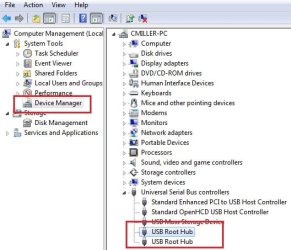
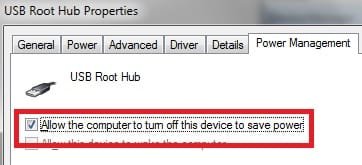
Has anyone disabled the "sleep" mode on their USB ports to see if it helps? I don't know if it would or not, but it is worth a try I guess. I've heard of this before with devices. It could just be a driver thing though like you all have already said.

See the two attached screen shots, maybe they'll help. They show where to turn off what I'm talking about.
 

Attachments

  • DeviceManage_USB_Root_Hub.jpg
    DeviceManage_USB_Root_Hub.jpg
    39.3 KB · Views: 152
  • USB_Root_Hub_Properties.jpg
    USB_Root_Hub_Properties.jpg
    11.3 KB · Views: 26

My Computer

OS
Windows 7 Ultimate
CPU
AMD Athlon Black Edition 5000+ 2.6Ghz
Motherboard
MSI K9a Platinum
Memory
G.Skill 4gb
Graphics Card(s)
Nvidia 8800GT 320mb
Sound Card
SoundBlaster Audigy
Monitor(s) Displays
Acer 22" Widscreen LCD
Screen Resolution
1680x1050
Hard Drives
Two Western Digial 320gb, 5400rpm
PSU
600 watt - forgot the brand!
Keyboard
Microsoft Razer Reclusa
Mouse
Razer Diamondback 3g Green
Internet Speed
10mbps RoadRunner
Just tried disabling that as described - no difference at all. Related symptom maybe - whenever I boot up - the loadout manager always generates a UAC warning which I have to click through every time.

Whenever the problem occurs - ie if i resume from hibernate - the n52 is in default keyboard mode (non-customized) - if i click the loadout manager icon in the tray - it is very slow to bring the application up. When it does come up - the n52 isnt listed as a device. If I unplug and plug it back it - it immediately lists in the loadout manager and works properly.

The problem may be in the LM coding itself not the driver.
 

My Computer

OS
Windows 7
After About 3 hrs i finally found a fix to this issue by creating a batch file that uninstalls the device from the computer prior to it being put on hibernate/standby. Then after the computer starts back up the device is reinstalled automatically. To do this i used 3 programs all free and available USBDeview, NIRcmd and AutoHotKey.

1: Download USBDeview and extract the main .exe to a folder. I made a folder called standby in my windows directory. Make sure you download the 32 bit version and not the 64 bit version because the feature that uninstalls the device was not available in the 64 bit version. This program will do what we need it to do if you have a 64 bit operating system in my case Windows7 Ultimate x64.

2: Open USBDeview.exe and locate Nostromo n52 HID Speedpad
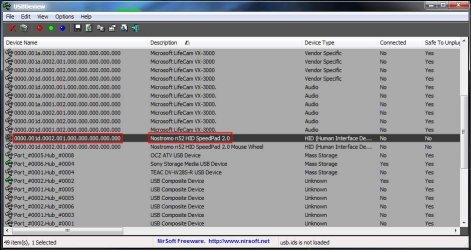
usbdeview.jpg
3: Copy the device number which in my case was 0000.001d.0002.001.000.000.000.000.000 to a text document that will be turned into a batch file later

4: download NIRcmd and place the .exe in the same folder as USBDeview. i used this program to start a hibernate via the command line in my batch file. This should work for both 32 and 64 bit versions.

5: Open the txt document that has your device number and create a batch file like so. I added the ping command as a wait command to make sure the nostromo is successfully uninstalled correctly. After 6 seconds your computer will enter into standby, and when you wake it up the device should reinstall automatically. Make sure after you have saved the txt file to rename it into a .bat so it can be executed. You may have to go into folder properties and enable extensions so you can rename it.

(Note. If you want to hibernate instead of standby just type hibernate instead of standby and the NIRcmd will trigger a hibernate instead)

(Note. You may have to reopen a nostromo profile after resuming windows. So far ive only had to do this once in my case crysis.ldt on my desktop)

usbdeview /remove 0000.001d.0002.001.000.000.000.000.000
PING 1.1.1.1 -n 1 -w 6000 >NUL
nircmd.exe standby

6: Now you can either make a shortcut to the batch file on your desktop whenever you want to standby or you can use AutoHotKey and make a key combination that will run the batch file.

After i installed autohotkey i made a simple script that executed the batch file. Make a text document and enter this. (change the path if you placed it in a different folder) This will execute the batch file when Ctrl+Alt+a is pressed.

^!a::
Run, standby.bat, C:\Windows\standby, max

Save the file and rename it to standby.ahk if you have autohotkey installed it should automatically associate .ahk files so if you place the .ahk file in your windows startup folder it should be ready whenever you computer starts.

 

My Computer

OS
Windows 7 Ultimate x64
That's awesome - thanks for your work - wish Belkin would just fix their flippin drivers.
 

My Computer

OS
Windows 7
I have tried to run the fix as reccomended by Cap3rOn but ahve run into a few problems. When windows resumes from standby I get the message that windows is installing the devices and then shows that they are sucessfully installed. However I can not get the Loadout Manager to launch properly. If I elave the Loadout manager up it comes back blank and I cannot reset the profile. I have tried to change the setting from automatic to manual and toggled start on windows startup with no sucess. If I close the Loadout manager before I go on standby I cannot get the problems to resume. On a sidebar the only way I have been able to start the programs on computer startup is to start the Editor first and then launch the Loadout Manager from the icon on it. Any suggestions on how I can allieviate this?
 

My Computer

OS
Windows 7 64 bit
Assuming you have the N52 plugged into the back of the PC, the easiest way is to attach the N52 to your PC with a USB extension cable. Have the join near to where the N52 is. After coming out of hibernation, just unplug the device at the extension link and plug it straight back in again. If you have it set to auto-load the FS profile, it comes back immediately.
 

My Computer

Computer type
PC/Desktop
Computer Manufacturer/Model Number
Custom Build
OS
Windows 7 Home Premium SP1 64-bit
CPU
Intel Core i7-4790K CPU @ 4.5GHz
Motherboard
Asus H97I-PLUS
Memory
16GB KINGSTON HYPER-X FURY DUAL-DDR3 1600MHz
Graphics Card(s)
8GB NVIDIA GEFORCE GTX 1070
Monitor(s) Displays
HannsG 28" & Dell 24"
Screen Resolution
1920x1200
Hard Drives
1 x 2TB Samsung Evo 860 SSD
2 x 500GB Samsung Evo 850 SSD
PSU
CORSAIR 650W CS SERIES
Case
Thermaltake Core V1 Mini ITX Cube
Cooling
NOCTUA NH-L12
Browser
Firefox
Other Info
Custom PC used for X-Plane 11
You are able to use macros and program the keys with windows 7? I can't get mine to do that.
 

My Computer

OS
64 bit windows 7 home
Back
Top