Not able to print anything from IE11

albertf

New member
Member
Local time
5:45 AM
Messages
44
I have windows 7 x64 bit OS and 16GB ram. I used Ie8 before and it printed without any issues on either printer. When I upgraded to IE9 or IE10, I get an error when trying to print - "An error has occurred in the script on this page. Line : 2053
Char: 1 Error : Invalid procedure call or argument.
Code: 0 URL: res/ieframe.dll/preview.js.:"

Yet when going from IE8 to IE11, I can not print on either printer of HP Laserrjet1015 and HP 8600 pro. I don't get any error message. I have the latest printer drivers for both printers and the latest video drivers as well. I have tried a lot of techniques and nothing seems to have fixed the printing issue on IE11.

This is what I have done:

I have checked that the folder of the temp folder has the folder "Low" and its there, tried turning off protected mode, running IE11 as admin, ran IE 11 without any add ons, cleaned out temp files, and still not able to print.

I just tried this technique of
  1. Click Start
    Collapse this imageExpand this image

    VistaStartButton.jpg

    , click All Programs, and then click Accessories.
  2. Right-click Command Prompt, and then click Run as administrator.
  3. Type following command and press ENTER:ICACLS "%userprofile%\AppData\Local\Temp\Low" /setintegritylevel (OI)(CI)low
  4. Restart the computer.
  5. Print or print preview a Web page in Internet Explorer.
and nothing worked either.

Just tried to print using xps and it worked fine and no issues. but still not printing a hard copy to printer on Hp LaserJet 1015 and HP Pro 8600. I need to be able to print to these printers

I can print from Google chrome without any issues but can not print from IE11
Any help would be great

AlbertF
 
Last edited:

My Computer My Computer

At a glance

WIndows 7 x64
Computer type
PC/Desktop
OS
WIndows 7 x64
Hi and welcome to SevenForums,
Try Clean boot,
http://www.sevenforums.com/tutorials/179159-troubleshoot-application-conflicts-performing-clean-startup.html
Click Start and type in the search box,
msconfig
Click on the suggestion on top or hit the Enter key,
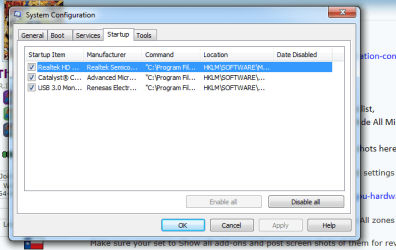
Go to the Startup section and take some screen shots for a complete list,
Go to the Services section and on the bottom left Check the box to Hide All Microsoft services,
Repeat the screen shots,
See the links above my signature on how to take and upload screen shots here,

Have you switched to software rendering instead of gpu in advanced settings ?
Make sure you restore Advanced settings first,
http://www.sevenforums.com/tutorials/149063-internet-explorer-gpu-hardware-acceleration-turn-off.html

If you've altered any settings in the Security section please Restore All zones to default as well,
What browser add-ons do you have installed in ie,
Make sure your set to Show all add-ons and post screen shots of them for review,

Finally have you tried to re-install the printers with the current version of ie11-10 installed ?
Cheers.
 

My Computer My Computer

At a glance

Win-7-Pro64bit 7-H-Prem-64biti7-5930K 2nd i9-9940x both water blocked VRM'...Trident-z 3200C14 2nd Trident-z 3600C16EVGA 1080ti ftw3 2nd Titan Xp both water blocked
Computer type
PC/Desktop
Computer Manufacturer/Model Number
Custom assembled by me :}
OS
Win-7-Pro64bit 7-H-Prem-64bit
CPU
i7-5930K 2nd i9-9940x both water blocked VRM's too
Motherboard
ASUS SABERTOOTH X99 2nd ASUS x299 Apex
Memory
Trident-z 3200C14 2nd Trident-z 3600C16
Graphics Card(s)
EVGA 1080ti ftw3 2nd Titan Xp both water blocked
Sound Card
Built-in Realtek
Monitor(s) Displays
1-AOC G2460PG 24"G-Sync 144Hz/ 2nd 1-ASUS VG248QE 24" 144Hz
Screen Resolution
1920 x 1080 144Hz
Hard Drives
2-Samsung M.2 Evo & Evo Plus
2-Samsung 850 EVO 500GB SSD's/ 3-2.5 W.D. Black 1tb-&3-1tb/3-3.5 WD Black 1tb hdd's
PSU
EVGA SuperNOVA 1000-P2 2nd 1200-P2
Case
2-Corsair Obsidian Series 450D Black ATX Mid Tower
Cooling
Custom water loops
Keyboard
Logitech G710+/ 2nd Logitech G910
Mouse
2-RedDragon M901 Perdition 16400 dpi Gaming mouse = wired
Internet Speed
Comcast Ping 19ms 89.31mbps download speed 6.12mbps upload
Antivirus
Malwarebytes Pro/ Superantispyware Pro
Browser
FireFox & Pale moon
Other Info
2nd ASUS X299 Apex/Intel i9-9940x with Custom water loop/7H-Prem-x64/Corsair 450D case/Ram Trident-z 3600C16 4x8gb / Samsung970Evo plus 500gb SSD/Dual ssd EZ swap evo/PSU EVGA SuperNova 1200w-P2 80+Platinum/GPU Titan Xp /8-ML-140 on push-pull on 2-280GTX rads
Hi

Thanks for your immediate response. I have attached 2 pics of msconfig of hiding all Microsoft items and startup to this.

I have not switched to software rendering instead of gpu in advanced settings for IE 11.
I did not alter any settings in security section
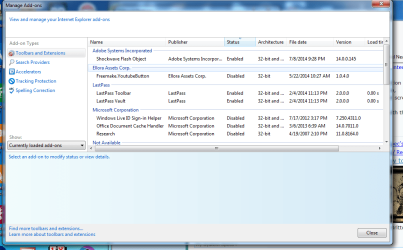
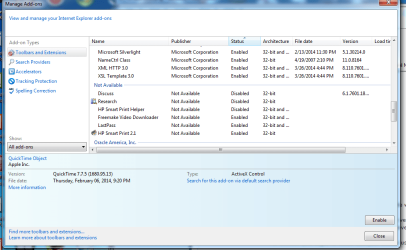
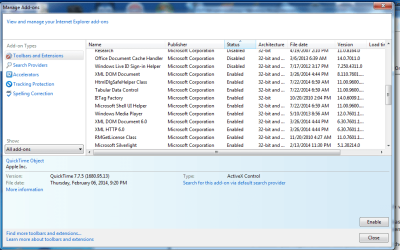
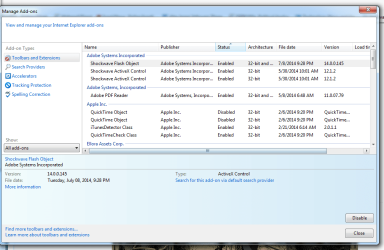
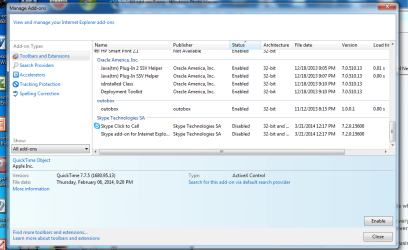
I have attached 3 pics of the addons to this posting.

I did not reinstall the printers at all with the current version of ie11. It worked fine and dandy with IE8

Thanks
 

Attachments

  • startup.png
    startup.png
    25.6 KB · Views: 44
  • msconfig.png
    msconfig.png
    21.2 KB · Views: 44
  • manage add on 1.png
    manage add on 1.png
    49.5 KB · Views: 2
  • manage add on 2.png
    manage add on 2.png
    40 KB · Views: 1
  • manage add on3.png
    manage add on3.png
    40.1 KB · Views: 1

My Computer My Computer

At a glance

WIndows 7 x64
Computer type
PC/Desktop
OS
WIndows 7 x64
Hi thanks for the additional information,
Unfortunately the manage add-ons page is set on Currently loaded and not on Show all,
all%20add-ons.jpg

Please redo those screen shots,
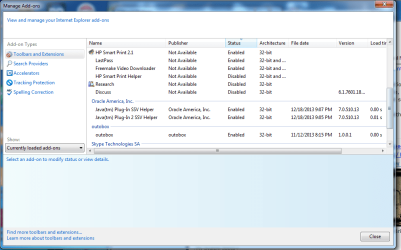
In any case all of the h-p add-ons are unavailable which would indicate they or your printers will need to be re-installed :(
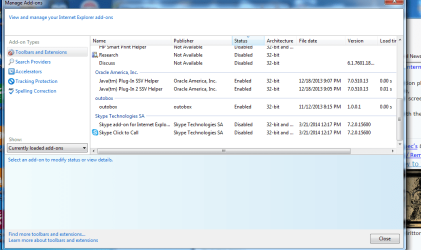
I would also uninstall Java from Oracle or at the very least make sure it's Disabled unless you actually need it via a prompt on a webpage but quite frankly I have never seen a need for Java ?

In addition you might re-install Last past toolbar using the current version of ie10- or 11
 

My Computer My Computer

At a glance

Win-7-Pro64bit 7-H-Prem-64biti7-5930K 2nd i9-9940x both water blocked VRM'...Trident-z 3200C14 2nd Trident-z 3600C16EVGA 1080ti ftw3 2nd Titan Xp both water blocked
Computer type
PC/Desktop
Computer Manufacturer/Model Number
Custom assembled by me :}
OS
Win-7-Pro64bit 7-H-Prem-64bit
CPU
i7-5930K 2nd i9-9940x both water blocked VRM's too
Motherboard
ASUS SABERTOOTH X99 2nd ASUS x299 Apex
Memory
Trident-z 3200C14 2nd Trident-z 3600C16
Graphics Card(s)
EVGA 1080ti ftw3 2nd Titan Xp both water blocked
Sound Card
Built-in Realtek
Monitor(s) Displays
1-AOC G2460PG 24"G-Sync 144Hz/ 2nd 1-ASUS VG248QE 24" 144Hz
Screen Resolution
1920 x 1080 144Hz
Hard Drives
2-Samsung M.2 Evo & Evo Plus
2-Samsung 850 EVO 500GB SSD's/ 3-2.5 W.D. Black 1tb-&3-1tb/3-3.5 WD Black 1tb hdd's
PSU
EVGA SuperNOVA 1000-P2 2nd 1200-P2
Case
2-Corsair Obsidian Series 450D Black ATX Mid Tower
Cooling
Custom water loops
Keyboard
Logitech G710+/ 2nd Logitech G910
Mouse
2-RedDragon M901 Perdition 16400 dpi Gaming mouse = wired
Internet Speed
Comcast Ping 19ms 89.31mbps download speed 6.12mbps upload
Antivirus
Malwarebytes Pro/ Superantispyware Pro
Browser
FireFox & Pale moon
Other Info
2nd ASUS X299 Apex/Intel i9-9940x with Custom water loop/7H-Prem-x64/Corsair 450D case/Ram Trident-z 3600C16 4x8gb / Samsung970Evo plus 500gb SSD/Dual ssd EZ swap evo/PSU EVGA SuperNova 1200w-P2 80+Platinum/GPU Titan Xp /8-ML-140 on push-pull on 2-280GTX rads
Hi

Sorry I did not send u the proper screen shots. I have now added the full add on list of things in IE11. I have attached all 5 pics to this report.

I will look into why HP is disabled.

OK, I have java disabled np

Why would I need to reinstall the last toolbar?

Thanks
 

Attachments

  • All add ons4.png
    All add ons4.png
    39.9 KB · Views: 1
  • All add ons3.png
    All add ons3.png
    41 KB · Views: 1
  • All add ons2.png
    All add ons2.png
    45.9 KB · Views: 1
  • All add ons.png
    All add ons.png
    45.1 KB · Views: 1
  • All add ons5.png
    All add ons5.png
    51.9 KB · Views: 1

My Computer My Computer

At a glance

WIndows 7 x64
Computer type
PC/Desktop
OS
WIndows 7 x64
I have disabled all of java and enable hp and still not able to print

Any suggestions for me

Thanks
Albertf
 

My Computer My Computer

At a glance

WIndows 7 x64
Computer type
PC/Desktop
OS
WIndows 7 x64
Hi thanks that is a list :)
Temp files delete,
Run this as administrator and Start the scanner,
Shut your machine down after it finishes,
http://www.geekstogo.com/forum/files/file/187-tfc-temp-file-cleaner-by-oldtimer/

Personally I would follow this reset process from the start menu search with all browser windows closed,
Reset process first opening Internet explorer
Once you double check which add-ons are still enabled after reset/ there should be only One if you follow the instructions = Flashplayer,
Attempt to print without enabling anything third party related toolbars Especially ;)
 

My Computer My Computer

At a glance

Win-7-Pro64bit 7-H-Prem-64biti7-5930K 2nd i9-9940x both water blocked VRM'...Trident-z 3200C14 2nd Trident-z 3600C16EVGA 1080ti ftw3 2nd Titan Xp both water blocked
Computer type
PC/Desktop
Computer Manufacturer/Model Number
Custom assembled by me :}
OS
Win-7-Pro64bit 7-H-Prem-64bit
CPU
i7-5930K 2nd i9-9940x both water blocked VRM's too
Motherboard
ASUS SABERTOOTH X99 2nd ASUS x299 Apex
Memory
Trident-z 3200C14 2nd Trident-z 3600C16
Graphics Card(s)
EVGA 1080ti ftw3 2nd Titan Xp both water blocked
Sound Card
Built-in Realtek
Monitor(s) Displays
1-AOC G2460PG 24"G-Sync 144Hz/ 2nd 1-ASUS VG248QE 24" 144Hz
Screen Resolution
1920 x 1080 144Hz
Hard Drives
2-Samsung M.2 Evo & Evo Plus
2-Samsung 850 EVO 500GB SSD's/ 3-2.5 W.D. Black 1tb-&3-1tb/3-3.5 WD Black 1tb hdd's
PSU
EVGA SuperNOVA 1000-P2 2nd 1200-P2
Case
2-Corsair Obsidian Series 450D Black ATX Mid Tower
Cooling
Custom water loops
Keyboard
Logitech G710+/ 2nd Logitech G910
Mouse
2-RedDragon M901 Perdition 16400 dpi Gaming mouse = wired
Internet Speed
Comcast Ping 19ms 89.31mbps download speed 6.12mbps upload
Antivirus
Malwarebytes Pro/ Superantispyware Pro
Browser
FireFox & Pale moon
Other Info
2nd ASUS X299 Apex/Intel i9-9940x with Custom water loop/7H-Prem-x64/Corsair 450D case/Ram Trident-z 3600C16 4x8gb / Samsung970Evo plus 500gb SSD/Dual ssd EZ swap evo/PSU EVGA SuperNova 1200w-P2 80+Platinum/GPU Titan Xp /8-ML-140 on push-pull on 2-280GTX rads
Hi man

I have ran Temp files delete program and it delete the files it needed to but the problem still exists.

I also have tried the reset option and this did not do anything to get the printer to print either.

I am open for more options

Reuven
 

My Computer My Computer

At a glance

WIndows 7 x64
Computer type
PC/Desktop
OS
WIndows 7 x64
Are any of these symbols appearing blue just before you attempt to print ?
active%20x%20filtering-2.jpg
 

My Computer My Computer

At a glance

Win-7-Pro64bit 7-H-Prem-64biti7-5930K 2nd i9-9940x both water blocked VRM'...Trident-z 3200C14 2nd Trident-z 3600C16EVGA 1080ti ftw3 2nd Titan Xp both water blocked
Computer type
PC/Desktop
Computer Manufacturer/Model Number
Custom assembled by me :}
OS
Win-7-Pro64bit 7-H-Prem-64bit
CPU
i7-5930K 2nd i9-9940x both water blocked VRM's too
Motherboard
ASUS SABERTOOTH X99 2nd ASUS x299 Apex
Memory
Trident-z 3200C14 2nd Trident-z 3600C16
Graphics Card(s)
EVGA 1080ti ftw3 2nd Titan Xp both water blocked
Sound Card
Built-in Realtek
Monitor(s) Displays
1-AOC G2460PG 24"G-Sync 144Hz/ 2nd 1-ASUS VG248QE 24" 144Hz
Screen Resolution
1920 x 1080 144Hz
Hard Drives
2-Samsung M.2 Evo & Evo Plus
2-Samsung 850 EVO 500GB SSD's/ 3-2.5 W.D. Black 1tb-&3-1tb/3-3.5 WD Black 1tb hdd's
PSU
EVGA SuperNOVA 1000-P2 2nd 1200-P2
Case
2-Corsair Obsidian Series 450D Black ATX Mid Tower
Cooling
Custom water loops
Keyboard
Logitech G710+/ 2nd Logitech G910
Mouse
2-RedDragon M901 Perdition 16400 dpi Gaming mouse = wired
Internet Speed
Comcast Ping 19ms 89.31mbps download speed 6.12mbps upload
Antivirus
Malwarebytes Pro/ Superantispyware Pro
Browser
FireFox & Pale moon
Other Info
2nd ASUS X299 Apex/Intel i9-9940x with Custom water loop/7H-Prem-x64/Corsair 450D case/Ram Trident-z 3600C16 4x8gb / Samsung970Evo plus 500gb SSD/Dual ssd EZ swap evo/PSU EVGA SuperNova 1200w-P2 80+Platinum/GPU Titan Xp /8-ML-140 on push-pull on 2-280GTX rads
Hi

Regarding ure question, there were none of the symbols when I try printing
 

My Computer My Computer

At a glance

WIndows 7 x64
Computer type
PC/Desktop
OS
WIndows 7 x64
I have tried this several times and none of these symbols
 

My Computer My Computer

At a glance

WIndows 7 x64
Computer type
PC/Desktop
OS
WIndows 7 x64
Safe mode with networking,
Shut down your machine,
Power up and Tap the F8 key continuously until you see a black page with white text,
Use the down arrow key to toggle to safe mode with networking/ hit the enter key.
Login as usual
And attempt to print a webpage,
Other advanced methods,
http://www.sevenforums.com/tutorials/69585-safe-mode.html
 

My Computer My Computer

At a glance

Win-7-Pro64bit 7-H-Prem-64biti7-5930K 2nd i9-9940x both water blocked VRM'...Trident-z 3200C14 2nd Trident-z 3600C16EVGA 1080ti ftw3 2nd Titan Xp both water blocked
Computer type
PC/Desktop
Computer Manufacturer/Model Number
Custom assembled by me :}
OS
Win-7-Pro64bit 7-H-Prem-64bit
CPU
i7-5930K 2nd i9-9940x both water blocked VRM's too
Motherboard
ASUS SABERTOOTH X99 2nd ASUS x299 Apex
Memory
Trident-z 3200C14 2nd Trident-z 3600C16
Graphics Card(s)
EVGA 1080ti ftw3 2nd Titan Xp both water blocked
Sound Card
Built-in Realtek
Monitor(s) Displays
1-AOC G2460PG 24"G-Sync 144Hz/ 2nd 1-ASUS VG248QE 24" 144Hz
Screen Resolution
1920 x 1080 144Hz
Hard Drives
2-Samsung M.2 Evo & Evo Plus
2-Samsung 850 EVO 500GB SSD's/ 3-2.5 W.D. Black 1tb-&3-1tb/3-3.5 WD Black 1tb hdd's
PSU
EVGA SuperNOVA 1000-P2 2nd 1200-P2
Case
2-Corsair Obsidian Series 450D Black ATX Mid Tower
Cooling
Custom water loops
Keyboard
Logitech G710+/ 2nd Logitech G910
Mouse
2-RedDragon M901 Perdition 16400 dpi Gaming mouse = wired
Internet Speed
Comcast Ping 19ms 89.31mbps download speed 6.12mbps upload
Antivirus
Malwarebytes Pro/ Superantispyware Pro
Browser
FireFox & Pale moon
Other Info
2nd ASUS X299 Apex/Intel i9-9940x with Custom water loop/7H-Prem-x64/Corsair 450D case/Ram Trident-z 3600C16 4x8gb / Samsung970Evo plus 500gb SSD/Dual ssd EZ swap evo/PSU EVGA SuperNova 1200w-P2 80+Platinum/GPU Titan Xp /8-ML-140 on push-pull on 2-280GTX rads
DO u have any other ideas for me
 

My Computer My Computer

At a glance

WIndows 7 x64
Computer type
PC/Desktop
OS
WIndows 7 x64

My Computer My Computer

At a glance

Win-7-Pro64bit 7-H-Prem-64biti7-5930K 2nd i9-9940x both water blocked VRM'...Trident-z 3200C14 2nd Trident-z 3600C16EVGA 1080ti ftw3 2nd Titan Xp both water blocked
Computer type
PC/Desktop
Computer Manufacturer/Model Number
Custom assembled by me :}
OS
Win-7-Pro64bit 7-H-Prem-64bit
CPU
i7-5930K 2nd i9-9940x both water blocked VRM's too
Motherboard
ASUS SABERTOOTH X99 2nd ASUS x299 Apex
Memory
Trident-z 3200C14 2nd Trident-z 3600C16
Graphics Card(s)
EVGA 1080ti ftw3 2nd Titan Xp both water blocked
Sound Card
Built-in Realtek
Monitor(s) Displays
1-AOC G2460PG 24"G-Sync 144Hz/ 2nd 1-ASUS VG248QE 24" 144Hz
Screen Resolution
1920 x 1080 144Hz
Hard Drives
2-Samsung M.2 Evo & Evo Plus
2-Samsung 850 EVO 500GB SSD's/ 3-2.5 W.D. Black 1tb-&3-1tb/3-3.5 WD Black 1tb hdd's
PSU
EVGA SuperNOVA 1000-P2 2nd 1200-P2
Case
2-Corsair Obsidian Series 450D Black ATX Mid Tower
Cooling
Custom water loops
Keyboard
Logitech G710+/ 2nd Logitech G910
Mouse
2-RedDragon M901 Perdition 16400 dpi Gaming mouse = wired
Internet Speed
Comcast Ping 19ms 89.31mbps download speed 6.12mbps upload
Antivirus
Malwarebytes Pro/ Superantispyware Pro
Browser
FireFox & Pale moon
Other Info
2nd ASUS X299 Apex/Intel i9-9940x with Custom water loop/7H-Prem-x64/Corsair 450D case/Ram Trident-z 3600C16 4x8gb / Samsung970Evo plus 500gb SSD/Dual ssd EZ swap evo/PSU EVGA SuperNova 1200w-P2 80+Platinum/GPU Titan Xp /8-ML-140 on push-pull on 2-280GTX rads

My Computer My Computer

At a glance

Desk1 7 Home Prem / Desk2 10 Pro / Main lap A...Desk1 i5 3750K / Laptop i7 GTX 860M / Desk2 i...Desk1 8GB (1866) / Desk2 16GB (1333) / Laptop...Desk 1& 2NVidia GTX 650 & Laptops on board Intel
Computer type
PC/Desktop
Computer Manufacturer/Model Number
Own build (new) Desk1 / Asus ROG Win 7 / Desk2 1st build
OS
Desk1 7 Home Prem / Desk2 10 Pro / Main lap Asus ROG 10 Pro 2 laptop Toshiba 7 Pro Asus P2520 7 & 10
CPU
Desk1 i5 3750K / Laptop i7 GTX 860M / Desk2 i5 2500
Motherboard
Desk1 Asus P877-V / Desk2 Gigabyte H67 UD3H / Laptop ?
Memory
Desk1 8GB (1866) / Desk2 16GB (1333) / Laptop 8Gb DDR3
Graphics Card(s)
Desk 1& 2NVidia GTX 650 & Laptops on board Intel
Sound Card
Desk 1 & 2 -XONAR DG Realtek High Def audio Laptop
Monitor(s) Displays
Desk 1 Benq HD 2450 / Desk2 Philips 24" / Laptop 17.5"
Screen Resolution
1920x1080 D1 & D2 & Laptop 1
Hard Drives
Desk1 Samsung 120GB 830 SSD
Asus ROG 256GB 850 Pro SSD
Desk2 Samsung 840 256 SSD
Toshiba 120GB EVO
PSU
Desk 1 Corsair HX 1050/ Laptop ? / Desk 2 Corsair HX 650
Case
Desk 1 Cooler HAF XM ? Toshiba laptop / Desk2 Coolermaster
Cooling
Fans on all Desk1 -2 Desk2 - all Coolermasters 5 Laptop ?
Keyboard
Desk 1 MS Sidewinder X6 Desk 2 MS Sidewinder X 4
Mouse
Desk 1&2 - Gigabyte MS 900 gamer - laptop - Logitec wireless
Internet Speed
ADSL2+
Other Info
One other Desktop (tester) and spare Toshba laptop both with SSD's
Running Kaspersky 2016 ISS on all machines config'd identically
Logitec audio stereo systems on each machine (x3)
Canon MG5250MFC
Router/modem TP-Link running WPA2SK
Reading your first post, it seems as though you tried many of the suggestions in this fix:
Unable to print or view the print preview of a webpage in Internet Explorer
it might be the same one Thrashzone pointed to.

Here are a few others you might consider.
Diagnose and fix printer and printing problems automatically

Fix printer problems - Windows Help

Find and Fix Common Printer Problems Using HP Diagnostic Tools for Windows | HP® Support

IE11: can't print web pages - Microsoft Community
Answer
Jayant Narang replied on April 3, 2014
Microsoft Support Engineer
.....
Method 4: Reset low integrity level on the Low folder

To reset the low integrity level on the Low folder, follow the steps below:
1.Click Start,
2.Type cmd in search box->right click on cmd and click Run as administrator.
type or copy and paste the following and press Enter

ICACLS %temp%\Low /setintegritylevel (OI)(CI)low
3.Restart the computer and attempt to print or print preview from Internet Explorer.


Please follow the instructions in OPTION TWO of http://www.sevenforums.com/tutorials/1538-sfc-scannow-command-system-file-checker.html

Copy C:\Windows\Logs\CBS\CBS.log to your Desktop (it is a protected file so you cannot attach the original)

Attach the copy of the entire CBS.log to a new post.

Thanks


Try one at a time and see if one helps. You can stop if the issue if resovled ;)
 

My Computer My Computer

At a glance

x64 (6.3.9600) Win8.1 Pro & soon dual boot x6...AMD A6-3420M APU with Radeon(tm) HD Graphics6.00 GBAMD Radeon(TM) HD 6520G
Computer type
Laptop
Computer Manufacturer/Model Number
HP Pavilion dv6-6c10us
OS
x64 (6.3.9600) Win8.1 Pro & soon dual boot x64 (6.1.7601) Win7_SP1 HomePrem
CPU
AMD A6-3420M APU with Radeon(tm) HD Graphics
Motherboard
Hewlett-Packard 1805
Memory
6.00 GB
Graphics Card(s)
AMD Radeon(TM) HD 6520G
Sound Card
(1) AMD High Definition Audio Device (2) IDT High Definiti
Monitor(s) Displays
HP W2072a 20" LCD (1600 x 900) @ 60 Hz
Screen Resolution
1366 x 768 x 32 bits (4294967296 colors) @ 60 Hz
Hard Drives
ST640LM0 00 HM641JI SATA Disk Device
Keyboard
Logitech k520 wireless KB
Mouse
Logitech m320 wireless mouse (bundled with KB)
Internet Speed
15/5 | 54 MB Wireless 'n'
Antivirus
Realtime: Defender or Avast | On-demand: Malwarebytes, ESET
Browser
IE 11 on Win8, IE 10 on win 7
Other Info
Media: [Gimp, Audacity, VLC] || Comm: [WEmail 2012, Skype] || Productivity: [OpenOffice,| Textpad] || Utils: [Sysinternals, cCleaner, Speccy, Defraggler]

My Computer My Computer

At a glance

Desk1 7 Home Prem / Desk2 10 Pro / Main lap A...Desk1 i5 3750K / Laptop i7 GTX 860M / Desk2 i...Desk1 8GB (1866) / Desk2 16GB (1333) / Laptop...Desk 1& 2NVidia GTX 650 & Laptops on board Intel
Computer type
PC/Desktop
Computer Manufacturer/Model Number
Own build (new) Desk1 / Asus ROG Win 7 / Desk2 1st build
OS
Desk1 7 Home Prem / Desk2 10 Pro / Main lap Asus ROG 10 Pro 2 laptop Toshiba 7 Pro Asus P2520 7 & 10
CPU
Desk1 i5 3750K / Laptop i7 GTX 860M / Desk2 i5 2500
Motherboard
Desk1 Asus P877-V / Desk2 Gigabyte H67 UD3H / Laptop ?
Memory
Desk1 8GB (1866) / Desk2 16GB (1333) / Laptop 8Gb DDR3
Graphics Card(s)
Desk 1& 2NVidia GTX 650 & Laptops on board Intel
Sound Card
Desk 1 & 2 -XONAR DG Realtek High Def audio Laptop
Monitor(s) Displays
Desk 1 Benq HD 2450 / Desk2 Philips 24" / Laptop 17.5"
Screen Resolution
1920x1080 D1 & D2 & Laptop 1
Hard Drives
Desk1 Samsung 120GB 830 SSD
Asus ROG 256GB 850 Pro SSD
Desk2 Samsung 840 256 SSD
Toshiba 120GB EVO
PSU
Desk 1 Corsair HX 1050/ Laptop ? / Desk 2 Corsair HX 650
Case
Desk 1 Cooler HAF XM ? Toshiba laptop / Desk2 Coolermaster
Cooling
Fans on all Desk1 -2 Desk2 - all Coolermasters 5 Laptop ?
Keyboard
Desk 1 MS Sidewinder X6 Desk 2 MS Sidewinder X 4
Mouse
Desk 1&2 - Gigabyte MS 900 gamer - laptop - Logitec wireless
Internet Speed
ADSL2+
Other Info
One other Desktop (tester) and spare Toshba laptop both with SSD's
Running Kaspersky 2016 ISS on all machines config'd identically
Logitec audio stereo systems on each machine (x3)
Canon MG5250MFC
Router/modem TP-Link running WPA2SK
The computer is windows 7 X64, 16 GB ram, 1 tera hard drive, HP 1015 and 8600 printer. I have the latest printer drivers for both printers.
 

My Computer My Computer

At a glance

WIndows 7 x64
Computer type
PC/Desktop
OS
WIndows 7 x64
I have attached the cbs.log file to the posting. I hope it helps understand why I can not print
 

My Computer My Computer

At a glance

WIndows 7 x64
Computer type
PC/Desktop
OS
WIndows 7 x64
I have tried Reset low integrity level on the Low folder by cmd and typing - "ICACLS %temp%\Low /setintegritylevel (OI)(CI)low and restarted computer. This did not change anything.

I also did the sfc and this did not report any violations.
 

My Computer My Computer

At a glance

WIndows 7 x64
Computer type
PC/Desktop
OS
WIndows 7 x64
Back
Top