Not able to search for files via start menu search box

robert waywong

New member
Local time
12:11 PM
Messages
2
I am only able to search for files and folders via the search box inside the start menu with one user. I had one admin account, and two standard user accounts. Right off the bat, Windows Explorer allows all users to search for files/folders. Searching for files/folders within the start menu search is only possible with the original administrator. No other users can search for files/folders, but all of them can search for programs. The other accounts were standard users. When searching for files/folders, I get the error message "Windows cannot access the specified device, path, or file. You may not have the appropriate permissions to access the item". For a giggle, I changed a standard user to an administrator. I got the same result. Since both users are administrators, I cannot see this as being an issue involving permissions. It's not a specific folder/file either, since it cannot find anything at all, ever.
Is it possible that the original account is searching in a different place than the other users? It seems unlikely, since programs are easily found by all users. I am more than a little frustrated. Any help with this matter would be greatly appreciated.
 

My Computer My Computer

At a glance

Windows 7
Computer type
PC/Desktop
OS
Windows 7
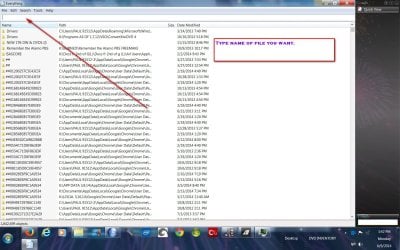
I use this program to search my comp ( I have 5 hdds) and it will find any file or folder in seconds.

Type in the name ( or even part of it)

Everything Search Engine
 

Attachments

  • everything pic 6,9,14.jpg
    everything pic 6,9,14.jpg
    231.3 KB · Views: 2

My Computer My Computer

At a glance

Windows 7 Professional X64Core i7 (2nd gen) i7-2600K / 3.40GHzDDR3 2400MHz (OC) 16gbIntel(R) HD Graphics 3000, -1988 Mb
Computer type
PC/Desktop
Computer Manufacturer/Model Number
Self-Built
OS
Windows 7 Professional X64
CPU
Core i7 (2nd gen) i7-2600K / 3.40GHz
Motherboard
ASUS P8Z77-V Intel 7 Series Motherboard
Memory
DDR3 2400MHz (OC) 16gb
Graphics Card(s)
Intel(R) HD Graphics 3000, -1988 Mb
Sound Card
8 ChannelsAudio Chipset Realtek ALC892
Monitor(s) Displays
LG 29UM65 Black 29"
Screen Resolution
2560 x 1080
Hard Drives
840 EVO 250 GB SSD ;2tb (2);Seagate;1tb Seagate; 750 gb Seagate; wd ext (2) 750 gb,WD 2tb X 2;WD 3TB Black
PSU
750 watt
Case
Thermaltake RX -1
Cooling
2120mm Fans Included 1Other Fan Ports 5x 200mm Fan Ports
Keyboard
Microsoft Digital Media Pro
Mouse
Microsoft Wireless 6000
Internet Speed
U-verse 18 mbps
Antivirus
MSE
Browser
Firefox, Chrome and my favorite: Pale Moon
Other Info
HdHomerun Dual Tuner.
SRS Audio Lab,
Pioneer BDR 208-DBK
PS3-What a difference in my Surround Sound Receiver!
HP 4540s - My new Toy.
Epson R280 Printer- To personalize my Dvds.
Canon MP 560 - For scanning.
PSCO2007,

I appreciate the suggestion on the software. Oftentimes, I am just doing a quick search for a single picture/file. I don't want to open a separate program to do so, Windows Explorer works in all user accounts. I just want to do a quick search from just off the Start menu. I don't understand why the search feature only works for the original administrator account, but won't search in any of the others.

Since both users are administrators, privileges would be the same, so there shouldn't be a problem using the search feature in the Start menu. If none of the users were able to use it, it would be one thing. That only one account can use it, just doesn't make any sense.
 

My Computer My Computer

At a glance

Windows 7
Computer type
PC/Desktop
OS
Windows 7
Just a guess. Did you install a program recently?

In addition, try to run your computer in Safe Mode and check if it still have the problem.


-Jethro.
 

My Computer My Computer

At a glance

Windows 7 Home Premium 32-bitIntel(R) Atom(TM) CPU N2600 @ 1.60GHz2.00 GBIntel(R) Graphics Media Accelerator 3600 Series
Computer type
Laptop
Computer Manufacturer/Model Number
Neo
OS
Windows 7 Home Premium 32-bit
CPU
Intel(R) Atom(TM) CPU N2600 @ 1.60GHz
Motherboard
CLEVO CO. W210CUQ
Memory
2.00 GB
Graphics Card(s)
Intel(R) Graphics Media Accelerator 3600 Series
Sound Card
(1) VIA High Definition Audio (2) Intel(R) Display Audio
Hard Drives
Hitachi HTS543232A7A384 ATA Device
Antivirus
Avast!/Malwarebytes (Free)
Browser
Firefox/Pale Moon
Back
Top