
- Local time
- 9:14 AM
- Messages
- 260
Hello (again!)
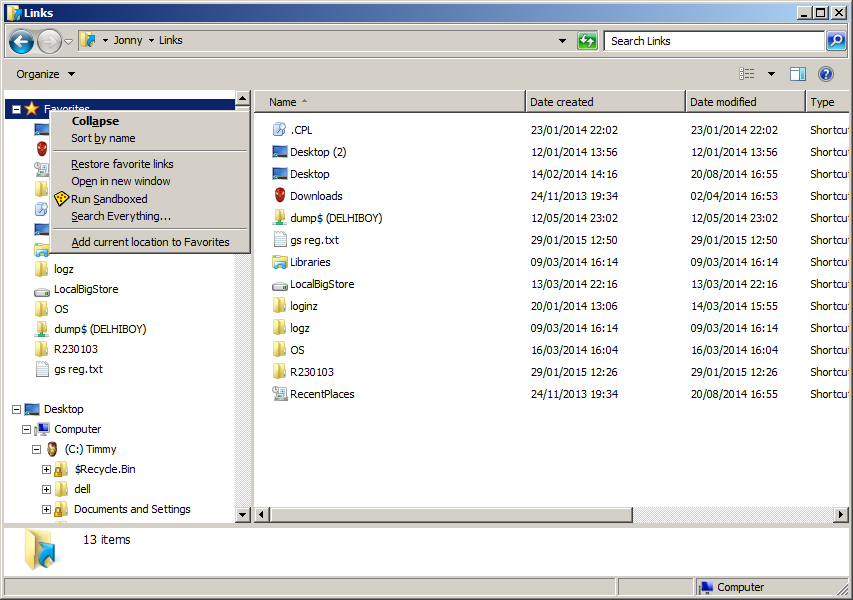
re the "User links" folder (aka Favourites), I'm trying to make it more ... usable.
Currently, every time I want to add a favourite, I have to right-click on the favourites folder - not as easy as it sounds when explorer auto-navigates to where you are (functionality I'm not willing to sacrifice)
I wanted to either
- add / access a commandstore entry [explorer menubar], or
- create a new context-menu entry (ideally on a folder's background), ie right-clicking whitespace,
as oppose to
. focusing the nav-pane {mouseover / shift+tab},
.. scrolling the nav-pane to the top {mouse scrollup / 'home'},
... right-clicking favorites to 'add current location to favourites'
Q: How does the OS perform the 'create link' operation? Is it a function in a DLL? Can it be 'referenced'?
********************************* TIP ****************
The favourites 'menu' is representing the (.lnk) contents of the 'userlinks' folder eg
C:\Users\Jonny\Links
so a (less elegant) workaround may be via a 'sendto-style solution' (junction+dropeffect=4 config)'
*******************************************************************************************
I found the option to add 'favorites' via start menu properties... but this adds the IE favourites... there's a messy hack to fix this (by replacing 'IE Favourites' with 'User Links Favourites' but I'd rather implement the correct solution of referencing the desired 'special folder'directly...
NB: I'm also interested in what governs the order of the startmenu panel entries -
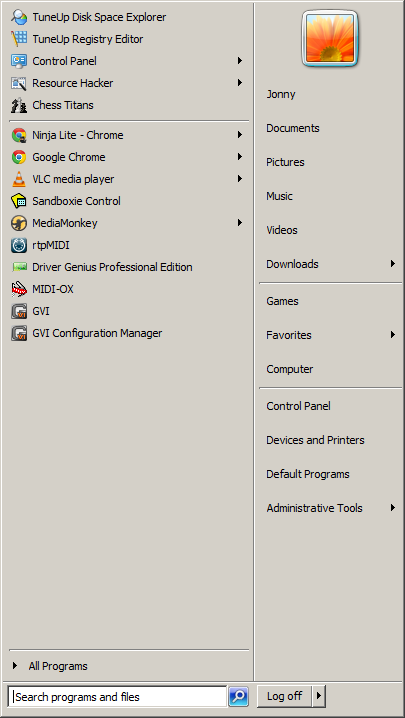
user folder is first
there are separators...
any ideas?
A million thanks
re the "User links" folder (aka Favourites), I'm trying to make it more ... usable.
Currently, every time I want to add a favourite, I have to right-click on the favourites folder - not as easy as it sounds when explorer auto-navigates to where you are (functionality I'm not willing to sacrifice)
I wanted to either
- add / access a commandstore entry [explorer menubar], or
- create a new context-menu entry (ideally on a folder's background), ie right-clicking whitespace,
as oppose to
. focusing the nav-pane {mouseover / shift+tab},
.. scrolling the nav-pane to the top {mouse scrollup / 'home'},
... right-clicking favorites to 'add current location to favourites'
Q: How does the OS perform the 'create link' operation? Is it a function in a DLL? Can it be 'referenced'?
********************************* TIP ****************
The favourites 'menu' is representing the (.lnk) contents of the 'userlinks' folder eg
C:\Users\Jonny\Links
so a (less elegant) workaround may be via a 'sendto-style solution' (junction+dropeffect=4 config)'
*******************************************************************************************
I found the option to add 'favorites' via start menu properties... but this adds the IE favourites... there's a messy hack to fix this (by replacing 'IE Favourites' with 'User Links Favourites' but I'd rather implement the correct solution of referencing the desired 'special folder'directly...
NB: I'm also interested in what governs the order of the startmenu panel entries -
user folder is first
there are separators...
any ideas?
A million thanks
My Computer
At a glance
Windows 7 Ultimate 64bit2.28GbNVIDIA
- Computer type
- Laptop
- Computer Manufacturer/Model Number
- Dell
- OS
- Windows 7 Ultimate 64bit
- CPU
- 2.2
- Memory
- 8Gb
- Graphics Card(s)
- NVIDIA
- Screen Resolution
- 1280/762
- Mouse
- built in pad || iphone || MS wireless
- Internet Speed
- 100MB
- Antivirus
- Avast
- Browser
- Chrome, Chrome portable


