
Solved Not able to set up system restore

Debby

New member
Member
VIP
Local time
3:05 AM
Messages
164
Hi! I am not able to set up system restore function to my computer because I always get an error message when I try to do so. I just now finished restoring my computer with restore disks. But I always have trouble trying to turn on that function, after restarting it, because I always an error messages when I do. The laptop computer I am trying to do this on is a Lenovo Thinkpad SL510 laptop computer. I just now looked and it says that it is turned on but now, I'm surprised (as always) because I got an error message before it finally said it's turned on. Am I supposed to automatically expect an error message just comes on and to just make up my mind to automatically ignore it? And now I tried to configure how much space I want the Restore system to take, but I got the same result known from (repeated perennial) same error message I gotten before - multiple times in my past: " Could not apply the settings for the following reason: the file name, directory name, or volume label syntax is incorrect: (080007007B)". Do you know any way to fix this problem? Thanks!:p
 

My Computer My Computer

Computer type
Laptop
Computer Manufacturer/Model Number
HP
OS
Windows 7
CPU
Intel(R) Core(TM)2 Duo CPU T5870 @ 2.00GHz
Motherboard
Intel(R) Core(TM)2 Duo CPU T5870 @ 2.00GHz
Memory
Intel(R) Core(TM)2 Duo CPU T5870 @ 2.00GHz
Graphics Card(s)
Intel(R) Core(TM)2 Duo CPU T5870 @ 2.00GHz
Sound Card
Intel(R) Core(TM)2 Duo CPU T5870 @ 2.00GHz
Monitor(s) Displays
Intel(R) Core(TM)2 Duo CPU T5870 @ 2.00GHz
Screen Resolution
Intel(R) Core(TM)2 Duo CPU T5870 @ 2.00GHz
Hard Drives
Intel(R) Core(TM)2 Duo CPU T5870 @ 2.00GHz
PSU
Intel(R) Core(TM)2 Duo CPU T5870 @ 2.00GHz
Case
Intel(R) Core(TM)2 Duo CPU T5870 @ 2.00GHz
Cooling
Intel(R) Core(TM)2 Duo CPU T5870 @ 2.00GHz
Keyboard
Intel(R) Core(TM)2 Duo CPU T5870 @ 2.00GHz
Mouse
Intel(R) Core(TM)2 Duo CPU T5870 @ 2.00GHz
Internet Speed
Intel(R) Core(TM)2 Duo CPU T5870 @ 2.00GHz
Antivirus
Windows Defender
Browser
Google Chrome
Other Info
Intel(R) Core(TM)2 Duo CPU T5870 @ 2.00GHz
Hi Debby-

Did you run the check for updates after the new installation and install any/all updates that show up?
 

My Computer My Computer

Computer type
Laptop
Computer Manufacturer/Model Number
Dell M6500 Precision Work Station
OS
Windows 7 Pro SP1 64 bit
Memory
8 GB
Screen Resolution
1920x
Internet Speed
30 Mbps
Antivirus
Norton Security
Browser
IE 11
No I haven't though I started them but then had to leave. That reminds me -I'll get them done now this morning! However, I've downloaded updates in the past and still had that problem. Anyhow, I'll keep trying for a while to fix the problem! Thanks for your efforts!
 

My Computer My Computer

Computer type
Laptop
Computer Manufacturer/Model Number
HP
OS
Windows 7
CPU
Intel(R) Core(TM)2 Duo CPU T5870 @ 2.00GHz
Motherboard
Intel(R) Core(TM)2 Duo CPU T5870 @ 2.00GHz
Memory
Intel(R) Core(TM)2 Duo CPU T5870 @ 2.00GHz
Graphics Card(s)
Intel(R) Core(TM)2 Duo CPU T5870 @ 2.00GHz
Sound Card
Intel(R) Core(TM)2 Duo CPU T5870 @ 2.00GHz
Monitor(s) Displays
Intel(R) Core(TM)2 Duo CPU T5870 @ 2.00GHz
Screen Resolution
Intel(R) Core(TM)2 Duo CPU T5870 @ 2.00GHz
Hard Drives
Intel(R) Core(TM)2 Duo CPU T5870 @ 2.00GHz
PSU
Intel(R) Core(TM)2 Duo CPU T5870 @ 2.00GHz
Case
Intel(R) Core(TM)2 Duo CPU T5870 @ 2.00GHz
Cooling
Intel(R) Core(TM)2 Duo CPU T5870 @ 2.00GHz
Keyboard
Intel(R) Core(TM)2 Duo CPU T5870 @ 2.00GHz
Mouse
Intel(R) Core(TM)2 Duo CPU T5870 @ 2.00GHz
Internet Speed
Intel(R) Core(TM)2 Duo CPU T5870 @ 2.00GHz
Antivirus
Windows Defender
Browser
Google Chrome
Other Info
Intel(R) Core(TM)2 Duo CPU T5870 @ 2.00GHz
I finished downloading all of the recommended updates plus the optional ones now. But I'm still unable to get rid of the error message whenever I try to move the slider to indicate more storage space for the restore system. Do you think my installations disks might be faulty? I bought them from online. Is it safer to make them myself, and if so, what do you think is the best procedure for doing so? Can they be made on ordinary blank DVDs?
 

My Computer My Computer

Computer type
Laptop
Computer Manufacturer/Model Number
HP
OS
Windows 7
CPU
Intel(R) Core(TM)2 Duo CPU T5870 @ 2.00GHz
Motherboard
Intel(R) Core(TM)2 Duo CPU T5870 @ 2.00GHz
Memory
Intel(R) Core(TM)2 Duo CPU T5870 @ 2.00GHz
Graphics Card(s)
Intel(R) Core(TM)2 Duo CPU T5870 @ 2.00GHz
Sound Card
Intel(R) Core(TM)2 Duo CPU T5870 @ 2.00GHz
Monitor(s) Displays
Intel(R) Core(TM)2 Duo CPU T5870 @ 2.00GHz
Screen Resolution
Intel(R) Core(TM)2 Duo CPU T5870 @ 2.00GHz
Hard Drives
Intel(R) Core(TM)2 Duo CPU T5870 @ 2.00GHz
PSU
Intel(R) Core(TM)2 Duo CPU T5870 @ 2.00GHz
Case
Intel(R) Core(TM)2 Duo CPU T5870 @ 2.00GHz
Cooling
Intel(R) Core(TM)2 Duo CPU T5870 @ 2.00GHz
Keyboard
Intel(R) Core(TM)2 Duo CPU T5870 @ 2.00GHz
Mouse
Intel(R) Core(TM)2 Duo CPU T5870 @ 2.00GHz
Internet Speed
Intel(R) Core(TM)2 Duo CPU T5870 @ 2.00GHz
Antivirus
Windows Defender
Browser
Google Chrome
Other Info
Intel(R) Core(TM)2 Duo CPU T5870 @ 2.00GHz
Hi Debby,

Update System Specifications

Please update your system specifications in your UserCP => Edit System Spec setup. It will help us to help you!

This SevenForums tutorial [Published by Brink and written by CyberZeus] makes this task very easy and quick to do. Click here => System Info - See Your System Specs.

Thanks.
 

My Computer My Computer

Computer type
Laptop
Computer Manufacturer/Model Number
Fujitsu LIFEBOOK
OS
Win 7 HP SP1 64-bit Vista HB SP2 32-bit Linux Mint 18.3
CPU
Intel(R) Pentium(R) CPU P6200 @ 2.13GHz
Motherboard
FUJITSU FJNBB06
Memory
4.00 GB
Graphics Card(s)
Intel(R) Graphics Media Accelerator HD
Sound Card
[1] Realtek High Definition Audio [2] Intel(R) Display Audio
Screen Resolution
1366 x 768 x 32 bits (4294967296 colors) @ 59 Hz
Hard Drives
TOSHIBA MK5076GSX
Antivirus
AVG FREE
This problem happened to me before and it was do to software. Specifically a RAM drive software. Perhaps you have a software there that is doing this. Can you think back to when system restore worked and remember the last program you installed?

Something else you can try is sfc /scannow in command prompt.

Type cmd in search. Right click cmd and run as Admin. In the black box type sfc /scannow. Note the space between sfc and the /.
 

My Computer My Computer

Computer type
PC/Desktop
OS
Windows 7 Ultimate x64
Not able to set up system restore successfully

Hi! I followed the advice about running Scannow: Something else you can try is sfc /scannow in command prompt. It went through a searching process, and at the end of it, said, "Windows Resource Protection checked - can't find any integrity violations C:windows\system327

In system protection settings, it does say they are all turned on, except for Lenovo Recovery, which I don't use, since I don't take system images of my computer - I prefer the recovery disks method of recovery. And though it says Windows Operating System is turned on, it says it is missing, which sounds questionable.

Again, although they say they are turned on, none of them got turned on without error message about wrong file,or etc. coming on. So I can't trust the on settings to be valid. Since I've tried to do restores in the past, and always got the message saying I had none.

As I said the other day, I recently recovered this computer again with my Restore disks.
If you can think of any other suggestions for me to try out for this problem, let me know. Thanks!:D
 

My Computer My Computer

Computer type
Laptop
Computer Manufacturer/Model Number
HP
OS
Windows 7
CPU
Intel(R) Core(TM)2 Duo CPU T5870 @ 2.00GHz
Motherboard
Intel(R) Core(TM)2 Duo CPU T5870 @ 2.00GHz
Memory
Intel(R) Core(TM)2 Duo CPU T5870 @ 2.00GHz
Graphics Card(s)
Intel(R) Core(TM)2 Duo CPU T5870 @ 2.00GHz
Sound Card
Intel(R) Core(TM)2 Duo CPU T5870 @ 2.00GHz
Monitor(s) Displays
Intel(R) Core(TM)2 Duo CPU T5870 @ 2.00GHz
Screen Resolution
Intel(R) Core(TM)2 Duo CPU T5870 @ 2.00GHz
Hard Drives
Intel(R) Core(TM)2 Duo CPU T5870 @ 2.00GHz
PSU
Intel(R) Core(TM)2 Duo CPU T5870 @ 2.00GHz
Case
Intel(R) Core(TM)2 Duo CPU T5870 @ 2.00GHz
Cooling
Intel(R) Core(TM)2 Duo CPU T5870 @ 2.00GHz
Keyboard
Intel(R) Core(TM)2 Duo CPU T5870 @ 2.00GHz
Mouse
Intel(R) Core(TM)2 Duo CPU T5870 @ 2.00GHz
Internet Speed
Intel(R) Core(TM)2 Duo CPU T5870 @ 2.00GHz
Antivirus
Windows Defender
Browser
Google Chrome
Other Info
Intel(R) Core(TM)2 Duo CPU T5870 @ 2.00GHz
Would you provide a screen shot of the system protection screen?
 

My Computer My Computer

Computer type
Laptop
Computer Manufacturer/Model Number
Dell M6500 Precision Work Station
OS
Windows 7 Pro SP1 64 bit
Memory
8 GB
Screen Resolution
1920x
Internet Speed
30 Mbps
Antivirus
Norton Security
Browser
IE 11
That computer is not able to take screenshots. Or at least I don't know how to enable it.
 

My Computer My Computer

Computer type
Laptop
Computer Manufacturer/Model Number
HP
OS
Windows 7
CPU
Intel(R) Core(TM)2 Duo CPU T5870 @ 2.00GHz
Motherboard
Intel(R) Core(TM)2 Duo CPU T5870 @ 2.00GHz
Memory
Intel(R) Core(TM)2 Duo CPU T5870 @ 2.00GHz
Graphics Card(s)
Intel(R) Core(TM)2 Duo CPU T5870 @ 2.00GHz
Sound Card
Intel(R) Core(TM)2 Duo CPU T5870 @ 2.00GHz
Monitor(s) Displays
Intel(R) Core(TM)2 Duo CPU T5870 @ 2.00GHz
Screen Resolution
Intel(R) Core(TM)2 Duo CPU T5870 @ 2.00GHz
Hard Drives
Intel(R) Core(TM)2 Duo CPU T5870 @ 2.00GHz
PSU
Intel(R) Core(TM)2 Duo CPU T5870 @ 2.00GHz
Case
Intel(R) Core(TM)2 Duo CPU T5870 @ 2.00GHz
Cooling
Intel(R) Core(TM)2 Duo CPU T5870 @ 2.00GHz
Keyboard
Intel(R) Core(TM)2 Duo CPU T5870 @ 2.00GHz
Mouse
Intel(R) Core(TM)2 Duo CPU T5870 @ 2.00GHz
Internet Speed
Intel(R) Core(TM)2 Duo CPU T5870 @ 2.00GHz
Antivirus
Windows Defender
Browser
Google Chrome
Other Info
Intel(R) Core(TM)2 Duo CPU T5870 @ 2.00GHz
Go to Accessories and right click on the Snipping Tool. Select Send To and Desktop. I suggest moving it to your taskbar. When you have the System Protection screen open and all drives shown, click on the Snipping Tool. It will cause your screen to go opaque. Click and hold on the left, top corner of the Protection Screen. Then, drag the mouse cursor to the right, bottom corner of the screen. Release the mouse button. The Snipping Tool interface will come up, showing the area you outlined. Click on File, Save As. Save it as a picture format. Then, upload the resulting file here.
 

My Computer My Computer

Computer type
Laptop
Computer Manufacturer/Model Number
Dell M6500 Precision Work Station
OS
Windows 7 Pro SP1 64 bit
Memory
8 GB
Screen Resolution
1920x
Internet Speed
30 Mbps
Antivirus
Norton Security
Browser
IE 11
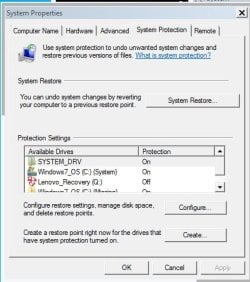
Hi! Okay here is a picture of my system protection page! But I can't figure out how to upload it. How do I do that? Thanks!
 

Attachments

  • system protection picture -Jpeg.jpg
    system protection picture -Jpeg.jpg
    32.5 KB · Views: 29

My Computer My Computer

Computer type
Laptop
Computer Manufacturer/Model Number
HP
OS
Windows 7
CPU
Intel(R) Core(TM)2 Duo CPU T5870 @ 2.00GHz
Motherboard
Intel(R) Core(TM)2 Duo CPU T5870 @ 2.00GHz
Memory
Intel(R) Core(TM)2 Duo CPU T5870 @ 2.00GHz
Graphics Card(s)
Intel(R) Core(TM)2 Duo CPU T5870 @ 2.00GHz
Sound Card
Intel(R) Core(TM)2 Duo CPU T5870 @ 2.00GHz
Monitor(s) Displays
Intel(R) Core(TM)2 Duo CPU T5870 @ 2.00GHz
Screen Resolution
Intel(R) Core(TM)2 Duo CPU T5870 @ 2.00GHz
Hard Drives
Intel(R) Core(TM)2 Duo CPU T5870 @ 2.00GHz
PSU
Intel(R) Core(TM)2 Duo CPU T5870 @ 2.00GHz
Case
Intel(R) Core(TM)2 Duo CPU T5870 @ 2.00GHz
Cooling
Intel(R) Core(TM)2 Duo CPU T5870 @ 2.00GHz
Keyboard
Intel(R) Core(TM)2 Duo CPU T5870 @ 2.00GHz
Mouse
Intel(R) Core(TM)2 Duo CPU T5870 @ 2.00GHz
Internet Speed
Intel(R) Core(TM)2 Duo CPU T5870 @ 2.00GHz
Antivirus
Windows Defender
Browser
Google Chrome
Other Info
Intel(R) Core(TM)2 Duo CPU T5870 @ 2.00GHz
I can barely see it but it appears that the C: drive is shown twice- once as System and the other looks like Mining but I'm not sure. I would turn protection off for the latter and System Drive. I don't know what else is in Available Drives.
 

My Computer My Computer

Computer type
Laptop
Computer Manufacturer/Model Number
Dell M6500 Precision Work Station
OS
Windows 7 Pro SP1 64 bit
Memory
8 GB
Screen Resolution
1920x
Internet Speed
30 Mbps
Antivirus
Norton Security
Browser
IE 11
Ok thanks for the advice. I'll turn off Lenovo recovery, since I don't care for taking system images. I think that's what it's for.
 

My Computer My Computer

Computer type
Laptop
Computer Manufacturer/Model Number
HP
OS
Windows 7
CPU
Intel(R) Core(TM)2 Duo CPU T5870 @ 2.00GHz
Motherboard
Intel(R) Core(TM)2 Duo CPU T5870 @ 2.00GHz
Memory
Intel(R) Core(TM)2 Duo CPU T5870 @ 2.00GHz
Graphics Card(s)
Intel(R) Core(TM)2 Duo CPU T5870 @ 2.00GHz
Sound Card
Intel(R) Core(TM)2 Duo CPU T5870 @ 2.00GHz
Monitor(s) Displays
Intel(R) Core(TM)2 Duo CPU T5870 @ 2.00GHz
Screen Resolution
Intel(R) Core(TM)2 Duo CPU T5870 @ 2.00GHz
Hard Drives
Intel(R) Core(TM)2 Duo CPU T5870 @ 2.00GHz
PSU
Intel(R) Core(TM)2 Duo CPU T5870 @ 2.00GHz
Case
Intel(R) Core(TM)2 Duo CPU T5870 @ 2.00GHz
Cooling
Intel(R) Core(TM)2 Duo CPU T5870 @ 2.00GHz
Keyboard
Intel(R) Core(TM)2 Duo CPU T5870 @ 2.00GHz
Mouse
Intel(R) Core(TM)2 Duo CPU T5870 @ 2.00GHz
Internet Speed
Intel(R) Core(TM)2 Duo CPU T5870 @ 2.00GHz
Antivirus
Windows Defender
Browser
Google Chrome
Other Info
Intel(R) Core(TM)2 Duo CPU T5870 @ 2.00GHz
Are you also going to turn it off for the ones I mentioned? You didn't say if there are more listed than what I can see.
 

My Computer My Computer

Computer type
Laptop
Computer Manufacturer/Model Number
Dell M6500 Precision Work Station
OS
Windows 7 Pro SP1 64 bit
Memory
8 GB
Screen Resolution
1920x
Internet Speed
30 Mbps
Antivirus
Norton Security
Browser
IE 11
From top to bottom, I see in System protection, these items:
(1 SYSTEM_ DRV ON
(2) Windows 7 _ OS ( C ) (System) ON
(3)) Lenovo Recovery (Q) off
(4) Windows 7 _ OS ( C ) (Missing) On
That's all I see in the window in there, even after scrolling down. I am in the process of Removing Lenovo Recovery Program, since I never do system images - I prefer using Restore disks instead. Do you mean I should remove both of the C items? That is (2) and also (4)?
 

My Computer My Computer

Computer type
Laptop
Computer Manufacturer/Model Number
HP
OS
Windows 7
CPU
Intel(R) Core(TM)2 Duo CPU T5870 @ 2.00GHz
Motherboard
Intel(R) Core(TM)2 Duo CPU T5870 @ 2.00GHz
Memory
Intel(R) Core(TM)2 Duo CPU T5870 @ 2.00GHz
Graphics Card(s)
Intel(R) Core(TM)2 Duo CPU T5870 @ 2.00GHz
Sound Card
Intel(R) Core(TM)2 Duo CPU T5870 @ 2.00GHz
Monitor(s) Displays
Intel(R) Core(TM)2 Duo CPU T5870 @ 2.00GHz
Screen Resolution
Intel(R) Core(TM)2 Duo CPU T5870 @ 2.00GHz
Hard Drives
Intel(R) Core(TM)2 Duo CPU T5870 @ 2.00GHz
PSU
Intel(R) Core(TM)2 Duo CPU T5870 @ 2.00GHz
Case
Intel(R) Core(TM)2 Duo CPU T5870 @ 2.00GHz
Cooling
Intel(R) Core(TM)2 Duo CPU T5870 @ 2.00GHz
Keyboard
Intel(R) Core(TM)2 Duo CPU T5870 @ 2.00GHz
Mouse
Intel(R) Core(TM)2 Duo CPU T5870 @ 2.00GHz
Internet Speed
Intel(R) Core(TM)2 Duo CPU T5870 @ 2.00GHz
Antivirus
Windows Defender
Browser
Google Chrome
Other Info
Intel(R) Core(TM)2 Duo CPU T5870 @ 2.00GHz
No. Item 2 is the one you want to use to set your system recovery options. Just turn protection off for the other 3. Actually, I don't know what it's seeing with item 4. Seems to me you could delete that one but I wouldn't think you would do that until after you've set a system restore point, just in case it's needed.
 

My Computer My Computer

Computer type
Laptop
Computer Manufacturer/Model Number
Dell M6500 Precision Work Station
OS
Windows 7 Pro SP1 64 bit
Memory
8 GB
Screen Resolution
1920x
Internet Speed
30 Mbps
Antivirus
Norton Security
Browser
IE 11
Thank you very much! I wouldn't have known what to do otherwise as I find no information about it on the internet. It will be interesting to see if I see any improvements to my computer through this fix. Bye!
 

My Computer My Computer

Computer type
Laptop
Computer Manufacturer/Model Number
HP
OS
Windows 7
CPU
Intel(R) Core(TM)2 Duo CPU T5870 @ 2.00GHz
Motherboard
Intel(R) Core(TM)2 Duo CPU T5870 @ 2.00GHz
Memory
Intel(R) Core(TM)2 Duo CPU T5870 @ 2.00GHz
Graphics Card(s)
Intel(R) Core(TM)2 Duo CPU T5870 @ 2.00GHz
Sound Card
Intel(R) Core(TM)2 Duo CPU T5870 @ 2.00GHz
Monitor(s) Displays
Intel(R) Core(TM)2 Duo CPU T5870 @ 2.00GHz
Screen Resolution
Intel(R) Core(TM)2 Duo CPU T5870 @ 2.00GHz
Hard Drives
Intel(R) Core(TM)2 Duo CPU T5870 @ 2.00GHz
PSU
Intel(R) Core(TM)2 Duo CPU T5870 @ 2.00GHz
Case
Intel(R) Core(TM)2 Duo CPU T5870 @ 2.00GHz
Cooling
Intel(R) Core(TM)2 Duo CPU T5870 @ 2.00GHz
Keyboard
Intel(R) Core(TM)2 Duo CPU T5870 @ 2.00GHz
Mouse
Intel(R) Core(TM)2 Duo CPU T5870 @ 2.00GHz
Internet Speed
Intel(R) Core(TM)2 Duo CPU T5870 @ 2.00GHz
Antivirus
Windows Defender
Browser
Google Chrome
Other Info
Intel(R) Core(TM)2 Duo CPU T5870 @ 2.00GHz
You're welcome. I assume that you are now able to set your system recovery options. If so, mark the thread as solved.
 

My Computer My Computer

Computer type
Laptop
Computer Manufacturer/Model Number
Dell M6500 Precision Work Station
OS
Windows 7 Pro SP1 64 bit
Memory
8 GB
Screen Resolution
1920x
Internet Speed
30 Mbps
Antivirus
Norton Security
Browser
IE 11
Thanks! You can close this now! Yes it works now!
 

My Computer My Computer

Computer type
Laptop
Computer Manufacturer/Model Number
HP
OS
Windows 7
CPU
Intel(R) Core(TM)2 Duo CPU T5870 @ 2.00GHz
Motherboard
Intel(R) Core(TM)2 Duo CPU T5870 @ 2.00GHz
Memory
Intel(R) Core(TM)2 Duo CPU T5870 @ 2.00GHz
Graphics Card(s)
Intel(R) Core(TM)2 Duo CPU T5870 @ 2.00GHz
Sound Card
Intel(R) Core(TM)2 Duo CPU T5870 @ 2.00GHz
Monitor(s) Displays
Intel(R) Core(TM)2 Duo CPU T5870 @ 2.00GHz
Screen Resolution
Intel(R) Core(TM)2 Duo CPU T5870 @ 2.00GHz
Hard Drives
Intel(R) Core(TM)2 Duo CPU T5870 @ 2.00GHz
PSU
Intel(R) Core(TM)2 Duo CPU T5870 @ 2.00GHz
Case
Intel(R) Core(TM)2 Duo CPU T5870 @ 2.00GHz
Cooling
Intel(R) Core(TM)2 Duo CPU T5870 @ 2.00GHz
Keyboard
Intel(R) Core(TM)2 Duo CPU T5870 @ 2.00GHz
Mouse
Intel(R) Core(TM)2 Duo CPU T5870 @ 2.00GHz
Internet Speed
Intel(R) Core(TM)2 Duo CPU T5870 @ 2.00GHz
Antivirus
Windows Defender
Browser
Google Chrome
Other Info
Intel(R) Core(TM)2 Duo CPU T5870 @ 2.00GHz
Back
Top