Not another sleep mode issue?

Kevlar

New member
Local time
4:36 PM
Messages
48
*sigh Yup, that is exactly what it is and before you think "search the forum" or "GOOOOGLE", I've tried. I have tried almost every possible solution to this problem and this problem is that every single time I put my computer into Sleep Mode, the PC will sleep for about ten seconds then awake to the log on screen.

These are the things I've tried without success:

  • Turning off "wake on this device" in Device Manager for EVERY thing
  • Turning off automatic updates
  • Turning off firewall (just to be sure)
  • Configuring my BIOS any and every way possible
  • Closing background programs before I enable sleep
  • turned off all my computer's extremities (stereo, hdd, monitor)
  • I even closed out of Windows Sidebar and all my gadgets:(
I may have forgot some different attempts as well. I was hoping someone here would have an idea that escaped my knowledge and frantic Google searches.

Thanks:)
 

My Computer

Computer Manufacturer/Model Number
Custom Built
OS
Windows 7 Ultimate RC Build 7100
CPU
AMD Anthlon 64X2 5600 2.80 GHz
Motherboard
ASUS M2N AM2 NVIDIA nForce 430 MCP ATX AMD
Memory
2x G.SKILL 2GB 240-Pin DDR2 800
Graphics Card(s)
GeForce GTS 250 Core Edition 1GB
Monitor(s) Displays
Sceptre 20"
Screen Resolution
1680 x 1050
Hard Drives
Western Digital Caviar Black 500gb 7200rpm
PSU
500w Rosewell
Case
Antec 300
Mouse
Microsoft Wireless Mouse 5000
Other Info
Its not the best, but hey, its sure is reliable.
*sigh Yup, that is exactly what it is and before you think "search the forum" or "GOOOOGLE", I've tried. I have tried almost every possible solution to this problem and this problem is that every single time I put my computer into Sleep Mode, the PC will sleep for about ten seconds then awake to the log on screen.

These are the things I've tried without success:

  • Turning off "wake on this device" in Device Manager for EVERY thing
  • Turning off automatic updates
  • Turning off firewall (just to be sure)
  • Configuring my BIOS any and every way possible
  • Closing background programs before I enable sleep
  • turned off all my computer's extremities (stereo, hdd, monitor)
  • I even closed out of Windows Sidebar and all my gadgets:(
I may have forgot some different attempts as well. I was hoping someone here would have an idea that escaped my knowledge and frantic Google searches.

Thanks:)

Do a clean boot. You can determine which process is waking your machine
http://support.microsoft.com/kb/929135
 

My Computer

Computer type
PC/Desktop
Computer Manufacturer/Model Number
Dell XPS 420
OS
Windows 10, Home Clean Install
CPU
Intel Core2 processsor Q8200(2.33Ghz 1333FSB) Quad Core Tech
Motherboard
Dell
Memory
6 gb
Graphics Card(s)
ATI Radeon 256MB HD3650
Sound Card
Intergrated 7.1 Channel Audio
Monitor(s) Displays
Dell SP2009W 20"
Hard Drives
640 GB Serial ATA Hard drive
Cooling
Fan
Keyboard
Dell USB Keyboard
Mouse
Dell Premium Optical USB
Internet Speed
DSL 2.85
Look in task scheduler too, for processes you never dreamt were kicking in automatically...
 

My Computer

Computer Manufacturer/Model Number
Custom built machine
OS
W7 x64
CPU
Intel Q9300 2.5Ghz Quad LGA775 (Would like Q9650)
Motherboard
Gigabyte GA-EP45T-UD3R (F6 Bios)
Memory
4Gb OCZ Gold 1,333Mhz
Graphics Card(s)
Palit HD4850 O/C Sonic 512Mb DDR3, Dual DViD's
Sound Card
Azalia to twin Samson 50w Studio Monitors
Monitor(s) Displays
Twin Dell (E-IPS) U2311H 23.6" Screens
Screen Resolution
1920 x 1080 @ 60Hz
Hard Drives
Crucial M4 SSD, archives on twin Western Digital Caviar Black WD2002FAEX, 2TB, 7200rpm HDD's, Samsung Ritemaster CD/DVD Burner...
PSU
OCZ 600w
Case
Lian-Li PC8 acoustifoamed' aluminium tower
Cooling
Scythe 140mm Zipang
Keyboard
Cherry PS/2 custom model
Mouse
Lenovo USB laser "Thinkpad" Mouse
Internet Speed
ADSL2+ @14Mbps downstream & Cat6 Gigabit Ethernet
Antivirus
NOD32
Browser
Opera
Other Info
Silicon Dust HD Homerun Dual FTA (Ethernet) TV Tuners, Dray Tek Vigor 2850Vn router and 8x HP Gigabit Switch. Lian-Li CR26 Card Reader, Canon MF4430 iSensys laser printer/scanner.
Do a clean boot. You can determine which process is waking your machine
How to troubleshoot a problem by performing a clean boot in Windows Vista or in Windows 7

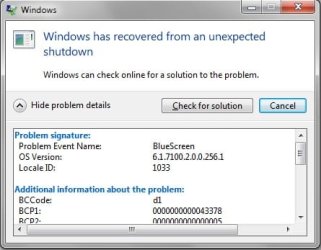
I tried the clean boot, restarted, and tried to go into sleep mode and this time my computer actually restarted, and then got these error details and the picture below:
Any suggestions?


Problem signature:
Problem Event Name: BlueScreen
OS Version: 6.1.7100.2.0.0.256.1
Locale ID: 1033

Additional information about the problem:
BCCode: d1
BCP1: 0000000000043378
BCP2: 0000000000000005
BCP3: 0000000000000000
BCP4: FFFFF88001101470
OS Version: 6_1_7100
Service Pack: 0_0
Product: 256_1

Files that help describe the problem:
C:\Windows\Minidump\010510-14149-01.dmp
C:\Users\kevlar\AppData\Local\Temp\WER-29811-0.sysdata.xml

Read our privacy statement online:
Windows 7 Privacy Highlights - Microsoft Windows

If the online privacy statement is not available, please read our privacy statement offline:
C:\Windows\system32\en-US\erofflps.txt
 

Attachments

  • error.jpg
    error.jpg
    22.9 KB · Views: 9

My Computer

Computer Manufacturer/Model Number
Custom Built
OS
Windows 7 Ultimate RC Build 7100
CPU
AMD Anthlon 64X2 5600 2.80 GHz
Motherboard
ASUS M2N AM2 NVIDIA nForce 430 MCP ATX AMD
Memory
2x G.SKILL 2GB 240-Pin DDR2 800
Graphics Card(s)
GeForce GTS 250 Core Edition 1GB
Monitor(s) Displays
Sceptre 20"
Screen Resolution
1680 x 1050
Hard Drives
Western Digital Caviar Black 500gb 7200rpm
PSU
500w Rosewell
Case
Antec 300
Mouse
Microsoft Wireless Mouse 5000
Other Info
Its not the best, but hey, its sure is reliable.
i had a bad sleep problem to, so i just backed up all my stuff, and did a clean install of 7, because my last one was an upgrade


Actually problem Is back :(
 
Last edited:

My Computer

Computer type
PC/Desktop
Computer Manufacturer/Model Number
Custom Build
OS
Windows 7 Professional 64bit
CPU
Intel Core i5 - 2500K @ 3.30GHz
Motherboard
Gigabyte Z77-HD3
Memory
4GB DDR3
Graphics Card(s)
EVGA Nvidia GeForce GT 740 2GB DDR3
Screen Resolution
1680 x 1050
Hard Drives
1T Samaung HD/ 1T toshiba external drive/ 1T western digital external drive/ 2T seagate external drive/ 250gb samaung SSD
PSU
Antec 430W
Keyboard
Microsoft Wireless Keyboard 800
Mouse
Microsoft Wireless Mouse 1000
Antivirus
AVG
Browser
Internet Explorer
Look in task scheduler too, for processes you never dreamt were kicking in automatically...

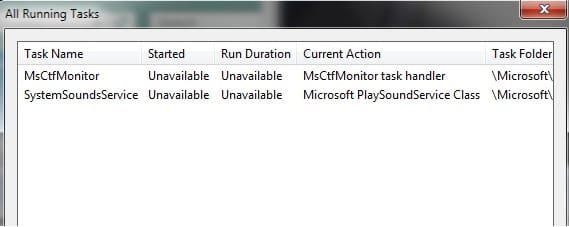
I never thought to look in there, unfortunately, the only things in there were two Microsoft items that looked like they were necessary:
 

Attachments

  • Tasks.jpg
    Tasks.jpg
    14.8 KB · Views: 7

My Computer

Computer Manufacturer/Model Number
Custom Built
OS
Windows 7 Ultimate RC Build 7100
CPU
AMD Anthlon 64X2 5600 2.80 GHz
Motherboard
ASUS M2N AM2 NVIDIA nForce 430 MCP ATX AMD
Memory
2x G.SKILL 2GB 240-Pin DDR2 800
Graphics Card(s)
GeForce GTS 250 Core Edition 1GB
Monitor(s) Displays
Sceptre 20"
Screen Resolution
1680 x 1050
Hard Drives
Western Digital Caviar Black 500gb 7200rpm
PSU
500w Rosewell
Case
Antec 300
Mouse
Microsoft Wireless Mouse 5000
Other Info
Its not the best, but hey, its sure is reliable.
Do a clean boot. You can determine which process is waking your machine
How to troubleshoot a problem by performing a clean boot in Windows Vista or in Windows 7

I tried the clean boot, restarted, and tried to go into sleep mode and this time my computer actually restarted, and then got these error details and the picture below:
Any suggestions?


Problem signature:
Problem Event Name: BlueScreen
OS Version: 6.1.7100.2.0.0.256.1
Locale ID: 1033

Additional information about the problem:
BCCode: d1
BCP1: 0000000000043378
BCP2: 0000000000000005
BCP3: 0000000000000000
BCP4: FFFFF88001101470
OS Version: 6_1_7100
Service Pack: 0_0
Product: 256_1

Files that help describe the problem:
C:\Windows\Minidump\010510-14149-01.dmp
C:\Users\kevlar\AppData\Local\Temp\WER-29811-0.sysdata.xml

Read our privacy statement online:
Windows 7 Privacy Highlights - Microsoft Windows

If the online privacy statement is not available, please read our privacy statement offline:
C:\Windows\system32\en-US\erofflps.txt

Post the dump file if you can
 

My Computer

Computer type
PC/Desktop
Computer Manufacturer/Model Number
Dell XPS 420
OS
Windows 10, Home Clean Install
CPU
Intel Core2 processsor Q8200(2.33Ghz 1333FSB) Quad Core Tech
Motherboard
Dell
Memory
6 gb
Graphics Card(s)
ATI Radeon 256MB HD3650
Sound Card
Intergrated 7.1 Channel Audio
Monitor(s) Displays
Dell SP2009W 20"
Hard Drives
640 GB Serial ATA Hard drive
Cooling
Fan
Keyboard
Dell USB Keyboard
Mouse
Dell Premium Optical USB
Internet Speed
DSL 2.85

My Computer

Computer Manufacturer/Model Number
Custom Built
OS
Windows 7 Ultimate RC Build 7100
CPU
AMD Anthlon 64X2 5600 2.80 GHz
Motherboard
ASUS M2N AM2 NVIDIA nForce 430 MCP ATX AMD
Memory
2x G.SKILL 2GB 240-Pin DDR2 800
Graphics Card(s)
GeForce GTS 250 Core Edition 1GB
Monitor(s) Displays
Sceptre 20"
Screen Resolution
1680 x 1050
Hard Drives
Western Digital Caviar Black 500gb 7200rpm
PSU
500w Rosewell
Case
Antec 300
Mouse
Microsoft Wireless Mouse 5000
Other Info
Its not the best, but hey, its sure is reliable.
UPDATE: Ok, so I disabled the "clean boot" thing because it didnt help, tried sleep again, and got a BSOD that said "IRQL_Not_Less_or_Equal". It might be the same error as posted previously but this is the first time I actually saw the BSOD.

Here are the updated dump files:
 

Attachments

My Computer

Computer Manufacturer/Model Number
Custom Built
OS
Windows 7 Ultimate RC Build 7100
CPU
AMD Anthlon 64X2 5600 2.80 GHz
Motherboard
ASUS M2N AM2 NVIDIA nForce 430 MCP ATX AMD
Memory
2x G.SKILL 2GB 240-Pin DDR2 800
Graphics Card(s)
GeForce GTS 250 Core Edition 1GB
Monitor(s) Displays
Sceptre 20"
Screen Resolution
1680 x 1050
Hard Drives
Western Digital Caviar Black 500gb 7200rpm
PSU
500w Rosewell
Case
Antec 300
Mouse
Microsoft Wireless Mouse 5000
Other Info
Its not the best, but hey, its sure is reliable.
I did not forget about you. I want you to get the best help possible. I have sent a message to our BSOD specialist. He will be with you as soon as he logs on. You have a head start because I have requested some of the information that he will need to help.
 

My Computer

Computer type
PC/Desktop
Computer Manufacturer/Model Number
Dell XPS 420
OS
Windows 10, Home Clean Install
CPU
Intel Core2 processsor Q8200(2.33Ghz 1333FSB) Quad Core Tech
Motherboard
Dell
Memory
6 gb
Graphics Card(s)
ATI Radeon 256MB HD3650
Sound Card
Intergrated 7.1 Channel Audio
Monitor(s) Displays
Dell SP2009W 20"
Hard Drives
640 GB Serial ATA Hard drive
Cooling
Fan
Keyboard
Dell USB Keyboard
Mouse
Dell Premium Optical USB
Internet Speed
DSL 2.85
UPDATE: Ok, so I disabled the "clean boot" thing because it didnt help, tried sleep again, and got a BSOD that said "IRQL_Not_Less_or_Equal". It might be the same error as posted previously but this is the first time I actually saw the BSOD.

Here are the updated dump files:

Hi and welcome

this one was caused by nvstor.sys. the the other two were not. My gut says you should
update you graphics driver, and directx.
I would also run a system file check. to do that type cmd in search>right click and run as admin> sfc /scannow

Let us know if you need help.

Ken J+

Code:
010510-14149-01.dmp    1/5/2010 4:04:56 PM    DRIVER_IRQL_NOT_LESS_OR_EQUAL    0x000000d1    00000000`00043378    00000000`00000005    00000000`00000000    fffff880`01101470    pci.sys    pci.sys+170470                    
010510-15990-01.dmp    1/5/2010 6:57:50 AM    DRIVER_IRQL_NOT_LESS_OR_EQUAL    0x000000d1    00000000`0000000f    00000000`00000002    00000000`00000001    fffff880`00fce95a                            
010510-14757-01.dmp    1/5/2010 4:47:54 PM    IRQL_NOT_LESS_OR_EQUAL    0x0000000a    00000000`00000048    00000000`00000002    00000000`00000000    fffff800`02ae391a    ntoskrnl.exe    ntoskrnl.exe+7ef80
Code:
Microsoft (R) Windows Debugger Version 6.11.0001.404 X86
Copyright (c) Microsoft Corporation. All rights reserved.


Loading Dump File [C:\Users\K\Desktop\New folder (2)\010510-15990-01.dmp]
Mini Kernel Dump File: Only registers and stack trace are available

Symbol search path is: SRV*d:\symbols*http://msdl.microsoft.com/download/symbols
Executable search path is: 
Windows 7 Kernel Version 7100 MP (2 procs) Free x64
Product: WinNt, suite: TerminalServer SingleUserTS
Built by: 7100.0.amd64fre.winmain_win7rc.090421-1700
Machine Name:
Kernel base = 0xfffff800`02a1e000 PsLoadedModuleList = 0xfffff800`02c57e90
Debug session time: Tue Jan  5 07:55:13.647 2010 (GMT-5)
System Uptime: 0 days 0:11:01.707
Loading Kernel Symbols
...............................................Unable to load image Unknown_Module_00000000`00000000, Win32 error 0n2
*** WARNING: Unable to verify timestamp for Unknown_Module_00000000`00000000
Unable to add module at 00000000`00000000

Loading User Symbols
Missing image name, possible paged-out or corrupt data.
Loading unloaded module list
.Missing image name, possible paged-out or corrupt data.
.
*******************************************************************************
*                                                                             *
*                        Bugcheck Analysis                                    *
*                                                                             *
*******************************************************************************

Use !analyze -v to get detailed debugging information.

BugCheck D1, {f, 2, 1, fffff88000fce95a}

Unable to load image \SystemRoot\system32\DRIVERS\nvstor.sys, Win32 error 0n2
*** WARNING: Unable to verify timestamp for nvstor.sys
*** ERROR: Module load completed but symbols could not be loaded for nvstor.sys
Probably caused by : nvstor.sys ( nvstor+1895a )

Followup: MachineOwner
---------

0: kd> !analyze -v
*******************************************************************************
*                                                                             *
*                        Bugcheck Analysis                                    *
*                                                                             *
*******************************************************************************

DRIVER_IRQL_NOT_LESS_OR_EQUAL (d1)
An attempt was made to access a pageable (or completely invalid) address at an
interrupt request level (IRQL) that is too high.  This is usually
caused by drivers using improper addresses.
If kernel debugger is available get stack backtrace.
Arguments:
Arg1: 000000000000000f, memory referenced
Arg2: 0000000000000002, IRQL
Arg3: 0000000000000001, value 0 = read operation, 1 = write operation
Arg4: fffff88000fce95a, address which referenced memory

Debugging Details:
------------------


WRITE_ADDRESS: GetPointerFromAddress: unable to read from fffff80002cc20e0
 000000000000000f 

CURRENT_IRQL:  0

FAULTING_IP: 
nvstor+1895a
fffff880`00fce95a 894710          mov     dword ptr [rdi+10h],eax

CUSTOMER_CRASH_COUNT:  1

DEFAULT_BUCKET_ID:  VISTA_DRIVER_FAULT

BUGCHECK_STR:  0xD1

PROCESS_NAME:  System

LAST_CONTROL_TRANSFER:  from fffff80002aa735a to fffff88003fa61e2

STACK_TEXT:  
fffff800`00b9cc98 fffff800`02aa735a : fffff800`02c04e80 fffffa80`053a40a8 00000001`8a687ba4 00000000`0000a5b0 : 0xfffff880`03fa61e2
fffff800`00b9cca0 fffff800`02a943ec : fffff800`02c04e80 00000000`00000000 fffff800`00000000 fffffa80`03d27b60 : nt!PoIdle+0x53a
fffff800`00b9cd80 00000000`00000000 : 00000000`00000000 00000000`00000000 00000000`00000000 00000000`00000000 : nt!KiIdleLoop+0x2c


STACK_COMMAND:  .bugcheck ; kb

FOLLOWUP_IP: 
nvstor+1895a
fffff880`00fce95a 894710          mov     dword ptr [rdi+10h],eax

SYMBOL_NAME:  nvstor+1895a

FOLLOWUP_NAME:  MachineOwner

MODULE_NAME: nvstor

IMAGE_NAME:  nvstor.sys

DEBUG_FLR_IMAGE_TIMESTAMP:  49e529c4

FAILURE_BUCKET_ID:  X64_0xD1_nvstor+1895a

BUCKET_ID:  X64_0xD1_nvstor+1895a

Followup: MachineOwner
---------

 

My Computer

Computer Manufacturer/Model Number
HP Pavillion dv-7 1005 Tx
OS
Win 8 Release candidate 8400
CPU
[email protected]
Memory
4 gigs
Graphics Card(s)
Nvidia 9600M
Sound Card
HD built-in
Monitor(s) Displays
17" Wxga
Screen Resolution
1440x900
Cooling
none
Internet Speed
45Mb down 5Mb up
I did not forget about you. I want you to get the best help possible. I have sent a message to our BSOD specialist. He will be with you as soon as he logs on. You have a head start because I have requested some of the information that he will need to help.

My post wasnt intended to belittle your help in any way, i was just posting what recently happened and believe me, I am truly grateful for your help so far and for notifying your BSOD specialist. I couldnt have asked for more. :D
 

My Computer

Computer Manufacturer/Model Number
Custom Built
OS
Windows 7 Ultimate RC Build 7100
CPU
AMD Anthlon 64X2 5600 2.80 GHz
Motherboard
ASUS M2N AM2 NVIDIA nForce 430 MCP ATX AMD
Memory
2x G.SKILL 2GB 240-Pin DDR2 800
Graphics Card(s)
GeForce GTS 250 Core Edition 1GB
Monitor(s) Displays
Sceptre 20"
Screen Resolution
1680 x 1050
Hard Drives
Western Digital Caviar Black 500gb 7200rpm
PSU
500w Rosewell
Case
Antec 300
Mouse
Microsoft Wireless Mouse 5000
Other Info
Its not the best, but hey, its sure is reliable.
this one was caused by nvstor.sys. the the other two were not. My gut says you should
update you graphics driver, and directx.
I would also run a system file check. to do that type cmd in search>right click and run as admin> sfc /scannow

Ok, so I ran the scan and Windows found no problems. I found a newer graphics drivers for my card and will install it soon but I cannot seem to find a Direct X update. I searched MS and only found one that mentioned dx9 and, correct me if I'm wrong, Windows 7 comes with dx11. Do you know where i could acquire the update?

By the way, I just want to let all you guys/girls who posted in this thread know that I am truly grateful for all your help so far. Thanks a lot.
 

My Computer

Computer Manufacturer/Model Number
Custom Built
OS
Windows 7 Ultimate RC Build 7100
CPU
AMD Anthlon 64X2 5600 2.80 GHz
Motherboard
ASUS M2N AM2 NVIDIA nForce 430 MCP ATX AMD
Memory
2x G.SKILL 2GB 240-Pin DDR2 800
Graphics Card(s)
GeForce GTS 250 Core Edition 1GB
Monitor(s) Displays
Sceptre 20"
Screen Resolution
1680 x 1050
Hard Drives
Western Digital Caviar Black 500gb 7200rpm
PSU
500w Rosewell
Case
Antec 300
Mouse
Microsoft Wireless Mouse 5000
Other Info
Its not the best, but hey, its sure is reliable.
I did not forget about you. I want you to get the best help possible. I have sent a message to our BSOD specialist. He will be with you as soon as he logs on. You have a head start because I have requested some of the information that he will need to help.

My post wasnt intended to belittle your help in any way, i was just posting what recently happened and believe me, I am truly grateful for your help so far and for notifying your BSOD specialist. I couldnt have asked for more. :D

I did not take offense at your post. Every poster is very important to all the members of Seven Forums. My post was made, only to make you realize that your question will receive the best possible response possible.
 

My Computer

Computer type
PC/Desktop
Computer Manufacturer/Model Number
Dell XPS 420
OS
Windows 10, Home Clean Install
CPU
Intel Core2 processsor Q8200(2.33Ghz 1333FSB) Quad Core Tech
Motherboard
Dell
Memory
6 gb
Graphics Card(s)
ATI Radeon 256MB HD3650
Sound Card
Intergrated 7.1 Channel Audio
Monitor(s) Displays
Dell SP2009W 20"
Hard Drives
640 GB Serial ATA Hard drive
Cooling
Fan
Keyboard
Dell USB Keyboard
Mouse
Dell Premium Optical USB
Internet Speed
DSL 2.85
Back
Top