
Not connecting to the internet by cable

kureave

New member
Local time
10:49 PM
Messages
4
Hi my laptop has not been able to connect to my own house internet by cable for a while. This happened ever since I upgraded to windows 7 Ultimate. One day I plug it in and restart my computer and connect by wire but then I turn off my laptop and go upstairs to connect by cable there. Unfortunately it does not work and i try restarting numerous times and still cannot connect. I Have already checked and know for sure that the cable and plug in port works. I even brought up a desktop and it worked fine with the cable. Please help.

Thanks
 

My Computer My Computer

Computer Manufacturer/Model Number
Msi GX720
OS
Windows 7
CPU
Intel(R) Core(TM)2 Duo CPU P8600 @ 2.40GHz (2 CPUs)
Memory
4096 RAM
Graphics Card(s)
As of right now a Standard VGA Graphics Adapter.
You are probably missing drivers for the port. Try visiting the website of the company that made your computer and choosing support and drivers. Type in your computer model number and look for network drivers. Install the wired one and see if that helps.
 

My Computer My Computer

OS
Windows 7 x64 Ultimate
CPU
Core i7 920
Motherboard
Asus P6T
Memory
6 GB
Graphics Card(s)
Nvidia Geforce 260
Monitor(s) Displays
Dell E228WFP
Screen Resolution
1680 x 1050
Hard Drives
750 GB Western Digital Caviar Black
PSU
Corsair
Case
Thermaltake
I downloaded the driver that I think may help solve the problem except i don't know how to install it. Here is a picture of what I downloaded from the manufacturers website.

Helponinstallingdrivers.jpg
 

My Computer My Computer

Computer Manufacturer/Model Number
Msi GX720
OS
Windows 7
CPU
Intel(R) Core(TM)2 Duo CPU P8600 @ 2.40GHz (2 CPUs)
Memory
4096 RAM
Graphics Card(s)
As of right now a Standard VGA Graphics Adapter.
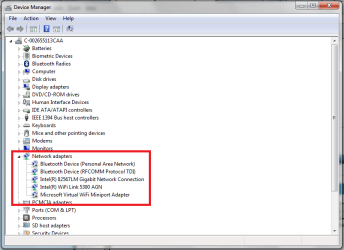
Click Start, Computer. Right click within Computer and choose properties. On the left hand side, choose Device Manager. (Click yes if prompted by UAC). Click the arrow next to network adapters and look for the one that says network connection (there might be a device with a yellow exclamation point and this might be it). Right click on this device and choose Update driver software. Choose Browse my computer for driver software and browse for the files you just downloaded. Then click next and allow the device to install.
 

Attachments

  • network.png
    network.png
    24.3 KB · Views: 13

My Computer My Computer

OS
Windows 7 x64 Ultimate
CPU
Core i7 920
Motherboard
Asus P6T
Memory
6 GB
Graphics Card(s)
Nvidia Geforce 260
Monitor(s) Displays
Dell E228WFP
Screen Resolution
1680 x 1050
Hard Drives
750 GB Western Digital Caviar Black
PSU
Corsair
Case
Thermaltake
Back
Top