
Thanks in advance for any help.
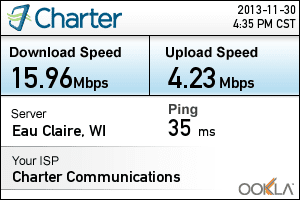
I'm here due to a long standing issue of not getting the reported speeds by Charter in my household. Basically I'm paying for a 30mb plan and I'm only getting around 10-15mb verified through Ookla. The hitch is that while the computers in our household report only 10-15mb (2 separate laptops, and even the first tech Charter sent out), the final techs came out with their laptop and were able to get a 50mb connection with no troubleshooting. This leads me to believe that either a wireless card or driver is having problems but I'm just not sure where the problem truly lies due to multiple computers having the issue and the problem occuring both hardwired into the modem and through wifi. I actually get 15mbps through wifi and only 10 hardwired to the modem for some reason.
Here's my rundown.
1. Wired and Wireless issue
2. ISP - Charter
3. Connection - Cable
4. Router - DLink WBR-1310 Firmware 1.04 , Modem - Motorola SB6121 (has been switched out by techs)
5. No antivirus installed. Malware bytes as a cleaner. (has been run, I'm clean)
6. See 3 attached files.
I am unsure of my wireless card's serial number but the only driver I had found to kick start my wireless after reinstalling windows was an Atheros driver. It shows Atheros AR9285 Wireless Network Adapter but that may be due to installing that driver. I'm unsure on that side of things due to Asus having different wireless LAN downloads on their site here.
https://www.asus.com/Notebooks_Ultrabooks/G73SW/#support
There was also an older thread mentioning this same problem that was left unresolved found here.
http://www.sevenforums.com/network-...idths-across-multiple-windows-7-machines.html
Any help with getting up to the speed that last tech reported would be great. While this is milled over and answers come through I'm going to verify my wireless card and try running through some of the separate drivers again on the Asus website. I personally think it may be an issue with some software throttling the connection in the laptops but I can't pinpoint what. Thanks.
Eric
I'm here due to a long standing issue of not getting the reported speeds by Charter in my household. Basically I'm paying for a 30mb plan and I'm only getting around 10-15mb verified through Ookla. The hitch is that while the computers in our household report only 10-15mb (2 separate laptops, and even the first tech Charter sent out), the final techs came out with their laptop and were able to get a 50mb connection with no troubleshooting. This leads me to believe that either a wireless card or driver is having problems but I'm just not sure where the problem truly lies due to multiple computers having the issue and the problem occuring both hardwired into the modem and through wifi. I actually get 15mbps through wifi and only 10 hardwired to the modem for some reason.
Here's my rundown.
1. Wired and Wireless issue
2. ISP - Charter
3. Connection - Cable
4. Router - DLink WBR-1310 Firmware 1.04 , Modem - Motorola SB6121 (has been switched out by techs)
5. No antivirus installed. Malware bytes as a cleaner. (has been run, I'm clean)
6. See 3 attached files.
I am unsure of my wireless card's serial number but the only driver I had found to kick start my wireless after reinstalling windows was an Atheros driver. It shows Atheros AR9285 Wireless Network Adapter but that may be due to installing that driver. I'm unsure on that side of things due to Asus having different wireless LAN downloads on their site here.
https://www.asus.com/Notebooks_Ultrabooks/G73SW/#support
There was also an older thread mentioning this same problem that was left unresolved found here.
http://www.sevenforums.com/network-...idths-across-multiple-windows-7-machines.html
Any help with getting up to the speed that last tech reported would be great. While this is milled over and answers come through I'm going to verify my wireless card and try running through some of the separate drivers again on the Asus website. I personally think it may be an issue with some software throttling the connection in the laptops but I can't pinpoint what. Thanks.
Eric
Attachments

My Computer
At a glance
Windows 7 64bit Home PremiumIntel i7-2630 QM8gbGTX 460m
- Computer type
- Laptop
- Computer Manufacturer/Model Number
- Asus G73SW
- OS
- Windows 7 64bit Home Premium
- CPU
- Intel i7-2630 QM
- Memory
- 8gb
- Graphics Card(s)
- GTX 460m
- Hard Drives
- 500gb

