
You are using an out of date browser. It may not display this or other websites correctly.
You should upgrade or use an alternative browser.
You should upgrade or use an alternative browser.
Not possible to format harddrive to exFAT
- Thread starter Supadupa
- Start date

I don't know what the max size of a exFAT partition is supported though.
Hmmm, looks like it's only meant for flash drives, not hard drives: exFAT - Wikipedia, the free encyclopedia
My Computer
At a glance
Windows 10 Pro X64Intel Quad Core i7-4770 @ 3.4Ghz16.0GB PC3-12800 DDR3 SDRAM 1600 MHzIntel Integrated HD Graphics
- Computer type
- PC/Desktop
- Computer Manufacturer/Model Number
- Lenovo IdeaCenter 450
- OS
- Windows 10 Pro X64
- CPU
- Intel Quad Core i7-4770 @ 3.4Ghz
- Memory
- 16.0GB PC3-12800 DDR3 SDRAM 1600 MHz
- Graphics Card(s)
- Intel Integrated HD Graphics
- Sound Card
- Realtek HD Audio
- Monitor(s) Displays
- HP 22" LCD
- Screen Resolution
- 1680 x 1050
- Hard Drives
- 250GB Samsung EVO SATA-3 SSD
2TB Seagate ST2000DM001 SATA-2
1.5TB Seagate ST3150041AS SATA
- Keyboard
- Dell USB
- Mouse
- Lenovo USB
- Internet Speed
- Cable via Road Runner 3MB Upload, 30MB Download
- Antivirus
- Windows Defender, MBAM Pro, MBAE
- Browser
- Seamonkey
- Other Info
- UEFI/GPT
PLDS DVD-RW DH16AERSH

- Local time
- 8:15 PM
- Messages
- 5,915
Hi,
I do get the option to exFAT format my 750GB external drive on my Windows 7 Machine. ( did not format though since I have all data there.)
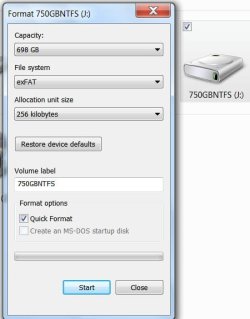
Are you sure you have no such option on your Windows 7 Machine?
I do get the option to exFAT format my 750GB external drive on my Windows 7 Machine. ( did not format though since I have all data there.)
Are you sure you have no such option on your Windows 7 Machine?
My Computer
At a glance
Windows 7 Home Premium 32 bit
- OS
- Windows 7 Home Premium 32 bit
Hi,
I do get the option to exFAT format my 750GB external drive on my Windows 7 Machine. ( did not format though since I have all data there.)
View attachment 259726
Are you sure you have no such option on your Windows 7 Machine?
Yes that was what I was asking about, I do not get this option. Do you get the option on internal drives also?
My Computer
At a glance
Windows 7 Ultimate x64
- OS
- Windows 7 Ultimate x64
- Local time
- 8:15 PM
- Messages
- 5,915
No option to exFAT formatting internal drives.
To format your external drive to exFAT try this:
- Open a command prompt by typing cmd into the Start/search box and pressing Enter
- Type format g: /FS:exFAT and then Enter to begin formatting the G drive as exFAT
(Replace g with the correct drive letter of your external drive.)
To see all other options, type format /? and press Enter.
To format your external drive to exFAT try this:
- Open a command prompt by typing cmd into the Start/search box and pressing Enter
- Type format g: /FS:exFAT and then Enter to begin formatting the G drive as exFAT
(Replace g with the correct drive letter of your external drive.)
To see all other options, type format /? and press Enter.
My Computer
At a glance
Windows 7 Home Premium 32 bit
- OS
- Windows 7 Home Premium 32 bit
No option to exFAT formatting internal drives.
To format your external drive to exFAT try this:
- Open a command prompt by typing cmd into the Start/search box and pressing Enter
- Type format g: /FS:exFAT and then Enter to begin formatting the G drive as exFAT
(Replace g with the correct drive letter of your external drive.)
To see all other options, type format /? and press Enter.
Thanyou but I actually get the option when I try it on external drives. I wanted to format a internal drive with exfat but maybe it's not possible
My Computer
At a glance
Windows 7 Ultimate x64
- OS
- Windows 7 Ultimate x64

You know Macs can read NTFS drive and write to them with NTFS-3G.
If you don't want to be bothered with setting up NTFS-3G on your Mac, commercial software is available: http://www.tuxera.com/products/tuxera-ntfs-for-mac/
If you don't want to be bothered with setting up NTFS-3G on your Mac, commercial software is available: http://www.tuxera.com/products/tuxera-ntfs-for-mac/
My Computer
At a glance
Windows 10 Pro (x64)Intel Core i7-3930K (3.2GHz - 4.5GHz)4x Samsung 4GB PC3-12800 DDR3 (16GB 1600MHz)Nvidia Geforce GTX 690
- Computer type
- PC/Desktop
- Computer Manufacturer/Model Number
- Alienware Aurora ALX R4
- OS
- Windows 10 Pro (x64)
- CPU
- Intel Core i7-3930K (3.2GHz - 4.5GHz)
- Motherboard
- Alienware Aurora-R4 x79
- Memory
- 4x Samsung 4GB PC3-12800 DDR3 (16GB 1600MHz)
- Graphics Card(s)
- Nvidia Geforce GTX 690
- Sound Card
- SteelSeries Siberia Elite
- Monitor(s) Displays
- Dell UltraSharp U3011
- Screen Resolution
- 2560x1600
- Hard Drives
- Samsung 850 Pro 256 GB, Seagate 1TB Desktop Hybrid HDD, 2x Western Digital 4TB Green HDD
- PSU
- 875W Some Dell PSU <.<
- Case
- Alienware Aurora ALX
- Cooling
- Custom Liquid Cooling (EK CPU & GPU blocks) dual EK 480RAD
- Keyboard
- Logitech G710+ Mechanical
- Mouse
- Logitech G700s
- Internet Speed
- Verizon Fios (50 mbps average)
- Other Info
- Server: Intel NUC D54250WYK: i5-4250U, 16GB, 256 GB mSATA, Windows Server 2012 R2
Did you try what jumanji suggested via Command Prompt?
My Computer
At a glance
Windows 10 Pro X64Intel Quad Core i7-4770 @ 3.4Ghz16.0GB PC3-12800 DDR3 SDRAM 1600 MHzIntel Integrated HD Graphics
- Computer type
- PC/Desktop
- Computer Manufacturer/Model Number
- Lenovo IdeaCenter 450
- OS
- Windows 10 Pro X64
- CPU
- Intel Quad Core i7-4770 @ 3.4Ghz
- Memory
- 16.0GB PC3-12800 DDR3 SDRAM 1600 MHz
- Graphics Card(s)
- Intel Integrated HD Graphics
- Sound Card
- Realtek HD Audio
- Monitor(s) Displays
- HP 22" LCD
- Screen Resolution
- 1680 x 1050
- Hard Drives
- 250GB Samsung EVO SATA-3 SSD
2TB Seagate ST2000DM001 SATA-2
1.5TB Seagate ST3150041AS SATA
- Keyboard
- Dell USB
- Mouse
- Lenovo USB
- Internet Speed
- Cable via Road Runner 3MB Upload, 30MB Download
- Antivirus
- Windows Defender, MBAM Pro, MBAE
- Browser
- Seamonkey
- Other Info
- UEFI/GPT
PLDS DVD-RW DH16AERSH
Internal drive exFAT format success.
I just tried formatting my Internal 1TB drive from an Administrator CMD window (using the format command given by Jumanji) and it worked fine.
I was prompted to unmount the volume before format began (to which I said Yes), then the format using exFAT went ahead.
So it seems it can be done, just via CMD rather than explorer.
BTW, thanks Jumanji, been trying to do this all day
Daillama
I just tried formatting my Internal 1TB drive from an Administrator CMD window (using the format command given by Jumanji) and it worked fine.
I was prompted to unmount the volume before format began (to which I said Yes), then the format using exFAT went ahead.
So it seems it can be done, just via CMD rather than explorer.
BTW, thanks Jumanji, been trying to do this all day
Daillama
My Computer
At a glance
Windows 7 Pro 64bitIntel Pentium Dual Core 2.2GHz8GBRadeon 2400HD
- Computer type
- PC/Desktop
- Computer Manufacturer/Model Number
- Dell Inspiron 530s
- OS
- Windows 7 Pro 64bit
- CPU
- Intel Pentium Dual Core 2.2GHz
- Motherboard
- Foxcon
- Memory
- 8GB
- Graphics Card(s)
- Radeon 2400HD
- Hard Drives
- 1x WD 320GB
1x Hitachi 1TB
- Antivirus
- Symantec Endpoint
- Browser
- Chrome
Just wanted to add that I also did not see the option to format with exFAT when creating the partition using "Disk Management". But if I created the partition without formatting, first. Then the formatting option include exFAT.
My Computer
At a glance
Windows 7 x64
- Computer type
- PC/Desktop
- OS
- Windows 7 x64
format exfat
I am using win 7 home 32 bit. I tried to format a 1tb hard drive to exfat using disk management and other methods. The command prompt will probably work but it appears to be the only way. Disk management only provides NTFS and no other. I placed the drive on an apple machine and it took less then one second to format to exfat. Drive now works with apple and microsoft. No problem. Why does microsoft not have exfat on disk management?
I am using win 7 home 32 bit. I tried to format a 1tb hard drive to exfat using disk management and other methods. The command prompt will probably work but it appears to be the only way. Disk management only provides NTFS and no other. I placed the drive on an apple machine and it took less then one second to format to exfat. Drive now works with apple and microsoft. No problem. Why does microsoft not have exfat on disk management?
My Computer
At a glance
windows 7 home 32 bit
- Computer type
- PC/Desktop
- OS
- windows 7 home 32 bit
hsmultimedia
New member
- Local time
- 4:45 PM
- Messages
- 1
Windows exFAT disk on Mac
Supadupa wants to format a disk as exFAT to be used with both Windows and Mac. If you have a Mac, the easiest way is to format the disk in the Mac environment using Disk Utility. It takes a second.
Supadupa wants to format a disk as exFAT to be used with both Windows and Mac. If you have a Mac, the easiest way is to format the disk in the Mac environment using Disk Utility. It takes a second.
My Computer
At a glance
win 7 64 home premiumi78 GB
- Computer type
- PC/Desktop
- Computer Manufacturer/Model Number
- iMac
- OS
- win 7 64 home premium
- CPU
- i7
- Memory
- 8 GB
- Hard Drives
- crucial 2 TB ssd
- Antivirus
- avast

- Local time
- 10:45 AM
- Messages
- 3,615
Take a look at: Free exFAT Format Tool: AOMEI Partition Assistant
My Computer
At a glance
Win 10 x64, Linux Lite, Win 7 x64, BlackArch,...
- Computer type
- PC/Desktop
- Computer Manufacturer/Model Number
- HP Desktop & Compaq Laptop
- OS
- Win 10 x64, Linux Lite, Win 7 x64, BlackArch, & Kali
- Hard Drives
- Samsung 850 Pro 256Gb,
Hitachi HDD 1Tb,
Crucial MX SSD 250Gb
Segate 3Tb USB 3.0 Ext. Backup HDD
- Internet Speed
- 150Mbps dn, 20Mbps up
- Antivirus
- Avast Free, Malwarebytes Anti-Exploit & Anti-Ransomware
- Browser
- Firefox, Chrome, Opera, & VPN
I am using win 7 home 32 bit. I tried to format a 1tb hard drive to exfat using disk management and other methods. The command prompt will probably work but it appears to be the only way. Disk management only provides NTFS and no other. I placed the drive on an apple machine and it took less then one second to format to exfat. Drive now works with apple and microsoft. No problem. Why does microsoft not have exfat on disk management?
perhaps exFAT was originally designed for XC (extended capacity) memory cards like SDXC, memory stick xc or any XC based usb flash drives (ex. 128gb drives); those can be formatted with exFAT but not internal hard drives (I'm not sure about SSD drives)
it's probably a "design" problem (aka. behavior by design) by MS
My Computer
At a glance
Windows 7 SP1 Home Premium 64bit [x64]Intel(R) Core(TM) i5-2310 CPU @ 2.90GHz6 GBIntel HD Graphics 2000
- Computer type
- PC/Desktop
- Computer Manufacturer/Model Number
- Dell Inspiron 620
- OS
- Windows 7 SP1 Home Premium 64bit [x64]
- CPU
- Intel(R) Core(TM) i5-2310 CPU @ 2.90GHz
- Memory
- 6 GB
- Graphics Card(s)
- Intel HD Graphics 2000
- Sound Card
- Conexant CX20641 HD Audio
- Hard Drives
- Western Digital 1TB (1024GB) WD10EALX-759BA1
- Internet Speed
- Spectrum Cable Internet up to 100Mbps
exFAT was designed as a lightweight alternative to FAT32 designed and optimized for flash drives and memory cards. It solves some of the problems with FAT32, such as the 4 GB file size limit. It is sometimes called FAT64. I believe at one time there were plans for adding advanced features such a file security but that is unlikely to happen. Like NTFS it is a Microsoft proprietary format and some aspects of the implementation are covered by patents. It was not intended for use with non Microsoft operating systems.
exFAT was never intended for use with internal drives where NTFS is usually a much better choice. Microsoft does not wish to encourage it's use in internal drives and for that reason it is not an option in Disk Manager. If you really wish to do so it can be done from the command line and with third party utilities. This was a deliberate design decision.
exFAT was never intended for use with internal drives where NTFS is usually a much better choice. Microsoft does not wish to encourage it's use in internal drives and for that reason it is not an option in Disk Manager. If you really wish to do so it can be done from the command line and with third party utilities. This was a deliberate design decision.
My Computer
At a glance
Windows 7 Pro 64 bitXeon W35208 GBNvidia Geforce 210
- Computer type
- PC/Desktop
- Computer Manufacturer/Model Number
- HP
- OS
- Windows 7 Pro 64 bit
- CPU
- Xeon W3520
- Memory
- 8 GB
- Graphics Card(s)
- Nvidia Geforce 210
Similar threads
- Replies
- 3
- Views
- 2K

- Replies
- 3
- Views
- 29K
- Locked
- Replies
- 13
- Views
- 56K
