Not responding

ilovecomputers

New member
Local time
4:05 PM
Messages
4
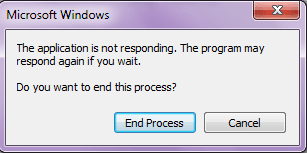
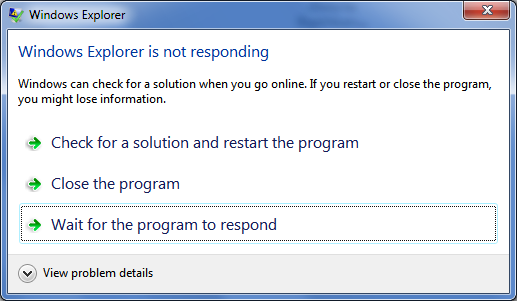
I noticed recently I see the screen below when an application is not responding instead of the 2nd one below. How can I fix this so that the normal not responding screen shows again?
attachment.php


win7-not-responding.png
 

Attachments

  • not.png
    not.png
    5.5 KB · Views: 577

My Computer My Computer

At a glance

Windows 7 Home Premium 64bitIntel4gb
OS
Windows 7 Home Premium 64bit
CPU
Intel
Memory
4gb
Screen Resolution
15.6" 1080p HD LCD
Cooling
Fan
Welcome to Windows Seven Forums.

I think you'll find the first screenshot refers to a specific program that is not responding, whereas the second one refers to Windows Explorer, which is an application in its own right.

More importantly, are you receiving these warnings on a regular basis, which if you are, suggests there's something wrong with your computer.
 

My Computer My Computer

At a glance

Windows 7 Ultimate SP1 64-BitIntel Core i7 870 @ 2.93GHz8Gb Dual-Channel DDR3 @ 664MHznVidia GeForce GTX 460 1024MB dedicated RAM
Computer Manufacturer/Model Number
HP Pavilion Elite 495UK
OS
Windows 7 Ultimate SP1 64-Bit
CPU
Intel Core i7 870 @ 2.93GHz
Motherboard
MSI 2A9C (CPU1)
Memory
8Gb Dual-Channel DDR3 @ 664MHz
Graphics Card(s)
nVidia GeForce GTX 460 1024MB dedicated RAM
Sound Card
Realtek HD Audio
Monitor(s) Displays
HP2310i
Screen Resolution
1920 x 1080
Hard Drives
1x1954GB Hitachi HDS22020ALA 330 (RAID), 1x1954GB Hitachi External for backup and storage
PSU
460W
Case
HP Elite
Cooling
Air cooled
Keyboard
Logitech K750 solar-powered keyboard
Mouse
Logitech Wireless M180 mouse
Internet Speed
2Mb
Other Info
Pure Avanti Flow Internet Radio with iPod Dock, 64Gb iPod, HP USB Speakers, Sony MDR-V500 Headphones, Sony Vaio F-Series Laptop
I do not receive these on a regular basis. I get the first message shown for which any program is not responding. Like if internet explorer or explorer or ccleaner does not respond, I get the first one. But on my other win7 computer, I get the second not responding screen. I do not have a choice to restart the program.
 

My Computer My Computer

At a glance

Windows 7 Home Premium 64bitIntel4gb
OS
Windows 7 Home Premium 64bit
CPU
Intel
Memory
4gb
Screen Resolution
15.6" 1080p HD LCD
Cooling
Fan

My Computer My Computer

At a glance

Windows 7 Ultimate SP1 64-BitIntel Core i7 870 @ 2.93GHz8Gb Dual-Channel DDR3 @ 664MHznVidia GeForce GTX 460 1024MB dedicated RAM
Computer Manufacturer/Model Number
HP Pavilion Elite 495UK
OS
Windows 7 Ultimate SP1 64-Bit
CPU
Intel Core i7 870 @ 2.93GHz
Motherboard
MSI 2A9C (CPU1)
Memory
8Gb Dual-Channel DDR3 @ 664MHz
Graphics Card(s)
nVidia GeForce GTX 460 1024MB dedicated RAM
Sound Card
Realtek HD Audio
Monitor(s) Displays
HP2310i
Screen Resolution
1920 x 1080
Hard Drives
1x1954GB Hitachi HDS22020ALA 330 (RAID), 1x1954GB Hitachi External for backup and storage
PSU
460W
Case
HP Elite
Cooling
Air cooled
Keyboard
Logitech K750 solar-powered keyboard
Mouse
Logitech Wireless M180 mouse
Internet Speed
2Mb
Other Info
Pure Avanti Flow Internet Radio with iPod Dock, 64Gb iPod, HP USB Speakers, Sony MDR-V500 Headphones, Sony Vaio F-Series Laptop
Would there be any easier way to fix this? Because this only happens every once in a while. But it doesnt only happen to one particular program. It happens to any random program I might be using. Is there any way to reset like the not responding porgram or could error reporting be a problem because I dont get an option to check for solutions?
 

My Computer My Computer

At a glance

Windows 7 Home Premium 64bitIntel4gb
OS
Windows 7 Home Premium 64bit
CPU
Intel
Memory
4gb
Screen Resolution
15.6" 1080p HD LCD
Cooling
Fan

My Computer My Computer

At a glance

Windows 7 Ultimate SP1 64-BitIntel Core i7 870 @ 2.93GHz8Gb Dual-Channel DDR3 @ 664MHznVidia GeForce GTX 460 1024MB dedicated RAM
Computer Manufacturer/Model Number
HP Pavilion Elite 495UK
OS
Windows 7 Ultimate SP1 64-Bit
CPU
Intel Core i7 870 @ 2.93GHz
Motherboard
MSI 2A9C (CPU1)
Memory
8Gb Dual-Channel DDR3 @ 664MHz
Graphics Card(s)
nVidia GeForce GTX 460 1024MB dedicated RAM
Sound Card
Realtek HD Audio
Monitor(s) Displays
HP2310i
Screen Resolution
1920 x 1080
Hard Drives
1x1954GB Hitachi HDS22020ALA 330 (RAID), 1x1954GB Hitachi External for backup and storage
PSU
460W
Case
HP Elite
Cooling
Air cooled
Keyboard
Logitech K750 solar-powered keyboard
Mouse
Logitech Wireless M180 mouse
Internet Speed
2Mb
Other Info
Pure Avanti Flow Internet Radio with iPod Dock, 64Gb iPod, HP USB Speakers, Sony MDR-V500 Headphones, Sony Vaio F-Series Laptop
I am going to try the clean boot on my next restart. I forgot to add that this issue isn't present on the other accounts.
 

My Computer My Computer

At a glance

Windows 7 Home Premium 64bitIntel4gb
OS
Windows 7 Home Premium 64bit
CPU
Intel
Memory
4gb
Screen Resolution
15.6" 1080p HD LCD
Cooling
Fan
ilovecomputers,

The next time you get that message, BEFORE clicking, then:

WIN | type RESMON | ENTER | CPU tab |
there will be an entry there in RED. , rigit-click on that entry |
choose Analyze Wait Chain. | work your way down that wait chain to the very bottom |
take note of the offending process | choose to End Process

Let us know what process was the offender.

That's one approach.

Another is:
Your problem is caused by software that you installed that is running when you are logged in.

To help us diagnose this problem, then:

Install CCleaner:
CCleaner - PC Optimization and Cleaning - Free Download

list of STARTUP PROGRAMS

CCleaner | Tools
icon | Startup button | Windows tab |
click on Save to text file button (bottom right side) |
accept Startup.txt as file name | SAVE button

list of SCHEDULED TASKS

CCleaner | Tools
icon | Startup button | Scheduled Tasks tab |
click on Save to text file button (bottom right side) |
enter Scheduled Tasks as File name | Save button

List of INSTALLED PROGRAMS

CCleaner | Tools
icon | Uninstall button |
click on Save to text file button (bottom right side) |
accept install.txt as File name | Save button


UPLOAD the startup.txt file
UPLOAD the Scheduled Tasks.txt file
UPLOAD the install.txt file.

HOW TO UPLOAD
Post a File or Screenshot in Seven Forums
========================================================

thanks,
karl
 

My Computer My Computer

At a glance

MS Windows 7 Ultimate SP1 64-bitAMD A10-4600M6.00 GB Dual-Channel DDR3 @ 798MHz (11-11-12-28)AMD Radeon HD 7660G
Computer Manufacturer/Model Number
Toshiba Satellite S875D-S7239 laptop
OS
MS Windows 7 Ultimate SP1 64-bit
CPU
AMD A10-4600M
Motherboard
AMD Pumori (Socket FT1)
Memory
6.00 GB Dual-Channel DDR3 @ 798MHz (11-11-12-28)
Graphics Card(s)
AMD Radeon HD 7660G
Sound Card
High Definition Audio Device
Monitor(s) Displays
Generic PnP Monitor (1600x900@60Hz)
Screen Resolution
1600x900@60Hz
Hard Drives
SSD 119GB Corsair CSSD-V128GB2 ATA Device
Keyboard
Standard PS/2 Keyboard
Mouse
HP Wireless Optical Mobile Mouse Model FHA-3410
Internet Speed
What the local pub, local coffee shop offers.
Other Info
Optical Drive:MATSHITA BD-CMB UJ160B ATA Device


Also have an Asus ha1002xp netbook with Win 7 Ultimate installed.
Back
Top