Not Supporting Windows7

tirumandala

New member
Local time
8:56 AM
Messages
3
Hi, I have installed Windows 7 enterprise (64-bit operating system) and i have a creative webcam (notebook ultra). When i try to install webcam in my laptop, i am getting message as " The windows operating system running on this computer is not supported by this product" . Please suggest me how can i install Creative webcam (Notebook ultra) with out any issues.
 

My Computer

OS
Windows 7 enterprice 64-bit
Hi, I have installed Windows 7 enterprise (64-bit operating system) and i have a creative webcam (notebook ultra). When i try to install webcam in my laptop, i am getting message as " The windows operating system running on this computer is not supported by this product" . Please suggest me how can i install Creative webcam (Notebook ultra) with out any issues.

Hi tirumandala, Welcome to the forums , the installation is not working because you are trying to install the 32bit driver you need to find the 64bit version of the driver , If you would be so kind and tell us the webcam model # we may be able to find the proper drivers for you ;)
 

My Computer

Computer type
PC/Desktop
Computer Manufacturer/Model Number
self build
OS
win 7 ultimate32bit, Win8.1pro wmc 32bit
CPU
amd phenom x4 9600
Motherboard
asus m2n32-sli deluxe
Memory
corsair twinxs 2x2gb
Graphics Card(s)
2x nvidia 1gb 8500gt
Sound Card
onboard
Monitor(s) Displays
23" PB Viseo 233d
Screen Resolution
1920x1080
Hard Drives
maxtor sata 500gb
maxtor sata 320gb
fujitsu sata200gb
PSU
oryxx tornado 750w
Case
thermaltake xaser lll
Cooling
artic freezer64 pro + 7 case fans
Webcam Not Supporting Windows7

Thanks for your prompt reply, Please find my webcam details below.Please let me know which driver i need to install for USB2.0 and WEBCAM.
CREATIVE WEBCAM (NOTEBOOK ULTRA)
MODEL NO : VF0070
 

My Computer

OS
Windows 7 enterprice 64-bit

My Computer

Computer type
PC/Desktop
Computer Manufacturer/Model Number
self build
OS
win 7 ultimate32bit, Win8.1pro wmc 32bit
CPU
amd phenom x4 9600
Motherboard
asus m2n32-sli deluxe
Memory
corsair twinxs 2x2gb
Graphics Card(s)
2x nvidia 1gb 8500gt
Sound Card
onboard
Monitor(s) Displays
23" PB Viseo 233d
Screen Resolution
1920x1080
Hard Drives
maxtor sata 500gb
maxtor sata 320gb
fujitsu sata200gb
PSU
oryxx tornado 750w
Case
thermaltake xaser lll
Cooling
artic freezer64 pro + 7 case fans
When i try to install the driver suggested by you is not installing and saying it is not supporting current operating system. Please suggest me in this regard.
 

My Computer

OS
Windows 7 enterprice 64-bit

My Computer

Computer type
PC/Desktop
Computer Manufacturer/Model Number
self build
OS
win 7 ultimate32bit, Win8.1pro wmc 32bit
CPU
amd phenom x4 9600
Motherboard
asus m2n32-sli deluxe
Memory
corsair twinxs 2x2gb
Graphics Card(s)
2x nvidia 1gb 8500gt
Sound Card
onboard
Monitor(s) Displays
23" PB Viseo 233d
Screen Resolution
1920x1080
Hard Drives
maxtor sata 500gb
maxtor sata 320gb
fujitsu sata200gb
PSU
oryxx tornado 750w
Case
thermaltake xaser lll
Cooling
artic freezer64 pro + 7 case fans
Make sure you are downloading the Creative WebCam Live!® Ultra (VF0070) Non-WHQL Certified Driver v1.11.02

VF0070 driver.JPG

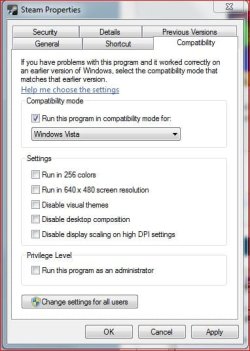
And use the first Vista for compatibility mode - the should be 3, Vista, Vista SP1, Vista SP2, if the first one doesn't work, try SP1, than SP2

Compatibility mode.JPG

If none of those work then there may not be any drivers for the OS in use :(
 

My Computer

Computer type
PC/Desktop
Computer Manufacturer/Model Number
Custom built by me.
OS
Windows 10 Pro
CPU
Intel Core i7-4770K (3.5Ghz)
Motherboard
Gigabyte G1 Sniper 5 (F10 Bios)
Memory
32 gig Corsair Dominator Platinum (4x8Gig)
Graphics Card(s)
Sapphire Tri-X R9 Fury
Sound Card
Soundblaster ZXR
Monitor(s) Displays
NEC PA242W 24" LCD Monitor
Screen Resolution
1920 x 1200
Hard Drives
Primary - Samsung 850 Pro (512gig), Samsung 840 Pro (256gig), 2TB WD Caviar Black.
PSU
EVGA Supernova 1000 G2
Case
Cooler Master HAF X
Cooling
Corsair H100i with Corsair Air Series SP120 Quiet Fans
Keyboard
Logitech Wireless Wave
Mouse
Logitech Performance MX
Internet Speed
High Speed Cable
Antivirus
Norton Security
Browser
IE11
Other Info
Memory Timings - 1866MHz @ 9-9-9-27-1T @ 1.5 volts
Hello Tiru,

If the above instructions didn't work. Just try the following since it worked for my friend.

* If the installation path shows as "C:\Program Files (x86)", then it must be a 32bit driver.
* Now just change the installation path to "C:\Program Files" (which would be the 64bit installation folder).

This should work. Make sure you change the compatibility as informed above, before starting the installation.
 

My Computer

Computer Manufacturer/Model Number
Dell Inspiron N5010
OS
Windows 7 Ultimate x64 SP1
CPU
Intel Core i3
Memory
4 GB DDR3
Screen Resolution
1366 X 768
Hard Drives
Seagate 500 GB
Internet Speed
4 MBPS
Back
Top