Solved Not sure what to call this.

caplecure

New member
Local time
2:55 PM
Messages
4
I have recently done a clean install of window 7 ultimate 64 bit on my SSD without issue, however I also have 2 additional HD's installed for storage both of which were disconnected during my fresh install of windows, on first boot all was well without my other 2 HD connected,finalised my fresh install with usual software all up and running nice and sweet.
Now the problem's start when connecting my other 2 HD's to the system 1st boot with 1 HD connected fine no problems if I connect both HD's I get post boot which identifies all drives but then fails to boot with a message saying.

The Boot selection failed because a required device is inaccessible.

Suspecting a faulty connection I reconnected both SATA leads but still the same problem,Ive also checked both HD's 1 at a time and they show fine, but when connecting both and try to boot I get the message again.
Here's the weired part. if I boot the system with 1HD connected fine, then connect the second HD while the system is up and running the 2nd HD show up no problem.
I have tried system repair via cd and command promt, using DISKPART to fixmbr and show to be successful so I am at a loss what to do next :confused:
 

My Computer My Computer

Computer type
PC/Desktop
Computer Manufacturer/Model Number
Custom
OS
Window 7 Ultimate 64 bit
CPU
Inte core i5-2500K 3.3GHz
Motherboard
Z68AP-D3
Memory
Kingston Hyper x 8GB
Graphics Card(s)
Nvidia Gforce GTX 750 tI
Hard Drives
Kingston SSD 160 GB
WDC 500 GB HD
WDC 300GB HD
Antivirus
Bitdefender 2017 total security
Browser
Opera - Chrome
Hi caplecure, welcome to the Forum.

Could you supply a screen shot of Disc Management after you get the computer started using your method mentioned, which is "Here's the weired part. if I boot the system with 1HD connected fine, then connect the second HD while the system is up and running the 2nd HD show up no problem".

To do a screen shot of Disc Management refer to this Forum tutorial. At item 7 is how to upload the the screen shot.

Disk Management - Post a Screen Capture Image
 

My Computer My Computer

Computer type
PC/Desktop
Computer Manufacturer/Model Number
Self built using existing case
OS
Windows 7 Home Premium 64 bit sp1
CPU
Intel i5 3570 3.4Ghz Ivy Bridge SKT 1155 quad core
Motherboard
Gigabyte Z77-HD3 SKT 1155 2xSata 3, 4x USB 3.0
Memory
G-Skill Rip Jaws 16Gb (8x2) DDR3 -1600 PC3 12800 CL 10 red
Graphics Card(s)
Gigabyte NVIDIA GT610 1Gb DDR3 810/1200 PCI-E 2.0 Silent
Sound Card
NVIDIA High Definition & Realtech High Definition Audio
Monitor(s) Displays
2 x Philips 226V4L 16:9 aspect ratio
Screen Resolution
1920 x 1080 HD
Hard Drives
Samsung 840 Pro 256gb SSD, SATA 3.
Hitachi Touro Portable 1tb, USB 3.0 HDD used for image b/ups.
PSU
Corsair VS450
Case
Codeng
Cooling
PSU fan & CPU fan
Keyboard
Logitech
Mouse
Logitech Wireless trackball M570
Internet Speed
Wireless 3G. 3mg down & 550kb up.
Antivirus
Bitdefender Internet Security 2020
Browser
Opera (Current Version) & Firefox
Other Info
MS Office 2013 Pro. Davis weather station software. MGE Nova 600 avr UPS.
I would say that one of your HDD used to have the OS and still has the MBR, even if you deleted the OS files.
Go to BIOS and make sure the first boot device is your SSD, not the old HDD.
 

My Computers My Computers

System One System Two

  • Computer type
    PC/Desktop
    Computer Manufacturer/Model Number
    custom build
    OS
    Windows 7 HP 64
    CPU
    i5 6600K - 800MHz to 4200MHz
    Motherboard
    GA-Z170-HD3P
    Memory
    4+4G GSkill DDR4 3000
    Graphics Card(s)
    IG - Intel 530
    Monitor(s) Displays
    Samsung 226BW
    Screen Resolution
    1680x1050
    Hard Drives
    (1) -1 SM951 – 128GB M.2 AHCI PCIe SSD drive for Windows 7 and Lubuntu
    (2) -1 WD SATA 3 - 1T for Data
    (3) -1 WD SATA 3 - 1T for backup
    PSU
    Thermaltake 450W TR2 gold
    Keyboard
    Old and good Chicony mechanical keyboard
    Mouse
    Logitech mX performance - 9 buttons (had to disable some)
    Internet Speed
    500Mb/s
    Browser
    Firefox 64
    Other Info
    TinyWall firewall
  • Computer type
    Laptop
    System Manufacturer/Model Number
    Asus Q550LF
    OS
    Windows 7 Pro
    CPU
    i7-4500U 800MHz to 3.0GHz
    Motherboard
    Asus Q550LF
    Memory
    (4+4)G DDR3 1600
    Graphics Card(s)
    IG intel 4400 + NVIDIA GeForce GT 745M
    Sound Card
    Realtek
    Monitor(s) Displays
    LG Display LP156WF4-SPH1
    Screen Resolution
    1920 x 1080
    Hard Drives
    BX500 120G SSD for Windows and programs +
    1T HDD for data
    Internet Speed
    500 Mb/s
    Browser
    Firefox
    Other Info
    TinyWall firewall
There is one law in the PC world, that many people either don't know or seem to forget,
and that is:
"Windows will always try to boot from the HD on the SATA 0 (port zero) first, then port #1,
#2, etc. It also looks for an MBR (Master Boot Record).

So if you want your SSD to be the default boot drive, make sure it's connected to SATA Port 0 on the motherboard. It doesn't hurt to have your bios set to boot to the SSD too.

Good Luck,
TechnoMage :cool:
 

My Computer My Computer

Computer type
PC/Desktop
Computer Manufacturer/Model Number
Various
OS
Win 7 Pro, SP1, x86, Win-11/Pro/64
CPU
AMD
Motherboard
Various
Memory
8GB Crucial
Graphics Card(s)
Various
Sound Card
OnBoard
Monitor(s) Displays
Acer 21.5"
Hard Drives
Crucial SSD, 500 GB
PSU
OEM
Case
SFF Slim Line Case
Cooling
OEM
Keyboard
eMachines
Mouse
Logitech Wireless
Internet Speed
varies
Antivirus
Windows Defender/Super Anti-Spyware
Browser
Firefox
Thanks for the welcome and for taking the time to read and reply to my post. Ranger4 Megahertz07 TechnoMage2016
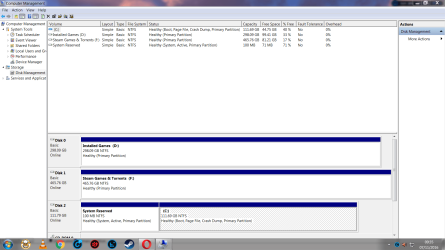
Here is a screen shot of disk management you asked for.

Megahertz07 I agree the HD in question did have an OS on it before.

TechnoMage2016 And yes my old HD is showing up as DISK 0 and SSD as DISK 1 but I can only boot to HD in Bios ? SSD isnt an option or I can see it.

TechnoMage2016 I will swap out the SATA cables from HD TO SSD and see if thats the problem.
 

Attachments

  • Capture - Copy (9).png
    Capture - Copy (9).png
    180.4 KB · Views: 7

My Computer My Computer

Computer type
PC/Desktop
Computer Manufacturer/Model Number
Custom
OS
Window 7 Ultimate 64 bit
CPU
Inte core i5-2500K 3.3GHz
Motherboard
Z68AP-D3
Memory
Kingston Hyper x 8GB
Graphics Card(s)
Nvidia Gforce GTX 750 tI
Hard Drives
Kingston SSD 160 GB
WDC 500 GB HD
WDC 300GB HD
Antivirus
Bitdefender 2017 total security
Browser
Opera - Chrome
Ok I have switched the SATA cables round and the system boots fine showing all drives, however SSD is still disk 1 and HD disk 0 in disk management.
 

My Computer My Computer

Computer type
PC/Desktop
Computer Manufacturer/Model Number
Custom
OS
Window 7 Ultimate 64 bit
CPU
Inte core i5-2500K 3.3GHz
Motherboard
Z68AP-D3
Memory
Kingston Hyper x 8GB
Graphics Card(s)
Nvidia Gforce GTX 750 tI
Hard Drives
Kingston SSD 160 GB
WDC 500 GB HD
WDC 300GB HD
Antivirus
Bitdefender 2017 total security
Browser
Opera - Chrome
Before any change in disk properties I recommend that you make a backup.
The disk 2 (F: Steam games) is active, and it has a MBR. Make it non active.
 

My Computers My Computers

System One System Two

  • Computer type
    PC/Desktop
    Computer Manufacturer/Model Number
    custom build
    OS
    Windows 7 HP 64
    CPU
    i5 6600K - 800MHz to 4200MHz
    Motherboard
    GA-Z170-HD3P
    Memory
    4+4G GSkill DDR4 3000
    Graphics Card(s)
    IG - Intel 530
    Monitor(s) Displays
    Samsung 226BW
    Screen Resolution
    1680x1050
    Hard Drives
    (1) -1 SM951 – 128GB M.2 AHCI PCIe SSD drive for Windows 7 and Lubuntu
    (2) -1 WD SATA 3 - 1T for Data
    (3) -1 WD SATA 3 - 1T for backup
    PSU
    Thermaltake 450W TR2 gold
    Keyboard
    Old and good Chicony mechanical keyboard
    Mouse
    Logitech mX performance - 9 buttons (had to disable some)
    Internet Speed
    500Mb/s
    Browser
    Firefox 64
    Other Info
    TinyWall firewall
  • Computer type
    Laptop
    System Manufacturer/Model Number
    Asus Q550LF
    OS
    Windows 7 Pro
    CPU
    i7-4500U 800MHz to 3.0GHz
    Motherboard
    Asus Q550LF
    Memory
    (4+4)G DDR3 1600
    Graphics Card(s)
    IG intel 4400 + NVIDIA GeForce GT 745M
    Sound Card
    Realtek
    Monitor(s) Displays
    LG Display LP156WF4-SPH1
    Screen Resolution
    1920 x 1080
    Hard Drives
    BX500 120G SSD for Windows and programs +
    1T HDD for data
    Internet Speed
    500 Mb/s
    Browser
    Firefox
    Other Info
    TinyWall firewall
I think Its all done have set steam games HD as inactive as shown below in screen shot system boots fine all HD's showing and functioning well.

Many thanks for your advice and time in solving my problem,learned something new in the process.

Regards Caplecure.
 

Attachments

  • Capture.PNG
    Capture.PNG
    62.5 KB · Views: 4

My Computer My Computer

Computer type
PC/Desktop
Computer Manufacturer/Model Number
Custom
OS
Window 7 Ultimate 64 bit
CPU
Inte core i5-2500K 3.3GHz
Motherboard
Z68AP-D3
Memory
Kingston Hyper x 8GB
Graphics Card(s)
Nvidia Gforce GTX 750 tI
Hard Drives
Kingston SSD 160 GB
WDC 500 GB HD
WDC 300GB HD
Antivirus
Bitdefender 2017 total security
Browser
Opera - Chrome
Glad you fixed it.
Please mark this treat as solved.
 

My Computers My Computers

System One System Two

  • Computer type
    PC/Desktop
    Computer Manufacturer/Model Number
    custom build
    OS
    Windows 7 HP 64
    CPU
    i5 6600K - 800MHz to 4200MHz
    Motherboard
    GA-Z170-HD3P
    Memory
    4+4G GSkill DDR4 3000
    Graphics Card(s)
    IG - Intel 530
    Monitor(s) Displays
    Samsung 226BW
    Screen Resolution
    1680x1050
    Hard Drives
    (1) -1 SM951 – 128GB M.2 AHCI PCIe SSD drive for Windows 7 and Lubuntu
    (2) -1 WD SATA 3 - 1T for Data
    (3) -1 WD SATA 3 - 1T for backup
    PSU
    Thermaltake 450W TR2 gold
    Keyboard
    Old and good Chicony mechanical keyboard
    Mouse
    Logitech mX performance - 9 buttons (had to disable some)
    Internet Speed
    500Mb/s
    Browser
    Firefox 64
    Other Info
    TinyWall firewall
  • Computer type
    Laptop
    System Manufacturer/Model Number
    Asus Q550LF
    OS
    Windows 7 Pro
    CPU
    i7-4500U 800MHz to 3.0GHz
    Motherboard
    Asus Q550LF
    Memory
    (4+4)G DDR3 1600
    Graphics Card(s)
    IG intel 4400 + NVIDIA GeForce GT 745M
    Sound Card
    Realtek
    Monitor(s) Displays
    LG Display LP156WF4-SPH1
    Screen Resolution
    1920 x 1080
    Hard Drives
    BX500 120G SSD for Windows and programs +
    1T HDD for data
    Internet Speed
    500 Mb/s
    Browser
    Firefox
    Other Info
    TinyWall firewall
Back
Top