Not Sure Which Startup Programs To Remove

woodbine

New member
Member
VIP
Local time
12:14 PM
Messages
178
Location
Bristol, UK
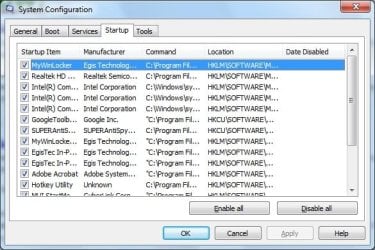
I'm in the process of some amateur optimisation of my desktop pc, using Windows 7 and IE. To improve performance and start up time, it seems to be a good idea to disable unused programmes from the startup. Trouble is, I'm not sure what a lot of them are for.

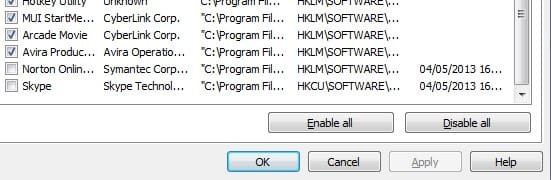
I realise it's difficult for others to know what I do or don't use. I mainly use my pc for the internet and don't use any games - if that helps. If someone could tell me which startups are vital, and which ones I could lose, that would help. Perhaps also some ideas what the obscure ones are on the list, eg. Realtek HD, Mywinlocker, EgisTec, MUI Startme?

Also;

1) I don't even have a Google tool bar, so I assume I'm safe to disable it?

2) Not sure what a hotkey utility is, but I'm sure I don't use it. Anyway, a box regularly comes up saying it has stopped working

3) Can I remove the Norton programme (Norton Online Backup) altogether? It came with the pc, and I don't use Norton.

Thanks for any help.
 

Attachments
  • Startup Programmes.jpg
    Startup Programmes.jpg
    111.5 KB · Views: 33
  • Startup Programmes  2.jpg
    Startup Programmes 2.jpg
    43.9 KB · Views: 33
Last edited:

My Computer

Computer type
PC/Desktop
Computer Manufacturer/Model Number
Acer Aspire Desktop M3910
OS
Windows 7 Home Premium 64 bit SP1
CPU
Intel i3 540
Memory
3GB DDR3SD
Monitor(s) Displays
LG Flatron L1960TR
Screen Resolution
1280x1024
Keyboard
Acer
Mouse
Genius
Antivirus
Avast (Free)
Browser
I E 11
That config tool only shows a portion of what happens at start up. Even if you disable an app via that config tool, parts of the "disabled" app can still impact your start up time and other aspects of your computer's performance (e.g. the time that it takes to display context menus). Before you use the system config tool to disable start up stuff, uninstall stuff.

Look in Programs and Features and uninstall Skype, Norton, Google toolbar, ....

I would also suggest that you uninstall Adobe Acrobat and look into using SumatraPDF. See this thread for more details http://www.sevenforums.com/vip/379350-need-pdf-reader.html#post3134875.

As for the hotkey utility, it probably came with the computer. I might be used to start apps from special keys on the keyboard (e.g. Internet key should start your default browser). If you don't use those keys, you can disable that start up entry and see how things work for you. You can always re-enable the entry later on - if need be. You can tell more about that hotkey app if you expand the column that let's us see the folder that the hotkey app is starting from.

re: Realtak HD, Mywinlocker, EgisTec, MUI Startme
Maybe other forum members can speak to those.
 

My Computer

Computer type
Laptop
Computer Manufacturer/Model Number
Employer provided Dell Latitude
OS
W7 Pro SP1 64bit
CPU
i7
Memory
8GB
Graphics Card(s)
Intel HD Graphics
Hard Drives
crappy SSD
Antivirus
Employer mandated Symantec Endpoint Protection
Browser
Pale Moon 64bit, IE11 64bit & Chrome 64bit
On a further note that comp also came with a couple of trial programs
McAfee, Office 2007, Mywinlocker.
Uninstall them with the>>Offical<< uninstallers not from Uninstall progs, include Norton as well.
MUI is part of Cyberlink, keep that but set it to manual in services.

Roy
 

My Computer

Computer type
PC/Desktop
Computer Manufacturer/Model Number
medionl/Aspire 6930G/acer x55a
OS
W7 home premium 32bit/W7HP 64bit/w10 tp insider ring
CPU
E5300 dual core
Motherboard
medion MS7366
Memory
3gb
Graphics Card(s)
Nvidia Geforce 7100 Nforce 630i
Monitor(s) Displays
avixc
Internet Speed
n (isp resticted to 72)
Antivirus
mse/pands
Browser
palemoon
Other Info
Belkin Fd7050 n USB using Railink RT2870 drivers, more upto date
I usually use CCleaner to disable Start up programs.

It's in Tools > Startup

Startup programs.png

Edit: I would disable Adobe, Better idea would be to uninstall it unless you somehow make money off it.
 

My Computer

Computer type
PC/Desktop
Computer Manufacturer/Model Number
Compac
OS
Microsoft Windows 7 Ultimate 32-bit 7601
CPU
Intel(R) Pentium(R) Dual CPU E2160 @ 1.80GHz
Motherboard
MSI Boston
Memory
4.00 GB
Graphics Card(s)
(1) VNC Mirror Driver (2) Intel(R) G33/G31 Express Chipset
Sound Card
Disabled
Monitor(s) Displays
Headless
Screen Resolution
1280 x 960 x 32 bits (4294967296 colors) @ 60 Hz
Hard Drives
ST3320820AS ATA Device
Keyboard
Headless
Mouse
Headless
Antivirus
Malwarebytes pro
Other Info
Also
Windows 8.1 Laptop and Desktop both Acer
Back
Top