Really Confused about which Startup Programs to Disable

jmak18

New member
Local time
8:29 PM
Messages
23
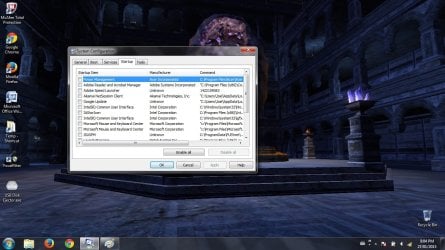
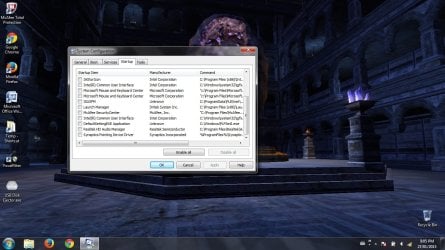
I've done a lot of research on the matter, but there's a lot of conflicting information out there. And I don't want to end up destroying my computer. I would really appreciate some advice on what's safe to disable. I have an Acer Windows 7 Home Premium. Thanks a bunch and here are the programs:

Synaptics Pointing Device Driver
Power Management
Intel (R) Common User Interface
Microsoft Mouse and Keyboard Center
McAfee SecurityCenter
IAStorIcon
Launch Manager
Realtek HD Audio Manager
 

My Computer

Computer type
Laptop
Computer Manufacturer/Model Number
Acer
OS
Windows 7 Home Premium x64
Memory
3 GB
Antivirus
McAfee Total Protection 2015

My Computer

Computer type
Laptop
Computer Manufacturer/Model Number
Sony Vaio VPCEB47GM Laptop
OS
Win 7 Pro 64-bit
CPU
Intel i5 2.4 Ghz
Memory
8GB DDR3
Graphics Card(s)
Intel HD 3000
Sound Card
IDT High Definition
Monitor(s) Displays
15.6 WGXA Anti-Glare LED
Screen Resolution
1280x800
Hard Drives
640Gb 7200rpm
Antivirus
MSE
Browser
Opera (primary) with IE9 backup
Hi and welcome to SevenForums,
With Mcafee installed you'll never get a decent startup no matter what,
The only real startup utility you need is your security,
Unfortunately you picked one of the worst possible,
Panda free is pretty good,
Save your money and get Malwarebytes lifetime license instead of wasting it on Mcafee,
Put your money in a better product ;)

Are any of them unchecked now ?
A couple I don't really know what they are
Use Clean boot,
http://www.sevenforums.com/tutorials/179159-troubleshoot-application-conflicts-performing-clean-startup.html
Click Start and type in the search box,
msconfig
Click on the suggestion on top or hit the Enter key,
Go to the Startup section and take some screen shots for a complete list,
Go to the Services section and on the bottom left Check the box to Hide All Microsoft services,
Repeat the screen shots,
See the links above my signature on how to take and upload screen shots here,
Cheers.
 

My Computer

Computer type
PC/Desktop
Computer Manufacturer/Model Number
Custom assembled by me :}
OS
Win-7-Pro64bit 7-H-Prem-64bit
CPU
i7-5930K 2nd i9-9940x both water blocked VRM's too
Motherboard
ASUS SABERTOOTH X99 2nd ASUS x299 Apex
Memory
Trident-z 3200C14 2nd Trident-z 3600C16
Graphics Card(s)
EVGA 1080ti ftw3 2nd Titan Xp both water blocked
Sound Card
Built-in Realtek
Monitor(s) Displays
1-AOC G2460PG 24"G-Sync 144Hz/ 2nd 1-ASUS VG248QE 24" 144Hz
Screen Resolution
1920 x 1080 144Hz
Hard Drives
2-Samsung M.2 Evo & Evo Plus
2-Samsung 850 EVO 500GB SSD's/ 3-2.5 W.D. Black 1tb-&3-1tb/3-3.5 WD Black 1tb hdd's
PSU
EVGA SuperNOVA 1000-P2 2nd 1200-P2
Case
2-Corsair Obsidian Series 450D Black ATX Mid Tower
Cooling
Custom water loops
Keyboard
Logitech G710+/ 2nd Logitech G910
Mouse
2-RedDragon M901 Perdition 16400 dpi Gaming mouse = wired
Internet Speed
Comcast Ping 19ms 89.31mbps download speed 6.12mbps upload
Antivirus
Malwarebytes Pro/ Superantispyware Pro
Browser
FireFox & Pale moon
Other Info
2nd ASUS X299 Apex/Intel i9-9940x with Custom water loop/7H-Prem-x64/Corsair 450D case/Ram Trident-z 3600C16 4x8gb / Samsung970Evo plus 500gb SSD/Dual ssd EZ swap evo/PSU EVGA SuperNova 1200w-P2 80+Platinum/GPU Titan Xp /8-ML-140 on push-pull on 2-280GTX rads
It's easy, disable ALL except McAfee which seems to be your security program. Nothing bad will happen.
 

My Computer

Computer Manufacturer/Model Number
HP, Dell, Gateway, Toshiba - 4 laptops and 2 desktops
OS
Vista, Windows7, Mint Mate, Zorin, Windows 8
CPU
from 1.6GHz Duo to i7
Monitor(s) Displays
2x HP w2207
Hard Drives
5x HDD, 7x SSD, 12x Externals
Keyboard
with trackball - no mices
Mouse
Trackball mice
Internet Speed
DSL 6000
Disable all except Synaptics Pointing Device Driver as that is the one that allows you to disable Tap-to-click on the Touchpad.
 

My Computer

Computer type
PC/Desktop
Computer Manufacturer/Model Number
Lenovo IdeaCenter 450
OS
Windows 10 Pro X64
CPU
Intel Quad Core i7-4770 @ 3.4Ghz
Memory
16.0GB PC3-12800 DDR3 SDRAM 1600 MHz
Graphics Card(s)
Intel Integrated HD Graphics
Sound Card
Realtek HD Audio
Monitor(s) Displays
HP 22" LCD
Screen Resolution
1680 x 1050
Hard Drives
250GB Samsung EVO SATA-3 SSD
2TB Seagate ST2000DM001 SATA-2
1.5TB Seagate ST3150041AS SATA
Keyboard
Dell USB
Mouse
Lenovo USB
Internet Speed
Cable via Road Runner 3MB Upload, 30MB Download
Antivirus
Windows Defender, MBAM Pro, MBAE
Browser
Seamonkey
Other Info
UEFI/GPT
PLDS DVD-RW DH16AERSH
jmak18. In your first post you mention Mcaffe Security Centre & in your System Specs you mention Norton Internet Security 2014. Do you have both these running on your computer, if so that will cause all sorts of conflicts. Only ever have one AV program at any one time.
Refer to this link for various AV removal.

http://www.sevenforums.com/tutorials/78961-av-uninstallers.html?ltr=A
 

My Computer

Computer type
PC/Desktop
Computer Manufacturer/Model Number
Self built using existing case
OS
Windows 7 Home Premium 64 bit sp1
CPU
Intel i5 3570 3.4Ghz Ivy Bridge SKT 1155 quad core
Motherboard
Gigabyte Z77-HD3 SKT 1155 2xSata 3, 4x USB 3.0
Memory
G-Skill Rip Jaws 16Gb (8x2) DDR3 -1600 PC3 12800 CL 10 red
Graphics Card(s)
Gigabyte NVIDIA GT610 1Gb DDR3 810/1200 PCI-E 2.0 Silent
Sound Card
NVIDIA High Definition & Realtech High Definition Audio
Monitor(s) Displays
2 x Philips 226V4L 16:9 aspect ratio
Screen Resolution
1920 x 1080 HD
Hard Drives
Samsung 840 Pro 256gb SSD, SATA 3.
Hitachi Touro Portable 1tb, USB 3.0 HDD used for image b/ups.
PSU
Corsair VS450
Case
Codeng
Cooling
PSU fan & CPU fan
Keyboard
Logitech
Mouse
Logitech Wireless trackball M570
Internet Speed
Wireless 3G. 3mg down & 550kb up.
Antivirus
Bitdefender Internet Security 2020
Browser
Opera (Current Version) & Firefox
Other Info
MS Office 2013 Pro. Davis weather station software. MGE Nova 600 avr UPS.
Hi and welcome to SevenForums,
With Mcafee installed you'll never get a decent startup no matter what,
The only real startup utility you need is your security,
Unfortunately you picked one of the worst possible,
Panda free is pretty good,
Save your money and get Malwarebytes lifetime license instead of wasting it on Mcafee,
Put your money in a better product ;)

Are any of them unchecked now ?
A couple I don't really know what they are
Use Clean boot,
http://www.sevenforums.com/tutorials/179159-troubleshoot-application-conflicts-performing-clean-startup.html
Click Start and type in the search box,
msconfig
Click on the suggestion on top or hit the Enter key,
Go to the Startup section and take some screen shots for a complete list,
Go to the Services section and on the bottom left Check the box to Hide All Microsoft services,
Repeat the screen shots,
See the links above my signature on how to take and upload screen shots here,
Cheers.


@ThrashZone Yeah, after using Norton I wanted to try out McAfee once to see how it is. But its not that great. I'll look into those one's you mentioned after my sub runs out. Also what is your opinion on Avast since I'm also trying that out on another computer?

As for the startup programs I initially disabled all except for McAfee and the Synaptics Touch Point. Which seemes to make startup a bit faster. I was wondering if deleting the entries (CCleaner) would make any difference from disabling them though?

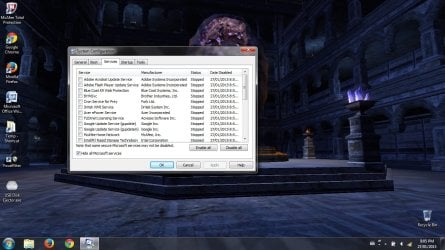
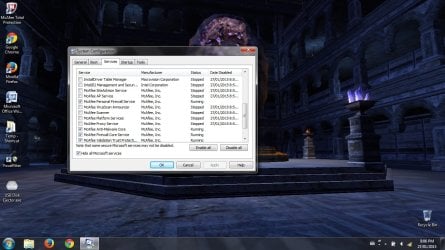
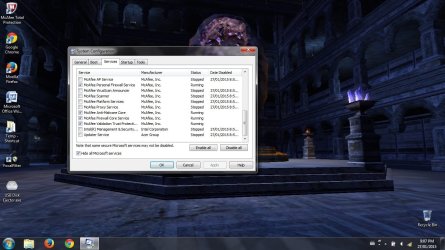
After that I did a clean boot and everything seems to be disabled now. Attaching screenshots.

@Ranger4 Yeah I used to run Norton, but forgot to update my specs.

@marsmimar Thanks for those, didn't realize I could disable things that extensively.
 

Attachments

  • 1.jpg
    1.jpg
    132.8 KB · Views: 7
  • 2.jpg
    2.jpg
    130.8 KB · Views: 4
  • 3.jpg
    3.jpg
    136 KB · Views: 1
  • 4.jpg
    4.jpg
    131.7 KB · Views: 3
  • 5.jpg
    5.jpg
    128.9 KB · Views: 2

My Computer

Computer type
Laptop
Computer Manufacturer/Model Number
Acer
OS
Windows 7 Home Premium x64
Memory
3 GB
Antivirus
McAfee Total Protection 2015
Back
Top