Which Startup Items Can I Safely Remove?

SonicBrewtality

New member
Member
VIP
Local time
7:01 PM
Messages
110
I'm trying to use video editing software but it's going incredibly slow. I've been advised to make sure there are as few background processes running at the same time and to uncheck everything on my startup list, but i'm not sure what is actually safe to uncheck. Here's my items:

Microsoft Windows Script Host
ELAN Smart pad (laptop touch pad)
Realtek HD Audio manager
HD Audio Background Process
Power Management
Adobe Updater Startup Utility
ZoneAlarm Browser Security
Microsoft Xbox 360 Acessories (for my 360 controller)
Intel (R) Common User Interface
Intel (R) Common User Interface (why are there 3?)
Logitech Download Assistant (my keyboard)
Microsoft Windows Operating System (i'll assume this needs to stay on :P)
Adobe Reader and Acrobat Manager
Acer Backup Manager
Launch Manager (it says Dritek Systems and something about USB 3.0)
USB 3.0 Monitor
Dolby Profile Selector
AVG Internet Security
Zonealarm
Java (TM) Platform SE Auto Updater
SBSV 2010/02/19-11:02:07 (something to do with Adobe :S)

So what can i uncheck?
 

My Computer

Computer Manufacturer/Model Number
Acer Aspire 5755G
OS
Windows 7 64bit
CPU
Intel Core i7-2670QM 2.3GHz
Memory
6 GB DDR3 RAM
Graphics Card(s)
Nvidia GeForce GT 630M 1GBVRAM
Monitor(s) Displays
13.3-inch LED with Multi-Touch Technology
Hard Drives
500 GB HDD
A lot of Forum members disable everything except their antivirus suite. Personally, I have my antivirus and touchpad for my laptop enabled. There's a free utility from Microsoft called Autoruns. It lists pretty much everything that fires up when you start your computer. Using this utility you can uncheck any startup item to see if it has a negative effect. If it does you can always re-check it again.

Autoruns for Windows

And here are a couple more things you may find helpful.

http://www.sevenforums.com/tutorials/1401-startup-programs-change.html

Seven Forums Search Results for Startup Items
 

My Computer

Computer type
Laptop
Computer Manufacturer/Model Number
Sony Vaio VPCEB47GM Laptop
OS
Win 7 Pro 64-bit
CPU
Intel i5 2.4 Ghz
Memory
8GB DDR3
Graphics Card(s)
Intel HD 3000
Sound Card
IDT High Definition
Monitor(s) Displays
15.6 WGXA Anti-Glare LED
Screen Resolution
1280x800
Hard Drives
640Gb 7200rpm
Antivirus
MSE
Browser
Opera (primary) with IE9 backup
I'm trying to use video editing software but it's going incredibly slow. I've been advised to make sure there are as few background processes running at the same time and to uncheck everything on my startup list, but i'm not sure what is actually safe to uncheck. Here's my items:

Microsoft Windows Script Host
ELAN Smart pad (laptop touch pad)
Realtek HD Audio manager
HD Audio Background Process
Power Management
Adobe Updater Startup Utility
ZoneAlarm Browser Security
Microsoft Xbox 360 Acessories (for my 360 controller)
Intel (R) Common User Interface
Intel (R) Common User Interface (why are there 3?)
Logitech Download Assistant (my keyboard)
Microsoft Windows Operating System (i'll assume this needs to stay on :P)
Adobe Reader and Acrobat Manager
Acer Backup Manager
Launch Manager (it says Dritek Systems and something about USB 3.0)
USB 3.0 Monitor
Dolby Profile Selector
AVG Internet Security
Zonealarm
Java (TM) Platform SE Auto Updater
SBSV 2010/02/19-11:02:07 (something to do with Adobe :S)

So what can i uncheck?
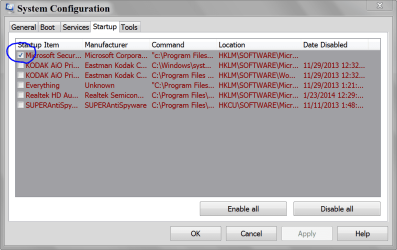
Leave the ones in RED check to startup. I would also recommend uninstalling either AVG or Zone Alarm Security.
 

My Computer

Computer type
PC/Desktop
Computer Manufacturer/Model Number
Home Built Desktop By DataTech
OS
Windows 7 Ultimate X64 SP1
CPU
Intel i5-2550K, Differing ~4.4-4.8GHz No built in GPU
Motherboard
ASUS P8Z68-V PRO/GEN3
Memory
16GB G.Skill Sniper 1866MHz @ 2133MHz 2x8GB
Graphics Card(s)
ASUS GTX650TIB-DC2OC-2GD5, (650TI Boost)
Sound Card
Onboard Realtek 5-1
Monitor(s) Displays
Samsung P2570HD
Screen Resolution
1920x1080
Hard Drives
Samsung 840 Pro 256GB SSD for OS, 500GB Seagate Constellation (Enterprise drive) for Data
PSU
Corsair HX650W
Case
Inwin Dragon Rider
Cooling
Hyper 212 EVO w/two Noctua fans, push-pull, @1300 RPM
Keyboard
E-Z Eyes, bright yellow keys with large characters
Mouse
steelseries SENSEI Laser Pro Gaming
Internet Speed
48-51Mbs Mbs down, 11 Mbs up Xfinity Cable
Antivirus
Norton Internet Security 2013
Browser
IE 10, Opera, Pale Moon if needed
Other Info
4 case fans, LG BluRay-RE, ASUS DVD-RW, Mr. Fusion power supply, 1.21 gigawatts.
You can disable everything with your name in the user section apart from Desktop Window Manager, your antivirus program and Windows explorer. Also don't delete any that have no name under user.
 

My Computer

Computer type
Laptop
Computer Manufacturer/Model Number
Acer Aspire 5349
OS
Windows 7 64bit operating system
CPU
Intel(R) Celeron(R) CPU B815 @ 1.60GHz
Motherboard
Acer Aspire 5349
Memory
4GB RAM
Graphics Card(s)
Intel(R) HD Graphics DDR3
Sound Card
Realtek High Definition Audio
Monitor(s) Displays
Generic PnP Monitor
Screen Resolution
1024x768
Hard Drives
700 GB Internal Hard Drive
Keyboard
Standard PS/2 Keyboard
Mouse
HID-compliant mouse and Synaptics PS/2 Port Touchpad
Internet Speed
30MB
Antivirus
AVG Free Edition 2014
Browser
Google Chrome, Opera, Mozilla Firefox
As Britton 30 has stated.
Use one and one only anti virus program on one computer at one time.
The two anti viruses will just fight each other and slow your computer down.
It will not make your computer safer and could make it less safe while the two anti viruses argue with each other. These should help.

http://www.avg.com/ww-en/faq.num-5172

Free Antivirus + Firewall Uninstall help.

This is the way my computers Services look like. I works well.
The things you uncheck will start up when you or Windows 7 tells them to. Therefor won't run in the background when not needed.

MSCONFIG STARTUP.PNG
 

My Computer

Computer type
PC/Desktop
Computer Manufacturer/Model Number
Home made Desktop
OS
Windows 10 Pro. 64/ version 1709 Windows 7 Pro/64
CPU
Intel i7-6800K @ 4.3
Motherboard
ASUS X-99 Deluxe II
Memory
Corsair Platinum 16 gig @2400
Graphics Card(s)
EVGA GTX 1070 OC
Monitor(s) Displays
Asus 27" LED LCD/VE278Q
Screen Resolution
1920-1080 or 1280-720 HDMI
Hard Drives
INTEL SSD 730-240 Gb Sata 3.0/
PSU
EVGA Platium 1200W
Case
Phanteks Luxe Tempered Glass 8 fans/ one radiator
Cooling
XSPC/ Water Cooled CPU
Keyboard
Das 4 Professional
Mouse
Logitech M705/MX Anywhere 2-S
Internet Speed
100 mbits
Antivirus
Microsoft Security Essentials/ Malwarebytes Premium 3.0/ SAS
Browser
I.E. 11 default/Firefox/ ISP Time Warner Cable/Spectrum
Other Info
LG BluRay Burner/
Sound system-KLipsch-THX/
Icy Dock ssd Hot Swap bays.
In addition to what the others have already said it looks like you are running two AV's too and as a general rule one is enough as two may conflict.

Oops read the post again and that has already been pointed out although it looks more like three.
 

My Computer

Computer type
PC/Desktop
Computer Manufacturer/Model Number
Own build (new) Desk1 / Asus ROG Win 7 / Desk2 1st build
OS
Desk1 7 Home Prem / Desk2 10 Pro / Main lap Asus ROG 10 Pro 2 laptop Toshiba 7 Pro Asus P2520 7 & 10
CPU
Desk1 i5 3750K / Laptop i7 GTX 860M / Desk2 i5 2500
Motherboard
Desk1 Asus P877-V / Desk2 Gigabyte H67 UD3H / Laptop ?
Memory
Desk1 8GB (1866) / Desk2 16GB (1333) / Laptop 8Gb DDR3
Graphics Card(s)
Desk 1& 2NVidia GTX 650 & Laptops on board Intel
Sound Card
Desk 1 & 2 -XONAR DG Realtek High Def audio Laptop
Monitor(s) Displays
Desk 1 Benq HD 2450 / Desk2 Philips 24" / Laptop 17.5"
Screen Resolution
1920x1080 D1 & D2 & Laptop 1
Hard Drives
Desk1 Samsung 120GB 830 SSD
Asus ROG 256GB 850 Pro SSD
Desk2 Samsung 840 256 SSD
Toshiba 120GB EVO
PSU
Desk 1 Corsair HX 1050/ Laptop ? / Desk 2 Corsair HX 650
Case
Desk 1 Cooler HAF XM ? Toshiba laptop / Desk2 Coolermaster
Cooling
Fans on all Desk1 -2 Desk2 - all Coolermasters 5 Laptop ?
Keyboard
Desk 1 MS Sidewinder X6 Desk 2 MS Sidewinder X 4
Mouse
Desk 1&2 - Gigabyte MS 900 gamer - laptop - Logitec wireless
Internet Speed
ADSL2+
Other Info
One other Desktop (tester) and spare Toshba laptop both with SSD's
Running Kaspersky 2016 ISS on all machines config'd identically
Logitec audio stereo systems on each machine (x3)
Canon MG5250MFC
Router/modem TP-Link running WPA2SK
An afterthought too I see it is an Acer is there a lot of bloatware on the machine too if so get rid of some of that:)
 

My Computer

Computer type
PC/Desktop
Computer Manufacturer/Model Number
Own build (new) Desk1 / Asus ROG Win 7 / Desk2 1st build
OS
Desk1 7 Home Prem / Desk2 10 Pro / Main lap Asus ROG 10 Pro 2 laptop Toshiba 7 Pro Asus P2520 7 & 10
CPU
Desk1 i5 3750K / Laptop i7 GTX 860M / Desk2 i5 2500
Motherboard
Desk1 Asus P877-V / Desk2 Gigabyte H67 UD3H / Laptop ?
Memory
Desk1 8GB (1866) / Desk2 16GB (1333) / Laptop 8Gb DDR3
Graphics Card(s)
Desk 1& 2NVidia GTX 650 & Laptops on board Intel
Sound Card
Desk 1 & 2 -XONAR DG Realtek High Def audio Laptop
Monitor(s) Displays
Desk 1 Benq HD 2450 / Desk2 Philips 24" / Laptop 17.5"
Screen Resolution
1920x1080 D1 & D2 & Laptop 1
Hard Drives
Desk1 Samsung 120GB 830 SSD
Asus ROG 256GB 850 Pro SSD
Desk2 Samsung 840 256 SSD
Toshiba 120GB EVO
PSU
Desk 1 Corsair HX 1050/ Laptop ? / Desk 2 Corsair HX 650
Case
Desk 1 Cooler HAF XM ? Toshiba laptop / Desk2 Coolermaster
Cooling
Fans on all Desk1 -2 Desk2 - all Coolermasters 5 Laptop ?
Keyboard
Desk 1 MS Sidewinder X6 Desk 2 MS Sidewinder X 4
Mouse
Desk 1&2 - Gigabyte MS 900 gamer - laptop - Logitec wireless
Internet Speed
ADSL2+
Other Info
One other Desktop (tester) and spare Toshba laptop both with SSD's
Running Kaspersky 2016 ISS on all machines config'd identically
Logitec audio stereo systems on each machine (x3)
Canon MG5250MFC
Router/modem TP-Link running WPA2SK
A lot of Forum members disable everything except their antivirus suite
That's the way I run since always and never had any problems. In addition I leave the sidebar (gadgets) and my Rocket dock. But those two I started myself.
 

My Computer

Computer Manufacturer/Model Number
HP, Dell, Gateway, Toshiba - 4 laptops and 2 desktops
OS
Vista, Windows7, Mint Mate, Zorin, Windows 8
CPU
from 1.6GHz Duo to i7
Monitor(s) Displays
2x HP w2207
Hard Drives
5x HDD, 7x SSD, 12x Externals
Keyboard
with trackball - no mices
Mouse
Trackball mice
Internet Speed
DSL 6000
Back
Top