notebook wakes up just after enterd sleep mode

tommygun

New member
Local time
5:49 AM
Messages
18
Hi.

Sleep mode was always working properly until a few days ago.

Now my notebook wakes up just after it got into sleep mode.

I did run cmd/powercfg -lastwake and it showed this:

Wake History Count - 1
Wake History [0]
Wake Source Count - 1
Wake Source [0]
Type: Device
Instance Path: ACPI\PNP0C0E\2&daba3ff&1
Friendly Name:
Description: ACPI Sleep Button
Manufacturer: (Standard system devices)

I understand that ACPI\PNP0C0E\2&daba3ff&1 is waking up my notebook.

What can I do to stop this ?

Any help is very much appreciated,
 

My Computer My Computer

At a glance

Windows 7 Ultimate x64
OS
Windows 7 Ultimate x64
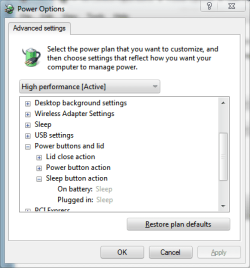
It sounds like your the sleep button itself is waking your computer. One thing you could try is disabling the sleep button's ability to wake your computer. You can do this in the power configuration.

Control Panel (All Items) > Power Options > Change Plan Settings > Change Advanced Power Settings > Power Buttons and Lid

Change the action of the Sleep button from "Sleep" to "Do Nothing"

sleepbutton.png

   Tip
This behavior might also go away if your update/install the correct drivers for your notebook. I'm not certain which of the various sets of drivers you'll need, but you should be able to find them on your manufacturer's website.
 

My Computer My Computer

At a glance

W7 Ult. x64 | OS XIntel Mobile Core 2 Duo 2.93Ghz [T9800 Penryn]4096MB Samsung DDR3 Dual Channel [PC3-8500F 1...NVIDIA GeForce 9600M GT 512MB [G96M Rev. C1]
Computer Manufacturer/Model Number
Apple Macbook Pro (April 2009)
OS
W7 Ult. x64 | OS X
CPU
Intel Mobile Core 2 Duo 2.93Ghz [T9800 Penryn]
Motherboard
NVIDIA nForce 730i Rev. B1 [Mac-F2268EC8 (U2E1)]
Memory
4096MB Samsung DDR3 Dual Channel [PC3-8500F 1066Mhz]
Graphics Card(s)
NVIDIA GeForce 9600M GT 512MB [G96M Rev. C1]
Sound Card
SB X-Fi Surround 5.1 USB | Onboard Realtek (Disabled)
Monitor(s) Displays
Acer x223wbd 22" | Apple Anti-Glare 17" (Disabled)
Screen Resolution
{Current} 1440x900 {Acer} 1680x1050 {Apple} 1920x1200
Hard Drives
{Internal}
Seagate Momentus 320GB 2.5" 7200RPM [ST9320421AS]

{Externals}
LaCie 320GB USB 2.0 HDD [301284UR]
LaCie 750GB USB 2.0 FW400 eSATA HDD [301314U]
LaCie 1TB USB 2.0 HDD [301304UR]
PSU
Magsafe
Case
Aluminum/Unibody (MBP52)
Cooling
2 x 6000 RPM Fans
Keyboard
Logitech G-15v2 [PN 920-000379]
Mouse
Logitech G-9 [PN 910-000338]
Internet Speed
12Mbps/2.5Mbps w/ 24Mbps Speed Boost [Comcast]
Other Info
Logitech X-540 Speakers [PN 970223-0122]
Sennheiser PC-151 Headset
Hi there, go to device mgr, right click on your network adaptor>Properties>Power management.
Uncheck Allow this device to wake up computer.

Untitled.png
 

My Computer My Computer

At a glance

Windows® 8 Pro (64-bit)Intel® Core™ i5 Processor 2467M (1.60GHz, 3MB...6GB DDR3 System Memory at 1,333MHz (on BD 4GB...AMD Radeon™ HD7550M 1GB DDR3 (Ext. Graphic)
Computer Manufacturer/Model Number
Samsung NP530U4B-S02IN
OS
Windows® 8 Pro (64-bit)
CPU
Intel® Core™ i5 Processor 2467M (1.60GHz, 3MB L3 Cache)
Motherboard
Samsung Electronics
Memory
6GB DDR3 System Memory at 1,333MHz (on BD 4GB + 2GB x 1)
Graphics Card(s)
AMD Radeon™ HD7550M 1GB DDR3 (Ext. Graphic)
Sound Card
Realtek High Definition Audio
Monitor(s) Displays
35.56cm (14.0) SuperBright 300nit HD LED Display
Screen Resolution
1366x768
Hard Drives
1TB S-ATA II Hard Drive (5400RPM) with ExpressCache 16GB SSD
Internet Speed
sucks
Antivirus
Microsoft Security Essentials
Browser
Google Chrome (Sync enabled)
....... thanks for both of your replies.

@Dinesh

All devices are already unchecked in the Device Manager in order to don't wake up the system.

@notsograymatter

I tried your suggestion but still the same behavior.

It was working fine all the time until a few days ago this problem started.

Hibernation is working as well as it should.

Hopefully you guys got another suggestion to fix this.

Thanks again .......
 

My Computer My Computer

At a glance

Windows 7 Ultimate x64
OS
Windows 7 Ultimate x64
Back
Top