Solved Nothing happens when pressing favorites star

rad1218

New member
Local time
3:19 PM
Messages
3
When I press the favorites star there is no drop down window that displays my favorites. My favorites do show up in my c drive on computer and can be accessed. The home button and tools button work with no problems. Have tried several different suggestions found on internet including resetting ie11, HKEY_CURRENT_USER and HKEY_USERS in which both show C:\username\favorites. This is a new computer running Windows 7 Professional 64 bit Internet Explorer 11. Any help with this issue would be greatly appreciated.

Thanks, rad
 

My Computer My Computer

At a glance

windows 7 professional 64bit
Computer type
PC/Desktop
Computer Manufacturer/Model Number
Dell
OS
windows 7 professional 64bit
Thanks Sky Ranch for replying, unfortunately I have tried that same tutorial with no results. I guess I'm going to make shortcuts on my desktop for the fav's that use the most.
 

My Computer My Computer

At a glance

windows 7 professional 64bit
Computer type
PC/Desktop
Computer Manufacturer/Model Number
Dell
OS
windows 7 professional 64bit
Hi Rad,
This is what I get in IE11 by clicking Favourites and the Star.

RR.png
 

My Computer My Computer

At a glance

Win7 H.Prem. 32bit+SP1
Computer Manufacturer/Model Number
Look in my Signature.
OS
Win7 H.Prem. 32bit+SP1
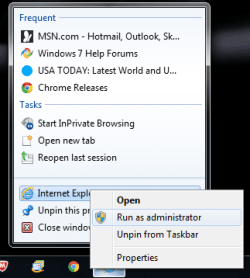
Try pressing the Favorites star when running Internet Explorer 11 as administrator and see if it works that way. See picture below:

If it works in admin mode, then disable any security suite if installed then open IE11 again and seen if it fixes the problem. Reason being is that I have experienced IE11 issues involving saving favorites due to a bug internet security software installed on my machine.

If none of the suggestions work then continue to monitor the thread as there are other's that can help.
 

Attachments

  • Untitled.png
    Untitled.png
    11.5 KB · Views: 15

My Computer My Computer

At a glance

Windows 7 Home 64-bit
Computer type
PC/Desktop
OS
Windows 7 Home 64-bit
solved

Thank you for your help in trying to resolve this problem. After exhausting all avenues I decided to get rid of Win7 and upgrade to Win10, no problem now works perfect in Win10.

RAD
 

My Computer My Computer

At a glance

windows 7 professional 64bit
Computer type
PC/Desktop
Computer Manufacturer/Model Number
Dell
OS
windows 7 professional 64bit
Back
Top