Notification Area Icons - Hide or Show System Icons and Notifications

How to Hide or Show System Icons and Notifications in Windows 7 and Windows 8

   Information
The notification area is a part of the taskbar that provides a temporary source for notifications and status. It can also be used to display icons for system and program features that are not on the desktop. The notification area was known historically as the system tray or status area.

By default, the only icons that will be visible in this area are some system icons. However, you can select which icons appear on the taskbar, and which icons hide in the overflow section.

This will show you how to hide or show your choice of the system icons and their notifications on the taskbar in Windows 7 and Windows 8.

   Note
Each system icon will have the choice to Only show notifications, Show icon and notifications, Hide icon and notifications, or Always show all icons on the taskbar with notifications.

   Tip
Microsoft has made available a hotfix that will resolve a problem where the taskbar customizations are lost and reset to defaults when automatic logon is enabled in Windows 7 and Windows Server 2008 R2. More details are available at:

FIX: The Taskbar is reset to the default settings when you use the "Automatically Log On" feature in Windows 7 and in Windows Server 2008 R2.


EXAMPLE: Show All System Icons and Hide System Icons on the Taskbar
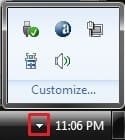
NOTE: To view icons that are hidden, click on the arrow in the notification area on the taskbar. (Right screenshot below)
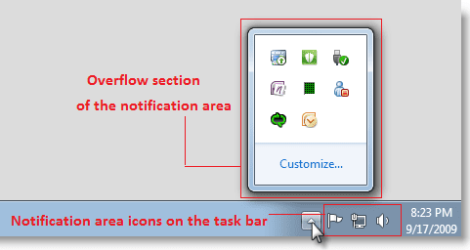
Notfication_Area_Icons.png


OPTION ONE

Through Notification Area Icons Settings


1. Do step 2, 3, or 4 below for what you would like to do.

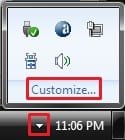
2. Click on the arrow in the notification area on the taskbar, and click on Customize, and go to step 5 below. (See screenshot below)
NOTE: You will not see this arrow unless you already have hidden system icons.
213d1225691787-notification-area-icons-hide-show-system-icons-notifications-hidden_icons-2.jpg

3. Open the Control Panel (icons view), click/tap on the Notification Area Icons icon, and go to step 5 below.

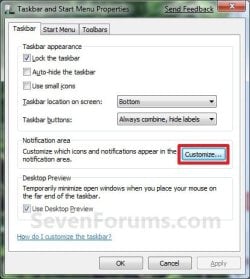
4. Right click or press and hold on the taskbar, and click/tap on Properties.
A) Click/tap on the Customize button to the right of "Notification area". (see screenshot below)

B) Click on Cancel to close the Taskbar and Start Menu Properties window, and go to step 5 below.
Taskbar_Properties.jpg
5. To Always Show All System Icons and Notifications
A) Check the Always show all icons and notifications on the taskbar box, and go to step 11 below. (See screenshot below)
NOTE: This will only gray out all of the Behaviors for the Icons. It will not change how the Behaviors are set if you wanted to uncheck this box later.
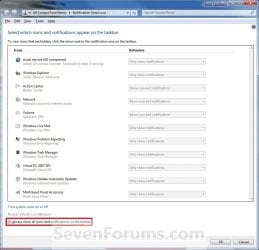
Customize-1.jpg
6. To Show a System Icon and its Notifications
A) Uncheck the Always show all icons and notifications on the taskbar box. (See screenshot above)
WARNING: Unchecking this box will also have all of the other listed system icons act as they are set in their Behaviors options.

B) Click/tap on the Behaviors drop down arrow menu to the right of the icon you want this behavior for. (See screenshot below step 11)

C) Click/tap on Show icon and notifications to select it.
7. To Hide a System Icon and its Notifications
A) Uncheck the Always show all icons and notifications on the taskbar box. (See screenshot below step 5A)
WARNING: Unchecking this box will also have all of the other listed system icons act as they are set in their Behaviors options.

B) Click/tap on the Behaviors drop down arrow menu to the right of the icon you want this behavior for. (See screenshot below step 11)

C) Click/tap on Hide icon and notifications to select it.
8. To Only Show a System Icon's Notifications
A) Uncheck the Always show all icons and notifications on the taskbar box. (See screenshot below step 2)
WARNING: Unchecking this box will also have all of the other listed system icons act as they are set in their Behaviors options.

B) Click/tap on the Behaviors drop down arrow menu to the right of the icon you want this behavior for. (See screenshot below step 10)

C) Click/tap on Only show notifications to select it.
9. Repeat steps 6 to 8 until you have set the system icon Behaviors to how you want them for each icon.

10. To Restore the Default System Icon's Behaviors
A) Uncheck the Always show all icons and notifications on the taskbar box. (See screenshot below step 2)
WARNING: Unchecking this box will also have all of the other listed system icons act as they are set in their Behaviors options.

B) Click/tap on the Restore default icon behaviors link. (See screenshot below)
11. When done, click/tap on OK. (See screenshot below)
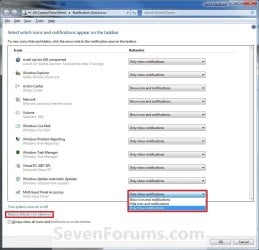
Customize-2.jpg
12. Click/tap on OK. (See screenshot below)
NOTE: You will not see this unless you had opened the System Icons window from the Control Panel above.


OPTION TWO

Using a REG File Download


NOTE: This will only turn on or off Always show icons and notifications on the taskbar.
1. To Turn On Always show all taskbar icons and notifcations
A) Click/tap on the download button below to download the file below.
Turn_On_Always_show_all_taskbar_icons_and_notifcations.reg


Download


B) Go to step 3.
2. To Turn Off Always show all taskbar icons and notifcations
A) Click/tap on the download button below to download the file below.
Turn_Off_Always_show_all_taskbar_icons_and_notifcations.reg

Download


3. Save the .reg file to the desktop.

4. Double click/tap on the downloaded .reg to merge it.

6. Click/tap on Run, Yes (UAC), Yes, and OK when prompted.

7. Log off and log on, or restart the computer to apply the changes.

8. When done, you can delete the downloaded .reg file if you like.


OPTION THREE

Manually in Registry Editor


NOTE: This will only turn on or off Always show icons and notifications on the taskbar.
1. Press the Windows+R keys to open the Run dialog, type regedit, and press Enter.

2. In regedit, navigate to the location below. (See screenshot below step 3)
HKEY_CURRENT_USER\Software\Microsoft\Windows\CurrentVersion\Explorer
3. In the right pane, double click/tap on EnableAutoTray to modify it. (See screenshot above)
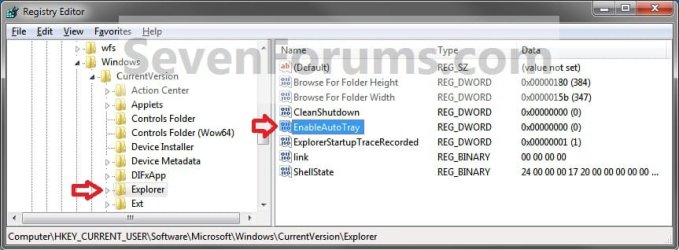
Regedit.jpg
4. To Turn On "Always show all taskbar icons and notifcations"
A) Type in 0 (zero) and click/tap on OK. (see screenshot below)
Modify.jpg
B) Go to step 6.
5. To Turn Off "Always show all taskbar icons and notifcations"
A) Type in 1 and click/tap on OK. (see screenshot above)
6. Close Regedit.

7. Log off and log on, or restart the computer to apply the changes.
That's it,
Shawn


Related Tutorials


Attachments

Last edited:
Sunimar,

If you haven't already, right click on the tray icon to see if there may be a setting or option to not display the tray icon.

If not, then you may have one of those programs that will override this setting and always will display their tray icon and/or give notification messages. It just depends on how the progam was written. :(

i did Shawn but i guess that's of no good...And it seems that the 2nd reason that you proposed is the reason for the icons still showing in the notification area.
 

My Computer My Computer

At a glance

Windows 7 Ultimate
Computer type
Laptop
OS
Windows 7 Ultimate
That's what I was afraid of. Sorry. :(
 

My Computer My Computer

At a glance

64-bit Windows 11 Pro for WorkstationsIntel i7-8700K OC'd to 5 GHz64 GB (4x16GB) G.SKILL TridentZ RGB DDR4 3600...ASUS ROG-STRIX-GTX1080TI-O11G-GAMING
Computer type
PC/Desktop
Computer Manufacturer/Model Number
Self built custom
OS
64-bit Windows 11 Pro for Workstations
CPU
Intel i7-8700K OC'd to 5 GHz
Motherboard
ASUS ROG Maximus XI Formula Z390
Memory
64 GB (4x16GB) G.SKILL TridentZ RGB DDR4 3600 MHz
Graphics Card(s)
ASUS ROG-STRIX-GTX1080TI-O11G-GAMING
Sound Card
Integrated
Monitor(s) Displays
2 x Samsung Odyssey G7 27"
Screen Resolution
2560x1440
Hard Drives
1TB Samsung 990 PRO M.2,
4TB Samsung 990 PRO PRO M.2,
TerraMaster F8 SSD Plus NAS
PSU
Seasonic Prime Titanium 850W
Case
Thermaltake Core P3
Cooling
Corsair Hydro H115i
Keyboard
Logitech wireless K800
Mouse
Logitech MX Master 4
Internet Speed
2 Gb/s Download and 100 Mb/s Upload
Antivirus
Malwarebyte Anti-Malware Premium
Browser
Google Chrome
Other Info
Logitech Z625 speaker system,
Logitech BRIO 4K Pro webcam,
HP Color LaserJet Pro MFP M477fdn,
APC SMART-UPS RT 1000 XL - SURT1000XLI,
Galaxy S23 Plus phone
Hahahahaha....why are you being sorry on Mr.Bill Gates behalf...you have tried to help others...Thanks again!!!
 

My Computer My Computer

At a glance

Windows 7 Ultimate
Computer type
Laptop
OS
Windows 7 Ultimate
I have a software that is shown in the List of Notification Icons. Under Behavior, I have "Show Icon and Notifacations. The Icon does not appear in the task Bar Notification area. If I select show All icons, it still doesn't appear. Of course a work around is to move the .exe file to Start Up but I don't want the program to open on the desk top.

Any work around for this or is this a quirk in the OS?
 

My Computer My Computer

At a glance

Windows 7 Home Premiun 64bitIntel Core i3-2100 301Ghz6 gigOnboard
Computer Manufacturer/Model Number
Clone
OS
Windows 7 Home Premiun 64bit
CPU
Intel Core i3-2100 301Ghz
Motherboard
Asus P8H61-M Rev 3.0
Memory
6 gig
Graphics Card(s)
Onboard
Sound Card
Onboard
Monitor(s) Displays
HP w1858
Hard Drives
WD Sata 500 Gig
Hello RM,

What program is this for?

You might check to see if the program may have it's own set of settings for it's notification icon to always appear or not.

Hope this helps for now,
Shawn
 
Last edited:

My Computer My Computer

At a glance

64-bit Windows 11 Pro for WorkstationsIntel i7-8700K OC'd to 5 GHz64 GB (4x16GB) G.SKILL TridentZ RGB DDR4 3600...ASUS ROG-STRIX-GTX1080TI-O11G-GAMING
Computer type
PC/Desktop
Computer Manufacturer/Model Number
Self built custom
OS
64-bit Windows 11 Pro for Workstations
CPU
Intel i7-8700K OC'd to 5 GHz
Motherboard
ASUS ROG Maximus XI Formula Z390
Memory
64 GB (4x16GB) G.SKILL TridentZ RGB DDR4 3600 MHz
Graphics Card(s)
ASUS ROG-STRIX-GTX1080TI-O11G-GAMING
Sound Card
Integrated
Monitor(s) Displays
2 x Samsung Odyssey G7 27"
Screen Resolution
2560x1440
Hard Drives
1TB Samsung 990 PRO M.2,
4TB Samsung 990 PRO PRO M.2,
TerraMaster F8 SSD Plus NAS
PSU
Seasonic Prime Titanium 850W
Case
Thermaltake Core P3
Cooling
Corsair Hydro H115i
Keyboard
Logitech wireless K800
Mouse
Logitech MX Master 4
Internet Speed
2 Gb/s Download and 100 Mb/s Upload
Antivirus
Malwarebyte Anti-Malware Premium
Browser
Google Chrome
Other Info
Logitech Z625 speaker system,
Logitech BRIO 4K Pro webcam,
HP Color LaserJet Pro MFP M477fdn,
APC SMART-UPS RT 1000 XL - SURT1000XLI,
Galaxy S23 Plus phone
It's VSO Downloader. A newly developed software for downloading internet videos. I emailed the developer to intagrate in his next release a "close to task bar" but nothing related to this issue
 

My Computer My Computer

At a glance

Windows 7 Home Premiun 64bitIntel Core i3-2100 301Ghz6 gigOnboard
Computer Manufacturer/Model Number
Clone
OS
Windows 7 Home Premiun 64bit
CPU
Intel Core i3-2100 301Ghz
Motherboard
Asus P8H61-M Rev 3.0
Memory
6 gig
Graphics Card(s)
Onboard
Sound Card
Onboard
Monitor(s) Displays
HP w1858
Hard Drives
WD Sata 500 Gig
The System Tray is one thing that drives me buggy. What it needs is a toggle to either Always show all icons and notifications, or Never show them. When you toggle it should change all the individual settings. Then you would only have to change the exceptions. For instance I should be able to set Show All icons and notifications, then just scroll down to Solve PC Issues and toggle that off or whatever.

The only quick way is to turn them all on, then waste the space showing all the crapware icons like Norton Anti-theft that isn't even activated. It's crazy.

So, long winded way of asking, has anyone done a utility to makes sense of the madness? :)
 

My Computer My Computer

At a glance

Windows 7 32 bitAMD 5200+ dual core2 GBNVidia GeForce 6150SE 128 MB
Computer Manufacturer/Model Number
HP Media Center
OS
Windows 7 32 bit
CPU
AMD 5200+ dual core
Memory
2 GB
Graphics Card(s)
NVidia GeForce 6150SE 128 MB
Monitor(s) Displays
CRT
Screen Resolution
1280x1024
Hard Drives
500 GB Sata internal :

SIIG USB 3.0 docking stations w/WD Caviar Black 6 Gb/s drives
Keyboard
PS/2
Mouse
PS/2 Wheel Mouse
Other Info
SIIG USB 3.0 PCIexpress card.

My Computer My Computer

At a glance

64-bit Windows 11 Pro for WorkstationsIntel i7-8700K OC'd to 5 GHz64 GB (4x16GB) G.SKILL TridentZ RGB DDR4 3600...ASUS ROG-STRIX-GTX1080TI-O11G-GAMING
Computer type
PC/Desktop
Computer Manufacturer/Model Number
Self built custom
OS
64-bit Windows 11 Pro for Workstations
CPU
Intel i7-8700K OC'd to 5 GHz
Motherboard
ASUS ROG Maximus XI Formula Z390
Memory
64 GB (4x16GB) G.SKILL TridentZ RGB DDR4 3600 MHz
Graphics Card(s)
ASUS ROG-STRIX-GTX1080TI-O11G-GAMING
Sound Card
Integrated
Monitor(s) Displays
2 x Samsung Odyssey G7 27"
Screen Resolution
2560x1440
Hard Drives
1TB Samsung 990 PRO M.2,
4TB Samsung 990 PRO PRO M.2,
TerraMaster F8 SSD Plus NAS
PSU
Seasonic Prime Titanium 850W
Case
Thermaltake Core P3
Cooling
Corsair Hydro H115i
Keyboard
Logitech wireless K800
Mouse
Logitech MX Master 4
Internet Speed
2 Gb/s Download and 100 Mb/s Upload
Antivirus
Malwarebyte Anti-Malware Premium
Browser
Google Chrome
Other Info
Logitech Z625 speaker system,
Logitech BRIO 4K Pro webcam,
HP Color LaserJet Pro MFP M477fdn,
APC SMART-UPS RT 1000 XL - SURT1000XLI,
Galaxy S23 Plus phone
No, I need most of them. But I want to shut off those that don't give me any info. What I'm looking for is something like a virus scnner where you can check all or uncheck all, then just turn off or on the exceptions. If you have a dozen 3rd party tray programs, then the ones that come installed, you can spend 10 minutes setting dropdown boxes. It should be radio buttons anyway. Then you wouldn't have to wait for them to react. Just click to fill in the desired setting. Those dropdowns are slow and flaky. Half the time they change to a different setting after you release the mouse button. The antithesis of convenience you might say. :)
 

My Computer My Computer

At a glance

Windows 7 32 bitAMD 5200+ dual core2 GBNVidia GeForce 6150SE 128 MB
Computer Manufacturer/Model Number
HP Media Center
OS
Windows 7 32 bit
CPU
AMD 5200+ dual core
Memory
2 GB
Graphics Card(s)
NVidia GeForce 6150SE 128 MB
Monitor(s) Displays
CRT
Screen Resolution
1280x1024
Hard Drives
500 GB Sata internal :

SIIG USB 3.0 docking stations w/WD Caviar Black 6 Gb/s drives
Keyboard
PS/2
Mouse
PS/2 Wheel Mouse
Other Info
SIIG USB 3.0 PCIexpress card.
I like this - thnx.

One issue :

I have all my icon behaviors set to 'Only Show Notifications'. When restart is complete the Network and Volume icons are displayed and I always have to go in and redo the settings. Anybody else have this issue? Can fix?

-thx.
 

My Computer My Computer

At a glance

Microsoft Windows 7 Home Premium 64-bit 7601 ...Pentium(R) Dual-Core CPU E5300 @ 2.60GHz6.00 GBIntel(R) G33/G31 Express Chipset Family
Computer type
PC/Desktop
Computer Manufacturer/Model Number
HP (HP-P6212F)
OS
Microsoft Windows 7 Home Premium 64-bit 7601 Multiprocessor Free Service Pack 1
CPU
Pentium(R) Dual-Core CPU E5300 @ 2.60GHz
Motherboard
PEGATRON CORPORATION Benicia
Memory
6.00 GB
Graphics Card(s)
Intel(R) G33/G31 Express Chipset Family
Sound Card
Realtek High Definition Audio
Monitor(s) Displays
24'' HP WS LCD
Screen Resolution
1920 x 1080 x 32 bits (4294967296 colors) @ 60 Hz
Hard Drives
(1) ATA Hitachi HDT72106 SCSI Disk Device (2) Generic- Compact Flash USB Device (3) Generic- MS/MS-Pro USB Device (4) Generic- SD/MMC USB Device (5) Generic- SM/xD-Picture USB Device (6) Verbatim STORE N GO USB Device
Keyboard
Logitech G510s
Mouse
Logitech Trackball M570
Antivirus
Microsoft Security Essentials / Malwarebytes
Browser
IE / Firefox / Chrome
I like this - thnx.

One issue :

I have all my icon behaviors set to 'Only Show Notifications'. When restart is complete the Network and Volume icons are displayed and I always have to go in and redo the settings. Anybody else have this issue? Can fix?

-thx.


Hello Marc,

Do they hide later on there own, or only if you reset their settings?
 
Last edited:

My Computer My Computer

At a glance

64-bit Windows 11 Pro for WorkstationsIntel i7-8700K OC'd to 5 GHz64 GB (4x16GB) G.SKILL TridentZ RGB DDR4 3600...ASUS ROG-STRIX-GTX1080TI-O11G-GAMING
Computer type
PC/Desktop
Computer Manufacturer/Model Number
Self built custom
OS
64-bit Windows 11 Pro for Workstations
CPU
Intel i7-8700K OC'd to 5 GHz
Motherboard
ASUS ROG Maximus XI Formula Z390
Memory
64 GB (4x16GB) G.SKILL TridentZ RGB DDR4 3600 MHz
Graphics Card(s)
ASUS ROG-STRIX-GTX1080TI-O11G-GAMING
Sound Card
Integrated
Monitor(s) Displays
2 x Samsung Odyssey G7 27"
Screen Resolution
2560x1440
Hard Drives
1TB Samsung 990 PRO M.2,
4TB Samsung 990 PRO PRO M.2,
TerraMaster F8 SSD Plus NAS
PSU
Seasonic Prime Titanium 850W
Case
Thermaltake Core P3
Cooling
Corsair Hydro H115i
Keyboard
Logitech wireless K800
Mouse
Logitech MX Master 4
Internet Speed
2 Gb/s Download and 100 Mb/s Upload
Antivirus
Malwarebyte Anti-Malware Premium
Browser
Google Chrome
Other Info
Logitech Z625 speaker system,
Logitech BRIO 4K Pro webcam,
HP Color LaserJet Pro MFP M477fdn,
APC SMART-UPS RT 1000 XL - SURT1000XLI,
Galaxy S23 Plus phone
Hi Shawn -

'On their own'? This is what should happen? I have always reset manually after the reboot. Are you suggesting I wait awhile? How long?
 

My Computer My Computer

At a glance

Microsoft Windows 7 Home Premium 64-bit 7601 ...Pentium(R) Dual-Core CPU E5300 @ 2.60GHz6.00 GBIntel(R) G33/G31 Express Chipset Family
Computer type
PC/Desktop
Computer Manufacturer/Model Number
HP (HP-P6212F)
OS
Microsoft Windows 7 Home Premium 64-bit 7601 Multiprocessor Free Service Pack 1
CPU
Pentium(R) Dual-Core CPU E5300 @ 2.60GHz
Motherboard
PEGATRON CORPORATION Benicia
Memory
6.00 GB
Graphics Card(s)
Intel(R) G33/G31 Express Chipset Family
Sound Card
Realtek High Definition Audio
Monitor(s) Displays
24'' HP WS LCD
Screen Resolution
1920 x 1080 x 32 bits (4294967296 colors) @ 60 Hz
Hard Drives
(1) ATA Hitachi HDT72106 SCSI Disk Device (2) Generic- Compact Flash USB Device (3) Generic- MS/MS-Pro USB Device (4) Generic- SD/MMC USB Device (5) Generic- SM/xD-Picture USB Device (6) Verbatim STORE N GO USB Device
Keyboard
Logitech G510s
Mouse
Logitech Trackball M570
Antivirus
Microsoft Security Essentials / Malwarebytes
Browser
IE / Firefox / Chrome

My Computer My Computer

At a glance

Microsoft Windows 7 Home Premium 64-bit 7601 ...Pentium(R) Dual-Core CPU E5300 @ 2.60GHz6.00 GBIntel(R) G33/G31 Express Chipset Family
Computer type
PC/Desktop
Computer Manufacturer/Model Number
HP (HP-P6212F)
OS
Microsoft Windows 7 Home Premium 64-bit 7601 Multiprocessor Free Service Pack 1
CPU
Pentium(R) Dual-Core CPU E5300 @ 2.60GHz
Motherboard
PEGATRON CORPORATION Benicia
Memory
6.00 GB
Graphics Card(s)
Intel(R) G33/G31 Express Chipset Family
Sound Card
Realtek High Definition Audio
Monitor(s) Displays
24'' HP WS LCD
Screen Resolution
1920 x 1080 x 32 bits (4294967296 colors) @ 60 Hz
Hard Drives
(1) ATA Hitachi HDT72106 SCSI Disk Device (2) Generic- Compact Flash USB Device (3) Generic- MS/MS-Pro USB Device (4) Generic- SD/MMC USB Device (5) Generic- SM/xD-Picture USB Device (6) Verbatim STORE N GO USB Device
Keyboard
Logitech G510s
Mouse
Logitech Trackball M570
Antivirus
Microsoft Security Essentials / Malwarebytes
Browser
IE / Firefox / Chrome
Yeah, you might give it the day to see if they may hide on their own.

Usually at Windows start up, the initializing of the network and volume most likely triggers them to show. Pretty much the same behavior with AV notification icons as well.

Do you have this issue when resuming from sleep or hibernation?
 

My Computer My Computer

At a glance

64-bit Windows 11 Pro for WorkstationsIntel i7-8700K OC'd to 5 GHz64 GB (4x16GB) G.SKILL TridentZ RGB DDR4 3600...ASUS ROG-STRIX-GTX1080TI-O11G-GAMING
Computer type
PC/Desktop
Computer Manufacturer/Model Number
Self built custom
OS
64-bit Windows 11 Pro for Workstations
CPU
Intel i7-8700K OC'd to 5 GHz
Motherboard
ASUS ROG Maximus XI Formula Z390
Memory
64 GB (4x16GB) G.SKILL TridentZ RGB DDR4 3600 MHz
Graphics Card(s)
ASUS ROG-STRIX-GTX1080TI-O11G-GAMING
Sound Card
Integrated
Monitor(s) Displays
2 x Samsung Odyssey G7 27"
Screen Resolution
2560x1440
Hard Drives
1TB Samsung 990 PRO M.2,
4TB Samsung 990 PRO PRO M.2,
TerraMaster F8 SSD Plus NAS
PSU
Seasonic Prime Titanium 850W
Case
Thermaltake Core P3
Cooling
Corsair Hydro H115i
Keyboard
Logitech wireless K800
Mouse
Logitech MX Master 4
Internet Speed
2 Gb/s Download and 100 Mb/s Upload
Antivirus
Malwarebyte Anti-Malware Premium
Browser
Google Chrome
Other Info
Logitech Z625 speaker system,
Logitech BRIO 4K Pro webcam,
HP Color LaserJet Pro MFP M477fdn,
APC SMART-UPS RT 1000 XL - SURT1000XLI,
Galaxy S23 Plus phone
... Do you have this issue when resuming from sleep or hibernation?
no.


I have this issue ONLY when I run this utility AND ...

CCleaner also performs notification area reset/cleanup, if the box is checked (refer to earlier posts in this thread). However, in the case of CCleaner one need only to restart explorer for reset/cleanup to take effect, a machine restart is not required. However, even this process generates this same issue.
 

My Computer My Computer

At a glance

Microsoft Windows 7 Home Premium 64-bit 7601 ...Pentium(R) Dual-Core CPU E5300 @ 2.60GHz6.00 GBIntel(R) G33/G31 Express Chipset Family
Computer type
PC/Desktop
Computer Manufacturer/Model Number
HP (HP-P6212F)
OS
Microsoft Windows 7 Home Premium 64-bit 7601 Multiprocessor Free Service Pack 1
CPU
Pentium(R) Dual-Core CPU E5300 @ 2.60GHz
Motherboard
PEGATRON CORPORATION Benicia
Memory
6.00 GB
Graphics Card(s)
Intel(R) G33/G31 Express Chipset Family
Sound Card
Realtek High Definition Audio
Monitor(s) Displays
24'' HP WS LCD
Screen Resolution
1920 x 1080 x 32 bits (4294967296 colors) @ 60 Hz
Hard Drives
(1) ATA Hitachi HDT72106 SCSI Disk Device (2) Generic- Compact Flash USB Device (3) Generic- MS/MS-Pro USB Device (4) Generic- SD/MMC USB Device (5) Generic- SM/xD-Picture USB Device (6) Verbatim STORE N GO USB Device
Keyboard
Logitech G510s
Mouse
Logitech Trackball M570
Antivirus
Microsoft Security Essentials / Malwarebytes
Browser
IE / Firefox / Chrome
I must admit that I'm not sure why they keep showing on you. They don't for me after a restart with the same setting.

Do they do this with any other user account?
 

My Computer My Computer

At a glance

64-bit Windows 11 Pro for WorkstationsIntel i7-8700K OC'd to 5 GHz64 GB (4x16GB) G.SKILL TridentZ RGB DDR4 3600...ASUS ROG-STRIX-GTX1080TI-O11G-GAMING
Computer type
PC/Desktop
Computer Manufacturer/Model Number
Self built custom
OS
64-bit Windows 11 Pro for Workstations
CPU
Intel i7-8700K OC'd to 5 GHz
Motherboard
ASUS ROG Maximus XI Formula Z390
Memory
64 GB (4x16GB) G.SKILL TridentZ RGB DDR4 3600 MHz
Graphics Card(s)
ASUS ROG-STRIX-GTX1080TI-O11G-GAMING
Sound Card
Integrated
Monitor(s) Displays
2 x Samsung Odyssey G7 27"
Screen Resolution
2560x1440
Hard Drives
1TB Samsung 990 PRO M.2,
4TB Samsung 990 PRO PRO M.2,
TerraMaster F8 SSD Plus NAS
PSU
Seasonic Prime Titanium 850W
Case
Thermaltake Core P3
Cooling
Corsair Hydro H115i
Keyboard
Logitech wireless K800
Mouse
Logitech MX Master 4
Internet Speed
2 Gb/s Download and 100 Mb/s Upload
Antivirus
Malwarebyte Anti-Malware Premium
Browser
Google Chrome
Other Info
Logitech Z625 speaker system,
Logitech BRIO 4K Pro webcam,
HP Color LaserJet Pro MFP M477fdn,
APC SMART-UPS RT 1000 XL - SURT1000XLI,
Galaxy S23 Plus phone
... Do they do this with any other user account?
Only one account (other than factory admin) on this machine.

Having this issue reproduced via CCLeaner tells me it is not due to your utility. I can live with it. Thx for looking in Shawn.
 

My Computer My Computer

At a glance

Microsoft Windows 7 Home Premium 64-bit 7601 ...Pentium(R) Dual-Core CPU E5300 @ 2.60GHz6.00 GBIntel(R) G33/G31 Express Chipset Family
Computer type
PC/Desktop
Computer Manufacturer/Model Number
HP (HP-P6212F)
OS
Microsoft Windows 7 Home Premium 64-bit 7601 Multiprocessor Free Service Pack 1
CPU
Pentium(R) Dual-Core CPU E5300 @ 2.60GHz
Motherboard
PEGATRON CORPORATION Benicia
Memory
6.00 GB
Graphics Card(s)
Intel(R) G33/G31 Express Chipset Family
Sound Card
Realtek High Definition Audio
Monitor(s) Displays
24'' HP WS LCD
Screen Resolution
1920 x 1080 x 32 bits (4294967296 colors) @ 60 Hz
Hard Drives
(1) ATA Hitachi HDT72106 SCSI Disk Device (2) Generic- Compact Flash USB Device (3) Generic- MS/MS-Pro USB Device (4) Generic- SD/MMC USB Device (5) Generic- SM/xD-Picture USB Device (6) Verbatim STORE N GO USB Device
Keyboard
Logitech G510s
Mouse
Logitech Trackball M570
Antivirus
Microsoft Security Essentials / Malwarebytes
Browser
IE / Firefox / Chrome
CCleaner also performs notification area reset/cleanup, if the box is checked (refer to earlier posts in this thread). However, in the case of CCleaner one need only to restart explorer for reset/cleanup to take effect, a machine restart is not required.
Hi Shawn -

Can you easily modify or make a new utility that will take effect with a restart of explorer as opposed to a full machine re-boot?

-thx
 

My Computer My Computer

At a glance

Microsoft Windows 7 Home Premium 64-bit 7601 ...Pentium(R) Dual-Core CPU E5300 @ 2.60GHz6.00 GBIntel(R) G33/G31 Express Chipset Family
Computer type
PC/Desktop
Computer Manufacturer/Model Number
HP (HP-P6212F)
OS
Microsoft Windows 7 Home Premium 64-bit 7601 Multiprocessor Free Service Pack 1
CPU
Pentium(R) Dual-Core CPU E5300 @ 2.60GHz
Motherboard
PEGATRON CORPORATION Benicia
Memory
6.00 GB
Graphics Card(s)
Intel(R) G33/G31 Express Chipset Family
Sound Card
Realtek High Definition Audio
Monitor(s) Displays
24'' HP WS LCD
Screen Resolution
1920 x 1080 x 32 bits (4294967296 colors) @ 60 Hz
Hard Drives
(1) ATA Hitachi HDT72106 SCSI Disk Device (2) Generic- Compact Flash USB Device (3) Generic- MS/MS-Pro USB Device (4) Generic- SD/MMC USB Device (5) Generic- SM/xD-Picture USB Device (6) Verbatim STORE N GO USB Device
Keyboard
Logitech G510s
Mouse
Logitech Trackball M570
Antivirus
Microsoft Security Essentials / Malwarebytes
Browser
IE / Firefox / Chrome
Hey Marc,

Not that I'm aware of. :(
 

My Computer My Computer

At a glance

64-bit Windows 11 Pro for WorkstationsIntel i7-8700K OC'd to 5 GHz64 GB (4x16GB) G.SKILL TridentZ RGB DDR4 3600...ASUS ROG-STRIX-GTX1080TI-O11G-GAMING
Computer type
PC/Desktop
Computer Manufacturer/Model Number
Self built custom
OS
64-bit Windows 11 Pro for Workstations
CPU
Intel i7-8700K OC'd to 5 GHz
Motherboard
ASUS ROG Maximus XI Formula Z390
Memory
64 GB (4x16GB) G.SKILL TridentZ RGB DDR4 3600 MHz
Graphics Card(s)
ASUS ROG-STRIX-GTX1080TI-O11G-GAMING
Sound Card
Integrated
Monitor(s) Displays
2 x Samsung Odyssey G7 27"
Screen Resolution
2560x1440
Hard Drives
1TB Samsung 990 PRO M.2,
4TB Samsung 990 PRO PRO M.2,
TerraMaster F8 SSD Plus NAS
PSU
Seasonic Prime Titanium 850W
Case
Thermaltake Core P3
Cooling
Corsair Hydro H115i
Keyboard
Logitech wireless K800
Mouse
Logitech MX Master 4
Internet Speed
2 Gb/s Download and 100 Mb/s Upload
Antivirus
Malwarebyte Anti-Malware Premium
Browser
Google Chrome
Other Info
Logitech Z625 speaker system,
Logitech BRIO 4K Pro webcam,
HP Color LaserJet Pro MFP M477fdn,
APC SMART-UPS RT 1000 XL - SURT1000XLI,
Galaxy S23 Plus phone
Odd - for the heck of it I thought I would re-download & run that 'reset notification area' bat file from your tutorial and rather than hit 'y' to restart I hit 'n' and would run an explorer restart instead. Behold : when I execute the bat a restart explorer dos command warning window pops up instructing to save all open programs and then hit any key. I hit any key and then the reset bat file runs with the dos window appearing as per the tutorial. I hit 'n' per the restart prompt. I go to view the Notification Area and it is clean!

I never told anyone this but I really do believe in the saying "ghost in the machine".
 

My Computer My Computer

At a glance

Microsoft Windows 7 Home Premium 64-bit 7601 ...Pentium(R) Dual-Core CPU E5300 @ 2.60GHz6.00 GBIntel(R) G33/G31 Express Chipset Family
Computer type
PC/Desktop
Computer Manufacturer/Model Number
HP (HP-P6212F)
OS
Microsoft Windows 7 Home Premium 64-bit 7601 Multiprocessor Free Service Pack 1
CPU
Pentium(R) Dual-Core CPU E5300 @ 2.60GHz
Motherboard
PEGATRON CORPORATION Benicia
Memory
6.00 GB
Graphics Card(s)
Intel(R) G33/G31 Express Chipset Family
Sound Card
Realtek High Definition Audio
Monitor(s) Displays
24'' HP WS LCD
Screen Resolution
1920 x 1080 x 32 bits (4294967296 colors) @ 60 Hz
Hard Drives
(1) ATA Hitachi HDT72106 SCSI Disk Device (2) Generic- Compact Flash USB Device (3) Generic- MS/MS-Pro USB Device (4) Generic- SD/MMC USB Device (5) Generic- SM/xD-Picture USB Device (6) Verbatim STORE N GO USB Device
Keyboard
Logitech G510s
Mouse
Logitech Trackball M570
Antivirus
Microsoft Security Essentials / Malwarebytes
Browser
IE / Firefox / Chrome
Back
Top