Notification Area Icons - Reset

How to Reset the Notification Area Icons Cache in Vista, Windows 7, and Windows 8

   Information
The notification area is a part of the taskbar that provides a temporary source for notifications and status. It can also be used to display icons for system and program features that are not on the desktop.

This will show you how reset the Notification Area Icons cache to fix any corrupted icons and remove any old icons of uninstalled programs from the Notification area Icons hide or show settings for your account in Windows 7/8 and Vista.


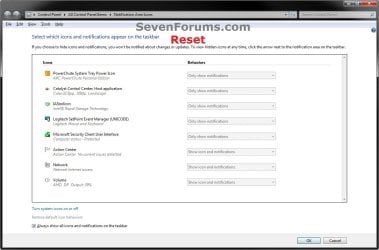
EXAMPLE: Windows 7 and Windows 8 "Notification Area Icons" Before and After Reset
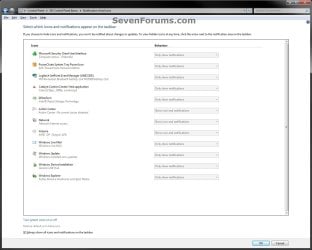
Windows7-Before.jpg

Windows7-After.jpg

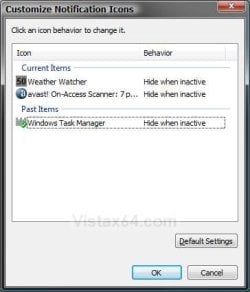
EXAMPLE: Vista "Customize Notification Icons" Before and After Reset
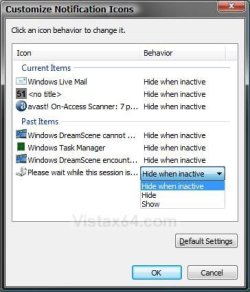
Vista-Before.jpg

Vista-After.jpg


Here's How:

1. Click/tap on the Download button below to download the file below.
Reset_Notification_Area_Icons_Cache.bat

   Note
This .bat (batch) file will confirm with you to kill the explorer.exe process, delete the registry keys IconStreams and PastIconsStream, restart the explorer.exe process, and confirm with you to restart the computer.

TrayNotify.jpg


2. Save the .bat file to your desktop.

3. Double click/tap on the .bat file to run it, click/tap on Run (if prompted by UAC), and follow the onscreen instructions in the command prompt.
NOTE: If you like, you can stop getting the Run prompt by unblocking the .bat file.

4. This is what you will see if the registry keys IconStreams and PastIconsStream have already been deleted.
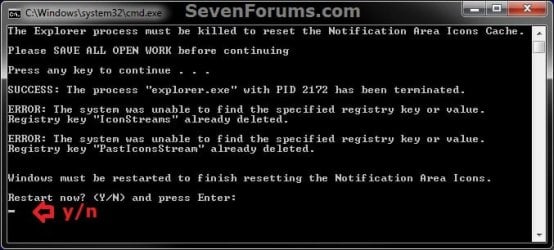
Already_Deleted.jpg
5. This is what you will see if the registry keys IconStreams and PastIconsStream have not already been deleted.
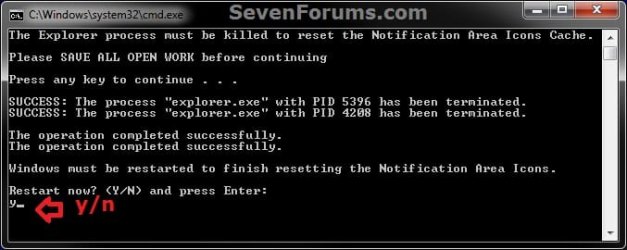
Not_Deleted_Yet.jpg
6. After the computer restarts, the IconStreams and PastIconsStream binary values in the registry will automatically be recreated the next time you make any change to the notification area icons in Windows 7/8 and Vista.


That's it,
Shawn Brink


Attachments

Last edited:
Many thanks!! To my anoyance this issue started the other day, put up with it for a while then spent 10 seconds to search google, another 30 or so to download the script and run. A system reboot and problem solved. Again my thanks!
..Collin
 

My Computer

Computer Manufacturer/Model Number
DIY - dual boot Windows / Hackintosh
OS
Windows 7 Professional 64 bit / MacOS Lion
CPU
Core i7 930
Motherboard
Gigabyit
Memory
24GB
Graphics Card(s)
Nvidia GeForce GTS 250
Sound Card
Onboard
Monitor(s) Displays
Dell UltraSharp U2711 27"
Hard Drives
Windows - Boot Drive Kingston HyperX 3K 120GB
- Storage Drive Hitachi 7K1000 1TB
MAC OS - Boot Drive Corsair Force 3 SSD 120GB
- Storage Drive Seagate Barracuda 1TB
PSU
Antec True Power 650
Case
Lian Li PC60
Cooling
Stock Intel
You're most welcome Collin, and welcome to Seven Forums. :)
 

My Computer

Computer type
PC/Desktop
Computer Manufacturer/Model Number
Self built custom
OS
64-bit Windows 11 Pro for Workstations
CPU
Intel i7-8700K OC'd to 5 GHz
Motherboard
ASUS ROG Maximus XI Formula Z390
Memory
64 GB (4x16GB) G.SKILL TridentZ RGB DDR4 3600 MHz
Graphics Card(s)
ASUS ROG-STRIX-GTX1080TI-O11G-GAMING
Sound Card
Integrated
Monitor(s) Displays
2 x Samsung Odyssey G7 27"
Screen Resolution
2560x1440
Hard Drives
1TB Samsung 990 PRO M.2,
4TB Samsung 990 PRO PRO M.2,
TerraMaster F8 SSD Plus NAS
PSU
Seasonic Prime Titanium 850W
Case
Thermaltake Core P3
Cooling
Corsair Hydro H115i
Keyboard
Logitech wireless K800
Mouse
Logitech MX Master 4
Internet Speed
2 Gb/s Download and 100 Mb/s Upload
Antivirus
Malwarebyte Anti-Malware Premium
Browser
Google Chrome
Other Info
Logitech Z625 speaker system,
Logitech BRIO 4K Pro webcam,
HP Color LaserJet Pro MFP M477fdn,
APC SMART-UPS RT 1000 XL - SURT1000XLI,
Galaxy S23 Plus phone
Hello Shawn am working on fiends Vista machine and I downloaded the Comodo ISS and had the icon in the notification area but also an annoying small pop up on the top of the desktop.

Deleted it but it also deleted the notification area icon. Now I get what I have to do I just want to make absolutely sure that this will only affect that feature as she particularly wants email and net stuff left intact.

I know I am being a bit over cautious I suppose but also want to get it absolutely right, and dont want to mess this machine up.

John
 

My Computer

Computer type
PC/Desktop
Computer Manufacturer/Model Number
Own build (new) Desk1 / Asus ROG Win 7 / Desk2 1st build
OS
Desk1 7 Home Prem / Desk2 10 Pro / Main lap Asus ROG 10 Pro 2 laptop Toshiba 7 Pro Asus P2520 7 & 10
CPU
Desk1 i5 3750K / Laptop i7 GTX 860M / Desk2 i5 2500
Motherboard
Desk1 Asus P877-V / Desk2 Gigabyte H67 UD3H / Laptop ?
Memory
Desk1 8GB (1866) / Desk2 16GB (1333) / Laptop 8Gb DDR3
Graphics Card(s)
Desk 1& 2NVidia GTX 650 & Laptops on board Intel
Sound Card
Desk 1 & 2 -XONAR DG Realtek High Def audio Laptop
Monitor(s) Displays
Desk 1 Benq HD 2450 / Desk2 Philips 24" / Laptop 17.5"
Screen Resolution
1920x1080 D1 & D2 & Laptop 1
Hard Drives
Desk1 Samsung 120GB 830 SSD
Asus ROG 256GB 850 Pro SSD
Desk2 Samsung 840 256 SSD
Toshiba 120GB EVO
PSU
Desk 1 Corsair HX 1050/ Laptop ? / Desk 2 Corsair HX 650
Case
Desk 1 Cooler HAF XM ? Toshiba laptop / Desk2 Coolermaster
Cooling
Fans on all Desk1 -2 Desk2 - all Coolermasters 5 Laptop ?
Keyboard
Desk 1 MS Sidewinder X6 Desk 2 MS Sidewinder X 4
Mouse
Desk 1&2 - Gigabyte MS 900 gamer - laptop - Logitec wireless
Internet Speed
ADSL2+
Other Info
One other Desktop (tester) and spare Toshba laptop both with SSD's
Running Kaspersky 2016 ISS on all machines config'd identically
Logitec audio stereo systems on each machine (x3)
Canon MG5250MFC
Router/modem TP-Link running WPA2SK
Hello John,

It shouldn't affect them at all. :)
 

My Computer

Computer type
PC/Desktop
Computer Manufacturer/Model Number
Self built custom
OS
64-bit Windows 11 Pro for Workstations
CPU
Intel i7-8700K OC'd to 5 GHz
Motherboard
ASUS ROG Maximus XI Formula Z390
Memory
64 GB (4x16GB) G.SKILL TridentZ RGB DDR4 3600 MHz
Graphics Card(s)
ASUS ROG-STRIX-GTX1080TI-O11G-GAMING
Sound Card
Integrated
Monitor(s) Displays
2 x Samsung Odyssey G7 27"
Screen Resolution
2560x1440
Hard Drives
1TB Samsung 990 PRO M.2,
4TB Samsung 990 PRO PRO M.2,
TerraMaster F8 SSD Plus NAS
PSU
Seasonic Prime Titanium 850W
Case
Thermaltake Core P3
Cooling
Corsair Hydro H115i
Keyboard
Logitech wireless K800
Mouse
Logitech MX Master 4
Internet Speed
2 Gb/s Download and 100 Mb/s Upload
Antivirus
Malwarebyte Anti-Malware Premium
Browser
Google Chrome
Other Info
Logitech Z625 speaker system,
Logitech BRIO 4K Pro webcam,
HP Color LaserJet Pro MFP M477fdn,
APC SMART-UPS RT 1000 XL - SURT1000XLI,
Galaxy S23 Plus phone
Thanls mate I will go ahead then.:)
 

My Computer

Computer type
PC/Desktop
Computer Manufacturer/Model Number
Own build (new) Desk1 / Asus ROG Win 7 / Desk2 1st build
OS
Desk1 7 Home Prem / Desk2 10 Pro / Main lap Asus ROG 10 Pro 2 laptop Toshiba 7 Pro Asus P2520 7 & 10
CPU
Desk1 i5 3750K / Laptop i7 GTX 860M / Desk2 i5 2500
Motherboard
Desk1 Asus P877-V / Desk2 Gigabyte H67 UD3H / Laptop ?
Memory
Desk1 8GB (1866) / Desk2 16GB (1333) / Laptop 8Gb DDR3
Graphics Card(s)
Desk 1& 2NVidia GTX 650 & Laptops on board Intel
Sound Card
Desk 1 & 2 -XONAR DG Realtek High Def audio Laptop
Monitor(s) Displays
Desk 1 Benq HD 2450 / Desk2 Philips 24" / Laptop 17.5"
Screen Resolution
1920x1080 D1 & D2 & Laptop 1
Hard Drives
Desk1 Samsung 120GB 830 SSD
Asus ROG 256GB 850 Pro SSD
Desk2 Samsung 840 256 SSD
Toshiba 120GB EVO
PSU
Desk 1 Corsair HX 1050/ Laptop ? / Desk 2 Corsair HX 650
Case
Desk 1 Cooler HAF XM ? Toshiba laptop / Desk2 Coolermaster
Cooling
Fans on all Desk1 -2 Desk2 - all Coolermasters 5 Laptop ?
Keyboard
Desk 1 MS Sidewinder X6 Desk 2 MS Sidewinder X 4
Mouse
Desk 1&2 - Gigabyte MS 900 gamer - laptop - Logitec wireless
Internet Speed
ADSL2+
Other Info
One other Desktop (tester) and spare Toshba laptop both with SSD's
Running Kaspersky 2016 ISS on all machines config'd identically
Logitec audio stereo systems on each machine (x3)
Canon MG5250MFC
Router/modem TP-Link running WPA2SK
You're welcome. :)
 

My Computer

Computer type
PC/Desktop
Computer Manufacturer/Model Number
Self built custom
OS
64-bit Windows 11 Pro for Workstations
CPU
Intel i7-8700K OC'd to 5 GHz
Motherboard
ASUS ROG Maximus XI Formula Z390
Memory
64 GB (4x16GB) G.SKILL TridentZ RGB DDR4 3600 MHz
Graphics Card(s)
ASUS ROG-STRIX-GTX1080TI-O11G-GAMING
Sound Card
Integrated
Monitor(s) Displays
2 x Samsung Odyssey G7 27"
Screen Resolution
2560x1440
Hard Drives
1TB Samsung 990 PRO M.2,
4TB Samsung 990 PRO PRO M.2,
TerraMaster F8 SSD Plus NAS
PSU
Seasonic Prime Titanium 850W
Case
Thermaltake Core P3
Cooling
Corsair Hydro H115i
Keyboard
Logitech wireless K800
Mouse
Logitech MX Master 4
Internet Speed
2 Gb/s Download and 100 Mb/s Upload
Antivirus
Malwarebyte Anti-Malware Premium
Browser
Google Chrome
Other Info
Logitech Z625 speaker system,
Logitech BRIO 4K Pro webcam,
HP Color LaserJet Pro MFP M477fdn,
APC SMART-UPS RT 1000 XL - SURT1000XLI,
Galaxy S23 Plus phone
dear Brick TY very much you really helped me to fix the problem with icons. :)
 

My Computer

Computer type
PC/Desktop
OS
--
Absolutely brilliant. Simplicity itself. Does exactly what it say on the tine - no more, no less.
 

My Computer

OS
Windows 7
I created a shortcut of this (the .bat file) hoping to pin it to either the taskbar or the start menu. However, when I select and r-clik on the new icon the context menu does not have these options listed. I am at a loss - help.
 

My Computer

Computer type
PC/Desktop
Computer Manufacturer/Model Number
HP (HP-P6212F)
OS
Microsoft Windows 7 Home Premium 64-bit 7601 Multiprocessor Free Service Pack 1
CPU
Pentium(R) Dual-Core CPU E5300 @ 2.60GHz
Motherboard
PEGATRON CORPORATION Benicia
Memory
6.00 GB
Graphics Card(s)
Intel(R) G33/G31 Express Chipset Family
Sound Card
Realtek High Definition Audio
Monitor(s) Displays
24'' HP WS LCD
Screen Resolution
1920 x 1080 x 32 bits (4294967296 colors) @ 60 Hz
Hard Drives
(1) ATA Hitachi HDT72106 SCSI Disk Device (2) Generic- Compact Flash USB Device (3) Generic- MS/MS-Pro USB Device (4) Generic- SD/MMC USB Device (5) Generic- SM/xD-Picture USB Device (6) Verbatim STORE N GO USB Device
Keyboard
Logitech G510s
Mouse
Logitech Trackball M570
Antivirus
Microsoft Security Essentials / Malwarebytes
Browser
IE / Firefox / Chrome
I created a shortcut of this (the .bat file) hoping to pin it to either the taskbar or the start menu. However, when I select and r-clik on the new icon the context menu does not have these options listed. I am at a loss - help.

Hey mate,

If you like, you could create a shortcut using this below that will let you "Pin to taskbar".

explorer "full path of .bat file"
 

My Computer

Computer type
PC/Desktop
Computer Manufacturer/Model Number
Self built custom
OS
64-bit Windows 11 Pro for Workstations
CPU
Intel i7-8700K OC'd to 5 GHz
Motherboard
ASUS ROG Maximus XI Formula Z390
Memory
64 GB (4x16GB) G.SKILL TridentZ RGB DDR4 3600 MHz
Graphics Card(s)
ASUS ROG-STRIX-GTX1080TI-O11G-GAMING
Sound Card
Integrated
Monitor(s) Displays
2 x Samsung Odyssey G7 27"
Screen Resolution
2560x1440
Hard Drives
1TB Samsung 990 PRO M.2,
4TB Samsung 990 PRO PRO M.2,
TerraMaster F8 SSD Plus NAS
PSU
Seasonic Prime Titanium 850W
Case
Thermaltake Core P3
Cooling
Corsair Hydro H115i
Keyboard
Logitech wireless K800
Mouse
Logitech MX Master 4
Internet Speed
2 Gb/s Download and 100 Mb/s Upload
Antivirus
Malwarebyte Anti-Malware Premium
Browser
Google Chrome
Other Info
Logitech Z625 speaker system,
Logitech BRIO 4K Pro webcam,
HP Color LaserJet Pro MFP M477fdn,
APC SMART-UPS RT 1000 XL - SURT1000XLI,
Galaxy S23 Plus phone
^
"And The Hits Just keep On Comin', Folks!!!"

just wonderful Shawn,
-thx!!!!!!!!!!!!!!!!
 

My Computer

Computer type
PC/Desktop
Computer Manufacturer/Model Number
HP (HP-P6212F)
OS
Microsoft Windows 7 Home Premium 64-bit 7601 Multiprocessor Free Service Pack 1
CPU
Pentium(R) Dual-Core CPU E5300 @ 2.60GHz
Motherboard
PEGATRON CORPORATION Benicia
Memory
6.00 GB
Graphics Card(s)
Intel(R) G33/G31 Express Chipset Family
Sound Card
Realtek High Definition Audio
Monitor(s) Displays
24'' HP WS LCD
Screen Resolution
1920 x 1080 x 32 bits (4294967296 colors) @ 60 Hz
Hard Drives
(1) ATA Hitachi HDT72106 SCSI Disk Device (2) Generic- Compact Flash USB Device (3) Generic- MS/MS-Pro USB Device (4) Generic- SD/MMC USB Device (5) Generic- SM/xD-Picture USB Device (6) Verbatim STORE N GO USB Device
Keyboard
Logitech G510s
Mouse
Logitech Trackball M570
Antivirus
Microsoft Security Essentials / Malwarebytes
Browser
IE / Firefox / Chrome
You're most welcome. :)
 

My Computer

Computer type
PC/Desktop
Computer Manufacturer/Model Number
Self built custom
OS
64-bit Windows 11 Pro for Workstations
CPU
Intel i7-8700K OC'd to 5 GHz
Motherboard
ASUS ROG Maximus XI Formula Z390
Memory
64 GB (4x16GB) G.SKILL TridentZ RGB DDR4 3600 MHz
Graphics Card(s)
ASUS ROG-STRIX-GTX1080TI-O11G-GAMING
Sound Card
Integrated
Monitor(s) Displays
2 x Samsung Odyssey G7 27"
Screen Resolution
2560x1440
Hard Drives
1TB Samsung 990 PRO M.2,
4TB Samsung 990 PRO PRO M.2,
TerraMaster F8 SSD Plus NAS
PSU
Seasonic Prime Titanium 850W
Case
Thermaltake Core P3
Cooling
Corsair Hydro H115i
Keyboard
Logitech wireless K800
Mouse
Logitech MX Master 4
Internet Speed
2 Gb/s Download and 100 Mb/s Upload
Antivirus
Malwarebyte Anti-Malware Premium
Browser
Google Chrome
Other Info
Logitech Z625 speaker system,
Logitech BRIO 4K Pro webcam,
HP Color LaserJet Pro MFP M477fdn,
APC SMART-UPS RT 1000 XL - SURT1000XLI,
Galaxy S23 Plus phone
Ran the tool to clean up the Notification Area Icons worked Great Thank You.

1. The Arrow to open the Notification Area Icons is missing from the task bar.
How do I get the arrow back on the task bar?

2. To open the Notification Area Icons Tap/Start Menu/Right Tap blank area/Tap Properties/Task Bar Tab/Notification Area/Tap Customize Notification Icons list the system Icons can turn on or off.

3. Tap Turn System Icons On Or Off

The Notification Area Icons Open is nice and clean thank you. Tap Customize Notification Icons/Icons Listed under Behaviors cannot make any changes. List the Programs Grayed out.

Sure it is listed in the forums or links I got a bit confused in the search and reading. :huh: How do I fix this so I can change the Icon behaviors?

Thank You

Larry
 

My Computer

Computer type
PC/Desktop
Computer Manufacturer/Model Number
Custom Build
OS
Windows 7 Ultimate 64 BIT
CPU
I 7 4930K @ 4.4 GHz
Motherboard
Asus Rampage lV Black Edition
Memory
G Skill Z Series 2133 MHz 16 Gb
Graphics Card(s)
Evga GTX 780 S.C. x 2 SLI
Sound Card
Peach Tree Nova 125SE DAC & Amp D-5 Speakers/Audeze LCD 2
Monitor(s) Displays
Dell Ultra Sharp Curved U3415W
Screen Resolution
3440 X 1440
Hard Drives
C: Intel 730 Series 250Gb
4 x Western Digital Velocity Raptors 300 GB Each
1 x Western Digital Black Caviar 2 Tb Storage 5 GB Page Files & Temp Files moved from C: Drive, Media Files.
1 x Western Digital Black Caviar 2 Tb Removable back up.
PSU
Corsair AX 1500i
Case
CaseLabs Magnum 8
Cooling
Noctua Fans NFS12A x 11 & CPU Heat Sink Nh-D14
Keyboard
Enermax Aurora
Mouse
Logitech G3
Internet Speed
100 Mbps
Antivirus
Norton Security 2015
Browser
Internet Explorer 10
Other Info
Various programs installed on 4 hard drives depending on usage. Air filters are custom by DEMCIFILTERS. Optic Drives None. System is built for Flight Simulator X and other flight sims. 3 x PDB boards for the fans and LCD lights. Really helps with cable management. Case fan RPM is a constant 1350 rpm extremely quiet system cannot hear the system running.
Hello Larry,

Q1) The little arrow on the taskbar by the notification center wouldn't be there if you checked the Always show all icons and notifications on the taskbar box.

http://www.sevenforums.com/tutorial...ons-hide-show-system-icons-notifications.html

Q2) You can open notification area icons using one of the methods above as well.

Q3) To turn system icons on/off: http://www.sevenforums.com/tutorials/292-system-icons-turn-off.html

If they are grayed out, then see if this below may help.

http://www.sevenforums.com/tutorials/19085-system-icons-enable-disable.html

Hope this helps for now, :)
Shawn
 

My Computer

Computer type
PC/Desktop
Computer Manufacturer/Model Number
Self built custom
OS
64-bit Windows 11 Pro for Workstations
CPU
Intel i7-8700K OC'd to 5 GHz
Motherboard
ASUS ROG Maximus XI Formula Z390
Memory
64 GB (4x16GB) G.SKILL TridentZ RGB DDR4 3600 MHz
Graphics Card(s)
ASUS ROG-STRIX-GTX1080TI-O11G-GAMING
Sound Card
Integrated
Monitor(s) Displays
2 x Samsung Odyssey G7 27"
Screen Resolution
2560x1440
Hard Drives
1TB Samsung 990 PRO M.2,
4TB Samsung 990 PRO PRO M.2,
TerraMaster F8 SSD Plus NAS
PSU
Seasonic Prime Titanium 850W
Case
Thermaltake Core P3
Cooling
Corsair Hydro H115i
Keyboard
Logitech wireless K800
Mouse
Logitech MX Master 4
Internet Speed
2 Gb/s Download and 100 Mb/s Upload
Antivirus
Malwarebyte Anti-Malware Premium
Browser
Google Chrome
Other Info
Logitech Z625 speaker system,
Logitech BRIO 4K Pro webcam,
HP Color LaserJet Pro MFP M477fdn,
APC SMART-UPS RT 1000 XL - SURT1000XLI,
Galaxy S23 Plus phone
Brink thank you. Liked the tool cleaned up a few Icons from uninstalled programs. Had a brain fart. :o I forgot to uncheck always show all icons and notifications on the task bar.

Shawn thank you.
 

My Computer

Computer type
PC/Desktop
Computer Manufacturer/Model Number
Custom Build
OS
Windows 7 Ultimate 64 BIT
CPU
I 7 4930K @ 4.4 GHz
Motherboard
Asus Rampage lV Black Edition
Memory
G Skill Z Series 2133 MHz 16 Gb
Graphics Card(s)
Evga GTX 780 S.C. x 2 SLI
Sound Card
Peach Tree Nova 125SE DAC & Amp D-5 Speakers/Audeze LCD 2
Monitor(s) Displays
Dell Ultra Sharp Curved U3415W
Screen Resolution
3440 X 1440
Hard Drives
C: Intel 730 Series 250Gb
4 x Western Digital Velocity Raptors 300 GB Each
1 x Western Digital Black Caviar 2 Tb Storage 5 GB Page Files & Temp Files moved from C: Drive, Media Files.
1 x Western Digital Black Caviar 2 Tb Removable back up.
PSU
Corsair AX 1500i
Case
CaseLabs Magnum 8
Cooling
Noctua Fans NFS12A x 11 & CPU Heat Sink Nh-D14
Keyboard
Enermax Aurora
Mouse
Logitech G3
Internet Speed
100 Mbps
Antivirus
Norton Security 2015
Browser
Internet Explorer 10
Other Info
Various programs installed on 4 hard drives depending on usage. Air filters are custom by DEMCIFILTERS. Optic Drives None. System is built for Flight Simulator X and other flight sims. 3 x PDB boards for the fans and LCD lights. Really helps with cable management. Case fan RPM is a constant 1350 rpm extremely quiet system cannot hear the system running.
You're most welcome. :)
 

My Computer

Computer type
PC/Desktop
Computer Manufacturer/Model Number
Self built custom
OS
64-bit Windows 11 Pro for Workstations
CPU
Intel i7-8700K OC'd to 5 GHz
Motherboard
ASUS ROG Maximus XI Formula Z390
Memory
64 GB (4x16GB) G.SKILL TridentZ RGB DDR4 3600 MHz
Graphics Card(s)
ASUS ROG-STRIX-GTX1080TI-O11G-GAMING
Sound Card
Integrated
Monitor(s) Displays
2 x Samsung Odyssey G7 27"
Screen Resolution
2560x1440
Hard Drives
1TB Samsung 990 PRO M.2,
4TB Samsung 990 PRO PRO M.2,
TerraMaster F8 SSD Plus NAS
PSU
Seasonic Prime Titanium 850W
Case
Thermaltake Core P3
Cooling
Corsair Hydro H115i
Keyboard
Logitech wireless K800
Mouse
Logitech MX Master 4
Internet Speed
2 Gb/s Download and 100 Mb/s Upload
Antivirus
Malwarebyte Anti-Malware Premium
Browser
Google Chrome
Other Info
Logitech Z625 speaker system,
Logitech BRIO 4K Pro webcam,
HP Color LaserJet Pro MFP M477fdn,
APC SMART-UPS RT 1000 XL - SURT1000XLI,
Galaxy S23 Plus phone
Good day.

In my Windows 7 calendar is no longer shown, no wireless signal icon shown and resource monitor does not start.

Recently I have noticed that I cannot get calendar to pop up after clicking on clock on system tray. I can with searching find settings to configure clock but I can't access calendar at all.

I also no longer see wireless icon with signals showing in system tray.

I tried to customize notification icons and in "Turn System Icons On or Off" I see that "Network" is disabled from changing (grayed out). Local Group Policy was not modified once so it's strange.
 

My Computer

OS
Windows 7 Enterprise x64
Good day.

In my Windows 7 calendar is no longer shown, no wireless signal icon shown and resource monitor does not start.

Recently I have noticed that I cannot get calendar to pop up after clicking on clock on system tray. I can with searching find settings to configure clock but I can't access calendar at all.

I also no longer see wireless icon with signals showing in system tray.

I tried to customize notification icons and in "Turn System Icons On or Off" I see that "Network" is disabled from changing (grayed out). Local Group Policy was not modified once so it's strange.

Hello Borisyo,

Since your Network icon is grayed out in "System Icons", you might see if using step 5 in OPTION TWO below may be able to help enable it again. :)

http://www.sevenforums.com/tutorials/19085-system-icons-enable-disable.html
 

My Computer

Computer type
PC/Desktop
Computer Manufacturer/Model Number
Self built custom
OS
64-bit Windows 11 Pro for Workstations
CPU
Intel i7-8700K OC'd to 5 GHz
Motherboard
ASUS ROG Maximus XI Formula Z390
Memory
64 GB (4x16GB) G.SKILL TridentZ RGB DDR4 3600 MHz
Graphics Card(s)
ASUS ROG-STRIX-GTX1080TI-O11G-GAMING
Sound Card
Integrated
Monitor(s) Displays
2 x Samsung Odyssey G7 27"
Screen Resolution
2560x1440
Hard Drives
1TB Samsung 990 PRO M.2,
4TB Samsung 990 PRO PRO M.2,
TerraMaster F8 SSD Plus NAS
PSU
Seasonic Prime Titanium 850W
Case
Thermaltake Core P3
Cooling
Corsair Hydro H115i
Keyboard
Logitech wireless K800
Mouse
Logitech MX Master 4
Internet Speed
2 Gb/s Download and 100 Mb/s Upload
Antivirus
Malwarebyte Anti-Malware Premium
Browser
Google Chrome
Other Info
Logitech Z625 speaker system,
Logitech BRIO 4K Pro webcam,
HP Color LaserJet Pro MFP M477fdn,
APC SMART-UPS RT 1000 XL - SURT1000XLI,
Galaxy S23 Plus phone
Thanks!
 

My Computer

Computer type
Laptop
Computer Manufacturer/Model Number
Acer 5760G
OS
windows server 2012 R2 Standard
CPU
i3 2330M 2.2GHz
Motherboard
Acer
Memory
DDR3 1333MHz 4GB
Graphics Card(s)
Nvidia GT 540M 1GB
Screen Resolution
1366x768
Antivirus
Eset Smart Security 8
It worked ! But how ?

Fantastic ! I tried this, and it cleaned up my badly corrupted System Tray. However, I'm eager for some explanations.

Problem

In the window which opens after clicking, in the Taskbar, Show hidden icons then Customize (title : Select which icons and notifications appear in the taskbar), there were :

  • Programs with the wrong icon.
  • Programs without an icon.
  • Programs which shouldn't really be there. For instance, one of Office's programs with a mention to the effect of sending Microsoft user experience information.
  • Programs which I had specifically instructed, during installation or afterwards, not to show themselves in that area (at least, I thought so).
  • Programs which had been completely uninstalled, with their remnants being hunted by the forced uninstallation feature of Revo Uninstaller Pro.
  • Programs called by their filename, not by their usual name.
  • Sysinternals Process Explorer, which, as a portable program, I thought could not even be there (and got stuck in that window by the only vertue of having been run once).
Action taken

  • I first tried Dinesh's gentler method through C-Cleaner Tray notification cache option. Right-click on the option, Clean. Nothing to clean. Then Restore default state, restart.
  • The Customize window was now a bit tidier, but still many unwelcome items. Maybe because I did like rsvr 85 :
    I must have blindly clicked through that prompt not understanding that you had to restart explorer in the current session as opposed to just rebooting.
  • Several restarts, to no avail.
  • Applied Brink's batch file, with screen #4 as a result (registry keys IconStreams and PastIconsStream already deleted).
  • Restart, Customize windows now perfectly tidied up !
And now for some questions

  • How come the batch file succeeded, since the offending keys had already been deleted, with no results ?
  • I originally thought that Hide icon and notifications, in that window, really meant hide -- and that's what I want to do : have most programs not show there at all. However, it seems that Hide actually means show, but not right on the taskbar ; in that "overflow windowlet" which appears when one clicks on the pointer, and which does not really have a Windows name, does it ? How confusing ! What do the three options really do ? (Only show notifications, Show icon and notifications, Hide icon and notifications.)
  • Some (apparently) well-behaved programs offer options, during install, after install or both, to appear in that three-tiered area (the System tray on the Taskbar proper, the "overflow windowlet" and the Customization window) -- or not, or maybe. What is exactly the latitude offered to the user by these programs ? Can he forbid the program to show there at all ?
  • Some programs do show in the "hidden" ("overflow") mini-window, but with a right-click menu offering an Exit option. What does that option do ? Does it prevent the icon from popping up there again after the next reboot ?
Obligatory one-minute anti-Microsoft rant : this user interface is really devised by warped minds. Most software designed, by, ahem, normal people (i.e. non-Microsoft businesses, or even authors of free programs) is way more staightforward and intuitive.

Thanks for cleaning after Microsoft !
 

My Computer

Computer type
PC/Desktop
Computer Manufacturer/Model Number
Custom build
OS
Windows 7 Home Premium 64-bit (OEM)
CPU
AMD Athlon II X4 640 (3 GHz, 4 cores)
Motherboard
Asus M4A 89 GTD Pro/USB3
Memory
Patriot 16Gb DDR3 1600 (2 kits of 2)
Graphics Card(s)
ATI Radeon HD 4290 (integrated)
Sound Card
AMD + Realtek HD Audio (integrated)
Monitor(s) Displays
Hewlett-Packard ZR2440w (24")
Screen Resolution
1920 x 1200
Hard Drives
Internal : Samsung SSD 860 EVO 250 Gb (system), Seagate Barrcuda 1 Tb (data), Western Digital Caviar Blue 500 Gb (archives).
External (USB) : 2 x 1 Tb 2,5" Seagate Barracuda (backups).
PSU
Corsair VX 450 W
Case
Antec Solo
Cooling
Cooler Master Hyper 212 Plus, 2 Nexus Real Silent Case fans
Keyboard
Cherry KC 1000
Mouse
Logitech M 90
Internet Speed
Fiber, 300 Mbit/s down, 200 Mbit/s up
Antivirus
Microsoft Security Essentials
Browser
Vivaldi, Tor
Other Info
BIOS Date: 07/18/11 Ver: 08.00.15.
Modem-router : provided by ISP
Back
Top