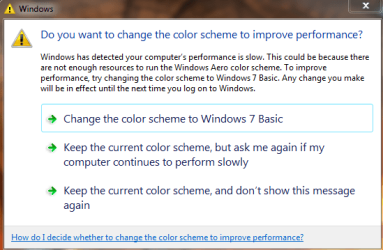
Solved notification with 3 options on it about performance?

MarioBros

New member
Local time
1:56 PM
Messages
24
Hello, I'm sorry to budge in an old thread but my search couldn't find any other thread regarding my problem which is described below.

Sometimes after a session of a video game I got this notification with 3 options on it about performance, I'm sorry I can't remember what is what and missed to take any screenshot, but I'm sure I clicked the option of "No and dont show me again" of some sort. But it keeps coming back every once in a while.

My question is how can I make it disappear forever?
Is it related to any service that I can disable?
Thanks in advance :)
 
Last edited:

My Computer

Computer Manufacturer/Model Number
built it myself out of the boxes
OS
Windows 7 Ultimate x64 7601 SP1
CPU
i5 2500k @stock
Motherboard
Asrock H61M-HVS
Memory
DDR3 Corsair 4GBx2 1333 7-7-7-20
Graphics Card(s)
AMD Sapphire 7850 OC Edition
Sound Card
Onboard VIA HD Audio
Monitor(s) Displays
LG E2250V
Screen Resolution
1920x1080
Hard Drives
HDD Seagate 1TB 7200rpm ST31000524AS
PSU
FSP Supersonic 550 Watt
Case
Powerlogic Futura 220 ITX value
Cooling
stock cooling
Keyboard
Sami value PS/2 wired standard keyboard
Mouse
Genius value PS/2 wired standard optical mouse
Internet Speed
Excelcomindo wireless 512kbps
Other Info
Google Chrome, Kaspersky Internet Security 2012, CCC 12.4, Windows Firewall and Windows Defender in off state, Windows Search and Hibernation disabled, Windows Dreamscene enabled.
Yoohoooo.. anybody there?
 

My Computer

Computer Manufacturer/Model Number
built it myself out of the boxes
OS
Windows 7 Ultimate x64 7601 SP1
CPU
i5 2500k @stock
Motherboard
Asrock H61M-HVS
Memory
DDR3 Corsair 4GBx2 1333 7-7-7-20
Graphics Card(s)
AMD Sapphire 7850 OC Edition
Sound Card
Onboard VIA HD Audio
Monitor(s) Displays
LG E2250V
Screen Resolution
1920x1080
Hard Drives
HDD Seagate 1TB 7200rpm ST31000524AS
PSU
FSP Supersonic 550 Watt
Case
Powerlogic Futura 220 ITX value
Cooling
stock cooling
Keyboard
Sami value PS/2 wired standard keyboard
Mouse
Genius value PS/2 wired standard optical mouse
Internet Speed
Excelcomindo wireless 512kbps
Other Info
Google Chrome, Kaspersky Internet Security 2012, CCC 12.4, Windows Firewall and Windows Defender in off state, Windows Search and Hibernation disabled, Windows Dreamscene enabled.
It would be very helpful to post a screenshot the next time that warning pops up.
Your description does not offer much of a clue.
http://www.sevenforums.com/tutorials/9733-screenshots-files-upload-post-seven-forums.html

You can check Event Viewer to see if there are any warnings, errors.

This maybe of some value: http://www.sevenforums.com/tutorials/74502-error-message-where-does-come.html

My question is how can I make it disappear forever?
Is it related to any service that I can disable?
Thanks in advance :)

P.S. If you can't see my system specs in this post, Chrome & Firefox, you can see it here. Or maybe it's just me.
Fix or repair what is causing the warning.

Don't worry about Services right now, if anything, it may be related to a Service that needs enabled.

P.S. Might be you, I can see them just fine, thank you for filling them out!

7Forums changed Servers today, that might be why there was a delay in answering your post.
 

My Computer

Computer type
PC/Desktop
Computer Manufacturer/Model Number
Gateway DX4831-01e (Mid-Tower Desktop)
OS
Originally Win 7 Hm Prem x64 Ver 6.1.7600 Build 7601-SP1 | Upgraded to Windows 10 December 14, 2019
CPU
Intel i3 530 2.93GHz, 2933MHz 2 Cores 4 Logical Processors
Motherboard
Gateway H57M01 133 megahertz
Memory
6GB of 1,333MHz DDR3 SDRAM
Graphics Card(s)
32MB Intel Graphics Media Accelerator HD IGChip
Sound Card
Realtek High Definition Audio
Monitor(s) Displays
Gateway HX2000 20inch TFT active matrix TN
Screen Resolution
1600 x 900 x 59 hertz
Hard Drives
WDC WD10EADS-00M2B0 [HDD] (1000.20 GB) -- drive 0,
HL-DT-ST DVDRAM GH41N [CD-ROM dr]
Four card readers, and Four USB 2.0
PSU
300watts.
Case
Mid-Tower Desktop
Cooling
Stock from Gateway
Keyboard
Natural Ergonomic Keyboard 4000, see Other Info
Mouse
Orig. Gateway wore out now using Insignia USB wired optical
Internet Speed
Vz FIOS 10ms png 57.64Mbps down 65.53Mbps up Speedtest.org
Antivirus
Zamana Anti-logger with Anti-malware, MSE, Windows Firewall,
Browser
IE11.0.9600.19399-Upd ver11.0.135, Firefox 68.0.1 x64
Other Info
System Specs by Belarc.

BIOS: American Megatrends Inc. P01-A0 11/17/2009

Replaced the MS 'Natural' Standard PS/2 Enhanced 101-102 Keyboard with a new Natural Ergonomic Keyboard 4000 on August 1st 2014.

Canon Pixma MG3222 Printer.

Updated to IE11 on 12102015 | Fios Quantum Router g1100

Additional AV: SpywareBlaster, manual Mbam, SAS

My Computer

Computer type
PC/Desktop
Computer Manufacturer/Model Number
Novatech iRush Pro
OS
Windows 7 Ultimate SP1 - 64 Bit
CPU
Intel Core i5 2500k
Motherboard
Foxconn H67M-S/H67M-V/H67
Memory
2x4GB DDR3 1333Hz
Graphics Card(s)
Ati Radeon 6770
Sound Card
None
Monitor(s) Displays
Samsung S22B150
Screen Resolution
1920x1080
Hard Drives
2x500GB
PSU
500W
Cooling
Fan
Keyboard
HP KU0316
Mouse
Wireless Logitech M185
Internet Speed
20MB/s
Antivirus
Avast Free
Browser
Google Chrome
Other Info
Logitech M185 Mouse
KU-M316 Keyboard
I think I know what you are seeing as I get this every now and then while gaming. Does it look something like this? If so, you can disable this message by doing the following:

1. Go to Start Menu and type in "Action Center" and start it
2. Click on Change Action Center settings
3. Under Maintenance Messages untick the Windows Troubleshooting checkbox
4. Click OK and that's it

I leave mine on as I don't really want to disable this. Although I never get any other types of messages, you never know when you might need this enabled. ;)

You could also disable Aero while playing the games that give you this message by right clicking on the game exe/properties and ticking "disable desktop composition" under compatibility.
 

Attachments

  • settings.png
    settings.png
    15.7 KB · Views: 18

My Computer

Computer type
PC/Desktop
Computer Manufacturer/Model Number
Self built
OS
Windows 7 Home Premium x64 SP1
CPU
Core i5 3570K 3.4GHz
Motherboard
Asus P8Z77-V
Memory
16GB Corsair Vengeance 1600MHz
Graphics Card(s)
EVGA GTX 970 4GB
Sound Card
Realtek High Definition Audio
Monitor(s) Displays
1. HP 2511X 2. Viewsonic VX2439wm
Screen Resolution
1. 1920x1080 2. 1920x1080
Hard Drives
1. Silicon Power S60 240GB 2. WD 1TB 3. WD 3TB 4. ESATA external 2TB
PSU
Corsair HXi HX850i
Case
ThermalTake Overseer RX-1 Full Tower
Cooling
Air
Keyboard
Corsair K70
Mouse
Logitech G9x
Internet Speed
Cable
I think you are on to something there Squid.

Your right about disabling it. If Mario has windows troubleshooting unchecked. S/he could miss some hardware device driver messages.

And, like you mentioned, there could be incompatibility with some of the games s/he's running, and turn off Desktop compatibility for those games.

I did find a brand spankin' new driver for the GPU (01-25-2012):
AMD Support Search

Read the Release notes: http://support.amd.com/us/kbarticles/AMD Catalyst™ Software Suite Version 12.1 Release Notes
 

My Computer

Computer type
PC/Desktop
Computer Manufacturer/Model Number
Gateway DX4831-01e (Mid-Tower Desktop)
OS
Originally Win 7 Hm Prem x64 Ver 6.1.7600 Build 7601-SP1 | Upgraded to Windows 10 December 14, 2019
CPU
Intel i3 530 2.93GHz, 2933MHz 2 Cores 4 Logical Processors
Motherboard
Gateway H57M01 133 megahertz
Memory
6GB of 1,333MHz DDR3 SDRAM
Graphics Card(s)
32MB Intel Graphics Media Accelerator HD IGChip
Sound Card
Realtek High Definition Audio
Monitor(s) Displays
Gateway HX2000 20inch TFT active matrix TN
Screen Resolution
1600 x 900 x 59 hertz
Hard Drives
WDC WD10EADS-00M2B0 [HDD] (1000.20 GB) -- drive 0,
HL-DT-ST DVDRAM GH41N [CD-ROM dr]
Four card readers, and Four USB 2.0
PSU
300watts.
Case
Mid-Tower Desktop
Cooling
Stock from Gateway
Keyboard
Natural Ergonomic Keyboard 4000, see Other Info
Mouse
Orig. Gateway wore out now using Insignia USB wired optical
Internet Speed
Vz FIOS 10ms png 57.64Mbps down 65.53Mbps up Speedtest.org
Antivirus
Zamana Anti-logger with Anti-malware, MSE, Windows Firewall,
Browser
IE11.0.9600.19399-Upd ver11.0.135, Firefox 68.0.1 x64
Other Info
System Specs by Belarc.

BIOS: American Megatrends Inc. P01-A0 11/17/2009

Replaced the MS 'Natural' Standard PS/2 Enhanced 101-102 Keyboard with a new Natural Ergonomic Keyboard 4000 on August 1st 2014.

Canon Pixma MG3222 Printer.

Updated to IE11 on 12102015 | Fios Quantum Router g1100

Additional AV: SpywareBlaster, manual Mbam, SAS
A reboot will solve the problem, your RAM is hitting peak cache that's all, mine does it after a few days of being on and I have to reboot to fix.
 

My Computer

Computer type
PC/Desktop
Computer Manufacturer/Model Number
Custom Build
OS
Windows 7 Ultimate x64 SP1
CPU
Intel Q6600 @ 2.6Ghz
Motherboard
Evga NF78-CK-132-A 3-Way SLI
Memory
4Gb DDR2 Corsair Dominator @ 800Mhz 5-5-5-15
Graphics Card(s)
EVGA 560 GTX SC FTW 1GB
Sound Card
Realtek HD 7.1 Audio, Plantronics GameCom780 7.1 Headset
Monitor(s) Displays
Dell S2409W
Screen Resolution
1920 x 1080
Hard Drives
SanDisk SDSSDHII-120G-G25 120GB SSD
Samsung 7200RPM 750Gb SATA
Samsung 850 EVO 120GB SSD
Western Digital Green 1TB 7200RPM
PSU
Xigmatek 750W Quad sli quad core 80% eff
Case
Antec 900 Gaming Case
Cooling
Zalman CNPS9700-NT NVIDIA Tritium
Keyboard
Logitech generic keyboard, MS wireless keyboard
Mouse
Razor Lachesis Banshee V2 Blue, 4000DPI, MS wireless mouse
Internet Speed
152Mb Virgin Media Fibre Optic
Antivirus
Microsoft Security Essentials
Browser
Google Chrome
Other Info
Wireless Gaming Receiver for Windows, Wireless Xbox 360 Pad
A reboot will solve the problem, your RAM is hitting peak cache that's all, mine does it after a few days of being on and I have to reboot to fix.

That might help the OP but it wouldn't work for me. My computer is only turned on when I play a game so it's not on very often and I still get this message at times when I play certain games. I can turn on my computer, immediately launch a game and still get this message. No biggie for me, I just click "keep the current color scheme" and play the game with no issues. :)
 

My Computer

Computer type
PC/Desktop
Computer Manufacturer/Model Number
Self built
OS
Windows 7 Home Premium x64 SP1
CPU
Core i5 3570K 3.4GHz
Motherboard
Asus P8Z77-V
Memory
16GB Corsair Vengeance 1600MHz
Graphics Card(s)
EVGA GTX 970 4GB
Sound Card
Realtek High Definition Audio
Monitor(s) Displays
1. HP 2511X 2. Viewsonic VX2439wm
Screen Resolution
1. 1920x1080 2. 1920x1080
Hard Drives
1. Silicon Power S60 240GB 2. WD 1TB 3. WD 3TB 4. ESATA external 2TB
PSU
Corsair HXi HX850i
Case
ThermalTake Overseer RX-1 Full Tower
Cooling
Air
Keyboard
Corsair K70
Mouse
Logitech G9x
Internet Speed
Cable
I think I know what you are seeing as I get this every now and then while gaming. Does it look something like this? If so, you can disable this message by doing the following:

1. Go to Start Menu and type in "Action Center" and start it
2. Click on Change Action Center settings
3. Under Maintenance Messages untick the Windows Troubleshooting checkbox
4. Click OK and that's it

I leave mine on as I don't really want to disable this. Although I never get any other types of messages, you never know when you might need this enabled. ;)

You could also disable Aero while playing the games that give you this message by right clicking on the game exe/properties and ticking "disable desktop composition" under compatibility.

Yes, that is exactly it. Good one, Mr. Squid.
I have disabled/unticked Windows Troubleshooting in Action Center as you suggest, WT hasn't been much help anyway. Or is there any important feature I might miss by disabling it?

And thanks everybody to have looked into my thread and helped :)
 

My Computer

Computer Manufacturer/Model Number
built it myself out of the boxes
OS
Windows 7 Ultimate x64 7601 SP1
CPU
i5 2500k @stock
Motherboard
Asrock H61M-HVS
Memory
DDR3 Corsair 4GBx2 1333 7-7-7-20
Graphics Card(s)
AMD Sapphire 7850 OC Edition
Sound Card
Onboard VIA HD Audio
Monitor(s) Displays
LG E2250V
Screen Resolution
1920x1080
Hard Drives
HDD Seagate 1TB 7200rpm ST31000524AS
PSU
FSP Supersonic 550 Watt
Case
Powerlogic Futura 220 ITX value
Cooling
stock cooling
Keyboard
Sami value PS/2 wired standard keyboard
Mouse
Genius value PS/2 wired standard optical mouse
Internet Speed
Excelcomindo wireless 512kbps
Other Info
Google Chrome, Kaspersky Internet Security 2012, CCC 12.4, Windows Firewall and Windows Defender in off state, Windows Search and Hibernation disabled, Windows Dreamscene enabled.
Hardware device driver messages won't be displayed. If I were you I would really leave this on and just disable Aero when you are playing these games that give you this message. You won't even notice Aero is off and it will come right back on after you quit the game.

Right click on the games exe file and click properties>compatibility>tick disable desktop composition and you are good to go!
 

My Computer

Computer type
PC/Desktop
Computer Manufacturer/Model Number
Self built
OS
Windows 7 Home Premium x64 SP1
CPU
Core i5 3570K 3.4GHz
Motherboard
Asus P8Z77-V
Memory
16GB Corsair Vengeance 1600MHz
Graphics Card(s)
EVGA GTX 970 4GB
Sound Card
Realtek High Definition Audio
Monitor(s) Displays
1. HP 2511X 2. Viewsonic VX2439wm
Screen Resolution
1. 1920x1080 2. 1920x1080
Hard Drives
1. Silicon Power S60 240GB 2. WD 1TB 3. WD 3TB 4. ESATA external 2TB
PSU
Corsair HXi HX850i
Case
ThermalTake Overseer RX-1 Full Tower
Cooling
Air
Keyboard
Corsair K70
Mouse
Logitech G9x
Internet Speed
Cable
Back
Top