
Notifications - Enable or Disable Message Balloons

How to Enable or Disable Balloon Notifications in Vista, Windows 7, and Windows 8

   Information
The notification area is located at the far right side of the taskbar. A notification informs users of events that are unrelated to the current user activity, by briefly displaying a balloon from an icon in the notification area. The notification could result from a user action or significant system event, or could offer potentially useful information from Windows or an application.

For more information about balloon notifications, see: Notifications


This tutorial will show you how to enable or disable displaying all balloon notifications in the taskbar notification area for all or specific users in Vista, Windows 7, and Windows 8.

   Note
This can be handy since the only options available in the customize Notification Area Icon settings are Show icon and notifications, Hide icon and notifications, or Only show notifications, and no Only show icons option. When Notifications is disabled, it will let you show all notification icons without showing any balloon notifications for any of the icons.


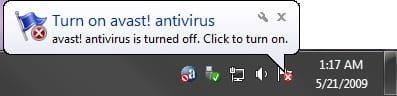
EXAMPLE: Balloon Notification
Notification.jpg


OPTION ONE

To Enable or Disable Balloon Notifications using a REG File


1. To Enable Balloon Notifications for Only Current User
NOTE: This is the default setting.
A) Click/tap on the Download button below to download the file below, and go to step 3 below.
Enable_Notifications.reg


Download


2. To Disable Balloon Notifications for Only Current User
A) Click/tap on the Download button below to download the file below, and go to step 3 below.
Disable_Notifications.reg

Download


3. Save the .reg file to your desktop.

4. Double click/tap on the downloaded .reg file to merge it.

5. Click/tap on Run, Yes (UAC Windows 7/8) or Continue (UAC Vista), Yes, and OK when prompted.

6. Log off and log on, or restart the computer to apply.

7. When finished, you can delete the downloaded .reg file if you like.

8. If enabled, don't forget to set your Notification Area Icons customize settings how you like.


OPTION TWO

To Enable or Disable Balloon Notifications Using Group Policy


1. Open the all users, specific users or groups, or all users except administrators Local Group Policy Editor for how you want this policy applied.

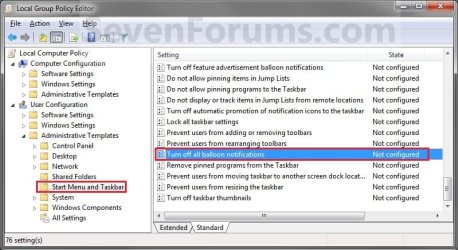
2. In the left pane, click/tap on the arrow to expand User Configuration, Administrative Templates, then click/tap on Start Menu and Taskbar. (See screenshot below)
Group_Policy.jpg
3. In the right pane of Start Menu and Taskbar, double click/tap on Turn off all balloon notifications to edit it. (See screenshot above)

4. To Enable Balloon Notifications
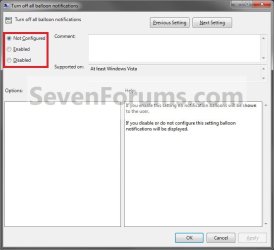
A) Select (dot) Not Configured or Disabled, and go to step 6 below. (See screenshot below step 6)
NOTE: Not Configured is the default setting.
5. To Disable Balloon Notifications
A) Select (dot) Enabled, and go to step 6 below. (See screenshot below step 6)
6. Click/tap on OK. (See screenshot below)
Properties.jpg
7. Close the Local Group Policy Editor.

8. If enabled, don't forget to set your Notification Area Icons customize settings how you like.

That's it,
Shawn


Attachments

Last edited:
I'm using Windows 7 Home Premium, after I did used the option #1 (through a download) and completely did those steps, the balloon notifications still not appear on my taskbar, especially when I want disconnect the USB modem and I don't see the safe remove hardware balloon notification.

When I click the safe remove hardware icon for unplug my USB Flashdisk , the balloon notifications ( You are now safe to remove your device ..) will appear, but if I click the icon for unplug my USB Modem, the balloon notification is not appear. .so I unplug my USB Modem straightly..

Please help me.. thanks
 
Last edited by a moderator:

My Computer

OS
Windows 7
Andr1don2,

You're balloon notifications are enabled if you are getting one for the USB flash drive.

I'm not sure that you would get a balloon notification for a USB modem since it's not a hard drive that could be in use being written to or read from. You might post this in the "Hardware and Devices" forum area to see if anyone else that has a USB modem is getting one with theirs.
 

My Computer

Computer type
PC/Desktop
Computer Manufacturer/Model Number
Self built custom
OS
64-bit Windows 11 Pro for Workstations
CPU
Intel i7-8700K OC'd to 5 GHz
Motherboard
ASUS ROG Maximus XI Formula Z390
Memory
64 GB (4x16GB) G.SKILL TridentZ RGB DDR4 3600 MHz
Graphics Card(s)
ASUS ROG-STRIX-GTX1080TI-O11G-GAMING
Sound Card
Integrated
Monitor(s) Displays
2 x Samsung Odyssey G7 27"
Screen Resolution
2560x1440
Hard Drives
1TB Samsung 990 PRO M.2,
4TB Samsung 990 PRO PRO M.2,
TerraMaster F8 SSD Plus NAS
PSU
Seasonic Prime Titanium 850W
Case
Thermaltake Core P3
Cooling
Corsair Hydro H115i
Keyboard
Logitech wireless K800
Mouse
Logitech MX Master 4
Internet Speed
2 Gb/s Download and 100 Mb/s Upload
Antivirus
Malwarebyte Anti-Malware Premium
Browser
Google Chrome
Other Info
Logitech Z625 speaker system,
Logitech BRIO 4K Pro webcam,
HP Color LaserJet Pro MFP M477fdn,
APC SMART-UPS RT 1000 XL - SURT1000XLI,
Galaxy S23 Plus phone
ok Boss..thank very much for your advise..success for you
 

My Computer

OS
Windows 7
You're welcome. Please keep us informed if you find out anything else on it.
 

My Computer

Computer type
PC/Desktop
Computer Manufacturer/Model Number
Self built custom
OS
64-bit Windows 11 Pro for Workstations
CPU
Intel i7-8700K OC'd to 5 GHz
Motherboard
ASUS ROG Maximus XI Formula Z390
Memory
64 GB (4x16GB) G.SKILL TridentZ RGB DDR4 3600 MHz
Graphics Card(s)
ASUS ROG-STRIX-GTX1080TI-O11G-GAMING
Sound Card
Integrated
Monitor(s) Displays
2 x Samsung Odyssey G7 27"
Screen Resolution
2560x1440
Hard Drives
1TB Samsung 990 PRO M.2,
4TB Samsung 990 PRO PRO M.2,
TerraMaster F8 SSD Plus NAS
PSU
Seasonic Prime Titanium 850W
Case
Thermaltake Core P3
Cooling
Corsair Hydro H115i
Keyboard
Logitech wireless K800
Mouse
Logitech MX Master 4
Internet Speed
2 Gb/s Download and 100 Mb/s Upload
Antivirus
Malwarebyte Anti-Malware Premium
Browser
Google Chrome
Other Info
Logitech Z625 speaker system,
Logitech BRIO 4K Pro webcam,
HP Color LaserJet Pro MFP M477fdn,
APC SMART-UPS RT 1000 XL - SURT1000XLI,
Galaxy S23 Plus phone
What about editing HKEY_CURRENT_USER\Software\Microsoft\Windows\CurrentVersion\Policies\Explorer\TaskbarNoNotification?

The key didn't exist for me (actually neither did the Explorer Key, it had to be created as well), but creating a DWORD value called 'TaskbarNoNotification' and setting the data to '1' did the trick for me. This is the key that the Group Policy Editor changes, the difference is if you set it in group policy, it applies to all users. If you edit (or create) this key it can be done on a per user basis.

Rob
 

My Computer

OS
Windows 7 Pro 64-bit
Hello Rob,

That's correct, and is what the REG files in OPTION ONE will do for you automatically instead of having to manually do it in Registry Editor.
 

My Computer

Computer type
PC/Desktop
Computer Manufacturer/Model Number
Self built custom
OS
64-bit Windows 11 Pro for Workstations
CPU
Intel i7-8700K OC'd to 5 GHz
Motherboard
ASUS ROG Maximus XI Formula Z390
Memory
64 GB (4x16GB) G.SKILL TridentZ RGB DDR4 3600 MHz
Graphics Card(s)
ASUS ROG-STRIX-GTX1080TI-O11G-GAMING
Sound Card
Integrated
Monitor(s) Displays
2 x Samsung Odyssey G7 27"
Screen Resolution
2560x1440
Hard Drives
1TB Samsung 990 PRO M.2,
4TB Samsung 990 PRO PRO M.2,
TerraMaster F8 SSD Plus NAS
PSU
Seasonic Prime Titanium 850W
Case
Thermaltake Core P3
Cooling
Corsair Hydro H115i
Keyboard
Logitech wireless K800
Mouse
Logitech MX Master 4
Internet Speed
2 Gb/s Download and 100 Mb/s Upload
Antivirus
Malwarebyte Anti-Malware Premium
Browser
Google Chrome
Other Info
Logitech Z625 speaker system,
Logitech BRIO 4K Pro webcam,
HP Color LaserJet Pro MFP M477fdn,
APC SMART-UPS RT 1000 XL - SURT1000XLI,
Galaxy S23 Plus phone
Just thought it might make a nice option 3 for those that are more comfortable modifying their own registry than downloading someone else's .reg file.

Rob
 

My Computer

OS
Windows 7 Pro 64-bit
No worries Rob. That's fine. :)
 

My Computer

Computer type
PC/Desktop
Computer Manufacturer/Model Number
Self built custom
OS
64-bit Windows 11 Pro for Workstations
CPU
Intel i7-8700K OC'd to 5 GHz
Motherboard
ASUS ROG Maximus XI Formula Z390
Memory
64 GB (4x16GB) G.SKILL TridentZ RGB DDR4 3600 MHz
Graphics Card(s)
ASUS ROG-STRIX-GTX1080TI-O11G-GAMING
Sound Card
Integrated
Monitor(s) Displays
2 x Samsung Odyssey G7 27"
Screen Resolution
2560x1440
Hard Drives
1TB Samsung 990 PRO M.2,
4TB Samsung 990 PRO PRO M.2,
TerraMaster F8 SSD Plus NAS
PSU
Seasonic Prime Titanium 850W
Case
Thermaltake Core P3
Cooling
Corsair Hydro H115i
Keyboard
Logitech wireless K800
Mouse
Logitech MX Master 4
Internet Speed
2 Gb/s Download and 100 Mb/s Upload
Antivirus
Malwarebyte Anti-Malware Premium
Browser
Google Chrome
Other Info
Logitech Z625 speaker system,
Logitech BRIO 4K Pro webcam,
HP Color LaserJet Pro MFP M477fdn,
APC SMART-UPS RT 1000 XL - SURT1000XLI,
Galaxy S23 Plus phone
Thank you for the registry key info.

I have Win7 Home and could not find a "group policy editor". I don't believe its included. Appreciate the registry key as I'ld rather know what to change instead of run code from an unknown source.

While mucking with the Registry might be dangerous I've managed to do so for ever without creating a problem so it can't be that bad.

Thanks again.
 

My Computer

Computer Manufacturer/Model Number
Toshiba Portega R705
OS
win 7 home premium 64bit
CPU
i3
Memory
4G
Hello ksanger,

No problem, you can right click on the downloaded REG file and click on Edit to open it Notepad to see what changes it makes and where in the registry. :)
 

My Computer

Computer type
PC/Desktop
Computer Manufacturer/Model Number
Self built custom
OS
64-bit Windows 11 Pro for Workstations
CPU
Intel i7-8700K OC'd to 5 GHz
Motherboard
ASUS ROG Maximus XI Formula Z390
Memory
64 GB (4x16GB) G.SKILL TridentZ RGB DDR4 3600 MHz
Graphics Card(s)
ASUS ROG-STRIX-GTX1080TI-O11G-GAMING
Sound Card
Integrated
Monitor(s) Displays
2 x Samsung Odyssey G7 27"
Screen Resolution
2560x1440
Hard Drives
1TB Samsung 990 PRO M.2,
4TB Samsung 990 PRO PRO M.2,
TerraMaster F8 SSD Plus NAS
PSU
Seasonic Prime Titanium 850W
Case
Thermaltake Core P3
Cooling
Corsair Hydro H115i
Keyboard
Logitech wireless K800
Mouse
Logitech MX Master 4
Internet Speed
2 Gb/s Download and 100 Mb/s Upload
Antivirus
Malwarebyte Anti-Malware Premium
Browser
Google Chrome
Other Info
Logitech Z625 speaker system,
Logitech BRIO 4K Pro webcam,
HP Color LaserJet Pro MFP M477fdn,
APC SMART-UPS RT 1000 XL - SURT1000XLI,
Galaxy S23 Plus phone
Thanks , it's work for me , but i want ask something , how the notification disable? i didn't disable it did you have any idea why suddenly disable itself? already 2 times like this, and if we randomly add register (Enable_Notification.reg) like that, can damaged our OS ?
 
Last edited:

My Computer

OS
Windows 7 Home Premium 64bit
Hello sle3pingz,

I'm happy to hear that it enabled it for you again. :)

It's not going to hurt anything to use either REG files since all it will do is to either enable or disable balloon notifications.

Do you have any all in one tweaking type programs installed that may include the option to enable/disable balloon notifications, and may have mistakenly set it to disabled them?
 

My Computer

Computer type
PC/Desktop
Computer Manufacturer/Model Number
Self built custom
OS
64-bit Windows 11 Pro for Workstations
CPU
Intel i7-8700K OC'd to 5 GHz
Motherboard
ASUS ROG Maximus XI Formula Z390
Memory
64 GB (4x16GB) G.SKILL TridentZ RGB DDR4 3600 MHz
Graphics Card(s)
ASUS ROG-STRIX-GTX1080TI-O11G-GAMING
Sound Card
Integrated
Monitor(s) Displays
2 x Samsung Odyssey G7 27"
Screen Resolution
2560x1440
Hard Drives
1TB Samsung 990 PRO M.2,
4TB Samsung 990 PRO PRO M.2,
TerraMaster F8 SSD Plus NAS
PSU
Seasonic Prime Titanium 850W
Case
Thermaltake Core P3
Cooling
Corsair Hydro H115i
Keyboard
Logitech wireless K800
Mouse
Logitech MX Master 4
Internet Speed
2 Gb/s Download and 100 Mb/s Upload
Antivirus
Malwarebyte Anti-Malware Premium
Browser
Google Chrome
Other Info
Logitech Z625 speaker system,
Logitech BRIO 4K Pro webcam,
HP Color LaserJet Pro MFP M477fdn,
APC SMART-UPS RT 1000 XL - SURT1000XLI,
Galaxy S23 Plus phone
i don't know , maybe some program i install, but isn't balloon notification is microsoft tools? why install other programs can disable it?
 

My Computer

OS
Windows 7 Home Premium 64bit
I suppose since a all-in-one tweaking type program just has a bunch of settings that allows you to be able to change them faster in one place instead of normally in Windows. Personally, I prefer to just change them myself since these type of programs usually tend to cause more issues for one reason or another.
 

My Computer

Computer type
PC/Desktop
Computer Manufacturer/Model Number
Self built custom
OS
64-bit Windows 11 Pro for Workstations
CPU
Intel i7-8700K OC'd to 5 GHz
Motherboard
ASUS ROG Maximus XI Formula Z390
Memory
64 GB (4x16GB) G.SKILL TridentZ RGB DDR4 3600 MHz
Graphics Card(s)
ASUS ROG-STRIX-GTX1080TI-O11G-GAMING
Sound Card
Integrated
Monitor(s) Displays
2 x Samsung Odyssey G7 27"
Screen Resolution
2560x1440
Hard Drives
1TB Samsung 990 PRO M.2,
4TB Samsung 990 PRO PRO M.2,
TerraMaster F8 SSD Plus NAS
PSU
Seasonic Prime Titanium 850W
Case
Thermaltake Core P3
Cooling
Corsair Hydro H115i
Keyboard
Logitech wireless K800
Mouse
Logitech MX Master 4
Internet Speed
2 Gb/s Download and 100 Mb/s Upload
Antivirus
Malwarebyte Anti-Malware Premium
Browser
Google Chrome
Other Info
Logitech Z625 speaker system,
Logitech BRIO 4K Pro webcam,
HP Color LaserJet Pro MFP M477fdn,
APC SMART-UPS RT 1000 XL - SURT1000XLI,
Galaxy S23 Plus phone
Thanks, it helped me a lot.
 

My Computer

Computer type
PC/Desktop
OS
W7
CPU
AMD Phenom II x4 925 2.8 GHz
Motherboard
ASUS M4A77T
Memory
DDR3 4 GB
Graphics Card(s)
GeForce GTX 650Ti
Sound Card
ASUS Xonar DG
Monitor(s) Displays
SAMSUNG B2230
Hard Drives
EALS 1TB
PSU
CoolerMaster GX Lite 500W
Case
Vento
Mouse
Prestigio PMSG1
Antivirus
Kaspersky 2012
Browser
Firefox
You're welcome Krtislav. :)
 

My Computer

Computer type
PC/Desktop
Computer Manufacturer/Model Number
Self built custom
OS
64-bit Windows 11 Pro for Workstations
CPU
Intel i7-8700K OC'd to 5 GHz
Motherboard
ASUS ROG Maximus XI Formula Z390
Memory
64 GB (4x16GB) G.SKILL TridentZ RGB DDR4 3600 MHz
Graphics Card(s)
ASUS ROG-STRIX-GTX1080TI-O11G-GAMING
Sound Card
Integrated
Monitor(s) Displays
2 x Samsung Odyssey G7 27"
Screen Resolution
2560x1440
Hard Drives
1TB Samsung 990 PRO M.2,
4TB Samsung 990 PRO PRO M.2,
TerraMaster F8 SSD Plus NAS
PSU
Seasonic Prime Titanium 850W
Case
Thermaltake Core P3
Cooling
Corsair Hydro H115i
Keyboard
Logitech wireless K800
Mouse
Logitech MX Master 4
Internet Speed
2 Gb/s Download and 100 Mb/s Upload
Antivirus
Malwarebyte Anti-Malware Premium
Browser
Google Chrome
Other Info
Logitech Z625 speaker system,
Logitech BRIO 4K Pro webcam,
HP Color LaserJet Pro MFP M477fdn,
APC SMART-UPS RT 1000 XL - SURT1000XLI,
Galaxy S23 Plus phone
Hi - I know this is an older thread, yet this entire forum has been SUCH a great help in my conversion from a lean/mean XP
to a win7 that's getting closer each day because of all the tips/tweaks here - so Thank You very much!

Just wanted to add, for anyone else having these problems --
in addition to the initial procedures (I chose to set it via the Group Policy on win7 Professional),
I had to go into the system tray "Customize Notifications" ,
and then select "Windows host process(Rundll32)" - Show icon and notification" ,
before the balloon would popup properly as I wanted.

Anyone that's had real data corruption due to not following the "proper-official" removal protocol,
knows how important that final visual confirmation is, to remove the paranoia.

And for any of the lucky ones who maintain .... "why, that never happens to ME!
I can remove all sorts of drives while wrestling alligators w/ my bare hands!"
[as one of my smart*ss know-it-all friends said]

..... then, I'm really really happy for you .... maybe I can take YOUR seminar some day :devil:
 

My Computer

OS
Windows 7 Ultimate 32bit
Is there a way to turn off the balloons JUST for printing? I'm in an office with the printer nearby and I don't really need a balloon pop up for every single document I send to the printer.

*Edit* nevermind I think I got it:

some blog commenter said:
From the Windows 7 Start menu, click Devices and Printers. The appropriate dialog box opens, but its toolbar contains only "Add a device" and "Add a printer."

Click a printer, and "Print server properties" appears on the toolbar, between the newly visible "See what's printing" and "Remove device" buttons (which have no button outlines).

Click "Print server properties" and in the dialog box that opens, click the "Advanced" tab to access the notifications check boxes.

Then untick the boxes to show informational notifications, either for local or network printers (network in my case). This is a system-wide setting that will affect all printers installed on your machine.
 

My Computer

Computer type
PC/Desktop
Computer Manufacturer/Model Number
Custom-built PC workstation
OS
Windows 7 Professional x64
CPU
Core i7-4790K Devil's Canyon Quad Core 4.0 GHz
Motherboard
ASUS Z97-E/USB3.1 ATX
Memory
G.SKILL Ripjaws X Series 32 GB DDR3-1866 (4x 8GB)
Graphics Card(s)
EVGA (nVIDIA) GTX 960 4 GB GDDR5
Sound Card
on-board
Monitor(s) Displays
2x Dell Ultrasharp 24" U2415
Screen Resolution
2x 1920x1200
Hard Drives
Crucial MX200 500GB 2.5" SSD SATA III 6 GB/sec
PSU
Rosewill Glacier 700M 700-watt
Case
Fractal Design Define R4 Silent PC mid-tower
Cooling
OEM PSU cooler, 3x 140mm case fans (2 intake, 1 exhaust)
Keyboard
Logitech
Mouse
Logitech
Internet Speed
100+ Mbps
Antivirus
BitDefender
Browser
Firefox/Chrome
Email notifications

Thank you for the instructions and download to reset my notifications. IT WORKED! (No New Emails is on the taskbar now!) :D
 

My Computer

OS
Windows 7 64 bit
Back
Top