Novice question on DISM++

goopy

New member
Member
VIP
Local time
1:43 PM
Messages
138
Novice question on DISM++ System Backup

Yes. You will also need to put your windows product key in again.
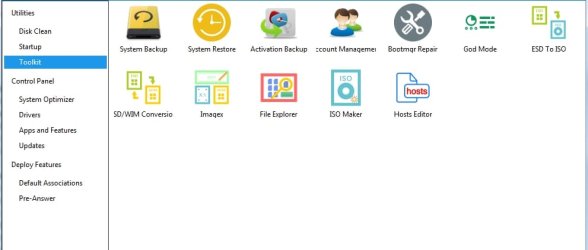
The easiest way is to use dism++. Click Toolkit in the left pane, then select activation backup.Click backup.
After the repair install has completed,run dism++ again. Select toolkit, click activation backup.Click restore.
....
Direct download dism++
https://www.chuyu.me/en/index.html

Greetings SIW2.
Came across this interesting post of yours, and have a few questions:
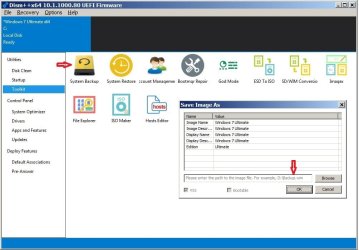
1. Can't seem to find activation backup mentioned in your post. Only System Backup is available.
2. Can the wim file created by System Backup be used to re-generate the system on a new drive by sticking it in the source folder of installation media and running it?
3. Does the wim file contain key/files necessary for activation?
4. Does it include also applications installed/

Many thanks and best regards,
 
Last edited:

My Computer

Computer type
PC/Desktop
OS
Windows 7 Ultimate x86
Hi goopy,

SIW2 is/was referring to the backup created during a Repair Install
 

My Computer

Computer type
PC/Desktop
Computer Manufacturer/Model Number
HP Desktop & Compaq Laptop
OS
Win 10 x64, Linux Lite, Win 7 x64, BlackArch, & Kali
Hard Drives
Samsung 850 Pro 256Gb,
Hitachi HDD 1Tb,
Crucial MX SSD 250Gb
Segate 3Tb USB 3.0 Ext. Backup HDD
Internet Speed
150Mbps dn, 20Mbps up
Antivirus
Avast Free, Malwarebytes Anti-Exploit & Anti-Ransomware
Browser
Firefox, Chrome, Opera, & VPN
Hi goopy,


Greetings SIW2.
Came across this interesting post of yours, and have a few questions:
1. Can't seem to find activation backup mentioned in your post. Only System Backup is available.
2. Can the wim file created by System Backup be used to re-generate the system on a new drive by sticking it in the source folder of installation media and running it?
3. Does the wim file contain key/files necessary for activation?
4. Does it include also applications installed?

[1] SIW2 gave you an alternative method of backing up and restoring the activation Product Key using DISM++.
On a laptop, it will either be on a sticker on the bottom, or in the battery compartment. If the sticker is too worn to read, or there isn't one, then you can retrieve it by either using Belarc Advisor or Magic Jelly Bean. Write this Product Key down and keep it in a safe place.
[2] In order to do this, you will need to clone the existing drive!
[3] Answered in 1..
[4] A cloned disk will contain all applications installed.

NOTE: During a repair install process, a C:\Windows.old backup folder gets created which is a FULL copy of the current version.

I hope this helps!
 

My Computer

Computer type
Laptop
Computer Manufacturer/Model Number
Fujitsu LIFEBOOK
OS
Win 7 HP SP1 64-bit Vista HB SP2 32-bit Linux Mint 18.3
CPU
Intel(R) Pentium(R) CPU P6200 @ 2.13GHz
Motherboard
FUJITSU FJNBB06
Memory
4.00 GB
Graphics Card(s)
Intel(R) Graphics Media Accelerator HD
Sound Card
[1] Realtek High Definition Audio [2] Intel(R) Display Audio
Screen Resolution
1366 x 768 x 32 bits (4294967296 colors) @ 59 Hz
Hard Drives
TOSHIBA MK5076GSX
Antivirus
AVG FREE
SIW2 appears to have suggested a simpler alternative to do windows updates and backups using DISM++. Here are the questions rephrased:

1. Where can one find activation backup on DISM++ Toolkit page?
2. Does the backup.wim created by System Backup contain activation key?
3. Is the backup.wim a complete backup of system drive inclusive of all installed programmes? Or only the windows components?
4. If the bcakup.wim is renamed install.wim and used in place of the existing on in the source folder, will the installation media create a replica of the backed-up OS on a new drive?


Many thank and best regards,
 

Attachments

  • dismbackup.jpg
    dismbackup.jpg
    61.6 KB · Views: 0
Last edited:

My Computer

Computer type
PC/Desktop
OS
Windows 7 Ultimate x86
There seems to be a glitch in the plugin for 10.1.1000.80

You can fix it by creating a Folder named ActiveBackup

dism++ActiveBackup1.jpg

Then you should get:


dism++ActiveBackup.jpg
 

My Computers

System One System Two

  • Computer type
    PC/Desktop
    OS
    7 X64
    CPU
    i5 8400
    Motherboard
    gigabyte b365m ds3h
    Memory
    2x8gb 3200mhz
    Hard Drives
    various
    PSU
    pure power 11 400w cm
    Case
    Coolermaster
    Cooling
    cryorig m9i
  • Computer type
    PC/Desktop
    OS
    7x64
    CPU
    g5400
    Motherboard
    ga b365m ds3h
    Memory
    8gb ddr4 2400
    PSU
    xfx pro 450w
Is the backup.wim a complete backup of system drive inclusive of all installed programmes?
Yes, it was the last time I looked.You can add exclusions if you like. Options>more settings>exclusion list settings

If the bcakup.wim is renamed install.wim and used in place of the existing on in the source folder, will the installation media create a replica of the backed-up OS on a new drive?

I haven't tested that. Dism++ can restore it. Recovery>System Restore>browse to Backup.wim
 

My Computers

System One System Two

  • Computer type
    PC/Desktop
    OS
    7 X64
    CPU
    i5 8400
    Motherboard
    gigabyte b365m ds3h
    Memory
    2x8gb 3200mhz
    Hard Drives
    various
    PSU
    pure power 11 400w cm
    Case
    Coolermaster
    Cooling
    cryorig m9i
  • Computer type
    PC/Desktop
    OS
    7x64
    CPU
    g5400
    Motherboard
    ga b365m ds3h
    Memory
    8gb ddr4 2400
    PSU
    xfx pro 450w
There seems to be a glitch in the plugin for 10.1.1000.80
You can fix it by creating a Folder named ActiveBackup
View attachment 405542
Then you should get:
View attachment 405543
SIW2 to the rescue again. Most brilliant.

.....
I haven't tested that. Dism++ can restore it. Recovery>System Restore>browse to Backup.wim
.....
True, but that assumes being able to boot up the OS. There would be times when this is not possible, and I'd imagine a simple procedure to re-create up-to-date OS from installation media would be most welcome.

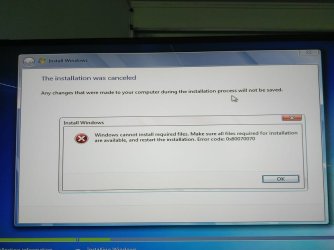
Anyway, first attempt to do so met with spectacular failure. Installation process stopped at 100% mark of copying windows files, and terminated with 0x80070070 error message. Any ideas what to try next?

Many thanks and best regards,
 

Attachments

  • dismerror.jpg
    dismerror.jpg
    44.7 KB · Views: 0

My Computer

Computer type
PC/Desktop
OS
Windows 7 Ultimate x86
True, but that assumes being able to boot up the OS.

There is an option to run dism++ in winre. Or you can boot any winpe and browse down to dism++ on any drive and run it.

Or you can very easily just pop it into any bootable wim. One simple way is to add this to winre.wim ( image 1) or boot.wim (image 2 ), using 7-zip or wimlib.

View attachment ADD-DISM++-TO-WINPE.zip

Then dism++ will appear as an extra option at the bottom of the system recovery options dialog.
 

My Computers

System One System Two

  • Computer type
    PC/Desktop
    OS
    7 X64
    CPU
    i5 8400
    Motherboard
    gigabyte b365m ds3h
    Memory
    2x8gb 3200mhz
    Hard Drives
    various
    PSU
    pure power 11 400w cm
    Case
    Coolermaster
    Cooling
    cryorig m9i
  • Computer type
    PC/Desktop
    OS
    7x64
    CPU
    g5400
    Motherboard
    ga b365m ds3h
    Memory
    8gb ddr4 2400
    PSU
    xfx pro 450w
Any ideas what to try next?

I haven't tested the create backup.wim and restore feature.

I would assume it is a complete wim backup, exactly as the system stands. It is logical that it is intended to be restored to the same partition on the same machine.

If that assumption is correct, then a couple of adjustments would be needed for successful restore to different partition\machine.

If you want to restore it elsewhere, one answer is probably to run sysprep before creating the backup.wim
 

My Computers

System One System Two

  • Computer type
    PC/Desktop
    OS
    7 X64
    CPU
    i5 8400
    Motherboard
    gigabyte b365m ds3h
    Memory
    2x8gb 3200mhz
    Hard Drives
    various
    PSU
    pure power 11 400w cm
    Case
    Coolermaster
    Cooling
    cryorig m9i
  • Computer type
    PC/Desktop
    OS
    7x64
    CPU
    g5400
    Motherboard
    ga b365m ds3h
    Memory
    8gb ddr4 2400
    PSU
    xfx pro 450w
Oh dear! Success(?) on the second attempt with the help of sonic swiss army knife and a larger disk.
Is there a log to check if backup.wim was installed properly?
Many thanks and best regards,
 

My Computer

Computer type
PC/Desktop
OS
Windows 7 Ultimate x86
Are you saying you restored the Backup.wim to a different hard drive from the source and it boots up fine?
 

My Computers

System One System Two

  • Computer type
    PC/Desktop
    OS
    7 X64
    CPU
    i5 8400
    Motherboard
    gigabyte b365m ds3h
    Memory
    2x8gb 3200mhz
    Hard Drives
    various
    PSU
    pure power 11 400w cm
    Case
    Coolermaster
    Cooling
    cryorig m9i
  • Computer type
    PC/Desktop
    OS
    7x64
    CPU
    g5400
    Motherboard
    ga b365m ds3h
    Memory
    8gb ddr4 2400
    PSU
    xfx pro 450w

My Computers

System One System Two

  • Computer type
    PC/Desktop
    OS
    7 X64
    CPU
    i5 8400
    Motherboard
    gigabyte b365m ds3h
    Memory
    2x8gb 3200mhz
    Hard Drives
    various
    PSU
    pure power 11 400w cm
    Case
    Coolermaster
    Cooling
    cryorig m9i
  • Computer type
    PC/Desktop
    OS
    7x64
    CPU
    g5400
    Motherboard
    ga b365m ds3h
    Memory
    8gb ddr4 2400
    PSU
    xfx pro 450w

My Computer

Computer type
PC/Desktop
OS
Windows 7 Ultimate x86
Hi goopy,

Are you saying that you deleted the original install.wim, renamed the backup.wim to install.wim, burnt it to a USB and then clean installed?

Thanks in advance.
 

My Computer

Computer type
Laptop
Computer Manufacturer/Model Number
Fujitsu LIFEBOOK
OS
Win 7 HP SP1 64-bit Vista HB SP2 32-bit Linux Mint 18.3
CPU
Intel(R) Pentium(R) CPU P6200 @ 2.13GHz
Motherboard
FUJITSU FJNBB06
Memory
4.00 GB
Graphics Card(s)
Intel(R) Graphics Media Accelerator HD
Sound Card
[1] Realtek High Definition Audio [2] Intel(R) Display Audio
Screen Resolution
1366 x 768 x 32 bits (4294967296 colors) @ 59 Hz
Hard Drives
TOSHIBA MK5076GSX
Antivirus
AVG FREE
If you're planning on creating customized installation media, there are better ways to do it. I use VMWare to get into audit mode, do my customization, seal the image with sysprep and capture it with Dism (not Dism++)
 

My Computer

Computer type
Laptop
Computer Manufacturer/Model Number
HP
OS
Windows 7 Ultimate x64
Ceo54,

We are aware of the standard deployment method.
That is not what the thread is about.

Dism++ is a tool with a lot of useful functions. The OP is trying to determine exactly what the dism++ backup to wim function does.
 

My Computers

System One System Two

  • Computer type
    PC/Desktop
    OS
    7 X64
    CPU
    i5 8400
    Motherboard
    gigabyte b365m ds3h
    Memory
    2x8gb 3200mhz
    Hard Drives
    various
    PSU
    pure power 11 400w cm
    Case
    Coolermaster
    Cooling
    cryorig m9i
  • Computer type
    PC/Desktop
    OS
    7x64
    CPU
    g5400
    Motherboard
    ga b365m ds3h
    Memory
    8gb ddr4 2400
    PSU
    xfx pro 450w
I have just had a look.

1) Restore backup.wim using dism++

When restoring backup.wim, dism++ sets the restored OS drive correctly to the volume value.
It didn't add a bootmenu entry.

That means backup.wim will be fine to restore to any partition on the same machine.

It is a useful feature.


2) Restore backup.wim using MS setup

I haven't yet tested what MS setup will do if backup.wim is used as a substitute for the regular install.wim.

I suspect it sets the OS drive to the volume value ( same as dism++). In addition I expect it will create the boot menu entry.
 

My Computers

System One System Two

  • Computer type
    PC/Desktop
    OS
    7 X64
    CPU
    i5 8400
    Motherboard
    gigabyte b365m ds3h
    Memory
    2x8gb 3200mhz
    Hard Drives
    various
    PSU
    pure power 11 400w cm
    Case
    Coolermaster
    Cooling
    cryorig m9i
  • Computer type
    PC/Desktop
    OS
    7x64
    CPU
    g5400
    Motherboard
    ga b365m ds3h
    Memory
    8gb ddr4 2400
    PSU
    xfx pro 450w
Just tested using backup.wim as a replacement for install.wim in the win 7 install media.

Ran setup.exe from within current booted windows and pointed custom setup at a different partition.

Installed successfully, drive letter setting and boot menu all created properly.

However, it booted directly into the user account. There was no routine installing drivers, or adjusting registry.

If the intention is to restore to different hardware, then it seems sensible to either:

1) Syprep before capture

OR

2) Run one of the popular adjust to new hardware programs after applying the image.

If you don't have one of those, O&O DiskImage pro 11 is avaliable on free giveaway. Alternatively, you can buy the O&O powerpack ( includes DiskImagePro12 ) for peanuts.

See here
 

My Computers

System One System Two

  • Computer type
    PC/Desktop
    OS
    7 X64
    CPU
    i5 8400
    Motherboard
    gigabyte b365m ds3h
    Memory
    2x8gb 3200mhz
    Hard Drives
    various
    PSU
    pure power 11 400w cm
    Case
    Coolermaster
    Cooling
    cryorig m9i
  • Computer type
    PC/Desktop
    OS
    7x64
    CPU
    g5400
    Motherboard
    ga b365m ds3h
    Memory
    8gb ddr4 2400
    PSU
    xfx pro 450w
Thanks for the kind replies.
Looks like it's time for more latin lessons. More of that later.
Meanwhile here are a few warning and error messages to be dealt with:

1. setupact.log
The 4 install.swim files were created using Dism/Split-Image, and expanded into the $WINDOWS.~LS folder during installation.
Does the message "Image file is not a match[gle=0x00000490]" suggests these files were not created or expanded properly?
Code:
[B]setupact.log[/B]
2018-10-08 21:38:38, Info                         Callback_SetSelectedImageInfoOnBB: Not running from downlevel; skipping check for WinPE image
2018-10-08 21:38:38, Info       [0x060076] IBS    Callback_SetSelectedImageInfoOnBB:Successfully read and cached the WinPE image's metadata.
2018-10-08 21:38:38, Info                         CDepImageInfoSetCache::GetCachedInfoSet: Found cached image info for [E:\Sources\install.swm]
2018-10-08 21:38:38, Info       [0x0606cc] IBS    CDepImageXMLInfo::GetEditionID:EditionID=Ultimate, Flags=Ultimate : Returning Ultimate, hr=0x0
2018-10-08 21:38:38, Info                  IBS    SetSelectedWindowsImageInfoOnBB:EditionID is [Ultimate].
2018-10-08 21:38:38, Info       [0x060088] IBS    CheckAdditionalMediaRequirements:Image part count is [4]
2018-10-08 21:38:38, Info       [0x060089] IBS    CheckAdditionalMediaRequirements:Looking for image file [E:\Sources\install2.swm]
2018-10-08 21:38:38, Info       [0x06008a] IBS    CheckAdditionalMediaRequirements:Found image file [E:\Sources\install2.swm]
2018-10-08 21:38:38, Info       [0x06008c] IBS    CheckAdditionalMediaRequirements:[COLOR=Red][B]Image file is not a match[gle=0x00000490][/B][/COLOR]
2018-10-08 21:38:38, Info       [0x060089] IBS    CheckAdditionalMediaRequirements:Looking for image file [E:\Sources\install3.swm]
2018-10-08 21:38:38, Info       [0x06008a] IBS    CheckAdditionalMediaRequirements:Found image file [E:\Sources\install3.swm]
2018-10-08 21:38:38, Info       [0x06008c] IBS    CheckAdditionalMediaRequirements:[COLOR=Red][B]Image file is not a match[gle=0x00000490][/B][/COLOR]
2018-10-08 21:38:38, Info       [0x060089] IBS    CheckAdditionalMediaRequirements:Looking for image file [E:\Sources\install4.swm]
2018-10-08 21:38:38, Info       [0x06008a] IBS    CheckAdditionalMediaRequirements:Found image file [E:\Sources\install4.swm]
2018-10-08 21:38:38, Info       [0x06008c] IBS    CheckAdditionalMediaRequirements:[COLOR=Red][B]Image file is not a match[gle=0x00000490][/B][/COLOR]
2018-10-08 21:38:38, Info       [0x060078] IBS    Callback_SetSelectedImageInfoOnBB:Successfully read and cached the Windows image's metadata.

2018-10-08 21:38:39, Warning    [0x070026] DIAG   Win32_Processor : Unable to retrieve Stepping, vtType = 8. Error code = 0x0
2018-10-08 21:38:40, Warning    [0x070026] DIAG   Win32_Processor : Unable to retrieve Stepping, vtType = 8. Error code = 0x0
2018-10-08 21:39:00, Error      [0x0606cc] IBS    ApplyDiskOperationUsingService: Failed to correctly apply disk operation of type [0xe]; hr = 0x8007009a[gle=0x0000009a]
2018-10-08 21:39:00, Error      [0x060492] IBS    PerformDiskOperation:Disk operation of type [14] failed; hr = 0x8007009a
2018-10-08 21:39:00, Error      [0x0606cc] IBS    LegacyGatherVolumeInfo: Couldn't find NT path for disk [0] region [0x6500000]; hr = 0x80070490.[gle=0x00000002]
2018-10-08 21:39:00, Error      [0x060222] IBS    GatherRegionInfo: LegacyGatherVolumeInfo failed, hr = 0x80070490[gle=0x00000002]
2. setuperr.log, diagwrn.xml and diagerr.xml
What's the problem here?
Code:
[B]setuperr.log[/B]
2018-10-08 21:39:00, Error      [0x0606cc] IBS    ApplyDiskOperationUsingService: Failed to correctly apply disk operation of type [0xe]; hr = 0x8007009a[gle=0x0000009a]
2018-10-08 21:39:00, Error      [0x060492] IBS    PerformDiskOperation:Disk operation of type [14] failed; hr = 0x8007009a
2018-10-08 21:39:00, Error      [0x0606cc] IBS    LegacyGatherVolumeInfo: Couldn't find NT path for disk [0] region [0x6500000]; hr = 0x80070490.[gle=0x00000002]
2018-10-08 21:39:00, Error      [0x060222] IBS    GatherRegionInfo: LegacyGatherVolumeInfo failed, hr = 0x80070490[gle=0x00000002]

[B]diagwrn.xml[/B]
<z:row Cls="D" Sev="50331648" Maj="Def" Min="Def" LN="1289" Fil="" Fun="CallbackAppCompatProgress" Uid="50987008" Msg="[APPCOMPAT UI] Got CallbackAppCompatProgress without compat progress page active" PID="936" TID="156" Con="" Exe="X:\Sources\setup.exe" Mod="win32ui.dll" Err="0" MD="" DT="2018-10-08T21:38:38"/>
<z:row Cls="D" Sev="50331648" Maj="diagnostic" Min="Def" LN="93" Fil="" Fun="CAccessWMI::LogErrorMessage" Uid="50790438" Msg="Win32_Processor : Unable to retrieve Stepping, vtType = 8. Error code = 0x0" PID="936" TID="156" Con="" Exe="X:\Sources\setup.exe" Mod="diagnostic.dll" Err="0" MD="" DT="2018-10-08T21:38:39"/>
<z:row Cls="D" Sev="50331648" Maj="diagnostic" Min="Def" LN="93" Fil="" Fun="CAccessWMI::LogErrorMessage" Uid="50790438" Msg="Win32_Processor : Unable to retrieve Stepping, vtType = 8. Error code = 0x0" PID="936" TID="156" Con="" Exe="X:\Sources\setup.exe" Mod="diagnostic.dll" Err="0" MD="" DT="2018-10-08T21:38:40"/>
<z:row Cls="D" Sev="50331648" Maj="Def" Min="Def" LN="1289" Fil="" Fun="CallbackAppCompatProgress" Uid="50987008" Msg="[APPCOMPAT UI] Got CallbackAppCompatProgress without compat progress page active" PID="936" TID="156" Con="" Exe="X:\Sources\setup.exe" Mod="win32ui.dll" Err="0" MD="" DT="2018-10-08T21:38:40"/>
<z:row Cls="D" Sev="50331648" Maj="Def" Min="Def" LN="1987" Fil="" Fun="CreateSystemVolume" Uid="50724864" Msg="CreateSystemVolume:Unable to assign long label name to System volume; Label will be ignored" PID="936" TID="956" Con="" Exe="X:\Sources\setup.exe" Mod="WinSetup.dll" Err="0" MD="" DT="2018-10-08T21:39:00"/>

[B]diagerr.xml[/B]
<z:row Cls="D" Sev="33554432" Maj="Def" Min="Def" LN="2260" Fil="" Fun="LogCallback" Uid="33949388" Msg="ApplyDiskOperationUsingService: Failed to correctly apply disk operation of type [0xe]; hr = 0x8007009a" PID="936" TID="1208" Con="" Exe="X:\Sources\setup.exe" Mod="WinSetup.dll" Err="154" MD="" DT="2018-10-08T21:39:00"/>
<z:row Cls="D" Sev="33554432" Maj="Def" Min="Def" LN="618" Fil="" Fun="PerformDiskOperation" Uid="33948818" Msg="PerformDiskOperation:Disk operation of type [14] failed; hr = 0x8007009a" PID="936" TID="956" Con="" Exe="X:\Sources\setup.exe" Mod="WinSetup.dll" Err="0" MD="" DT="2018-10-08T21:39:00"/>
<z:row Cls="D" Sev="33554432" Maj="Def" Min="Def" LN="2260" Fil="" Fun="LogCallback" Uid="33949388" Msg="LegacyGatherVolumeInfo: Couldn&apos;t find NT path for disk [0] region [0x6500000]; hr = 0x80070490." PID="936" TID="1220" Con="" Exe="X:\Sources\setup.exe" Mod="WinSetup.dll" Err="2" MD="" DT="2018-10-08T21:39:00"/>
 <z:row Cls="D" Sev="33554432" Maj="Def" Min="Def" LN="2260" Fil="" Fun="LogCallback" Uid="33948194" Msg="GatherRegionInfo: LegacyGatherVolumeInfo failed, hr = 0x80070490" PID="936" TID="1220" Con="" Exe="X:\Sources\setup.exe" Mod="WinSetup.dll" Err="2" MD="" DT="2018-10-08T21:39:00"/>
3. cbs.log
Anything to do with the KB3177467 Servicing stack update?
What could have gone wrong?
Code:
[B]cbs.log[/B]
2018-10-08 22:32:09, Info                  DISM   DISM Provider Store: PID=1844 Failed to get and initialize the PE Provider.  Continuing by assuming that it is not a WinPE image. - CDISMProviderStore::Final_OnConnect
2018-10-08 22:32:09, Warning               DISM   DISM Provider Store: PID=1844 Failed to Load the provider: X:\Sources\WimProvider.dll. - CDISMProviderStore::Internal_GetProvider(hr:0x8007007e)
2018-10-08 22:32:09, Warning               DISM   DISM.EXE: Failed to load WimManager. Try running from the Deployment Tools Command Prompt. If the issue persists, ensure that wimgapi.dll and wimserv.exe are up to date.
2018-10-08 22:32:09, Warning               DISM   [COLOR=Red][B]DISM.EXE: Failed to add any commands.[/B][/COLOR]
2018-10-08 22:32:12, Warning               DISM   DISM Provider Store: PID=1888 Failed to Load the provider: G:\$WINDOWS.~LS\PackageTemp\d187a553-4848-471a-a278-272004fd04a5\229AD944-63BD-4232-B113-C64BEE6F51F0\PEProvider.dll. - CDISMProviderStore::Internal_GetProvider(hr:0x8007007e)
2018-10-08 22:32:12, Info                  DISM   DISM Provider Store: PID=1888 Failed to get and initialize the PE Provider.  Continuing by assuming that it is not a WinPE image. - CDISMProviderStore::Final_OnConnect
2018-10-08 22:32:12, Info                  CBS    [COLOR=Red][B]Failed to find a matching version for servicing stack: [/B][/COLOR]G:\Windows\WinSxS\amd64_microsoft-windows-servicingstack_31bf3856ad364e35_6.1.7601.23505_none_681aa442f6fed7f0\ [HRESULT = 0x80070490 - ERROR_NOT_FOUND]
2018-10-08 22:32:12, Info                  CBS    Failed to find servicing stack directory in online store. [HRESULT = 0x80070490 - ERROR_NOT_FOUND]
2018-10-08 22:32:13, Info                  CBS    Failed to unload offline registry: {bf1a281b-ad7b-4476-ac95-f47682990ce7}G:/Windows/System32/config/SOFTWARE, the client may still need it open. [HRESULT = 0x80070005 - E_ACCESSDENIED]
....
4. System integrity check
Finally, is there a tool to check the system integrity of the new installation, and if any files/components are missing?

Many thanks and best regards,
 

My Computer

Computer type
PC/Desktop
OS
Windows 7 Ultimate x86
Hi goopy,

4. System integrity check
Finally, is there a tool to check the system integrity of the new installation, and if any files/components are missing?

Firstly, try running CHKDSK.

To run CHKDSK [Check Disk], please follow my instructions below!

CHKDSK[Check Disk]

CHKDSK [Check Disk] is a Windows utility program for detecting and repairing corruptions of the file system [FAT16, FAT32, and NTFS drives]. CHKDSK must be run from an elevated command prompt => Click Start, in the search box type cmd, when cmd appears in the menu under Programs, right-click it and select Run as administrator. The elevated command prompt window will now open.

[1] Run CHKDSK in non-invasive read-only and detect mode. Copy chkdsk C: [yes there is a space there] and Paste it [you need to use the mouse right-click and paste for this as CTRL+V doesn’t work] into the elevated command prompt window and press Enter - This analyses drive C:\ and reports any errors or corruptions, but doesn’t repair them.

[2] If there are any errors or corruptions, then run CHKDSK in repair mode. This one repairs errors on the disk without scanning for any bad sectors. Copy CHKDSK C: /F [yes there are 2 spaces there] and Paste it [you need to use the mouse right-click and paste for this as CTRL+V doesn’t work] into the elevated command prompt window and press Enter - This does repair any file system errors or corruptions on drive C:\, provided that the disk isn’t in use. If the disk is in use, CHKDSK displays a prompt that asks whether you want to schedule the disk to be checked the next time you restart the OS, click Yes to schedule this check and then Restart.

[3] If there are still any errors or corruptions, then run CHKDSK in repair mode again. This one repairs errors on the disk and scans for bad sectors, it then attempts to repair or recover any readable information [implies /F]. Copy CHKDSK C: /R [yes there are 2 spaces there] and Paste it [you need to use the mouse right-click and paste for this as CTRL+V doesn’t work] into the elevated command prompt window and press Enter - This does repair any file system errors or corruptions on drive C:\, provided that the disk isn’t in use. If the disk is in use, CHKDSK displays a prompt that asks whether you want to schedule the disk to be checked the next time you restart the OS, click Yes to schedule this check and then Restart.

We could also run SFC [System File Checker] after this. Please let me know if you want to do this and I will post the procedure.

I hope this helps!
 

My Computer

Computer type
Laptop
Computer Manufacturer/Model Number
Fujitsu LIFEBOOK
OS
Win 7 HP SP1 64-bit Vista HB SP2 32-bit Linux Mint 18.3
CPU
Intel(R) Pentium(R) CPU P6200 @ 2.13GHz
Motherboard
FUJITSU FJNBB06
Memory
4.00 GB
Graphics Card(s)
Intel(R) Graphics Media Accelerator HD
Sound Card
[1] Realtek High Definition Audio [2] Intel(R) Display Audio
Screen Resolution
1366 x 768 x 32 bits (4294967296 colors) @ 59 Hz
Hard Drives
TOSHIBA MK5076GSX
Antivirus
AVG FREE
Back
Top