Now I am really puzzled - mystery active partition

whs

New member
Guru
Gold Member
VIP
Local time
1:13 PM
Messages
26,200
Location
Florida in winter, Black Forest/Germany
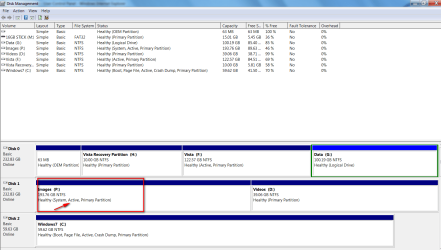
I have 2 HDDs and 1 SSD.

On HDD Disk0 I have Vista which is an active partition (F)
On SSD Disk2 I have Windows7 which is an active partition (C). Win7 was installed with the HDDs unplugged.
On HDD Disk1 I have 2 data partitions. One for Videos (D) and one for Macrium Images (P).

Yesterday I discovered by accident that this Image partition (P) is active. So I cranked up my trusted Partition Wizard and made it inactive. This morning my system would not boot any more. So this time I used my bootable Partition Wizard CD and changed it back to active. After that the system booted as usual.

Would anybody have an idea why a data partition would be set to active and why the system would depend on such a data partition to boot. I am completely puzzled.

Note that I have never used Disk1 for any system installation. It has always been a data disk.
 

Attachments
  • 2010-09-16_232153.png
    2010-09-16_232153.png
    45 KB · Views: 130

My Computer My Computer

At a glance

Vista, Windows7, Mint Mate, Zorin, Windows 8from 1.6GHz Duo to i7
Computer Manufacturer/Model Number
HP, Dell, Gateway, Toshiba - 4 laptops and 2 desktops
OS
Vista, Windows7, Mint Mate, Zorin, Windows 8
CPU
from 1.6GHz Duo to i7
Monitor(s) Displays
2x HP w2207
Hard Drives
5x HDD, 7x SSD, 12x Externals
Keyboard
with trackball - no mices
Mouse
Trackball mice
Internet Speed
DSL 6000
Try searching that disk, you might find windows installation files in it. I know when win 7 is installed it puts files on another logical drive but it usually creates a 100mb partition of its own.

I don't know exactly why it has put the files there but one of my machines has done the same thing and put the boot files in a data pattition.

A fix? I'm not sure, whith that machine I will wait until I need to re-install windows, remove all other drives until installed, back up data from the other drive and then Kill Disk it and put the data back.

It hasn't caused me any problems having the boot files, you might find that is what has happened, just at a guess.
 

My Computer My Computer

At a glance

Windows 7 Ultimate x64i7920 @ 4.0GHz12GB G-Skill 1600 MHzGTX480 2 way SLI OC 900MHz Water Cooled
OS
Windows 7 Ultimate x64
CPU
i7920 @ 4.0GHz
Motherboard
Gigagyte X58a UD7
Memory
12GB G-Skill 1600 MHz
Graphics Card(s)
GTX480 2 way SLI OC 900MHz Water Cooled
Sound Card
On board
Monitor(s) Displays
Asus 26 inch
Hard Drives
2 X WD 640 GB SATA3 AAEX, 1 X WD 500 GB AALS
PSU
Crosair 850 GX
Case
CM HAF 932
Cooling
Corsair H50 CPU, GB pump Swiftech 2 core 3 fan radiator GPU
Keyboard
G15
Mouse
MX Revolution
Internet Speed
Cable
Other Info
Logitech Z 550D Speakers
Hello Wolfgang.


I assume when you added the SSD Windows 7 choose the first "Active" it saw and put the boot files there but I have no way of knowing and you may never find an actual reason.


What I would do is mark the "Disk 2, C:" as active and run the 3 separate startup repairs with a system restart between each repair to the "Disk 2, C:" if that's the one you want to be "System" making Windows 7 as "System, Active" now will make it easier to remove/delete Vista later if you choose.

You may need to add an entry for Vista after though, which is no big deal.

EasyBCD

Startup Repair - Run 3 Separate Times

Also mark "Disk 1, P:" and "Disk 0 F:" as inactive before you run the repairs.
click to enlarge
Inactive2.jpg
 

My Computer My Computer

At a glance

W 7 64-bit UltimateIntel Q9550 Yorkfield8GB Dominator 8500C5DATI : XFX 5870
Computer Manufacturer/Model Number
* BFK Customs *
OS
W 7 64-bit Ultimate
CPU
Intel Q9550 Yorkfield
Motherboard
ASUS P5Q Pro
Memory
8GB Dominator 8500C5D
Graphics Card(s)
ATI : XFX 5870
Sound Card
Realtek HD Audio 7-1
Monitor(s) Displays
1x 47" LCD HDMI & 3x 26" LCD HDMI
Screen Resolution
1920x1080P & 1920x1200
Hard Drives
1x 80GB Intel X25-M G2 SSD : 1x 500GB & 1x 640GB WD Caviar Black(s)
PSU
Corsair 620HX
Case
Cooler Master RC-690
Cooling
Tuniq Tower 120, 2x 140mm and 3x 120mm case fans
Keyboard
Microsoft 500
Mouse
Razer Diamondback 3G
Internet Speed
14 Mb/s
Other Info
1x Koutech 3Gb/s SATA HDD Hot Swap Rack
Hi guys, thanks for the answers. But let me remind you that I had the SSDs disconnected when Win7 was installed. So nothing could have gotten on there during the Installation. The MBR must have gotten on there after the installation.
I did one Macrium recovery from the P-disk (where my images are) a couple of weeks ago. I wonder whether Macrium wrote the MBR to the P-disk although the target disk for the recovery was C.
 

My Computer My Computer

At a glance

Vista, Windows7, Mint Mate, Zorin, Windows 8from 1.6GHz Duo to i7
Computer Manufacturer/Model Number
HP, Dell, Gateway, Toshiba - 4 laptops and 2 desktops
OS
Vista, Windows7, Mint Mate, Zorin, Windows 8
CPU
from 1.6GHz Duo to i7
Monitor(s) Displays
2x HP w2207
Hard Drives
5x HDD, 7x SSD, 12x Externals
Keyboard
with trackball - no mices
Mouse
Trackball mice
Internet Speed
DSL 6000
Hello mate, have you decided what you're going to do with it?
 

My Computer My Computer

At a glance

W 7 64-bit UltimateIntel Q9550 Yorkfield8GB Dominator 8500C5DATI : XFX 5870
Computer Manufacturer/Model Number
* BFK Customs *
OS
W 7 64-bit Ultimate
CPU
Intel Q9550 Yorkfield
Motherboard
ASUS P5Q Pro
Memory
8GB Dominator 8500C5D
Graphics Card(s)
ATI : XFX 5870
Sound Card
Realtek HD Audio 7-1
Monitor(s) Displays
1x 47" LCD HDMI & 3x 26" LCD HDMI
Screen Resolution
1920x1080P & 1920x1200
Hard Drives
1x 80GB Intel X25-M G2 SSD : 1x 500GB & 1x 640GB WD Caviar Black(s)
PSU
Corsair 620HX
Case
Cooler Master RC-690
Cooling
Tuniq Tower 120, 2x 140mm and 3x 120mm case fans
Keyboard
Microsoft 500
Mouse
Razer Diamondback 3G
Internet Speed
14 Mb/s
Other Info
1x Koutech 3Gb/s SATA HDD Hot Swap Rack
I will have to make some more tests - e.g.with my Vista partition. But I am kind of busy right now so will take a couple of days.
 

My Computer My Computer

At a glance

Vista, Windows7, Mint Mate, Zorin, Windows 8from 1.6GHz Duo to i7
Computer Manufacturer/Model Number
HP, Dell, Gateway, Toshiba - 4 laptops and 2 desktops
OS
Vista, Windows7, Mint Mate, Zorin, Windows 8
CPU
from 1.6GHz Duo to i7
Monitor(s) Displays
2x HP w2207
Hard Drives
5x HDD, 7x SSD, 12x Externals
Keyboard
with trackball - no mices
Mouse
Trackball mice
Internet Speed
DSL 6000
When you have time, I'm curious. ;)
 

My Computer My Computer

At a glance

W 7 64-bit UltimateIntel Q9550 Yorkfield8GB Dominator 8500C5DATI : XFX 5870
Computer Manufacturer/Model Number
* BFK Customs *
OS
W 7 64-bit Ultimate
CPU
Intel Q9550 Yorkfield
Motherboard
ASUS P5Q Pro
Memory
8GB Dominator 8500C5D
Graphics Card(s)
ATI : XFX 5870
Sound Card
Realtek HD Audio 7-1
Monitor(s) Displays
1x 47" LCD HDMI & 3x 26" LCD HDMI
Screen Resolution
1920x1080P & 1920x1200
Hard Drives
1x 80GB Intel X25-M G2 SSD : 1x 500GB & 1x 640GB WD Caviar Black(s)
PSU
Corsair 620HX
Case
Cooler Master RC-690
Cooling
Tuniq Tower 120, 2x 140mm and 3x 120mm case fans
Keyboard
Microsoft 500
Mouse
Razer Diamondback 3G
Internet Speed
14 Mb/s
Other Info
1x Koutech 3Gb/s SATA HDD Hot Swap Rack
Here is an interim progress report:

1. I checked out my Vista. It is not effected by the MBR on P. It works with or without.
2. I now remember (sorry for my failing memory) that I did not unplug Disk1 during the installation of Win7 - the plug would not give. That's why I only unlugged Disk0 with Vista on it. So the MBR must have been put on the P partition during the Win7 installation. Question is why because I clearly directed the installation towards Disk2, the SSD.
3. Although my Win7 C partition is marked as "active", Partition Wizard does not recognize it as being active. I wanted to set it to "inactive", but that option is greyed out - and the "active" option is greyed out too. I guess it is a hybrid. It must have been the Macrium recovery that set it that way because I declared C as active not knowing about the MBR on P.
4. I guess one day I will fix it with a Startup/Repair. I better unplug my Vista disk during that operation.
 

My Computer My Computer

At a glance

Vista, Windows7, Mint Mate, Zorin, Windows 8from 1.6GHz Duo to i7
Computer Manufacturer/Model Number
HP, Dell, Gateway, Toshiba - 4 laptops and 2 desktops
OS
Vista, Windows7, Mint Mate, Zorin, Windows 8
CPU
from 1.6GHz Duo to i7
Monitor(s) Displays
2x HP w2207
Hard Drives
5x HDD, 7x SSD, 12x Externals
Keyboard
with trackball - no mices
Mouse
Trackball mice
Internet Speed
DSL 6000
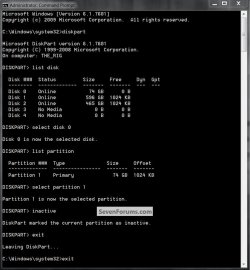
Hello.


Did you have a look at the diskpart snip I put in my post #3 above?
 

My Computer My Computer

At a glance

W 7 64-bit UltimateIntel Q9550 Yorkfield8GB Dominator 8500C5DATI : XFX 5870
Computer Manufacturer/Model Number
* BFK Customs *
OS
W 7 64-bit Ultimate
CPU
Intel Q9550 Yorkfield
Motherboard
ASUS P5Q Pro
Memory
8GB Dominator 8500C5D
Graphics Card(s)
ATI : XFX 5870
Sound Card
Realtek HD Audio 7-1
Monitor(s) Displays
1x 47" LCD HDMI & 3x 26" LCD HDMI
Screen Resolution
1920x1080P & 1920x1200
Hard Drives
1x 80GB Intel X25-M G2 SSD : 1x 500GB & 1x 640GB WD Caviar Black(s)
PSU
Corsair 620HX
Case
Cooler Master RC-690
Cooling
Tuniq Tower 120, 2x 140mm and 3x 120mm case fans
Keyboard
Microsoft 500
Mouse
Razer Diamondback 3G
Internet Speed
14 Mb/s
Other Info
1x Koutech 3Gb/s SATA HDD Hot Swap Rack
With Diskpart I succeeded in setting the Win7 partition inactive - after a few detours, LOL. Thanks BFK. I will now reboot and see what happens.


Microsoft Windows [Version 6.1.7600]
Copyright (c) 2009 Microsoft Corporation. All rights reserved.
C:\Windows\system32>diskpart
Microsoft DiskPart version 6.1.7600
Copyright (C) 1999-2008 Microsoft Corporation.
On computer: WHS-PC
DISKPART> list disk
Disk ### Status Size Free Dyn Gpt
-------- ------------- ------- ------- --- ---
Disk 0 Online 232 GB 1024 KB
Disk 1 Online 232 GB 1024 KB
Disk 2 Online 59 GB 0 B
Disk 3 No Media 0 B 0 B
Disk 4 No Media 0 B 0 B
Disk 5 No Media 0 B 0 B
Disk 6 No Media 0 B 0 B
Disk 7 Online 15 GB 0 B
DISKPART> select disk 2
Disk 2 is now the selected disk.
DISKPART> list partition
Partition ### Type Size Offset
------------- ---------------- ------- -------
Partition 1 Primary 59 GB 1024 KB
DISKPART> inactive
There is no partition selected.
Please select a partition and try again.
DISKPART> select partition 2
The specified partition is not valid.
Please select a valid partition.
There is no partition selected.
DISKPART> select partition 1
Partition 1 is now the selected partition.
DISKPART> inactive
DiskPart marked the current partition as inactive.
DISKPART>
 

My Computer My Computer

At a glance

Vista, Windows7, Mint Mate, Zorin, Windows 8from 1.6GHz Duo to i7
Computer Manufacturer/Model Number
HP, Dell, Gateway, Toshiba - 4 laptops and 2 desktops
OS
Vista, Windows7, Mint Mate, Zorin, Windows 8
CPU
from 1.6GHz Duo to i7
Monitor(s) Displays
2x HP w2207
Hard Drives
5x HDD, 7x SSD, 12x Externals
Keyboard
with trackball - no mices
Mouse
Trackball mice
Internet Speed
DSL 6000
Well, the reboot worked. So far so good. Now I only have to move the MFT to where it belongs. But I will do that another day because I want to disconnect my Vista disk and that requires to take my box apart.
 

My Computer My Computer

At a glance

Vista, Windows7, Mint Mate, Zorin, Windows 8from 1.6GHz Duo to i7
Computer Manufacturer/Model Number
HP, Dell, Gateway, Toshiba - 4 laptops and 2 desktops
OS
Vista, Windows7, Mint Mate, Zorin, Windows 8
CPU
from 1.6GHz Duo to i7
Monitor(s) Displays
2x HP w2207
Hard Drives
5x HDD, 7x SSD, 12x Externals
Keyboard
with trackball - no mices
Mouse
Trackball mice
Internet Speed
DSL 6000
Back
Top