
NT 4.0 policy that blocks adding printer drivers?

spbanzaca

New member
Local time
5:30 PM
Messages
24
Location
Clayton NC
Does anyone know what is causing this? I have one computer in a company of over 8000 computers that won't allow me to add the print queue for a company wide network printing set up. No one else is having this issue but this guy. So it's NOT a Group Policy issue...

We are working with a Win 7 Enterprise OS.
 

Attachments
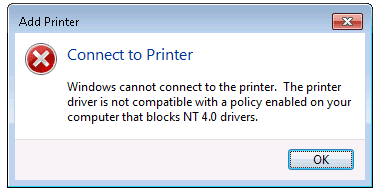
  • Blocking Policy.PNG
    Blocking Policy.PNG
    7.8 KB · Views: 9

My Computer

Computer type
PC/Desktop
OS
64
Is Group Policy User Configuration consistent with Group Policy Computer Configuration? You will find that Group Policy allows the Admin to treat individual users as exceptions to the computer configuration.
 

My Computer

Computer type
PC/Desktop
OS
Windows 7 x64, Vista x64, 8.1 smartphone
CPU
Intel E8400 65W 64-bit
Motherboard
Gigabyte EP45-UD3LR
Memory
DDR2 2 x 2GB, 1GB x 2
Graphics Card(s)
XFX Radeon HD5750
Sound Card
AMD High Definition Audio; Realtek High Definition Audio
Monitor(s) Displays
iiyama prolite X2377HDS
Screen Resolution
1920 x 1080
Hard Drives
500GB 7200 rpm Seagate ST3500413AS 16MB, 500GB 5400 rpm Toshiba MQ02ABF050H 32MB, 200GB 7200 rpm Seagate ST3200820AS 8MB, 2TB 7200 rpm Western Digital WD20EZRX 64MB
PSU
Enermax Liberty Modular
Case
Antec P193 Midi Tower
Keyboard
Mionix ZIBAL 60
Mouse
Razer USB 2.0 Diamondback Mouse or Huion Graphics Tablet
Browser
Internet Explorer, Lunascape, Firefox, Opera, Avast Safezone
It looks like a problem with printer driver are you running 64 bit systems and is the driver signed?
 

My Computer

Computer type
PC/Desktop
OS
win 8 32 bit
Print driver is not the issue. We are using the same print driver that is on every pc in this company. We use a print driver called the Xerox Pull Print Driver. We utilize the Nuance/Equitrac FollowYouPrint utility which is one print queue that works with every Xerox printer in the company which allows you to send the print job to the server and is held on the server and can be retrieved from ANY Xerox printer in the company.

The driver is installed on every PC when the PC's are imaged. His was working he said up until two weeks ago.
 

My Computer

Computer type
PC/Desktop
OS
64
Back
Top