NTLDR is Missing

joshuah2003

New member
Local time
10:40 AM
Messages
15
This is what comes up when I restart my computer into my windows 7 partition. My hard drive had 2 partitions on it. One contained a Windows XP install that I never used and then Windows 7 which I always use. I used Partition Magic to format the Windows XP partition and to also switch my Windows 7 partition from being a logical drive to a primary drive. It then required that I restart my computer. i did so and it came up and successfully formatted the XP partition to a clean slate. I was planning to install Linux Mint 8 on that partition instead. It then restarted one more time and..."NTLDR is Missing, Ctrl+Alt+Del to restart". It does this every time. I've partitioned a lot and never had this problem. I'm thinking it is because I was dual booting XP and 7, so it would ask me at start up each time which I wanted to boot into. I was hoping someone knew how I might be able to goes into the bios...or do something to get back into Windows 7. Please help. I really need to get back into that install.

So I just booted into my old hard drive which I still have installed in the computer. It is also windows XP. I went to my computer and the drives are currently like this: Local Disk (C: ), DVD-RAM Drive (D: ), Linux (E: ), Local Disk (F: ).

Right before I formatted my Windows 7 install was under the (C: ) drive, now it is the (F: ) drive. Maybe this is the problem? Maybe I need to set in the bios or something that it should be (C: )? I dunno, please someone help me.

---------- Post added at 08:32 PM ---------- Previous post was at 08:07 PM ----------

After doing some research It seems that NTLDR is only for windows XP and that Windows 7 uses a file called BOOTMGR, so it must still be trying to dual boot with XP as well? please help.
 

My Computer

Computer Manufacturer/Model Number
Me
OS
Windows 7
Partition Magic is a poor choice. It is long outdated. Who knows what it did. Have a look at this method. Maybe it helps.
 

My Computer

Computer Manufacturer/Model Number
HP, Dell, Gateway, Toshiba - 4 laptops and 2 desktops
OS
Vista, Windows7, Mint Mate, Zorin, Windows 8
CPU
from 1.6GHz Duo to i7
Monitor(s) Displays
2x HP w2207
Hard Drives
5x HDD, 7x SSD, 12x Externals
Keyboard
with trackball - no mices
Mouse
Trackball mice
Internet Speed
DSL 6000
Partition Magic is not compatible with the new Vista/7 partitioning rules.

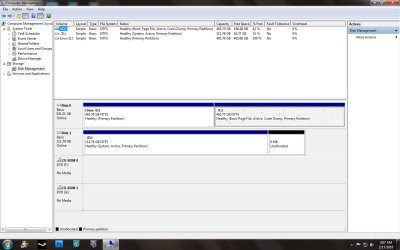
Please post a screenshot of your Disk Management Window

http://www.sevenforums.com/tutorials/9733-how-post-screenshot-seven-forums.html

You could see if running this will do the trick:

should work fine from within XP - just dble click on sispar.cmd.

Input the drive letter of your 7 partition as seen from where you are ( i.e. F) - only takes a couple of seconds.
 
Last edited:

My Computers

System One System Two

  • Computer type
    PC/Desktop
    OS
    7 X64
    CPU
    i5 8400
    Motherboard
    gigabyte b365m ds3h
    Memory
    2x8gb 3200mhz
    Hard Drives
    various
    PSU
    pure power 11 400w cm
    Case
    Coolermaster
    Cooling
    cryorig m9i
  • Computer type
    PC/Desktop
    OS
    7x64
    CPU
    g5400
    Motherboard
    ga b365m ds3h
    Memory
    8gb ddr4 2400
    PSU
    xfx pro 450w
i'm trying that now SIW2, if not i'll post the image.

---------- Post added at 09:00 PM ---------- Previous post was at 08:57 PM ----------

Or maybe I meant partition wizard
I Used: Free Download Partition Wizard

because it said it worked for 7. I was going to try what i normally use: Easeus , but they make u pay for 64bit 7.

---------- Post added at 09:01 PM ---------- Previous post was at 09:00 PM ----------

after running that it says: "A disk read error occured Press Ctrl alt del to restart"

---------- Post added at 09:03 PM ---------- Previous post was at 09:01 PM ----------

Wait....it worked! Kind of... It boots from my IDE HD though, but all the files are still on my sata hd.... How can I make it boot using the hard drive that Windows 7 is actually installed on?
 

My Computer

Computer Manufacturer/Model Number
Me
OS
Windows 7

My Computers

System One System Two

  • Computer type
    PC/Desktop
    OS
    7 X64
    CPU
    i5 8400
    Motherboard
    gigabyte b365m ds3h
    Memory
    2x8gb 3200mhz
    Hard Drives
    various
    PSU
    pure power 11 400w cm
    Case
    Coolermaster
    Cooling
    cryorig m9i
  • Computer type
    PC/Desktop
    OS
    7x64
    CPU
    g5400
    Motherboard
    ga b365m ds3h
    Memory
    8gb ddr4 2400
    PSU
    xfx pro 450w
We can advise you better after seeing the Disk Management screenshot. Use the Snipping Tool in Start Menu, attaching file using paper clip in reply box.

It is likely a matter of marking Win7 partition active using Partition Wizard bootable CD or Diskpart, then booting the Win7 DVD Repair console to run Startup Repair up to 3 separate times with reboots, to repair or rewrite the MBR to Win7.

You can then deal with any partitioning or dual boot issues.

But let us see the screenshot first to be certain of any advice.
 
Okay here is a screenshot.
 

Attachments

  • diskmanagement.jpg
    diskmanagement.jpg
    119.3 KB · Views: 223

My Computer

Computer Manufacturer/Model Number
Me
OS
Windows 7
SIW2, do I have to run that FROM xp? I just tried and it did the same thing, but i ran it from my 7 install.
 

My Computer

Computer Manufacturer/Model Number
Me
OS
Windows 7
No, you can run it from XP /Vista/7.

If you are getting a disk read error - that is something else. I just recreated all the boot critical files and the boot sector and disk code on your 7 HD.

I see you are now able to boot either XP or 7 from the XP HD.
 

My Computers

System One System Two

  • Computer type
    PC/Desktop
    OS
    7 X64
    CPU
    i5 8400
    Motherboard
    gigabyte b365m ds3h
    Memory
    2x8gb 3200mhz
    Hard Drives
    various
    PSU
    pure power 11 400w cm
    Case
    Coolermaster
    Cooling
    cryorig m9i
  • Computer type
    PC/Desktop
    OS
    7x64
    CPU
    g5400
    Motherboard
    ga b365m ds3h
    Memory
    8gb ddr4 2400
    PSU
    xfx pro 450w
Correct. I now get the disk read error on the 7 HD. So basically, I need to figure out what is causing the disk read error and get it so 7 boots from my sata hd.
 

My Computer

Computer Manufacturer/Model Number
Me
OS
Windows 7
When I was experimenting with installing XP with the Win 7 System Reserve Partition, I got a lot of "Can't find NTLDR" type messages. I could always fix it by booting to the Install DVD or Repair CD and going to command prompt and using the Bootrec /fixmbr then the Bootrec /fixboot commands.

As I understand it, a startup repair should do this, but my way is faster.
 

My Computer

Computer Manufacturer/Model Number
Homebuilt
OS
Windows 7 x64
CPU
i7-2600K
Motherboard
Asus P8Z77-v Pro
Memory
8 G
Graphics Card(s)
GTX 480
Sound Card
Onboard
Monitor(s) Displays
LG W2753V
Screen Resolution
1920x1080
Hard Drives
Crucial M4 128 G SSD
I am no longer getting the NTLDR message after following SIW2's instructions, but now it is "A disk read error has occurred press ctrl + alt + del to restart"...
 

My Computer

Computer Manufacturer/Model Number
Me
OS
Windows 7
Sispar will run fine from within 7 - but if you are wanting to use it on the same partition you are booted into ( which you are ) it may not be completely successful because the volume cannot be dismounted.

Try running this new sisparV5.cmd from within XP - input the 7 drive letter - that should do the trick.

View attachment sisparV5.zip
 

My Computers

System One System Two

  • Computer type
    PC/Desktop
    OS
    7 X64
    CPU
    i5 8400
    Motherboard
    gigabyte b365m ds3h
    Memory
    2x8gb 3200mhz
    Hard Drives
    various
    PSU
    pure power 11 400w cm
    Case
    Coolermaster
    Cooling
    cryorig m9i
  • Computer type
    PC/Desktop
    OS
    7x64
    CPU
    g5400
    Motherboard
    ga b365m ds3h
    Memory
    8gb ddr4 2400
    PSU
    xfx pro 450w
Do you still want XP or just plugged it back in to boot Win7 since it was System HD?

If not I would unplug it, boot the Win7 DVD Repair console to run Startup Repair up to 3 separate times to write the MBR to Win7 which is already active.
 
i'm trying that to see if it works. It takes forever since I'm doing this all from my old xp install which is so so so slow and so unupdated that windows decided to take the liberty this very second to do 39 updates before it restarts :mad:

edit: yeah I don't want that xp that i just got rid of. I wanted it gone. So yeah, all I want on my sata hd is windows 7.
 

My Computer

Computer Manufacturer/Model Number
Me
OS
Windows 7
Then unplug XP, boot the Win7 DVD, select Repair on second screen, click through to Recovery tools list to run Startup Repair up to 3 separate times with reboots to write the MBR to Win7.
 
TRY SISPAR V5 run it from within XP - no need for all that multiple running of startup repair.

Then remove the old XP drive - you should then boot straight to 7 without a boot menu.

btw greg , the mbr is just fine as it is.
 

My Computers

System One System Two

  • Computer type
    PC/Desktop
    OS
    7 X64
    CPU
    i5 8400
    Motherboard
    gigabyte b365m ds3h
    Memory
    2x8gb 3200mhz
    Hard Drives
    various
    PSU
    pure power 11 400w cm
    Case
    Coolermaster
    Cooling
    cryorig m9i
  • Computer type
    PC/Desktop
    OS
    7x64
    CPU
    g5400
    Motherboard
    ga b365m ds3h
    Memory
    8gb ddr4 2400
    PSU
    xfx pro 450w
i'll take a look at that if my old hd with xp that I'm using here ever finishes its updates. Hopefully before the end of the century.
 

My Computer

Computer Manufacturer/Model Number
Me
OS
Windows 7
Si, is this a batch command to bootrec and/or bootsect Win7? Marks active too? (I know his already is).
 
TRY SISPAR V5 run it from within XP - no need for all that multiple running of startup repair.

btw greg , the mbr is just fine as it is.

I just did. However, i am still getting the "A disk read error occurred Press..."

Any idea what I should do about that? Looks like it might be working though since it didn't give me the NTLDR message.
 

My Computer

Computer Manufacturer/Model Number
Me
OS
Windows 7
Back
Top