NTLDR is Missing

That is curious - normally get the message if the newer bootsector is corrupted by a prior version of windows. The bootsector code should have been completely rewritten if you just ran v5 from within XP and selected F ( your 7 drive letter ).
i am still getting the "A disk read error occurred Press..."

Maybe better to boot the 7 dvd and go to command prompt - just run the command manually - avoid any problems with the partition being inaccessible.

boot 7 dvd to the command prompt, type:

bootsect /nt60 all

press enter.
 

My Computers

System One System Two

  • Computer type
    PC/Desktop
    OS
    7 X64
    CPU
    i5 8400
    Motherboard
    gigabyte b365m ds3h
    Memory
    2x8gb 3200mhz
    Hard Drives
    various
    PSU
    pure power 11 400w cm
    Case
    Coolermaster
    Cooling
    cryorig m9i
  • Computer type
    PC/Desktop
    OS
    7x64
    CPU
    g5400
    Motherboard
    ga b365m ds3h
    Memory
    8gb ddr4 2400
    PSU
    xfx pro 450w
That is curious - normally get the message if the newer bootsector is corrupted by a prior version of windows. The bootsector code should have been completely rewritten if you just ran v5 from within XP and selected F ( your 7 drive letter ).

that's what i did.
 

My Computer

Computer Manufacturer/Model Number
Me
OS
Windows 7
Maybe better to boot the 7 dvd and go to command prompt - just run the command manually - avoid any problems with the partition being inaccessible.

boot 7 dvd to the command prompt, type:

bootsect /nt60 all

press enter.
 

My Computers

System One System Two

  • Computer type
    PC/Desktop
    OS
    7 X64
    CPU
    i5 8400
    Motherboard
    gigabyte b365m ds3h
    Memory
    2x8gb 3200mhz
    Hard Drives
    various
    PSU
    pure power 11 400w cm
    Case
    Coolermaster
    Cooling
    cryorig m9i
  • Computer type
    PC/Desktop
    OS
    7x64
    CPU
    g5400
    Motherboard
    ga b365m ds3h
    Memory
    8gb ddr4 2400
    PSU
    xfx pro 450w
where do i find the command prompt on the dvd? all i have is the install disc....

edit: found it

'bootsc' is not recognized as an internal or external command, operable program or batch file.
 

My Computer

Computer Manufacturer/Model Number
Me
OS
Windows 7
Boot the dvd - windows loading files - select keyboard region from the dropdown, click Next.

You get a screen saying Install Now - press shift+F10 together.
 

My Computers

System One System Two

  • Computer type
    PC/Desktop
    OS
    7 X64
    CPU
    i5 8400
    Motherboard
    gigabyte b365m ds3h
    Memory
    2x8gb 3200mhz
    Hard Drives
    various
    PSU
    pure power 11 400w cm
    Case
    Coolermaster
    Cooling
    cryorig m9i
  • Computer type
    PC/Desktop
    OS
    7x64
    CPU
    g5400
    Motherboard
    ga b365m ds3h
    Memory
    8gb ddr4 2400
    PSU
    xfx pro 450w
found it, but got that error which i posted.

Tried it again, now it did something.

---------- Post added at 11:51 PM ---------- Previous post was at 11:42 PM ----------

Okay did that. It said it successfully ...something about the boot or something ( i forgot, but it was successful). I still get A disk read error though.
 

My Computer

Computer Manufacturer/Model Number
Me
OS
Windows 7
That doesn't sound good.

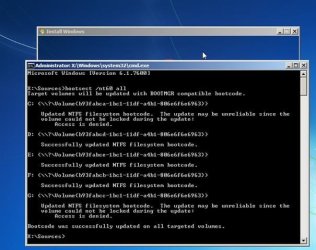
I just ran it from the recovery options cmd promt myself and took this screenie - I assume it said it was susccessful, like this:

BOOTSECT-2010-02-17_044428 (Small).jpg

( The reason C is locked in my screenie is because I booted the wim from the drive - I couldn't be bothered booting the dvd - you shouldn't have any locked volumes when booting from the dvd.)


The other thing you might try is running checkdisk. Tell it to fix filesystem errors .

Computer>rt click the drive and select Properties>Tools >Check Now> Tick Automatically fix filesystem errors.

Or you can do it from the command prompt on the dvd, type :

diskpart

lis vol

( get the letter of your 7 volume - it might not be F from the recovery environment - check for the size and volume label - i have used z : below- replace z: with the letter of your 7 partition )

exi

chkdsk z: /f

press enter
 

My Computers

System One System Two

  • Computer type
    PC/Desktop
    OS
    7 X64
    CPU
    i5 8400
    Motherboard
    gigabyte b365m ds3h
    Memory
    2x8gb 3200mhz
    Hard Drives
    various
    PSU
    pure power 11 400w cm
    Case
    Coolermaster
    Cooling
    cryorig m9i
  • Computer type
    PC/Desktop
    OS
    7x64
    CPU
    g5400
    Motherboard
    ga b365m ds3h
    Memory
    8gb ddr4 2400
    PSU
    xfx pro 450w
I'll try that, yes that is the result I got. Everything is still the same, if I boot to the 7 hard drive it gives the disk error and i can still boot 7 from the xp hard drive.
 

My Computer

Computer Manufacturer/Model Number
Me
OS
Windows 7
Greg, you will only see it with a disk editor .
 

My Computers

System One System Two

  • Computer type
    PC/Desktop
    OS
    7 X64
    CPU
    i5 8400
    Motherboard
    gigabyte b365m ds3h
    Memory
    2x8gb 3200mhz
    Hard Drives
    various
    PSU
    pure power 11 400w cm
    Case
    Coolermaster
    Cooling
    cryorig m9i
  • Computer type
    PC/Desktop
    OS
    7x64
    CPU
    g5400
    Motherboard
    ga b365m ds3h
    Memory
    8gb ddr4 2400
    PSU
    xfx pro 450w
You know, I'm thinking this might just be easier if I backup the stuff I want and wipe the hard drive completely. I could then partition it without having to worry about screwing anything else up and put linux and 7 on like I initially planned.
 

My Computer

Computer Manufacturer/Model Number
Me
OS
Windows 7
I formatted the drive into 2 partitions and installed windows 7 and it STILL boots from the xp HD. It went back to saying NTLDR is missing if I use my (now reinstalled windows 7 hd). How the heck do I stop making new installs boot from my XP Hard drive!?

I'm just basically destroying the entire hd, then partitioning agian, hopefully that works.
 

My Computer

Computer Manufacturer/Model Number
Me
OS
Windows 7
Then unplug XP, boot the Win7 DVD, select Repair on second screen, click through to Recovery tools list to run Startup Repair up to 3 separate times with reboots to write the MBR to Win7.

This would have solved it from the start.

You needed to either repair Win7 (repeatedly to write the mBR) or reinstall it with the XP drive unplugged. Otherwise it finds the XP MBR to update during Win7 install.

Unplug the XP HD and run Startup Repair up to 3 separate times with reboots as given above. You may need to mark Win7 active first using Partition Wizard or Diskpart commands.
 
Back
Top
