Nvidia 310.54 PhysX Fail

Xiigen

New member
Local time
3:50 PM
Messages
29
When I tryed to install the latest beta driver for my Nvidia 450 it failed, so i went one by one in custom installation installing each thing seperately. I could install all but the PhysX System Software 9.12.1031 driver.
Don't know what to do, or what it is.
 

My Computer

OS
Windows 7
Is there Physx uninstall option in add/remove programs?


If so, uninstall it first.

You could also try ticking the 'perform clean' option when upgrading using custom install option.


(Physx is the nvidia physics software package. Some games simply won't work if it is not installed.)


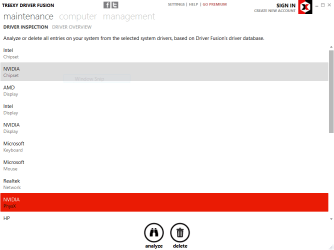
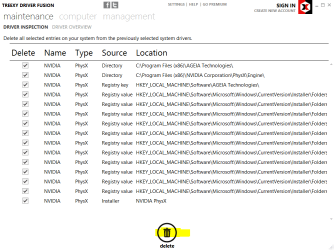
The last option would be to download and install Driver Fusion and use the analyze and delete function for physx. Drivr Fusion was once known as DriverSweeper

ie

Select PhsyX>Analyze

DF1.PNG
Delete
DF2.PNG


Create a manual Restore Point before hand, just in case.


(Watch the Driver Fusion installer. There is an additional app option attached you need to untick.)


You should now be able to install physx.
 

My Computer

Computer type
PC/Desktop
Computer Manufacturer/Model Number
Systems by SmartEyeball
OS
8 Pro x64
CPU
i7 3770K 4.6GHz
Motherboard
ASUS P8Z77 WS
Memory
16GB G.Skill Trident X 2666mhz
Graphics Card(s)
x2 EVGA 780 Ti Superclocked SLI
Sound Card
SB X-FI Surround 5.1 PRO USB / ATH-AD900 Headphones
Monitor(s) Displays
x3 Dell U2410 / 58" Samsung
Screen Resolution
5760*1200/ 1920*1200
Hard Drives
2x Intel 520 240GB (RAID 0) * 2x WD Caviar Blacks 2TB (RAID 0) * 2TB WD Caviar Black * Sony Optirac DVD
PSU
Silverstone Strider Evolution 1200W
Case
Thermaltake Level 10 GT Snow Edition
Cooling
Noctua NH-D14
Keyboard
Topre Realforce // Ducky Shine MX Black // Filco Ninja TKL
Mouse
Thermaltake Theron (Highly Recommended) + Razer Imperator
Antivirus
MSE
Browser
IE, FF, WaterFox
Other Info
GT Extreme V2 Sim Racing Cockpit + 40" LCD and K/B Mouse stand ▼
Fanatec CSR Elite Wheel + Clubsport V1 Pedals + CSR shifter/7G-H ▼Saitek X52 Pro ▼ TrackIR 5 Pro
Buttkicker v2 Seat Rumbler with Dedicated 5.1 and Sub Woofer attached to frame ▼
=
Bloody Big Grin
Thanks for the great reply! I kind of posted this in a haze last night, and I was just getting fed up with my computer. I did do a clean install via custom options in the first place but it failed, so thats when I went to go into custom install and choose the first option only. When that succeeded, I restarted and went back and selected both the first and second, and repeated till i had all of them selected except physx. Then when I tried all of them including physx it failed. When I go into the driver preliminary set up, in custom options it says that there is no previous physx version at all.
When I have the time I will try Driver Fusion, but I'm kind of confused when you say
(Watch the Driver Fusion installer. There is an additional app option attached you need to untick.)
 

My Computer

OS
Windows 7
So I did as you said, but there was nothing to remove, but it allowed me to anyway. I did so, restarted, tried with all things selected and it failed: http://i.imgur.com/2f2Fn.jpg
As you can see it failed at the physx installation.
Now it shows when I want to install: http://i.imgur.com/cbScu.png
Obviously I don't have Physx or the 3d Vision driver installed, so I'm going to do a reinstall without Physx selected so I can have the 3d Vision driver installed.
 

My Computer

OS
Windows 7
Back
Top