nvidia 9600 gt

I noticed the video memory, too. I did know whether that could be driver related or not.
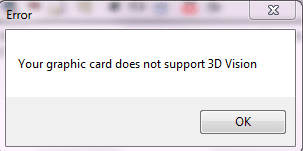
3d vision is also not working.
 

Attachments

  • Capture.PNG
    Capture.PNG
    4.8 KB · Views: 161

My Computer

OS
windows 7 ultimate
CPU
INTEL CORE2 DUO 2.93 GHZ
Motherboard
GIGABYTE EP 45T UD3LR
Memory
TRANSCEND DDR-3 2GB
Graphics Card(s)
NVIDIA GEFORCE 9600 GT/1GB/D3
Monitor(s) Displays
SAMSUNG SYNCMASTER 2043SWXPLUS
Screen Resolution
1600*900
Hard Drives
SAMSUNG SATA 320 GB
PSU
SMPS SERIES PRO 380W
So you're saying that the control panel was there before in the 177 version but it's gone now? Try rebooting your system. If that doesn't work, try uninstalling the drivers and reinstalling them.

3D Vision requires a monitor that supports it.

If wiping your drivers completely and then reinstalling them doesn't fix the video ram issue, I'm going to recommend that you perform a Repair Install which will reset the following:

Brink said:
* Sounds
* Services
* Visual Effects Settings
* Device Drivers - Be sure to have these handy to reinstall. They do not always remain after the repair (upgrade) install.
* You may lose the ability to sign on to MSN Messenger, to solve this problem have a look at this thread Unable to sign in to WLM.
* You may lose your custom themes due to not having permisions set on the old themes. Go to the hidden themes folder at C:/Users/(User-Name)/AppData/Local/Microsoft/Windows/Themes, then Take Ownership of the themes folder and you will now have all your themes back.
* It has been reported that you may also lose your Media Center gadget after doing the repair install.
* Windows Updates will need to be checked and reinstalled again.

http://www.sevenforums.com/tutorials/3413-repair-install.html
 

My Computer

Computer Manufacturer/Model Number
Apple Macbook Pro (April 2009)
OS
W7 Ult. x64 | OS X
CPU
Intel Mobile Core 2 Duo 2.93Ghz [T9800 Penryn]
Motherboard
NVIDIA nForce 730i Rev. B1 [Mac-F2268EC8 (U2E1)]
Memory
4096MB Samsung DDR3 Dual Channel [PC3-8500F 1066Mhz]
Graphics Card(s)
NVIDIA GeForce 9600M GT 512MB [G96M Rev. C1]
Sound Card
SB X-Fi Surround 5.1 USB | Onboard Realtek (Disabled)
Monitor(s) Displays
Acer x223wbd 22" | Apple Anti-Glare 17" (Disabled)
Screen Resolution
{Current} 1440x900 {Acer} 1680x1050 {Apple} 1920x1200
Hard Drives
{Internal}
Seagate Momentus 320GB 2.5" 7200RPM [ST9320421AS]

{Externals}
LaCie 320GB USB 2.0 HDD [301284UR]
LaCie 750GB USB 2.0 FW400 eSATA HDD [301314U]
LaCie 1TB USB 2.0 HDD [301304UR]
PSU
Magsafe
Case
Aluminum/Unibody (MBP52)
Cooling
2 x 6000 RPM Fans
Keyboard
Logitech G-15v2 [PN 920-000379]
Mouse
Logitech G-9 [PN 910-000338]
Internet Speed
12Mbps/2.5Mbps w/ 24Mbps Speed Boost [Comcast]
Other Info
Logitech X-540 Speakers [PN 970223-0122]
Sennheiser PC-151 Headset
Is it there when you right click on your desktop?
 

Attachments

  • control.JPG
    control.JPG
    23.9 KB · Views: 1

My Computer

Computer type
PC/Desktop
Computer Manufacturer/Model Number
Self Built
OS
Win 10 Pro x64
CPU
Intel I5-2500K @3.3GHz
Motherboard
Asrock P67 Extreme4
Memory
16GB G.Skill Ripjaws X (4x4GB)
Graphics Card(s)
EVGA GeForce 750 Ti SC 2GB
Sound Card
ASUS Xonar DG 5.1 Channels 24-bit 96KHz PCI Interface Sound
Monitor(s) Displays
auria eq2367
Screen Resolution
1920 x 1080
Hard Drives
250GB Samsung 850 EVO SSD
1TB WD Blue
1TB Hitachi
PSU
SeaSonic X 650W 80 Plus Gold
Case
Corsair Obsidian 750D
Cooling
Corsair H60, Three 140mm case fans
Keyboard
Logitech Wireless Keyboard K520
Mouse
Logitech Wireless Mouse M310
Internet Speed
Wave Broadband ~ 100 dn 5 up
Antivirus
Windows Defender, Malwarebytes Premium
Browser
Edge, IE11, Chrome
Other Info
Laptop specs: HP g7-1365dx /
CPU: AMD A6-3420M APU with Radeon(tm) HD Graphics /
RAM: Crucial 8Gb (2x4Gb) /
SSD: Crucial M4-CT128M4SSD2 ATA Device/ FW 000F /
GFX: AMD Radeon HD 6520G /
OS: Windows 10 Pro x64
So you're saying that the control panel was there before in the 177 version but it's gone now? Try rebooting your system. If that doesn't work, try uninstalling the drivers and reinstalling them.

3D Vision requires a monitor that supports it.

just rebooted?
monitor:-samsung syncmaster 2043 swxplus with 50000:1 ratio. does it support 3d vision?
 

My Computer

OS
windows 7 ultimate
CPU
INTEL CORE2 DUO 2.93 GHZ
Motherboard
GIGABYTE EP 45T UD3LR
Memory
TRANSCEND DDR-3 2GB
Graphics Card(s)
NVIDIA GEFORCE 9600 GT/1GB/D3
Monitor(s) Displays
SAMSUNG SYNCMASTER 2043SWXPLUS
Screen Resolution
1600*900
Hard Drives
SAMSUNG SATA 320 GB
PSU
SMPS SERIES PRO 380W

My Computer

OS
windows 7 ultimate
CPU
INTEL CORE2 DUO 2.93 GHZ
Motherboard
GIGABYTE EP 45T UD3LR
Memory
TRANSCEND DDR-3 2GB
Graphics Card(s)
NVIDIA GEFORCE 9600 GT/1GB/D3
Monitor(s) Displays
SAMSUNG SYNCMASTER 2043SWXPLUS
Screen Resolution
1600*900
Hard Drives
SAMSUNG SATA 320 GB
PSU
SMPS SERIES PRO 380W
So you're saying that the control panel was there before in the 177 version but it's gone now? Try rebooting your system. If that doesn't work, try uninstalling the drivers and reinstalling them.

3D Vision requires a monitor that supports it.

just rebooted?
monitor:-samsung syncmaster 2043 swxplus with 50000:1 ratio. does it support 3d vision?

In order to be able to run 3d Vision your monitor has to be able to run at 120Hz

The 2233RZ is 3D Vision compatible, but I don't think your monitor is, I think it's max is 75Hz just like mine.

Are you absolutely certain that you installed your graphics card correctly?
I.E. It's in a PCI Express 2.0 x16 slot and all cables are connected properly.
 

My Computer

Computer Manufacturer/Model Number
Apple Macbook Pro (April 2009)
OS
W7 Ult. x64 | OS X
CPU
Intel Mobile Core 2 Duo 2.93Ghz [T9800 Penryn]
Motherboard
NVIDIA nForce 730i Rev. B1 [Mac-F2268EC8 (U2E1)]
Memory
4096MB Samsung DDR3 Dual Channel [PC3-8500F 1066Mhz]
Graphics Card(s)
NVIDIA GeForce 9600M GT 512MB [G96M Rev. C1]
Sound Card
SB X-Fi Surround 5.1 USB | Onboard Realtek (Disabled)
Monitor(s) Displays
Acer x223wbd 22" | Apple Anti-Glare 17" (Disabled)
Screen Resolution
{Current} 1440x900 {Acer} 1680x1050 {Apple} 1920x1200
Hard Drives
{Internal}
Seagate Momentus 320GB 2.5" 7200RPM [ST9320421AS]

{Externals}
LaCie 320GB USB 2.0 HDD [301284UR]
LaCie 750GB USB 2.0 FW400 eSATA HDD [301314U]
LaCie 1TB USB 2.0 HDD [301304UR]
PSU
Magsafe
Case
Aluminum/Unibody (MBP52)
Cooling
2 x 6000 RPM Fans
Keyboard
Logitech G-15v2 [PN 920-000379]
Mouse
Logitech G-9 [PN 910-000338]
Internet Speed
12Mbps/2.5Mbps w/ 24Mbps Speed Boost [Comcast]
Other Info
Logitech X-540 Speakers [PN 970223-0122]
Sennheiser PC-151 Headset
Yeah I'm going to agree with notsograymatter, You should uninstall all those drivers and start fresh.
 

My Computer

Computer type
PC/Desktop
Computer Manufacturer/Model Number
Self Built
OS
Win 10 Pro x64
CPU
Intel I5-2500K @3.3GHz
Motherboard
Asrock P67 Extreme4
Memory
16GB G.Skill Ripjaws X (4x4GB)
Graphics Card(s)
EVGA GeForce 750 Ti SC 2GB
Sound Card
ASUS Xonar DG 5.1 Channels 24-bit 96KHz PCI Interface Sound
Monitor(s) Displays
auria eq2367
Screen Resolution
1920 x 1080
Hard Drives
250GB Samsung 850 EVO SSD
1TB WD Blue
1TB Hitachi
PSU
SeaSonic X 650W 80 Plus Gold
Case
Corsair Obsidian 750D
Cooling
Corsair H60, Three 140mm case fans
Keyboard
Logitech Wireless Keyboard K520
Mouse
Logitech Wireless Mouse M310
Internet Speed
Wave Broadband ~ 100 dn 5 up
Antivirus
Windows Defender, Malwarebytes Premium
Browser
Edge, IE11, Chrome
Other Info
Laptop specs: HP g7-1365dx /
CPU: AMD A6-3420M APU with Radeon(tm) HD Graphics /
RAM: Crucial 8Gb (2x4Gb) /
SSD: Crucial M4-CT128M4SSD2 ATA Device/ FW 000F /
GFX: AMD Radeon HD 6520G /
OS: Windows 10 Pro x64
Yeah I'm going to agree with notsograymatter, You should uninstall all those drivers and start fresh.

I'm more worried that this has nothing to do with his system and he installed the video card in a PCIe x4 slot or something which is making it tweak out.
 

My Computer

Computer Manufacturer/Model Number
Apple Macbook Pro (April 2009)
OS
W7 Ult. x64 | OS X
CPU
Intel Mobile Core 2 Duo 2.93Ghz [T9800 Penryn]
Motherboard
NVIDIA nForce 730i Rev. B1 [Mac-F2268EC8 (U2E1)]
Memory
4096MB Samsung DDR3 Dual Channel [PC3-8500F 1066Mhz]
Graphics Card(s)
NVIDIA GeForce 9600M GT 512MB [G96M Rev. C1]
Sound Card
SB X-Fi Surround 5.1 USB | Onboard Realtek (Disabled)
Monitor(s) Displays
Acer x223wbd 22" | Apple Anti-Glare 17" (Disabled)
Screen Resolution
{Current} 1440x900 {Acer} 1680x1050 {Apple} 1920x1200
Hard Drives
{Internal}
Seagate Momentus 320GB 2.5" 7200RPM [ST9320421AS]

{Externals}
LaCie 320GB USB 2.0 HDD [301284UR]
LaCie 750GB USB 2.0 FW400 eSATA HDD [301314U]
LaCie 1TB USB 2.0 HDD [301304UR]
PSU
Magsafe
Case
Aluminum/Unibody (MBP52)
Cooling
2 x 6000 RPM Fans
Keyboard
Logitech G-15v2 [PN 920-000379]
Mouse
Logitech G-9 [PN 910-000338]
Internet Speed
12Mbps/2.5Mbps w/ 24Mbps Speed Boost [Comcast]
Other Info
Logitech X-540 Speakers [PN 970223-0122]
Sennheiser PC-151 Headset
Yeah I'm going to agree with notsograymatter, You should uninstall all those drivers and start fresh.

I'm more worried that this has nothing to do with his system and he installed the video card in a PCIe x4 slot or something which is making it tweak out.

That would be nice to confirm, I understand what you're saying. Carry on my good man.;)
 

My Computer

Computer type
PC/Desktop
Computer Manufacturer/Model Number
Self Built
OS
Win 10 Pro x64
CPU
Intel I5-2500K @3.3GHz
Motherboard
Asrock P67 Extreme4
Memory
16GB G.Skill Ripjaws X (4x4GB)
Graphics Card(s)
EVGA GeForce 750 Ti SC 2GB
Sound Card
ASUS Xonar DG 5.1 Channels 24-bit 96KHz PCI Interface Sound
Monitor(s) Displays
auria eq2367
Screen Resolution
1920 x 1080
Hard Drives
250GB Samsung 850 EVO SSD
1TB WD Blue
1TB Hitachi
PSU
SeaSonic X 650W 80 Plus Gold
Case
Corsair Obsidian 750D
Cooling
Corsair H60, Three 140mm case fans
Keyboard
Logitech Wireless Keyboard K520
Mouse
Logitech Wireless Mouse M310
Internet Speed
Wave Broadband ~ 100 dn 5 up
Antivirus
Windows Defender, Malwarebytes Premium
Browser
Edge, IE11, Chrome
Other Info
Laptop specs: HP g7-1365dx /
CPU: AMD A6-3420M APU with Radeon(tm) HD Graphics /
RAM: Crucial 8Gb (2x4Gb) /
SSD: Crucial M4-CT128M4SSD2 ATA Device/ FW 000F /
GFX: AMD Radeon HD 6520G /
OS: Windows 10 Pro x64
Good Work Amigo, If he pops up again we'll see if the fresh installation fixed it, if not he's off to a repair install and I'm done w/ this thread.
 

My Computer

Computer Manufacturer/Model Number
Apple Macbook Pro (April 2009)
OS
W7 Ult. x64 | OS X
CPU
Intel Mobile Core 2 Duo 2.93Ghz [T9800 Penryn]
Motherboard
NVIDIA nForce 730i Rev. B1 [Mac-F2268EC8 (U2E1)]
Memory
4096MB Samsung DDR3 Dual Channel [PC3-8500F 1066Mhz]
Graphics Card(s)
NVIDIA GeForce 9600M GT 512MB [G96M Rev. C1]
Sound Card
SB X-Fi Surround 5.1 USB | Onboard Realtek (Disabled)
Monitor(s) Displays
Acer x223wbd 22" | Apple Anti-Glare 17" (Disabled)
Screen Resolution
{Current} 1440x900 {Acer} 1680x1050 {Apple} 1920x1200
Hard Drives
{Internal}
Seagate Momentus 320GB 2.5" 7200RPM [ST9320421AS]

{Externals}
LaCie 320GB USB 2.0 HDD [301284UR]
LaCie 750GB USB 2.0 FW400 eSATA HDD [301314U]
LaCie 1TB USB 2.0 HDD [301304UR]
PSU
Magsafe
Case
Aluminum/Unibody (MBP52)
Cooling
2 x 6000 RPM Fans
Keyboard
Logitech G-15v2 [PN 920-000379]
Mouse
Logitech G-9 [PN 910-000338]
Internet Speed
12Mbps/2.5Mbps w/ 24Mbps Speed Boost [Comcast]
Other Info
Logitech X-540 Speakers [PN 970223-0122]
Sennheiser PC-151 Headset
does repair install also formats my c:.in other words have i to install all softwares again? please reply
 

My Computer

OS
windows 7 ultimate
CPU
INTEL CORE2 DUO 2.93 GHZ
Motherboard
GIGABYTE EP 45T UD3LR
Memory
TRANSCEND DDR-3 2GB
Graphics Card(s)
NVIDIA GEFORCE 9600 GT/1GB/D3
Monitor(s) Displays
SAMSUNG SYNCMASTER 2043SWXPLUS
Screen Resolution
1600*900
Hard Drives
SAMSUNG SATA 320 GB
PSU
SMPS SERIES PRO 380W
does repair install also formats my c:.in other words have i to install all softwares again? please reply

No it keeps all your software and most settings.
 

My Computer

Computer type
PC/Desktop
Computer Manufacturer/Model Number
Self Built
OS
Win 10 Pro x64
CPU
Intel I5-2500K @3.3GHz
Motherboard
Asrock P67 Extreme4
Memory
16GB G.Skill Ripjaws X (4x4GB)
Graphics Card(s)
EVGA GeForce 750 Ti SC 2GB
Sound Card
ASUS Xonar DG 5.1 Channels 24-bit 96KHz PCI Interface Sound
Monitor(s) Displays
auria eq2367
Screen Resolution
1920 x 1080
Hard Drives
250GB Samsung 850 EVO SSD
1TB WD Blue
1TB Hitachi
PSU
SeaSonic X 650W 80 Plus Gold
Case
Corsair Obsidian 750D
Cooling
Corsair H60, Three 140mm case fans
Keyboard
Logitech Wireless Keyboard K520
Mouse
Logitech Wireless Mouse M310
Internet Speed
Wave Broadband ~ 100 dn 5 up
Antivirus
Windows Defender, Malwarebytes Premium
Browser
Edge, IE11, Chrome
Other Info
Laptop specs: HP g7-1365dx /
CPU: AMD A6-3420M APU with Radeon(tm) HD Graphics /
RAM: Crucial 8Gb (2x4Gb) /
SSD: Crucial M4-CT128M4SSD2 ATA Device/ FW 000F /
GFX: AMD Radeon HD 6520G /
OS: Windows 10 Pro x64
Yeah, like I mentioned and linked to it just removes drivers and system settings mostly...

http://www.sevenforums.com/tutorials/3413-repair-install.html

EDIT: I'm tired, if you can't get the drivers to work properly by uninstalling, rebooting and reinstalling, I suggest that you either try an older version of the drivers (See Below) or a repair install.

Version 196 - http://www.nvidia.com/object/win7_winvista_32bit_196.21_whql.html
195 - http://www.nvidia.com/object/win7_winvista_32bit_195.62_whql.html
191 - http://www.nvidia.com/object/win7_winvista_32bit_191.07_whql.html
190 - http://www.nvidia.com/object/win7_winvista_32bit_190.62_whql.html
186 - http://www.nvidia.com/object/win7_winvista_32bit_186.18_whql.html
185 - http://www.nvidia.com/object/win7_x86_185.85_whql.html

Remember, the settings on the NVIDIA website are: GeForce 9 Series, GeForce 9600 GT, Windows 7 32-Bit.

If any of that is wrong, go to the site and change the settings for the right drivers.
 

My Computer

Computer Manufacturer/Model Number
Apple Macbook Pro (April 2009)
OS
W7 Ult. x64 | OS X
CPU
Intel Mobile Core 2 Duo 2.93Ghz [T9800 Penryn]
Motherboard
NVIDIA nForce 730i Rev. B1 [Mac-F2268EC8 (U2E1)]
Memory
4096MB Samsung DDR3 Dual Channel [PC3-8500F 1066Mhz]
Graphics Card(s)
NVIDIA GeForce 9600M GT 512MB [G96M Rev. C1]
Sound Card
SB X-Fi Surround 5.1 USB | Onboard Realtek (Disabled)
Monitor(s) Displays
Acer x223wbd 22" | Apple Anti-Glare 17" (Disabled)
Screen Resolution
{Current} 1440x900 {Acer} 1680x1050 {Apple} 1920x1200
Hard Drives
{Internal}
Seagate Momentus 320GB 2.5" 7200RPM [ST9320421AS]

{Externals}
LaCie 320GB USB 2.0 HDD [301284UR]
LaCie 750GB USB 2.0 FW400 eSATA HDD [301314U]
LaCie 1TB USB 2.0 HDD [301304UR]
PSU
Magsafe
Case
Aluminum/Unibody (MBP52)
Cooling
2 x 6000 RPM Fans
Keyboard
Logitech G-15v2 [PN 920-000379]
Mouse
Logitech G-9 [PN 910-000338]
Internet Speed
12Mbps/2.5Mbps w/ 24Mbps Speed Boost [Comcast]
Other Info
Logitech X-540 Speakers [PN 970223-0122]
Sennheiser PC-151 Headset
He may have to try each of those drivers right down the line uninstalling one and installing another. Just for the record, I did not have the control panel when I tried the 191.xxx driver. None of the 19X series worked for me including the beta. I ended up with the 186.xxx driver.
 

My Computer

Computer Manufacturer/Model Number
Home built
OS
Windows 7 Ultimate 32 bit
CPU
Intel(R) Pentium(R) 4 CPU 3.00GHz
Motherboard
ASUS P4P800-VM Motherboard Chipset: Intel 865G + ICH5
Memory
2.50 GB RAM
Graphics Card(s)
NVIDIA GeForce 7600 GS
Sound Card
SoundMax Integrated Digital Audio (Chip)
Monitor(s) Displays
ViewSonic VX 1962 wm
Screen Resolution
1680 X 1050
Hard Drives
Seagate Barracuda 7200.10 80 GB
ST380215A ATA Device 18.6 GB
Western Digital "My Book" external hard drive 750 GB
Cooling
Fan based
Keyboard
Microsoft Comfort Curve Keyboard 2000 v10 USB
Mouse
Logitec optic USB
Internet Speed
3.01 Mb/s download 0.64 Mb/s upload
ok guys i will try?
thanks a lot for your precious time?
 

My Computer

OS
windows 7 ultimate
CPU
INTEL CORE2 DUO 2.93 GHZ
Motherboard
GIGABYTE EP 45T UD3LR
Memory
TRANSCEND DDR-3 2GB
Graphics Card(s)
NVIDIA GEFORCE 9600 GT/1GB/D3
Monitor(s) Displays
SAMSUNG SYNCMASTER 2043SWXPLUS
Screen Resolution
1600*900
Hard Drives
SAMSUNG SATA 320 GB
PSU
SMPS SERIES PRO 380W
So I take it you found a driver that worked? If not, try the 186 drivers as Carl did.
 

My Computer

Computer Manufacturer/Model Number
Apple Macbook Pro (April 2009)
OS
W7 Ult. x64 | OS X
CPU
Intel Mobile Core 2 Duo 2.93Ghz [T9800 Penryn]
Motherboard
NVIDIA nForce 730i Rev. B1 [Mac-F2268EC8 (U2E1)]
Memory
4096MB Samsung DDR3 Dual Channel [PC3-8500F 1066Mhz]
Graphics Card(s)
NVIDIA GeForce 9600M GT 512MB [G96M Rev. C1]
Sound Card
SB X-Fi Surround 5.1 USB | Onboard Realtek (Disabled)
Monitor(s) Displays
Acer x223wbd 22" | Apple Anti-Glare 17" (Disabled)
Screen Resolution
{Current} 1440x900 {Acer} 1680x1050 {Apple} 1920x1200
Hard Drives
{Internal}
Seagate Momentus 320GB 2.5" 7200RPM [ST9320421AS]

{Externals}
LaCie 320GB USB 2.0 HDD [301284UR]
LaCie 750GB USB 2.0 FW400 eSATA HDD [301314U]
LaCie 1TB USB 2.0 HDD [301304UR]
PSU
Magsafe
Case
Aluminum/Unibody (MBP52)
Cooling
2 x 6000 RPM Fans
Keyboard
Logitech G-15v2 [PN 920-000379]
Mouse
Logitech G-9 [PN 910-000338]
Internet Speed
12Mbps/2.5Mbps w/ 24Mbps Speed Boost [Comcast]
Other Info
Logitech X-540 Speakers [PN 970223-0122]
Sennheiser PC-151 Headset
So I take it you found a driver that worked? If not, try the 186 drivers as Carl did.
i did now 186 driver from your list above but nvidia control panel was no installed?
n trying others
 

My Computer

OS
windows 7 ultimate
CPU
INTEL CORE2 DUO 2.93 GHZ
Motherboard
GIGABYTE EP 45T UD3LR
Memory
TRANSCEND DDR-3 2GB
Graphics Card(s)
NVIDIA GEFORCE 9600 GT/1GB/D3
Monitor(s) Displays
SAMSUNG SYNCMASTER 2043SWXPLUS
Screen Resolution
1600*900
Hard Drives
SAMSUNG SATA 320 GB
PSU
SMPS SERIES PRO 380W
As I said, if none of the others work, try a Repair install or a Clean Install.

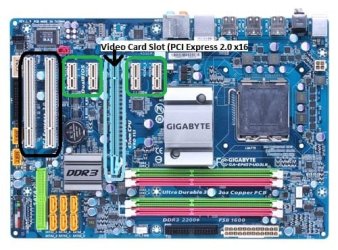
Also, make sure your video card is installed in the correct slot... According to the GIGABYTE website you have 1 x PCIe 2.0 x16, 4 x PCIe x1 and 2 x PCI. In the picture below, the slot you should be using is light blue, the PCIe x1 slots are white higlighted in green and the PCI slots are white highlighted in black.
motherboard_productimage_ga-ep45t-ud3lr_big.jpg

Latest Bios Version (F7) http://www.gigabyte.us/Support/Motherboard/BIOS_DownloadFile.aspx?FileType=BIOS&FileID=15326

Audio Driver (Realtek) http://america.gigabyte.com.tw/FileList/Driver/motherboard_driver_audio_realtek_azalia.exe

Chipset Driver (Intel IMF) http://america.gigabyte.com.tw/FileList/Driver/mb_driver_chipset_intel.exe

LAN Driver (Realtek Driver) http://america.gigabyte.com.tw/FileList/Driver/motherboard_driver_lan_realtek_8111_w7.exe

LAN Driver (Realtek Diagnostic Utility) http://america.gigabyte.com.tw/FileList/Driver/mb_driver_lan_realtek_rtltool.exe

SATA RAID Driver (Intel) http://america.gigabyte.com.tw/FileList/Driver/motherboard_driver_intel_sataraid.exe
 

My Computer

Computer Manufacturer/Model Number
Apple Macbook Pro (April 2009)
OS
W7 Ult. x64 | OS X
CPU
Intel Mobile Core 2 Duo 2.93Ghz [T9800 Penryn]
Motherboard
NVIDIA nForce 730i Rev. B1 [Mac-F2268EC8 (U2E1)]
Memory
4096MB Samsung DDR3 Dual Channel [PC3-8500F 1066Mhz]
Graphics Card(s)
NVIDIA GeForce 9600M GT 512MB [G96M Rev. C1]
Sound Card
SB X-Fi Surround 5.1 USB | Onboard Realtek (Disabled)
Monitor(s) Displays
Acer x223wbd 22" | Apple Anti-Glare 17" (Disabled)
Screen Resolution
{Current} 1440x900 {Acer} 1680x1050 {Apple} 1920x1200
Hard Drives
{Internal}
Seagate Momentus 320GB 2.5" 7200RPM [ST9320421AS]

{Externals}
LaCie 320GB USB 2.0 HDD [301284UR]
LaCie 750GB USB 2.0 FW400 eSATA HDD [301314U]
LaCie 1TB USB 2.0 HDD [301304UR]
PSU
Magsafe
Case
Aluminum/Unibody (MBP52)
Cooling
2 x 6000 RPM Fans
Keyboard
Logitech G-15v2 [PN 920-000379]
Mouse
Logitech G-9 [PN 910-000338]
Internet Speed
12Mbps/2.5Mbps w/ 24Mbps Speed Boost [Comcast]
Other Info
Logitech X-540 Speakers [PN 970223-0122]
Sennheiser PC-151 Headset
Back
Top