
NVIDIA and A13G+ dual monitors problem

ufischer

New member
Local time
7:58 PM
Messages
7
I have a PCchips A13G+ motherboard generic PC with an NVIDIA GeForce 6100 nForce 405 card in one of the slots. This configuration allowed me to have a desktop covering both monitors running XP. Since I tried Vista, then Windows 7 RC1, I have only been able to get one of the monitors going at a time. Whichever one I tell the Bios to activate first, is the one that comes up. The other one is not detected. It looks like there are many other examples of dual monitor setups failing under Windows 7 and Vista which worked fine under XP. I've got all the latest drivers from NVIDIA and all the updates from the Windows updates site. Any ideas? Seems like Microsoft wants us to pay extra for reduced functionality. Doesn't seem like a good deal to me.
 

My Computer

Computer Manufacturer/Model Number
PCchips A13G+
OS
Windows 7 RC1
CPU
AMD Athlon 64 3500+
Motherboard
A13G+ version 2
Memory
2GB
Graphics Card(s)
NVIDIA GEforce 6100 Nforce 405, onboard A13G+ MoBo
Sound Card
Onboard A13G+
Monitor(s) Displays
Acer X223W, NEC MultiSync FE700+
Hard Drives
Sata 120 GB, SATA 160 GB
First; Welcome to the SevenForums. :D

Not really sure why you are having this problem, and basically do not believe this is a problem caused by the OS, but the video card. If it worked under XP if should work with Vista or 7. Did some research which I will include here:

A. Please use the latest 7.15.11.6369 version of the device driver, it will help you to use functions of your NVIDIA GeForce 6100 nForce 405, easier and better. Old versions can create conflicts of devices and an error in display work. Try to update drivers for NVIDIA GeForce 6100 nForce 405 monthly or more often. Choose the correct driver for your NVIDIA GeForce 6100 nForce 405 and make windows backup each time when you wish to update the nVidia driver.

B. Step-by-step guide for install NVIDIA GeForce 6100 nForce 405 driver.

1. Download file for NVIDIA GeForce 6100 nForce 405 from our site, save it on your computer and unzip.
2. Connect your NVIDIA GeForce 6100 nForce 405 to computer.
3. Right click on My computer and click Properties. Go to Hardware tab. Click to Device Manager button.
4. Find your new NVIDIA GeForce 6100 nForce 405 on display category double click on device and press Reinstall Driver button.
5. Select Install from specific location, check Include this location and click Browse button to select the nVidiadriver click Next button to continue and click Finish button to finish installation.
6. After this procedure you should see new NVIDIA GeForce 6100 nForce 405 in display inside device manager.

This information can be found here. Not sure if it will help, can only hope. There is a lot more information on your graphics card on google if this doesn't help. :)
 

My Computer

Computer Manufacturer/Model Number
HP Pavilion a4302f
OS
Win 7 Pro x64, VM Win XP, Win7 Pro Sandbox, Kubuntu 11
CPU
AMD Athlon(tm) II X4 640 @ 3.0 Gbz
Memory
12GB 1066MHz DDR3 SDRAM - 2x4GB, 2x2GB
Graphics Card(s)
ATI Radeon HD 4350 HD Graphics/Audio with 512MB
Sound Card
Realtek High Definition Audio
Monitor(s) Displays
1. Dell 23" SP2307, 2. Mitsublishi 40" HDTV, Hannspree 25"
Screen Resolution
1. 2048x1152, 2. 1920-1080, 3. 1920x1200
Hard Drives
Int: 1 120 Gig SSD i
1 - 2.5" 500 USB External HDD
1 -1 Tb USB External HDD
Case
Mid Tower
Cooling
Standard Fans - 5 fans (very quiet)
Keyboard
Microsoft Wireless 2000
Mouse
Microsoft Wireless Mouse 5000
Internet Speed
10 Mbit (realistically 500 Kbit - 1.2 Mbit)
Other Info
Speakers - Bose Desktop (Excellent Sound)
1 external CD|DVD\Blue-ray Recorders/Players (Sony)
Thanks for quick reply

Thank you Lee, for your quick reply.

I've been updating the drivers from the nvidia site as directed by the Windows 7 troubleshooter on a weekly basis with no luck. The problem seems to be that whenever I have the BIOS enable the onboard NVIDIA chipset first, it comes up as generic VGA in Windows 7 and the PCI card is not detected. When I have the BIOS enable the PCI card first, the PCI connected monitor comes up correctly and the PCI card seems to be correctly identified but the onboard is detected by the Device Manager as an NVIDIA MM 400 or something like that but it has an error code on it and says it is not working. I don't have this problem with XP, both monitors just come up and the desktop is spread across both the way God intended... :) Win7 trouble shooter keeps saying it is a compatibility issue with the NVIDIA drivers. I've had a similar problem with a VISTA ultimate system at work and eventually got that resolved by installing a pair of identical dual monitor cards there so that one driver handled all 4 monitors. I would much rather not have to go to that expense on my home system where I just want to have my old dual monitor setup working in Windows 7.
 

My Computer

Computer Manufacturer/Model Number
PCchips A13G+
OS
Windows 7 RC1
CPU
AMD Athlon 64 3500+
Motherboard
A13G+ version 2
Memory
2GB
Graphics Card(s)
NVIDIA GEforce 6100 Nforce 405, onboard A13G+ MoBo
Sound Card
Onboard A13G+
Monitor(s) Displays
Acer X223W, NEC MultiSync FE700+
Hard Drives
Sata 120 GB, SATA 160 GB
Unless you added a video card (PCI or PCI-E), that 6100 is the onboard video. Also how are you running dual monitors? Again unless you added a video card, there is only one VGA port on the motherboard. This is a picture of the back panel of your motherboard,

backpanel.png


Another problem that you will run into with that board/chipset (nForce 405) is that Nvidia has relegated it to legacy status, so in all likelihood it will never see a Windows 7 update. It will also be just a matter of time before Nvidia drops support for the onboard video (which is supported still in the latest 190.62), as nothing they have before the 8xxx series supports Windows 7's new WDDM 1.1 driver model.
 

My Computer

Computer type
PC/Desktop
Computer Manufacturer/Model Number
Me
OS
Win 7 Ultimate x64
CPU
FX-8350 @ 4.6 GHz so far
Motherboard
Asus M5A97 EVO
Memory
ADATA XPG V1 Series Black 8GB DDR3 1600
Graphics Card(s)
Sapphire R9 270x Dual-X
Sound Card
Xonar DGX w/ Corsair Vengence 1300
Monitor(s) Displays
Acer S232HL Abid
Screen Resolution
1920x1080
Hard Drives
120 GB OCZ Vertex 3
500 GB Seagate 7200.12
PSU
Antec Earthwatts 650W Green
Case
Antec Three Hundred
Cooling
Cooler Master 212 EVO
Keyboard
Logitech G510
Mouse
Logitech G500s
Internet Speed
35000/3000
stormy13 is correct on legacy support. Manufactures of video cards and sound cards are at present establishing a cut off point for older cards. Thus, they are not going to supply drivers for cards over a certain age, or version. It is not beneficial for them to do so, hence, in your case you are forced to buy something new.
 

My Computer

Computer Manufacturer/Model Number
HP Pavilion a4302f
OS
Win 7 Pro x64, VM Win XP, Win7 Pro Sandbox, Kubuntu 11
CPU
AMD Athlon(tm) II X4 640 @ 3.0 Gbz
Memory
12GB 1066MHz DDR3 SDRAM - 2x4GB, 2x2GB
Graphics Card(s)
ATI Radeon HD 4350 HD Graphics/Audio with 512MB
Sound Card
Realtek High Definition Audio
Monitor(s) Displays
1. Dell 23" SP2307, 2. Mitsublishi 40" HDTV, Hannspree 25"
Screen Resolution
1. 2048x1152, 2. 1920-1080, 3. 1920x1200
Hard Drives
Int: 1 120 Gig SSD i
1 - 2.5" 500 USB External HDD
1 -1 Tb USB External HDD
Case
Mid Tower
Cooling
Standard Fans - 5 fans (very quiet)
Keyboard
Microsoft Wireless 2000
Mouse
Microsoft Wireless Mouse 5000
Internet Speed
10 Mbit (realistically 500 Kbit - 1.2 Mbit)
Other Info
Speakers - Bose Desktop (Excellent Sound)
1 external CD|DVD\Blue-ray Recorders/Players (Sony)
Thanks folks... I guess I'll have to bite the...

...proverbial bullet on this one and spring for a newer dual monitor card.
 

My Computer

Computer Manufacturer/Model Number
PCchips A13G+
OS
Windows 7 RC1
CPU
AMD Athlon 64 3500+
Motherboard
A13G+ version 2
Memory
2GB
Graphics Card(s)
NVIDIA GEforce 6100 Nforce 405, onboard A13G+ MoBo
Sound Card
Onboard A13G+
Monitor(s) Displays
Acer X223W, NEC MultiSync FE700+
Hard Drives
Sata 120 GB, SATA 160 GB
Dual monitors... the nightmare continues

Ok, so I got a PNY GeForce PCI 5200 dual VGA port video card and installed it in my A13G+ motherboard's first PCI slot. When I first installed it, the bios stuff came up on one of those VGA outlets but Window 7 only came up on the old onboard VGA port. I tried playing around with the BIOS settings to tell it to enable the onboard video only if there is no external video and to activate the PCI video first but now the BIOS stuff only comes up on the onboard regardless of the settings. I think I've tried all possible combinations by now and always the BIOS (and then Win7) comes up on the onboard VGA. I'm digging thru the PCchips A13G+ manual but so far no solution jumps out at me.:mad: very frustrating. As usual, once Win7 comes up on the onboard, it doesn't see the PCI display adapter
I installed the drivers from the CD that came with the new PCI video card and the install procedure recognized the onboard Nvidia chpset and set that up so I can now set the resolution to 1280x1024x32bit color but since Win7 can't see the PCI card, I guess neither could the drivers CD install program.
 

My Computer

Computer Manufacturer/Model Number
PCchips A13G+
OS
Windows 7 RC1
CPU
AMD Athlon 64 3500+
Motherboard
A13G+ version 2
Memory
2GB
Graphics Card(s)
NVIDIA GEforce 6100 Nforce 405, onboard A13G+ MoBo
Sound Card
Onboard A13G+
Monitor(s) Displays
Acer X223W, NEC MultiSync FE700+
Hard Drives
Sata 120 GB, SATA 160 GB
Unless you installed the drivers for that 5200 in XP compatibility mode, I don't see how they installed at all. Seeing as there is a grand total of one driver for that card that supports Vista (and is 3 years old to boot),

ForceWare Release 95

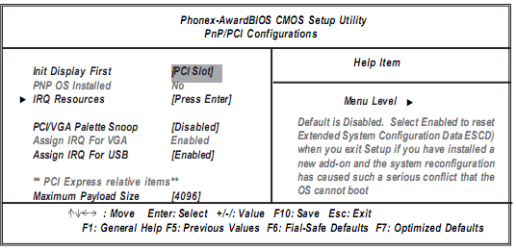
I don't think you're ever going to see a working Windows 7 driver that hasn't been hacked or modded in some way to work. Here is the section of the bios you are looking for,

pcchips.PNG

You need to make sure that it is set to PCI Slot where is says "Init Display First". Also don't have either of your monitors connected to the onboard video ports.
 

My Computer

Computer type
PC/Desktop
Computer Manufacturer/Model Number
Me
OS
Win 7 Ultimate x64
CPU
FX-8350 @ 4.6 GHz so far
Motherboard
Asus M5A97 EVO
Memory
ADATA XPG V1 Series Black 8GB DDR3 1600
Graphics Card(s)
Sapphire R9 270x Dual-X
Sound Card
Xonar DGX w/ Corsair Vengence 1300
Monitor(s) Displays
Acer S232HL Abid
Screen Resolution
1920x1080
Hard Drives
120 GB OCZ Vertex 3
500 GB Seagate 7200.12
PSU
Antec Earthwatts 650W Green
Case
Antec Three Hundred
Cooling
Cooler Master 212 EVO
Keyboard
Logitech G510
Mouse
Logitech G500s
Internet Speed
35000/3000
Problem solved kinda... thanks folks

Ok, After careful perusing of the manual that came with the PNY GEFORCE PCI card, I found that booting up with the onboard video, going into device manager and disabling the onboard video from there (in addition to telling the bios to enable the onboard only absent a video card) -- solved the problem. I had to shut down blindly because as soon as I disabled the onboard video, the monitor, of course, went black, but when I rebooted with that setting (even with a monitor still plugged into the onboard VGA port), it finally came up with the monitors attached to the PNY PCI card. After that, I installed the Vista 32 bit drivers that came with the PNY PCI card and then I was able to set resolutions and extend the desktop the way I wanted across the two monitors on the PCI card. I did disconnect the monitor that was attached to the onboard video before I started installing the drivers for the PNY PCI card. I haven't tried any of this with the 64 bit version of Win7. I'll leave that for another week when I don't have anything to do. I haven't noticed any benefit of running 64 bit Win7 vs 32bit so I'll leave it installed with the 32 bit Win7 RC1 for now.

On this bios, there is no option to outright disable the onboard vga, just a choice to enable it always or only if there is no "external" graphics card.
For some weird reason, until I actually disabled the onboard VGA from the Win7 device manager, the Onboard VGA just kept taking over regardless of the bios settings or whether or not the PCI card was installed.

Looks like a step backward to me. With XP, there was no problem having two different graphics "cards" -- the onboard and a PCI card running at the same time, each handling its own monitor with its own drivers. With Vista and Win7, it has suddenly become a much bigger deal... Even Windows 2000 handled this situation more smoothly. Thanks a lot Microsoft for wasting yet another 40 odd hours of my life!

Interestingly enough, after a few Windows updates of XP on my Lenovo compact desktop system, I'm now finding that the single VGA graphic cards that were working fine before on that system in tandem with the onboard graphics card there -- are now no longer working to support a 2nd monitor. I'm back to one monitor on that system now. I'll just leave that one that way since I don't really need to have a 2nd monitor on that system.
 

My Computer

Computer Manufacturer/Model Number
PCchips A13G+
OS
Windows 7 RC1
CPU
AMD Athlon 64 3500+
Motherboard
A13G+ version 2
Memory
2GB
Graphics Card(s)
NVIDIA GEforce 6100 Nforce 405, onboard A13G+ MoBo
Sound Card
Onboard A13G+
Monitor(s) Displays
Acer X223W, NEC MultiSync FE700+
Hard Drives
Sata 120 GB, SATA 160 GB
Sorry to hijack this thread

Hello everyone. TS, it looks as though your problem has been solved, so I'd like to ask you a question. I have the same board you own in a computer of mine. I'm trying to install win xp 64 bit and am having a lot of trouble with the onboard LAN drivers. I'm upgrading both of my systems to Win 7 64bit soon. My question is did you experience any problems with the onboard LAN using Win7?
Thanks!
 

My Computer

Computer Manufacturer/Model Number
Custom
OS
Win xp 64bit
CPU
X2 5000+
Motherboard
Biostar
Memory
4 GB
Graphics Card(s)
on board
Sound Card
have one of those too
Back
Top