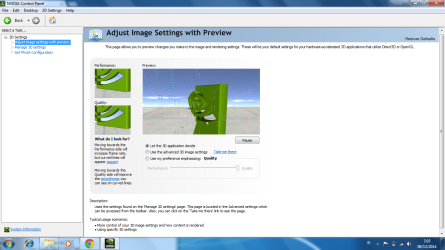
Y yosua New member Local time 5:10 PM Messages 5 Dec 9, 2014 #1 hello sir, i asking for your help . i have just installed nvidia . when it done, i open my nvidia control panel , there is a line and blur in nvidia logo, i cannot play any game now . can you help me how to fix it ? Attachments 2.png 84.8 KB · Views: 6 My Computer My Computer At a glance Windows 7 Ultimate x644GBNVIDIA GEFORCE 740MComputer typePC/DesktopComputer Manufacturer/Model NumberAsusOSWindows 7 Ultimate x64Memory4GBGraphics Card(s)NVIDIA GEFORCE 740MBrowserGOOGLE CHROME
hello sir, i asking for your help . i have just installed nvidia . when it done, i open my nvidia control panel , there is a line and blur in nvidia logo, i cannot play any game now . can you help me how to fix it ?
RoasterMen .. .. .. .. Pro User Gold Member VIP Local time 6:10 AM Messages 2,021 Location Suita, Osaka Dec 9, 2014 #2 Check your temperatures. Download SpeedFan My Computer My Computer At a glance Windows 7 Home Premium 64-BITAMD A8 7200P8GB 1600mhzRadeon R5 (APU) + Radeon R5 M230 2GB Dual Gra...Computer typePC/DesktopComputer Manufacturer/Model NumberASUS X550ZEOSWindows 7 Home Premium 64-BITCPUAMD A8 7200PMotherboardN/AMemory8GB 1600mhzGraphics Card(s)Radeon R5 (APU) + Radeon R5 M230 2GB Dual GraphicsSound CardRealtek ALC269 with SonicMasterMonitor(s) DisplaysLaptop DisplayScreen Resolution1920 x 1080 @60hzHard DrivesWDC WD50 00LPVX-80V0TT0 (500GB)PSULaptop ChargerMouseARMAGGEDON TEXTRON SCORPION 7Internet Speed100 mbps DOWN / 50 mbps UPAntivirusWindows DefenderBrowserMozzila FireFox, Valve Steam in-game internet browser
Y yosua New member Thread Starter Local time 5:10 PM Messages 5 Dec 9, 2014 #3 after i check it, what should i do next sir ? My Computer My Computer At a glance Windows 7 Ultimate x644GBNVIDIA GEFORCE 740MComputer typePC/DesktopComputer Manufacturer/Model NumberAsusOSWindows 7 Ultimate x64Memory4GBGraphics Card(s)NVIDIA GEFORCE 740MBrowserGOOGLE CHROME
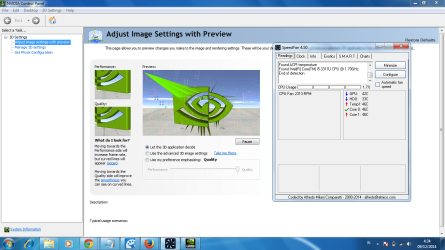
Y yosua New member Thread Starter Local time 5:10 PM Messages 5 Dec 9, 2014 #4 @RoasterMan : i have check it, here is the picture . Attachments qa.png 94.3 KB · Views: 3 My Computer My Computer At a glance Windows 7 Ultimate x644GBNVIDIA GEFORCE 740MComputer typePC/DesktopComputer Manufacturer/Model NumberAsusOSWindows 7 Ultimate x64Memory4GBGraphics Card(s)NVIDIA GEFORCE 740MBrowserGOOGLE CHROME
RoasterMen .. .. .. .. Pro User Gold Member VIP Local time 6:10 AM Messages 2,021 Location Suita, Osaka Dec 9, 2014 #5 It should be a problem with windows now since the temperatures are fine. Have you tried reinstalling windows? My Computer My Computer At a glance Windows 7 Home Premium 64-BITAMD A8 7200P8GB 1600mhzRadeon R5 (APU) + Radeon R5 M230 2GB Dual Gra...Computer typePC/DesktopComputer Manufacturer/Model NumberASUS X550ZEOSWindows 7 Home Premium 64-BITCPUAMD A8 7200PMotherboardN/AMemory8GB 1600mhzGraphics Card(s)Radeon R5 (APU) + Radeon R5 M230 2GB Dual GraphicsSound CardRealtek ALC269 with SonicMasterMonitor(s) DisplaysLaptop DisplayScreen Resolution1920 x 1080 @60hzHard DrivesWDC WD50 00LPVX-80V0TT0 (500GB)PSULaptop ChargerMouseARMAGGEDON TEXTRON SCORPION 7Internet Speed100 mbps DOWN / 50 mbps UPAntivirusWindows DefenderBrowserMozzila FireFox, Valve Steam in-game internet browser
It should be a problem with windows now since the temperatures are fine. Have you tried reinstalling windows?
AddRAM R.I.P. Guru Gold Member VIP Local time 6:10 PM Messages 13,491 Location New Jersey Dec 10, 2014 #6 Roll back to the previous driver, or re install the nvidia driver doing a custom clean install. Or use the video driver from the manufacturer`s website. My Computer My Computer At a glance Windows 10 Pro x64Intel Core i7 6700KGSkill TridentZ RGB 16GB 3600 16-16-16-36EVGA GTX 980 Ti SC x2Computer typePC/DesktopComputer Manufacturer/Model NumberSkylake Special #666OSWindows 10 Pro x64CPUIntel Core i7 6700KMotherboardAsus Sabertooth Z170 Mark 1MemoryGSkill TridentZ RGB 16GB 3600 16-16-16-36Graphics Card(s)EVGA GTX 980 Ti SC x2Sound CardRealtek High DefinitionMonitor(s) DisplaysAOC G2460PGScreen Resolution1920 x 1080 144HzHard DrivesSamsung 860 Pro 256GB, Seagate Barracuda 4TB x2PSUEVGA 1000 P2, EVGA White Custom Braided CablesCaseCorsair Vengeance C70 Gunmetal BlackCoolingCorsair H100i v2, Corsair ML120 x2, Thermal Grizzly KryonautKeyboardLogitech G910 Orion SpectrumMouseLogitech G700sInternet SpeedVerizon Fios Quantum Gateway 75/75AntivirusWindows Defender, Malwarebytes Free 3.8.3BrowserChromeOther InfoCorsair SP120 x4, LG Blu-ray Drive, Durabrand HT-395 100 Watt Dolby Digital Amp, Corsair H2100 Wireless 7.1 Headset
Roll back to the previous driver, or re install the nvidia driver doing a custom clean install. Or use the video driver from the manufacturer`s website.
Y yosua New member Thread Starter Local time 5:10 PM Messages 5 Dec 11, 2014 #7 i have re instal nvidia with custom clean instal, but the problem wont gone . is there possibility my nvidia broken ? My Computer My Computer At a glance Windows 7 Ultimate x644GBNVIDIA GEFORCE 740MComputer typePC/DesktopComputer Manufacturer/Model NumberAsusOSWindows 7 Ultimate x64Memory4GBGraphics Card(s)NVIDIA GEFORCE 740MBrowserGOOGLE CHROME
i have re instal nvidia with custom clean instal, but the problem wont gone . is there possibility my nvidia broken ?