NVidia display driver stopped responding and has recovered

CharlieBrown22

New member
Local time
12:42 PM
Messages
16
Every so often when doing some relatively video-intensive activity (multiple YouTube tabs open, etc.), my screen will black out. In the instances when the screen goes back to normal (~75% of the time), I get the following error:

NVidia display driver stopped responding and has recovered, version 327.02.

Any ideas of what I can do to fix this? Thank you!

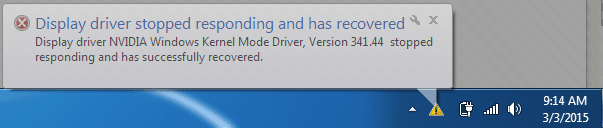
EDIT: I've attached a screenshot of the error. The exact wording of the error is the following:

"Display driver NVIDIA Windows Kernel Mode Driver, Version 327.02 stopped responding and has successfully recovered."
 

Attachments

  • nvidia driver problem.png
    nvidia driver problem.png
    7.1 KB · Views: 32
Last edited:

My Computer My Computer

Computer type
Laptop
Computer Manufacturer/Model Number
Toshiba Satellite A665-S6070
OS
64-bit Windows 7 Home Premium
CPU
Intel Core i7 Q 720 @ 1.60Ghz
Memory
4096 MB RAM
Graphics Card(s)
NVIDIA GeForce 310M
Screen Resolution
1366 x 768 (32 bit) (60Hz)
Just a slight bump.
 

My Computer My Computer

Computer type
Laptop
Computer Manufacturer/Model Number
Toshiba Satellite A665-S6070
OS
64-bit Windows 7 Home Premium
CPU
Intel Core i7 Q 720 @ 1.60Ghz
Memory
4096 MB RAM
Graphics Card(s)
NVIDIA GeForce 310M
Screen Resolution
1366 x 768 (32 bit) (60Hz)

My Computer My Computer

Computer type
Laptop
Computer Manufacturer/Model Number
Toshiba Satellite A665-S6070
OS
64-bit Windows 7 Home Premium
CPU
Intel Core i7 Q 720 @ 1.60Ghz
Memory
4096 MB RAM
Graphics Card(s)
NVIDIA GeForce 310M
Screen Resolution
1366 x 768 (32 bit) (60Hz)
The error still continues. My computer has crashed a few times since my last post. I'm attaching the error that was returned a few minutes ago, in which case the driver actually recovered.
 

Attachments

  • nvidia.png
    nvidia.png
    10.5 KB · Views: 15

My Computer My Computer

Computer type
Laptop
Computer Manufacturer/Model Number
Toshiba Satellite A665-S6070
OS
64-bit Windows 7 Home Premium
CPU
Intel Core i7 Q 720 @ 1.60Ghz
Memory
4096 MB RAM
Graphics Card(s)
NVIDIA GeForce 310M
Screen Resolution
1366 x 768 (32 bit) (60Hz)
Where are you getting the drivers from ?

nVidia or Toshiba ?

Laptops are funny and sometimes can only use the video drivers from the manufacturer.
 

My Computer My Computer

Computer type
PC/Desktop
Computer Manufacturer/Model Number
Skylake Special #666
OS
Windows 10 Pro x64
CPU
Intel Core i7 6700K
Motherboard
Asus Sabertooth Z170 Mark 1
Memory
GSkill TridentZ RGB 16GB 3600 16-16-16-36
Graphics Card(s)
EVGA GTX 980 Ti SC x2
Sound Card
Realtek High Definition
Monitor(s) Displays
AOC G2460PG
Screen Resolution
1920 x 1080 144Hz
Hard Drives
Samsung 860 Pro 256GB, Seagate Barracuda 4TB x2
PSU
EVGA 1000 P2, EVGA White Custom Braided Cables
Case
Corsair Vengeance C70 Gunmetal Black
Cooling
Corsair H100i v2, Corsair ML120 x2, Thermal Grizzly Kryonaut
Keyboard
Logitech G910 Orion Spectrum
Mouse
Logitech G700s
Internet Speed
Verizon Fios Quantum Gateway 75/75
Antivirus
Windows Defender, Malwarebytes Free 3.8.3
Browser
Chrome
Other Info
Corsair SP120 x4, LG Blu-ray Drive, Durabrand HT-395 100 Watt Dolby Digital Amp, Corsair H2100 Wireless 7.1 Headset
I did get them from NVIDIA.

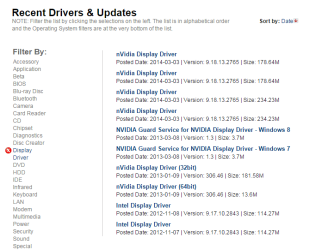
So would you suggest I try a clean install with a driver downloaded from the Toshiba website?
Drivers & Software Support | Toshiba

If so, which ones out of the list would you suggest?
 

Attachments

  • nvidiadisplay.png
    nvidiadisplay.png
    16.8 KB · Views: 0

My Computer My Computer

Computer type
Laptop
Computer Manufacturer/Model Number
Toshiba Satellite A665-S6070
OS
64-bit Windows 7 Home Premium
CPU
Intel Core i7 Q 720 @ 1.60Ghz
Memory
4096 MB RAM
Graphics Card(s)
NVIDIA GeForce 310M
Screen Resolution
1366 x 768 (32 bit) (60Hz)
Back
Top