Nvidia drivers capping hz @ 85 hz?

It is true about the human eye seeing about only 30 fps max. I can tell immediately though, the difference when I used to set old crt monitors from 60 to even just 65 Hz. I attribute that to the fact that I believe eyesight along with brain can "sense" a higher smoothness even while not being able to "process" the information as quickly.
 

My Computer My Computer

Computer Manufacturer/Model Number
self built
OS
7600.20510 x86
CPU
P4 550 3.4 GHz HT running at 3.5 GHz
Motherboard
MSI PM8M3-V (MS-7211 v1.x) Micro-ATX mainboard
Memory
OCZ 2 GB(2x1GB) DDR400mHz running @ 414 mHz
Graphics Card(s)
HIS Radeon HD 3850 IceQ 3 Turbo HDMI Dual DL-DVI AGP
Sound Card
MOTU Traveler firewire studio interface 192 kHz 24 bit
Monitor(s) Displays
22" widescreen Acer X223W LCD, 17" Compaq P75 CRT
Screen Resolution
1680x1050 and 1280x1024
Hard Drives
SATA I x2 WD, 400 GB and 120 GB, SATA 2 WD Caviar Black 1 TB
PSU
350W generic
Case
Cybertronpc, it glows blue
Cooling
stock cpu fan, Ice-Q 3 gpu and system, many case fans
Keyboard
Logitch Classical Keyboard 200
Mouse
Logitech Mediaplay cordless
Internet Speed
1792/448 kbits/sec
Other Info
SATA II PCI fake RAID adapter, 1 GB Readyboost, original ATI Remote Wonder (even works with WMC perfectly), Logitech Rumblepad 2 game controller x2
True, I mean their are differences, I guess I've just goten used to 75-80Hz and now perfer that? Heh, but yeah I get what you mean.
 

My Computer My Computer

Computer Manufacturer/Model Number
Custom
OS
Windows 7, Linux
CPU
AMD Phemon II x2 3@3750
Motherboard
ASRock M3A770DE
Memory
1G Crucial 1666
Graphics Card(s)
8800GT OC (custom OC)
Sound Card
Sound Blaster Live! (never changes!)
Monitor(s) Displays
Vivitron 22"
Screen Resolution
1600x1200
Hard Drives
Western Digital 120G/160G SATA
Maxtor 80G IDE
PSU
450w
Case
Unknown
Cooling
Custom Air cooled
Keyboard
Logitech
Mouse
Logitech M-BZ15A Laser
Internet Speed
Cable 10mbit
I finally was able to get into 100hz in the 800x600 resolution.

The issue was with my monitors driver.

I uninstalled the nvidia drivers, restarted into safe mode and ran drive sweeper, rebooted, installed monitor driver, installed nvidia drivers.

Here are my monitor inf files, first the unmodified version, and then the modified version. The modified version finally allowed me to select "unsupported" resolutions, but wich the monitor runs just fine.


;================================================= =
; sm957mb.inf 06/20/2002 ver. 1.0
;
; Copyright 2002 Samsung Electronics Corporation
;
; This is a Setup information file for Samsung Monitor.
;================================================= =

[Version]
signature="$CHICAGO$"
Class=Monitor
ClassGuid={4D36E96E-E325-11CE-BFC1-08002BE10318}
Provider=%Samsung%
CatalogFile=sm957mb.cat
DriverVer=06/20/2002,1.0

;--------------------------------------------------
[ControlFlags]
ExcludeFromSelect.nt=Monitor\SAM0070

[ClassInstall32]
AddReg=ClassAddReg32

[ClassAddReg32]
HKR,,,,%MonitorClassName%
HKR,,Icon,,"-1"
HKR,,NoInstallClass,,1

[DestinationDirs]
DefaultDestDir = 11
sm957mb.CopyFiles = 23

[SourceDisksNames]
1=%DISK%,,,

[SourceDisksFiles]
sm957mb.icm=1

[Manufacturer]
%Samsung%=Samsung

; Manufacturer sections
;-----------------------------------------------------
[Samsung]
%sm957mb%=sm957mb.Install, Monitor\SAM0070

; Install Sections
;-----------------------------------------------------

[sm957mb.Install]
DelReg=DEL_CURRENT_REG
AddReg=sm957mb.AddReg, 2048, DPMS
CopyFiles=sm957mb.CopyFiles


; Addreg & DelReg sections
;-----------------------------------------------------

[DEL_CURRENT_REG]
HKR,MODES
HKR,,MaxResolution
HKR,,DPMS
HKR,,ICMProfile


[2048]
HKR,,MaxResolution,,"2048,1536"

[DPMS]
HKR,,DPMS,,1

; AddReg sections
;-----------------------------------------------------


[sm957mb.AddReg]
HKR,"MODES\2048,1536",Mode1,,"30-96,50-160,+,+"
HKR,,ICMProfile,0,"sm957mb.icm"


;------------------------------------------------------

[sm957mb.CopyFiles]
sm957mb.icm


;------------------------------------------------------

[Strings]
DISK="Samsung Monitor Installation Disk"
MonitorClassName="Monitor"
Samsung="Samsung"
sm957mb="SyncMaster 957MB/917MB/950MB SyncMaster Magic CD197D(P)"


----

Modified version of the driver:

---
;================================================= =
; sm957mb.inf 06/20/2002 ver. 1.0
;
; Copyright 2002 Samsung Electronics Corporation
;
; This is a Setup information file for Samsung Monitor.
;================================================= =

[Version]
signature="$CHICAGO$"
Class=Monitor
ClassGuid={4D36E96E-E325-11CE-BFC1-08002BE10318}
Provider=%Samsung%
CatalogFile=sm957mb.cat
DriverVer=06/20/2002,1.0

;--------------------------------------------------
[ControlFlags]
ExcludeFromSelect.nt=Monitor\SAM0070

[ClassInstall32]
AddReg=ClassAddReg32

[ClassAddReg32]
HKR,,,,%MonitorClassName%
HKR,,Icon,,"-1"
HKR,,NoInstallClass,,1

[DestinationDirs]
DefaultDestDir =23


[SourceDisksNames]
1="Samsung Monitor Installation Disk",,1

[Manufacturer]
%Samsung%=Samsung,NTx86,NTAMD64

; Manufacturer sections
;-----------------------------------------------------
[Samsung.NTamd64]
%sm957mb%=sm957mb.Install.NTamd64, Monitor\SAM0070

; Install Sections
;-----------------------------------------------------

[sm957mb.Install]
DelReg=DEL_CURRENT_REG
AddReg=sm957mb.AddReg, 2048, DPMS

; Addreg & DelReg sections
;-----------------------------------------------------

[DEL_CURRENT_REG]
HKR,MODES
HKR,,MaxResolution
HKR,,DPMS
HKR,,ICMProfile


[2048]
HKR,,MaxResolution,,"2048,1536"

[DPMS]
HKR,,DPMS,,1

; AddReg sections
;-----------------------------------------------------


[sm957mb.AddReg]
HKR,"MODES\2048,1536",Mode1,,"30-96,50-160,+,+"
HKR,"MODES\800,600",Mode1,,"30-96,100-160,+,+"
HKR,,ICMProfile,1,9


;------------------------------------------------------


[Strings]
DISK="Samsung Monitor Installation Disk"
MonitorClassName="Monitor"
Samsung="Samsung"
sm957mb="SyncMaster 957MB/917MB/950MB SyncMaster Magic CD197D(P)"


----

This is how the driver is now,
I added
HKR,"MODES\800,600",Mode1,,"30-96,100-160,+,+"

I followed some other guys inf file modding and added .NTamd64 in various places to get W7 to accept the inf file.

Otherwise I have no idea really what I'm doing, but after uninstalling the Nvidia drivers, installing that monitor driver, and then running drivesweeper in safe mode, and then installing nvidia drivers again I'm able to see "unsupported" resolutions, resolutions that I used just fine in WinXP.

 

My Computer My Computer

OS
Windows 7 64bit
CPU
Intel Duo 8500
Motherboard
Asus P5E Deluxe
Memory
2x2GB 1066mhz DDR2 Kingston HyperX
Graphics Card(s)
eVGA GTX 280
Sound Card
x-fi fatality platinium
Monitor(s) Displays
Samsung Syncmaster 957mb CRT
Hard Drives
Samsung 1TB
PSU
Antec 650w
Case
Antec P182
Cooling
Thermaltake something
True, I mean their are differences, I guess I've just goten used to 75-80Hz and now perfer that? Heh, but yeah I get what you mean.

There's a reason why TV manufacturers are striving to have their LCD's 100hz or more, better picture quality and better fast motion.
 

My Computer My Computer

OS
Windows 7 64bit
CPU
Intel Duo 8500
Motherboard
Asus P5E Deluxe
Memory
2x2GB 1066mhz DDR2 Kingston HyperX
Graphics Card(s)
eVGA GTX 280
Sound Card
x-fi fatality platinium
Monitor(s) Displays
Samsung Syncmaster 957mb CRT
Hard Drives
Samsung 1TB
PSU
Antec 650w
Case
Antec P182
Cooling
Thermaltake something
How? I modified that line but I can't set the 100Hz yet :S
What drivers are you using? Can you make a little guide explaining all the steps?
Thank you very much.
 

My Computer My Computer

OS
Seven
You have to find your monitors driver from its manufacturer, if its outdated and only for windows xp you can manually edit it like I did.

1. Uninstall Nvidia drivers
2. Reboot into safe mode
3. Run Driver Sweeper ( Guru3D - Driver Sweeper )
4. Ask it to clean everything related to your graphics card, Nvidia drivers, Physx everything.
5. Reboot into windows normally
6. Go into device manager and take these steps:
--6.1 - Browse my computer for driver software
--6.2 - Let me pick from a list of device drivers on my computer
--6.3 - Have disk and direct it to your edited monitor inf file.
7. Install the Nvidia driver
8. Restart

If This doesnt work, I dont know :(
 

My Computer My Computer

OS
Windows 7 64bit
CPU
Intel Duo 8500
Motherboard
Asus P5E Deluxe
Memory
2x2GB 1066mhz DDR2 Kingston HyperX
Graphics Card(s)
eVGA GTX 280
Sound Card
x-fi fatality platinium
Monitor(s) Displays
Samsung Syncmaster 957mb CRT
Hard Drives
Samsung 1TB
PSU
Antec 650w
Case
Antec P182
Cooling
Thermaltake something
I've been trying to get my 19" samsung CRT monitor to reach 100hz with windows7, but it seems to be impossible.
.

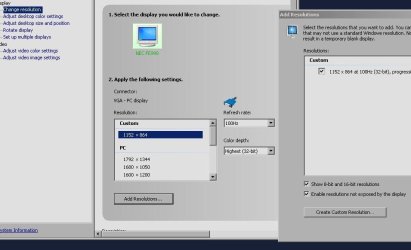
I'm resolve this problem that way:
1. download old driver GeForce 190.62 (windows 7)
2. install & make new resolution in nVidia control panel, active and enjoy

see picture
 

Attachments

  • 100hz.JPG
    100hz.JPG
    51 KB · Views: 202

My Computer My Computer

OS
windows 7 (+xp)
CPU
Intel 6750
Motherboard
Gigabyte p35c-s3
Memory
2gb
Graphics Card(s)
Ge-Force 8800 GTS 320mb (Sparkle)
Monitor(s) Displays
NEC FE990 (CRT)
Hard Drives
1T
Cooling
AIR
Back
Top