Nvidia Geforce 9200 Flickering When using HDMI/DVI

Vaughn Whynot

The Bearded Basterd
Member
VIP
Local time
10:07 AM
Messages
106
Location
Nova Scotia
so bought Nvidia GsForce 9200 and two 22inch Acer X223w monitors.

when i hook one up via VGA and the other with HDMI with a DVI/HDMI adaptor on the DVI port of the screen (which worked for people who i have asked) the one screen with the hdmi flickers once and awhile.
seems when alot if going on (IMs,Movies and games)
i have replaced all the cords and adapters also reinstalled all drivers and programs for both
but it seems to keep happening
i did some researching and people said it was driver problems and others said ti was the refresh rate...i have tried to sort is all out and still happens....
anyone got any ideas?
 

My Computer My Computer

Computer type
PC/Desktop
Computer Manufacturer/Model Number
Acer Aspire M3970
OS
Microsoft Windows 7 Ultimate 64-bit SP1
CPU
Intel Core i3 2120 @ 3.30GHz
Motherboard
Acer AM3970
Memory
6.00GB Dual-Channel DDR3 @ 665MHz (9-9-9-24)
Graphics Card(s)
1024MB ATI AMD Radeon HD 5700 Series
Sound Card
Realtek High Definition Audio
Monitor(s) Displays
Acer X223W & HP 2511
Screen Resolution
(1920x1080@60Hz) & (1680x1050@60Hz)
Hard Drives
466GB Seagate ST3500320AS ATA Device (SATA)
932GB Seagate ST31000524AS ATA Device (SATA)
PSU
600 Watt ATX Diablotek DA Series
Case
Acer M3970 Default Case
Cooling
CoolerMaster Hyper 101i
Keyboard
Logitech G5
Mouse
Razer Black Widow Ultimate
Internet Speed
20d/2u
Antivirus
Windows Security Essentials & Malwarebytes Anti-Malware
Browser
Firefox
What did you have before the Nvidia GsForce 9200?
 

My Computer My Computer

Computer type
PC/Desktop
Computer Manufacturer/Model Number
Self Build
OS
MS Windows 7 Professional 64-bit SP1
CPU
AMD FX(tm)-6100 Six-Core Processor Socket AM3+ (942)
Motherboard
ASUSTeK COMPUTER INC. SABERTOOTH 990FX (AM3r2)
Memory
8.00 GB Dual-Channel DDR3 @ 802MHz (11-11-11-36) 1.5Volts
Graphics Card(s)
NVIDIA GeForce GTX 560 Ti
Sound Card
Onboard Realtek HD
Monitor(s) Displays
shimian (1920x1080@60Hz)
Screen Resolution
1920*1080
Hard Drives
OCZ-AGIL ITY3 SATA Disk Device 120GB
PSU
Corsair TX 750
Case
Corsair
Cooling
WaterCooled
Keyboard
Microsoft Wired
Mouse
Logitech USB Optical TiltWheel Mouse
Internet Speed
Realtek PCIe GBE Family Controller 20MB*1MB
Antivirus
Avast
Browser
Firefox
Other Info
150GB Internal Hard Drive for Backing Up Important Files -
Hauppauge Nova-DT Dual DVB-T Tuner Device (+IR) -
USB PC Camera with Mic (SN9C105)

My Computer My Computer

Computer type
PC/Desktop
Computer Manufacturer/Model Number
Acer Aspire M3970
OS
Microsoft Windows 7 Ultimate 64-bit SP1
CPU
Intel Core i3 2120 @ 3.30GHz
Motherboard
Acer AM3970
Memory
6.00GB Dual-Channel DDR3 @ 665MHz (9-9-9-24)
Graphics Card(s)
1024MB ATI AMD Radeon HD 5700 Series
Sound Card
Realtek High Definition Audio
Monitor(s) Displays
Acer X223W & HP 2511
Screen Resolution
(1920x1080@60Hz) & (1680x1050@60Hz)
Hard Drives
466GB Seagate ST3500320AS ATA Device (SATA)
932GB Seagate ST31000524AS ATA Device (SATA)
PSU
600 Watt ATX Diablotek DA Series
Case
Acer M3970 Default Case
Cooling
CoolerMaster Hyper 101i
Keyboard
Logitech G5
Mouse
Razer Black Widow Ultimate
Internet Speed
20d/2u
Antivirus
Windows Security Essentials & Malwarebytes Anti-Malware
Browser
Firefox
Did you uninstall the old drivers before attaching the new Video Card?
 

My Computer My Computer

Computer type
PC/Desktop
Computer Manufacturer/Model Number
Self Build
OS
MS Windows 7 Professional 64-bit SP1
CPU
AMD FX(tm)-6100 Six-Core Processor Socket AM3+ (942)
Motherboard
ASUSTeK COMPUTER INC. SABERTOOTH 990FX (AM3r2)
Memory
8.00 GB Dual-Channel DDR3 @ 802MHz (11-11-11-36) 1.5Volts
Graphics Card(s)
NVIDIA GeForce GTX 560 Ti
Sound Card
Onboard Realtek HD
Monitor(s) Displays
shimian (1920x1080@60Hz)
Screen Resolution
1920*1080
Hard Drives
OCZ-AGIL ITY3 SATA Disk Device 120GB
PSU
Corsair TX 750
Case
Corsair
Cooling
WaterCooled
Keyboard
Microsoft Wired
Mouse
Logitech USB Optical TiltWheel Mouse
Internet Speed
Realtek PCIe GBE Family Controller 20MB*1MB
Antivirus
Avast
Browser
Firefox
Other Info
150GB Internal Hard Drive for Backing Up Important Files -
Hauppauge Nova-DT Dual DVB-T Tuner Device (+IR) -
USB PC Camera with Mic (SN9C105)
Did you uninstall the old drivers before attaching the new Video Card?
yes, and i spent 2 hours with nivida support last night and they went over everything
then said, "sorry, we have no more ideas for you to try. consider buying a new video card" this video card is less then 2 weeks old.
 

My Computer My Computer

Computer type
PC/Desktop
Computer Manufacturer/Model Number
Acer Aspire M3970
OS
Microsoft Windows 7 Ultimate 64-bit SP1
CPU
Intel Core i3 2120 @ 3.30GHz
Motherboard
Acer AM3970
Memory
6.00GB Dual-Channel DDR3 @ 665MHz (9-9-9-24)
Graphics Card(s)
1024MB ATI AMD Radeon HD 5700 Series
Sound Card
Realtek High Definition Audio
Monitor(s) Displays
Acer X223W & HP 2511
Screen Resolution
(1920x1080@60Hz) & (1680x1050@60Hz)
Hard Drives
466GB Seagate ST3500320AS ATA Device (SATA)
932GB Seagate ST31000524AS ATA Device (SATA)
PSU
600 Watt ATX Diablotek DA Series
Case
Acer M3970 Default Case
Cooling
CoolerMaster Hyper 101i
Keyboard
Logitech G5
Mouse
Razer Black Widow Ultimate
Internet Speed
20d/2u
Antivirus
Windows Security Essentials & Malwarebytes Anti-Malware
Browser
Firefox
I had a similar problem.

I was using a DVI to VGA adapter and I couldn't raise my resolution above 1600x1200 with out my refresh rate going to 30mhz interlaced.

Then I connected directly to DVI and my problem was solved.

Are you sure about your video card? I've never heard of a Geforce 9300 video card.

If you are running dual monitors you need a direct digital connection with no adapters, VGA supports a lower resolution for dual monitors than DVI does.

If you already have used DVI cables and it still didn't work, my suggestion is to lower your resolution because it's likely your video card can't handle 2 22 inch monitors at max resolution, which is what?

EDIT: For the high end 9 series cards like the 9800GX2, the maximum resolution is 2560x1600 with digital and 2048x1536 VGA.
 

My Computer My Computer

Computer Manufacturer/Model Number
Custom
OS
Windows 7 Professional 64 bit
CPU
AMD Phenom X4 925 @ 2.8ghz
Motherboard
Gigabyte GA-MA785GT-UD3H AM3
Memory
4GB DDR3 1600mhz A-DATA gaming series
Graphics Card(s)
Dual HIS Radeon HD 5770
Sound Card
Asus Xonar D1
Monitor(s) Displays
Samsung Syncmaster EX2220
Screen Resolution
1920x1080
Hard Drives
Dual Hitatchi 500GB Sata
PSU
Thermaltake Toughpower Grand 1200w A+ certified Gold.
Case
Thermaltake V3 Black
Cooling
Watercooler with Radiator on CPU, with 4 120mm case fans.
Keyboard
Thermaltake Challenger Pro
Mouse
Death Adder
Internet Speed
10mbps/1mbps
You must use Driver Sweeper to remove the traces of your previous graphics card drivers: Guru3D - Driver Sweeper
 

My Computer My Computer

Computer Manufacturer/Model Number
Macbook Pro 15" (2011) (Matte Version)
OS
Win 7 Pro x64 SP1 OS X Snow Leopard 10.6.7
CPU
Intel Core i7 2820QM 2.3GHz (Quad-Core)
Motherboard
N/A
Memory
8GB 1333 MHz PC3-10600 DDR3 SDRAM
Graphics Card(s)
ATI Radeon HD 6750M (1GB, GDDR5)
Sound Card
N/A
Monitor(s) Displays
1 Display
Screen Resolution
1,680 x 1050 (Matte Screen, Anti-Glare)
Hard Drives
750GB SATA (5400 rpm)
WD My Passport Essential 1TB Portable Hard Drive
PSU
N/A
Case
N/A
Cooling
N/A
Keyboard
Apple Wireless Keyboard
Mouse
Apple Wireless Magic Mouse
Internet Speed
Max - 2.2MB/sec; DSL provided by Telecom NZ
Other Info
MS Office Professional 2010
McAfee Total Protection 2011
On a Laptop Stand (Hand-Built)
Do both your monitors show up in device manager as Acer X223W's? If not you might want to go to the Acer site and see if they have a driver for your monitors a (.inf file) and install them. It could have something to do if their showing up as PnP monitors.
Monitor drivers http://support.acer.com/us/en/product/default.aspx?tab=1&modelId=834

Their only Vista 32 bit but you could install them in compatibility mode if your running 32bit
http://www.sevenforums.com/tutorials/316-compatibility-mode.html

You may also want to make sure your card is well seated, cables are firmly attached, and you have used driver sweeper to remove any remnants of the old drivers.
You could also try hooking them up with the same inputs or changing the connections to the monitor and see if the other one behaves the same way.

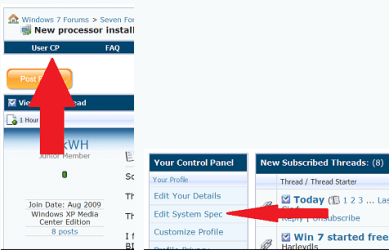
Also please take the time to fill in all your system specs here
usercp 1.png

A couple programs to help with that if you don't know them.
http://majorgeeks.com/HWiNFO32_d280.html
http://majorgeeks.com/Speccy_d6358.html
Thanks. Fabe
 

My Computer My Computer

Computer Manufacturer/Model Number
Self Built
OS
Windows 7 ultimate 64 bit / XP Home sp3
CPU
intel Core 2 Duo E8400 3.0ghz
Motherboard
Asus P5ND bios 1401
Memory
8 gigs 1066 OCZ Fata1ty
Graphics Card(s)
EVGA GTX 580 Call of Duty Black Ops Edition
Sound Card
Creative Soundblaster Audigy 2zs
Monitor(s) Displays
Asus 24in LCD's 2MS X2
Screen Resolution
1920x1080p @60Hz
Hard Drives
WD Caviar 500 Black/ WD Caviar 200 Blue
PSU
OCZ 700W GameXtreme
Case
NZXT Apollo
Cooling
Corsair H50 CPU/120mm x3 /60mm x2 /Corsair Dominator Ram
Keyboard
Logitech Bluetooth Wireless MX5000
Mouse
Logitech Bluetooth Wireless MX1000
Internet Speed
Download 19.83 Upload 0.97
Other Info
Logitech Z2300 Speakers/ Bose Noise Cancelling Headphones/Avermedia PCI-e Hybrid TV Bravo/Epson NX415 all in one/ 4 Port Powered USB Hub/ LG 10x Bluray Burner /TSST Corp DVDRW External
I had a similar problem.

I was using a DVI to VGA adapter and I couldn't raise my resolution above 1600x1200 with out my refresh rate going to 30mhz interlaced.

Then I connected directly to DVI and my problem was solved.

Are you sure about your video card? I've never heard of a Geforce 9300 video card.

If you are running dual monitors you need a direct digital connection with no adapters, VGA supports a lower resolution for dual monitors than DVI does.

If you already have used DVI cables and it still didn't work, my suggestion is to lower your resolution because it's likely your video card can't handle 2 22 inch monitors at max resolution, which is what?

EDIT: For the high end 9 series cards like the 9800GX2, the maximum resolution is 2560x1600 with digital and 2048x1536 VGA.

You must use Driver Sweeper to remove the traces of your previous graphics card drivers: Guru3D - Driver Sweeper

Do both your monitors show up in device manager as Acer X223W's? If not you might want to go to the Acer site and see if they have a driver for your monitors a (.inf file) and install them. It could have something to do if their showing up as PnP monitors.
Monitor drivers http://support.acer.com/us/en/product/default.aspx?tab=1&modelId=834

Their only Vista 32 bit but you could install them in compatibility mode if your running 32bit
http://www.sevenforums.com/tutorials/316-compatibility-mode.html

You may also want to make sure your card is well seated, cables are firmly attached, and you have used driver sweeper to remove any remnants of the old drivers.
You could also try hooking them up with the same inputs or changing the connections to the monitor and see if the other one behaves the same way.

Also please take the time to fill in all your system specs here
View attachment 138806

A couple programs to help with that if you don't know them.
http://majorgeeks.com/HWiNFO32_d280.html
http://majorgeeks.com/Speccy_d6358.html
Thanks. Fabe


matt - sorry Geforce 9200, and i can't go any higher then 1650x1080
Dean - i have done that with customer service for Nvidia
fabe - all cords are on good and whatnot. will update specs.
 

My Computer My Computer

Computer type
PC/Desktop
Computer Manufacturer/Model Number
Acer Aspire M3970
OS
Microsoft Windows 7 Ultimate 64-bit SP1
CPU
Intel Core i3 2120 @ 3.30GHz
Motherboard
Acer AM3970
Memory
6.00GB Dual-Channel DDR3 @ 665MHz (9-9-9-24)
Graphics Card(s)
1024MB ATI AMD Radeon HD 5700 Series
Sound Card
Realtek High Definition Audio
Monitor(s) Displays
Acer X223W & HP 2511
Screen Resolution
(1920x1080@60Hz) & (1680x1050@60Hz)
Hard Drives
466GB Seagate ST3500320AS ATA Device (SATA)
932GB Seagate ST31000524AS ATA Device (SATA)
PSU
600 Watt ATX Diablotek DA Series
Case
Acer M3970 Default Case
Cooling
CoolerMaster Hyper 101i
Keyboard
Logitech G5
Mouse
Razer Black Widow Ultimate
Internet Speed
20d/2u
Antivirus
Windows Security Essentials & Malwarebytes Anti-Malware
Browser
Firefox
Matt2488 is correct. It's most likely the adapter you're using. Also, the brand is something to consider as well.
 

My Computer My Computer

Computer type
PC/Desktop
Computer Manufacturer/Model Number
Custom Build
OS
Windows 7 Home Premium x64
CPU
Intel Core i7-3770S Quad @ 3.1 GHz (Turbo-Boost to 3.9GHz)
Motherboard
ASUS ROG Maximus V Formula ATX
Memory
16GB (DDR3) @1,600MHz Corsair Vengeance 2
Graphics Card(s)
EVGA GeForce GTX 960 SuperSC ACX 2.0+ 2GB
Monitor(s) Displays
Acer 23" S230HL
Screen Resolution
1920 x 1080
Hard Drives
Seagate 1TB @7,200rpm
PSU
850W Power Supply (Thermaltake - SP850M)
Case
NZXT SWITCH 810 Gun-Metal CA-SW810-G1
Cooling
Cooler Master Hyper 212 EVO (RR-212E-20PK)
Keyboard
Logitech G510
Mouse
Logitech G602
Internet Speed
5Mbps Download / 756kbps Upload
Antivirus
Microsoft Security Essentials
Matt2488 is correct. It's most likely the adapter you're using. Also, the brand is something to consider as well.

Yeah that was also a problem for me that I forgot to mention here.

Some adapters support bigger resolutions than others, from my experience.

One of my old adapters broke, and I had to buy a crappy Ativa adapter from Office Depot and it wouldn't let me go bigger than 1600x1200 resolution. A Friend of mine let me borrow an extra HIS adapter he had laying around and I could get my monitor back to max resolution, and then I just bought some DVI cables from Amazon because I need to go digital or HDMI for better quality anyway.

Office Depot has insane prices. The cheapest DVI cables they had for almost 40 bucks, and I bought some off Amazon for 10.
 

My Computer My Computer

Computer Manufacturer/Model Number
Custom
OS
Windows 7 Professional 64 bit
CPU
AMD Phenom X4 925 @ 2.8ghz
Motherboard
Gigabyte GA-MA785GT-UD3H AM3
Memory
4GB DDR3 1600mhz A-DATA gaming series
Graphics Card(s)
Dual HIS Radeon HD 5770
Sound Card
Asus Xonar D1
Monitor(s) Displays
Samsung Syncmaster EX2220
Screen Resolution
1920x1080
Hard Drives
Dual Hitatchi 500GB Sata
PSU
Thermaltake Toughpower Grand 1200w A+ certified Gold.
Case
Thermaltake V3 Black
Cooling
Watercooler with Radiator on CPU, with 4 120mm case fans.
Keyboard
Thermaltake Challenger Pro
Mouse
Death Adder
Internet Speed
10mbps/1mbps
I bought an adapter from Office Depot about a few months ago, I used it and it made my computer screen have a dark purple tint to it. I switched back to my old one and it worked fine. Reason I got a new one if my other was working fine, long story.

Don't understand why everything can't be universal.
 

My Computer My Computer

Computer type
PC/Desktop
Computer Manufacturer/Model Number
Custom Build
OS
Windows 7 Home Premium x64
CPU
Intel Core i7-3770S Quad @ 3.1 GHz (Turbo-Boost to 3.9GHz)
Motherboard
ASUS ROG Maximus V Formula ATX
Memory
16GB (DDR3) @1,600MHz Corsair Vengeance 2
Graphics Card(s)
EVGA GeForce GTX 960 SuperSC ACX 2.0+ 2GB
Monitor(s) Displays
Acer 23" S230HL
Screen Resolution
1920 x 1080
Hard Drives
Seagate 1TB @7,200rpm
PSU
850W Power Supply (Thermaltake - SP850M)
Case
NZXT SWITCH 810 Gun-Metal CA-SW810-G1
Cooling
Cooler Master Hyper 212 EVO (RR-212E-20PK)
Keyboard
Logitech G510
Mouse
Logitech G602
Internet Speed
5Mbps Download / 756kbps Upload
Antivirus
Microsoft Security Essentials
well you guys where all wrong, it was a driver issue and is now fixed.....
 

My Computer My Computer

Computer type
PC/Desktop
Computer Manufacturer/Model Number
Acer Aspire M3970
OS
Microsoft Windows 7 Ultimate 64-bit SP1
CPU
Intel Core i3 2120 @ 3.30GHz
Motherboard
Acer AM3970
Memory
6.00GB Dual-Channel DDR3 @ 665MHz (9-9-9-24)
Graphics Card(s)
1024MB ATI AMD Radeon HD 5700 Series
Sound Card
Realtek High Definition Audio
Monitor(s) Displays
Acer X223W & HP 2511
Screen Resolution
(1920x1080@60Hz) & (1680x1050@60Hz)
Hard Drives
466GB Seagate ST3500320AS ATA Device (SATA)
932GB Seagate ST31000524AS ATA Device (SATA)
PSU
600 Watt ATX Diablotek DA Series
Case
Acer M3970 Default Case
Cooling
CoolerMaster Hyper 101i
Keyboard
Logitech G5
Mouse
Razer Black Widow Ultimate
Internet Speed
20d/2u
Antivirus
Windows Security Essentials & Malwarebytes Anti-Malware
Browser
Firefox
Back
Top