NVIDIA GeForce G210

lmw2184

Banned
Local time
4:51 PM
Messages
33
Every few minutes my computer flashes or blinks and I get this error message (below). Not playing games or anything, just browsing. Updating through windows/device manager it shows no updates, but it looks like on NIVIDIA website there is a driver update. I assume HP has had these graphics cards for awhile because this model computer (released March 2011) was shipped after NVIDIA updated it (January 2011) but HP still had old driver software installed. I don't know why they wouldn't have the latest shipped on a PC built and tested in March when there was a update for it released by NIVIDIA in January.

So I called HP, technical support and of course they are clueless. They also have no updates for this on their website. My question is, could I update that driver from NIVIDIA to see if that fixes the problem? Would I need to update the BIOS too? I thought you should download this stuff from HP so you don't have conflicts with the recovery software
 

Attachments

  • Untitled.png
    Untitled.png
    12 KB · Views: 250

My Computer

OS
Windows 7 Home Premium 64-bit
CPU
i5-650
Memory
6GB
Hard Drives
1TB
Hi.
The first thing that comes to my mind is trying to uninstall then re-install the graphic driver. Try that out if you haven't.
 

My Computer

Computer type
PC/Desktop
Computer Manufacturer/Model Number
Custom build
OS
Windows 10 Professional 64-bit
CPU
Ryzen 9 5900X
Motherboard
Gigabyte X570 Aorus Master
Memory
G.Skill 3600Mhz CL16 16GB × 4
Graphics Card(s)
EVGA GeForce RTX 3070 Ti FTW3 Ultra Gaming
Sound Card
On-board
Monitor(s) Displays
Dell Alienware AW3418DW
Screen Resolution
3440x1440
Hard Drives
1×Sabrent Rocket 4 Plus 2TB nvme SSD (System, internal)
2x4TB Western Digital Blue (Internal)
1x4TB HDST 7200RPM (Internal)
PSU
Seasonic Focus Plus 850W Platinum
Case
Corsair 680X
Cooling
Stock fans + 3× Corsair QL120, Corsair H100i Platinum
Keyboard
Logitech K350
Mouse
Logitech M510
Internet Speed
120Mbits dl - 20Mbits up
Antivirus
ESET NOD32 Antivirus
Browser
Firefox (latest version)
Other Info
Headphones : Audio-Technica ATH-M50x
Scanner : Canon Canoscan LiDE 220 + Plustek OptiBook 4800
That is a TDR error. It means the graphics chip is not responding as expected.

While there are many causes of TDRs, the most common are bad drivers and hardware defects.

If you cannot update your driver from the HP website you may have trouble updating directly from nVidia due to the "dual graphics" nature of laptops today.

Bottom line is that this is a new laptop still under warranty. It has a defect. Return it.

More info here:
http://www.sevenforums.com/graphic-cards/152483-video-card-stopped-responding-but-recovered.html
 

My Computer

Computer type
PC/Desktop
Computer Manufacturer/Model Number
Home Built - Jan 2013
OS
Windows 7 64 Bit Home Premium SP1
CPU
i7-3820
Motherboard
Asus P9X79-PRO - Bios 4608
Memory
GSkill F3-14900CL9Q - 16GB
Graphics Card(s)
EVGA GeForce GTX660 - Driver 352.86
Sound Card
On board Realtek ALC898
Monitor(s) Displays
Acer S271HL
Screen Resolution
1920 x 1080
Hard Drives
#1- Samsung 840 Pro Series
#2- Western Digital WD1002FAEX Sata3 Black
#3- Western Digital WD1002FAEX Sata3 Black
PSU
Corsair CMPSU-850TX-V2 - 850 watt (by Seasonic)
Case
Corsair Obsidian 550D
Cooling
Standard 3 120mm case fans, Cooler Master Hyper 212 EVO
Keyboard
MS KC-0405
Mouse
Intellimouse 5-button
Internet Speed
56 Mbits/Sec (on a good day)
Antivirus
Avast & Malwarebytes
Browser
Firefox
Other Info
Asus DVD - DRW-24B1ST 24X
That is a TDR error. It means the graphics chip is not responding as expected.

While there are many causes of TDRs, the most common are bad drivers and hardware defects.

If you cannot update your driver from the HP website you may have trouble updating directly from nVidia due to the "dual graphics" nature of laptops today.

Bottom line is that this is a new laptop still under warranty. It has a defect. Return it.

More info here:
http://www.sevenforums.com/graphic-cards/152483-video-card-stopped-responding-but-recovered.html


I hope you're wrong. I have spent days setting this thing up and months to receive it.
 

My Computer

OS
Windows 7 Home Premium 64-bit
CPU
i5-650
Memory
6GB
Hard Drives
1TB
Are you by chance using Firefox 4?

The reason I ask, is because I have a 210, and I get that message. It is caused by Firefox 4's HW acceleration occasionally crashing the graphics driver. In my case, Im fairly certain this is because I am using old drivers, (258.96) as the newer one's don't scale the desktop properly at lower resolutions, (such as playing games).

Can't say for certain, but it seems likely to me that IE9, and other applications that use similar technology would cause the same error.

Just something to consider.
 

My Computer

Computer type
PC/Desktop
Computer Manufacturer/Model Number
Medion Erazer (note to self: insert model number) - with custom additions
OS
Windows 10 Pro x64
CPU
Intel Core i5 7400 @ 3.00GHz
Motherboard
OEM supllied with PC
Memory
8GB 2133Mhz DDR4 (OEM supplied)
Graphics Card(s)
Gygabyte Windforce GTX 1050Ti (Factory Overclocked)
Sound Card
Realtek
Monitor(s) Displays
Acer Al1980 + HKC
Screen Resolution
1360*768(HKC) / 1280*1024(Acer)
Hard Drives
1TB Toshiba
1TB WD Caviar Green
120GB Samsung Evo 840
PSU
OEM supplied (no power rating on case)
Case
OEM Supplied
Cooling
Stock
Keyboard
Logitech Wireless
Mouse
Logitect Wireless
Internet Speed
40Mb/s Down 10Mb/s Up
Antivirus
Defender
Browser
Firefox
Are you by chance using Firefox 4?

The reason I ask, is because I have a 210, and I get that message. It is caused by Firefox 4's HW acceleration occasionally crashing the graphics driver. In my case, Im fairly certain this is because I am using old drivers, (258.96) as the newer one's don't scale the desktop properly at lower resolutions, (such as playing games).

Just something to consider.

I am. and I hope you are right and TVeblen is wrong. How do you know this for sure? And do you know if Firefox is aware of this and working on a fix?
 

My Computer

OS
Windows 7 Home Premium 64-bit
CPU
i5-650
Memory
6GB
Hard Drives
1TB
I am 100% positive. I never ever saw that before I started testing FF4 beta, it never happens when I'm not using FF and in fact with later releases it became less and less common. I have seen other posts on bugzilla outlining the same problem, so hopefully Mozilla are working on it.

I have to say though, on my machine, the crashes are only roughly once or twice a week, if that, if you are seeing more then it may be that Tveblen has a point.

Of course you could always turn off Hardware acceleration, but to me, the benefits are worth the occasional graphics crash.
 

My Computer

Computer type
PC/Desktop
Computer Manufacturer/Model Number
Medion Erazer (note to self: insert model number) - with custom additions
OS
Windows 10 Pro x64
CPU
Intel Core i5 7400 @ 3.00GHz
Motherboard
OEM supllied with PC
Memory
8GB 2133Mhz DDR4 (OEM supplied)
Graphics Card(s)
Gygabyte Windforce GTX 1050Ti (Factory Overclocked)
Sound Card
Realtek
Monitor(s) Displays
Acer Al1980 + HKC
Screen Resolution
1360*768(HKC) / 1280*1024(Acer)
Hard Drives
1TB Toshiba
1TB WD Caviar Green
120GB Samsung Evo 840
PSU
OEM supplied (no power rating on case)
Case
OEM Supplied
Cooling
Stock
Keyboard
Logitech Wireless
Mouse
Logitect Wireless
Internet Speed
40Mb/s Down 10Mb/s Up
Antivirus
Defender
Browser
Firefox
TVeblen - I am wondering why you assumed that it was a laptop? I didnt see where he said laptop in the OP (did I missing something?)

I am actually having this same issue with my built from scratch desktop. I have not installed the latest drivers for the video card yet, but from it seems, that might not even solve the issue? i am wondering if a different video card would solve this issue... its not really a big thing, just more of a nuisance..
 

My Computer

Computer Manufacturer/Model Number
Self Built
OS
Windows 7 Home Premium x64
CPU
AMD Phenom II X4 955 Black Edition
Motherboard
ASUS M4A79XTD EVO
Memory
Kingston 4GB DDR3 1333
Graphics Card(s)
PNY GeForce 210 1GB DDR2 PCIe 2.0
Sound Card
Integrated Audio
Monitor(s) Displays
LG W2286L HDMI LED monitor
Screen Resolution
1680 x 1050
Hard Drives
500GB WD 7200rpm SATA (OS)
500GB WD 7200rpm SATA
250GB Seagate 7200rpm SATA
PSU
Rosewill RG700-S12 700W
Case
Rosewill Blackbone ATX Mid Tower
Cooling
COOLER MASTER Hyper N520, 3 case fans (front, back, side)
Keyboard
Basic
Mouse
Basic
Internet Speed
Cable
Other Info
Laptop - Toshiba Satellite P755, Intel i3 2.1GHz, 640GB HDD, 6GB RAM, Intel HD Video, 1366x768 Resolution, Windows 7 Home Premium x64
TVeblen - I am wondering why you assumed that it was a laptop? I didnt see where he said laptop in the OP (did I missing something?)I am actually having this same issue with my built from scratch desktop. I have not installed the latest drivers for the video card yet, but from it seems, that might not even solve the issue? i am wondering if a different video card would solve this issue... its not really a big thing, just more of a nuisance..

No your not missing something, the 210 is a Desktop card, I think Tveblem assumed it was a laptop because the OP said it was HP.

On the drivers, as I said, I am deliberately running outdated drivers, so cannot comment, Im thinking it's probably a Firefox issue though, as with each phase of the Beta's and RC's the crashes got less and less frequent. Mozilla of course, are blaming nvidia, and Nvidia are blaming Mozilla, so I wouldn't put too much faith in a fix coming any time soon.

As I said though, for me now the crashes are down to once or twice a week at most, and it's instantly recovering, so it's not really a game breaker.
 

My Computer

Computer type
PC/Desktop
Computer Manufacturer/Model Number
Medion Erazer (note to self: insert model number) - with custom additions
OS
Windows 10 Pro x64
CPU
Intel Core i5 7400 @ 3.00GHz
Motherboard
OEM supllied with PC
Memory
8GB 2133Mhz DDR4 (OEM supplied)
Graphics Card(s)
Gygabyte Windforce GTX 1050Ti (Factory Overclocked)
Sound Card
Realtek
Monitor(s) Displays
Acer Al1980 + HKC
Screen Resolution
1360*768(HKC) / 1280*1024(Acer)
Hard Drives
1TB Toshiba
1TB WD Caviar Green
120GB Samsung Evo 840
PSU
OEM supplied (no power rating on case)
Case
OEM Supplied
Cooling
Stock
Keyboard
Logitech Wireless
Mouse
Logitect Wireless
Internet Speed
40Mb/s Down 10Mb/s Up
Antivirus
Defender
Browser
Firefox
i agree that its not anything more than a small nuisance to me, but it shouldnt happen.. that's the only issue I have with my machine.. and as with you, it doesnt h appen all the time, just a few/couple times per week.. i will try updating my drivers and see if that helps (I dont require gaming resolution or anything like that)..
 

My Computer

Computer Manufacturer/Model Number
Self Built
OS
Windows 7 Home Premium x64
CPU
AMD Phenom II X4 955 Black Edition
Motherboard
ASUS M4A79XTD EVO
Memory
Kingston 4GB DDR3 1333
Graphics Card(s)
PNY GeForce 210 1GB DDR2 PCIe 2.0
Sound Card
Integrated Audio
Monitor(s) Displays
LG W2286L HDMI LED monitor
Screen Resolution
1680 x 1050
Hard Drives
500GB WD 7200rpm SATA (OS)
500GB WD 7200rpm SATA
250GB Seagate 7200rpm SATA
PSU
Rosewill RG700-S12 700W
Case
Rosewill Blackbone ATX Mid Tower
Cooling
COOLER MASTER Hyper N520, 3 case fans (front, back, side)
Keyboard
Basic
Mouse
Basic
Internet Speed
Cable
Other Info
Laptop - Toshiba Satellite P755, Intel i3 2.1GHz, 640GB HDD, 6GB RAM, Intel HD Video, 1366x768 Resolution, Windows 7 Home Premium x64
Well mine definitely happens more than a few times per week. More like 5-6 times an hour for me. I have only had this Touchsmart for a few days though, so I have not noticed if it has only been doing it while on Firefox. I'll start paying attention from now on.
 

My Computer

OS
Windows 7 Home Premium 64-bit
CPU
i5-650
Memory
6GB
Hard Drives
1TB
I notice from your original post that you are running 260 series drivers. That's almost as old as the one's I'm running! Unless you have problems with the resolution like I do, I would seriously suggest upgrading
 

My Computer

Computer type
PC/Desktop
Computer Manufacturer/Model Number
Medion Erazer (note to self: insert model number) - with custom additions
OS
Windows 10 Pro x64
CPU
Intel Core i5 7400 @ 3.00GHz
Motherboard
OEM supllied with PC
Memory
8GB 2133Mhz DDR4 (OEM supplied)
Graphics Card(s)
Gygabyte Windforce GTX 1050Ti (Factory Overclocked)
Sound Card
Realtek
Monitor(s) Displays
Acer Al1980 + HKC
Screen Resolution
1360*768(HKC) / 1280*1024(Acer)
Hard Drives
1TB Toshiba
1TB WD Caviar Green
120GB Samsung Evo 840
PSU
OEM supplied (no power rating on case)
Case
OEM Supplied
Cooling
Stock
Keyboard
Logitech Wireless
Mouse
Logitect Wireless
Internet Speed
40Mb/s Down 10Mb/s Up
Antivirus
Defender
Browser
Firefox
TVeblen - I am wondering why you assumed that it was a laptop? I didnt see where he said laptop in the OP (did I missing something?)

I assumed wrong. That is why filling out your My System Specs helps.
 

My Computer

Computer type
PC/Desktop
Computer Manufacturer/Model Number
Home Built - Jan 2013
OS
Windows 7 64 Bit Home Premium SP1
CPU
i7-3820
Motherboard
Asus P9X79-PRO - Bios 4608
Memory
GSkill F3-14900CL9Q - 16GB
Graphics Card(s)
EVGA GeForce GTX660 - Driver 352.86
Sound Card
On board Realtek ALC898
Monitor(s) Displays
Acer S271HL
Screen Resolution
1920 x 1080
Hard Drives
#1- Samsung 840 Pro Series
#2- Western Digital WD1002FAEX Sata3 Black
#3- Western Digital WD1002FAEX Sata3 Black
PSU
Corsair CMPSU-850TX-V2 - 850 watt (by Seasonic)
Case
Corsair Obsidian 550D
Cooling
Standard 3 120mm case fans, Cooler Master Hyper 212 EVO
Keyboard
MS KC-0405
Mouse
Intellimouse 5-button
Internet Speed
56 Mbits/Sec (on a good day)
Antivirus
Avast & Malwarebytes
Browser
Firefox
Other Info
Asus DVD - DRW-24B1ST 24X
I am. and I hope you are right and TVeblen is wrong. How do you know this for sure? And do you know if Firefox is aware of this and working on a fix?

I hope I'm wrong too!
Seeing as this is a desktop (sorry, got yours and another post mixed up) you have more options to repair and will not have to "send it back".

Work on clean installing new drivers first, that is a very common cure for these errors.

But if that does not provide relief then you will need to work your way down that checklist of diagnostic procedures that are listed in the post that I gave you a link to in my original post.

Cutting to the chase, the 200 series nVidia cards were notoriously buggy with W7. You might well end up replacing the card, but please try the less costly and easier diagnostics first.
 

My Computer

Computer type
PC/Desktop
Computer Manufacturer/Model Number
Home Built - Jan 2013
OS
Windows 7 64 Bit Home Premium SP1
CPU
i7-3820
Motherboard
Asus P9X79-PRO - Bios 4608
Memory
GSkill F3-14900CL9Q - 16GB
Graphics Card(s)
EVGA GeForce GTX660 - Driver 352.86
Sound Card
On board Realtek ALC898
Monitor(s) Displays
Acer S271HL
Screen Resolution
1920 x 1080
Hard Drives
#1- Samsung 840 Pro Series
#2- Western Digital WD1002FAEX Sata3 Black
#3- Western Digital WD1002FAEX Sata3 Black
PSU
Corsair CMPSU-850TX-V2 - 850 watt (by Seasonic)
Case
Corsair Obsidian 550D
Cooling
Standard 3 120mm case fans, Cooler Master Hyper 212 EVO
Keyboard
MS KC-0405
Mouse
Intellimouse 5-button
Internet Speed
56 Mbits/Sec (on a good day)
Antivirus
Avast & Malwarebytes
Browser
Firefox
Other Info
Asus DVD - DRW-24B1ST 24X
I notice from your original post that you are running 260 series drivers. That's almost as old as the one's I'm running! Unless you have problems with the resolution like I do, I would seriously suggest upgrading

Sad fact is that our cards are old!
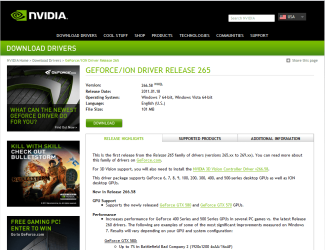
This is the latest driver package that is compatible with the 210:
 

Attachments

  • Capture.PNG
    Capture.PNG
    73.6 KB · Views: 90

My Computer

Computer type
PC/Desktop
Computer Manufacturer/Model Number
Home Built - Jan 2013
OS
Windows 7 64 Bit Home Premium SP1
CPU
i7-3820
Motherboard
Asus P9X79-PRO - Bios 4608
Memory
GSkill F3-14900CL9Q - 16GB
Graphics Card(s)
EVGA GeForce GTX660 - Driver 352.86
Sound Card
On board Realtek ALC898
Monitor(s) Displays
Acer S271HL
Screen Resolution
1920 x 1080
Hard Drives
#1- Samsung 840 Pro Series
#2- Western Digital WD1002FAEX Sata3 Black
#3- Western Digital WD1002FAEX Sata3 Black
PSU
Corsair CMPSU-850TX-V2 - 850 watt (by Seasonic)
Case
Corsair Obsidian 550D
Cooling
Standard 3 120mm case fans, Cooler Master Hyper 212 EVO
Keyboard
MS KC-0405
Mouse
Intellimouse 5-button
Internet Speed
56 Mbits/Sec (on a good day)
Antivirus
Avast & Malwarebytes
Browser
Firefox
Other Info
Asus DVD - DRW-24B1ST 24X
That's a shame, It really is not a bad little card, ok it's not a gaming card, but I knew that when I bought it, for HD video though it does the job wonderfully.
 

My Computer

Computer type
PC/Desktop
Computer Manufacturer/Model Number
Medion Erazer (note to self: insert model number) - with custom additions
OS
Windows 10 Pro x64
CPU
Intel Core i5 7400 @ 3.00GHz
Motherboard
OEM supllied with PC
Memory
8GB 2133Mhz DDR4 (OEM supplied)
Graphics Card(s)
Gygabyte Windforce GTX 1050Ti (Factory Overclocked)
Sound Card
Realtek
Monitor(s) Displays
Acer Al1980 + HKC
Screen Resolution
1360*768(HKC) / 1280*1024(Acer)
Hard Drives
1TB Toshiba
1TB WD Caviar Green
120GB Samsung Evo 840
PSU
OEM supplied (no power rating on case)
Case
OEM Supplied
Cooling
Stock
Keyboard
Logitech Wireless
Mouse
Logitect Wireless
Internet Speed
40Mb/s Down 10Mb/s Up
Antivirus
Defender
Browser
Firefox
i updated my drivers to the 266.58 driver (had a 256.xx version previously).. interestingly enough, my Windows Experience rating for graphics went from 5.1 (with the old drivers) to a 4.9 (with the newer driver).. WTH?
 

My Computer

Computer Manufacturer/Model Number
Self Built
OS
Windows 7 Home Premium x64
CPU
AMD Phenom II X4 955 Black Edition
Motherboard
ASUS M4A79XTD EVO
Memory
Kingston 4GB DDR3 1333
Graphics Card(s)
PNY GeForce 210 1GB DDR2 PCIe 2.0
Sound Card
Integrated Audio
Monitor(s) Displays
LG W2286L HDMI LED monitor
Screen Resolution
1680 x 1050
Hard Drives
500GB WD 7200rpm SATA (OS)
500GB WD 7200rpm SATA
250GB Seagate 7200rpm SATA
PSU
Rosewill RG700-S12 700W
Case
Rosewill Blackbone ATX Mid Tower
Cooling
COOLER MASTER Hyper N520, 3 case fans (front, back, side)
Keyboard
Basic
Mouse
Basic
Internet Speed
Cable
Other Info
Laptop - Toshiba Satellite P755, Intel i3 2.1GHz, 640GB HDD, 6GB RAM, Intel HD Video, 1366x768 Resolution, Windows 7 Home Premium x64
Yeah, that can happen. Some algorithm doesn't like the new settings.

I wouldn't read too much into WEI. It can just be "funny" sometimes.

How does the card perform in real world use?
 

My Computer

Computer type
PC/Desktop
Computer Manufacturer/Model Number
Home Built - Jan 2013
OS
Windows 7 64 Bit Home Premium SP1
CPU
i7-3820
Motherboard
Asus P9X79-PRO - Bios 4608
Memory
GSkill F3-14900CL9Q - 16GB
Graphics Card(s)
EVGA GeForce GTX660 - Driver 352.86
Sound Card
On board Realtek ALC898
Monitor(s) Displays
Acer S271HL
Screen Resolution
1920 x 1080
Hard Drives
#1- Samsung 840 Pro Series
#2- Western Digital WD1002FAEX Sata3 Black
#3- Western Digital WD1002FAEX Sata3 Black
PSU
Corsair CMPSU-850TX-V2 - 850 watt (by Seasonic)
Case
Corsair Obsidian 550D
Cooling
Standard 3 120mm case fans, Cooler Master Hyper 212 EVO
Keyboard
MS KC-0405
Mouse
Intellimouse 5-button
Internet Speed
56 Mbits/Sec (on a good day)
Antivirus
Avast & Malwarebytes
Browser
Firefox
Other Info
Asus DVD - DRW-24B1ST 24X
oh, card is fine for my needs. im not a gamer, so unless something really goes wrong with it, i wont replace it in the near future..
 

My Computer

Computer Manufacturer/Model Number
Self Built
OS
Windows 7 Home Premium x64
CPU
AMD Phenom II X4 955 Black Edition
Motherboard
ASUS M4A79XTD EVO
Memory
Kingston 4GB DDR3 1333
Graphics Card(s)
PNY GeForce 210 1GB DDR2 PCIe 2.0
Sound Card
Integrated Audio
Monitor(s) Displays
LG W2286L HDMI LED monitor
Screen Resolution
1680 x 1050
Hard Drives
500GB WD 7200rpm SATA (OS)
500GB WD 7200rpm SATA
250GB Seagate 7200rpm SATA
PSU
Rosewill RG700-S12 700W
Case
Rosewill Blackbone ATX Mid Tower
Cooling
COOLER MASTER Hyper N520, 3 case fans (front, back, side)
Keyboard
Basic
Mouse
Basic
Internet Speed
Cable
Other Info
Laptop - Toshiba Satellite P755, Intel i3 2.1GHz, 640GB HDD, 6GB RAM, Intel HD Video, 1366x768 Resolution, Windows 7 Home Premium x64
Does anyone know if it's a good idea to try and update the newer version from NVIDIA website? I've talked to two tech support guys in the last couple days, and as I experience with all tech support, they are really about as computer knowledgeable as a 3rd grader. So I seek answers elsewhere.
 

My Computer

OS
Windows 7 Home Premium 64-bit
CPU
i5-650
Memory
6GB
Hard Drives
1TB
Back
Top