NVIDIA + Win7 + Dual Monitors = Frustration

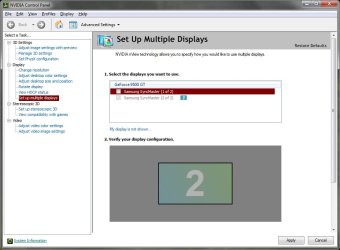
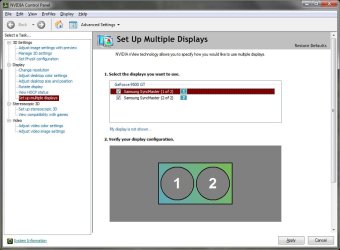
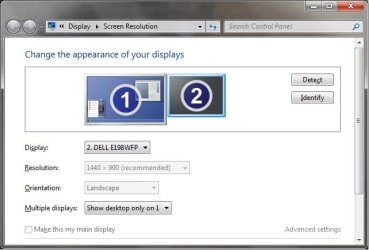
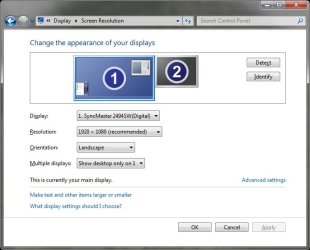
I am able to select these options and even click on apply, but the settings do not take. A couple of things I notice that are interesting is in the Windows7 settings, see how the 2 monitor is shown smaller? Why is this? And in the NVIDIA control panel, when I check both displays, the only option is to duplicate the displays. It will not let me select extend.
Untitled5.jpg Untitled6.jpg
Untitled7.jpg Untitled8.jpg
 

My Computer My Computer

At a glance

Win7 UltimateCore2Quad 2.664GBEVGA GeForce 9500GT
Computer Manufacturer/Model Number
Dell Vostro 220
OS
Win7 Ultimate
CPU
Core2Quad 2.66
Memory
4GB
Graphics Card(s)
EVGA GeForce 9500GT
Monitor(s) Displays
(2) Samsung 2494
The second monitor will be displayed smaller if it's resolution is set lower than the other one. I've seen that happen on my XP PC even though both monitors are identical. Once I up the resolution they both show as being the same size in that window. Did you try disabling that LogMeIn Mirror Driver?
 

My Computer My Computer

At a glance

Windows 10 Education 64 bitAMD Phenom II X4 980 Black Edition Deneb 3.7GHz8GB 4GBx2 Kingston PC10600 DDR3 1333 MemoryZotac NVIDIA Geforce GT640 2 Gig DDR3 PCIe
Computer type
PC/Desktop
Computer Manufacturer/Model Number
Home Built
OS
Windows 10 Education 64 bit
CPU
AMD Phenom II X4 980 Black Edition Deneb 3.7GHz
Motherboard
Asus M4N68T-M V2 µATX Motherboard
Memory
8GB 4GBx2 Kingston PC10600 DDR3 1333 Memory
Graphics Card(s)
Zotac NVIDIA Geforce GT640 2 Gig DDR3 PCIe
Sound Card
VIA VT1708s High Definition Audio 8-channel Onboard
Monitor(s) Displays
22" LG E2242 1080p and 2 19" I-INC AG191D
Screen Resolution
1280x1024 - 1920x1080 - 1280x1024
Hard Drives
Crucial M100 256 GB SSD and 500 GB WD Blue SATA
PSU
Thermaltake TR 620
Case
Power Up Black ATX Mid-Tower Case
Cooling
Stock heatsink and fan
Keyboard
Logitech Wireless K350 Wave
Mouse
Logitech Wireless M570 Trackman Wheel
Internet Speed
80 Mbps Down 30 Mbps Up
Antivirus
Windows Defender
Browser
Internet Explorer 11
Other Info
HP DVD1040e Lightscribe - External USB2
I am able to select these options and even click on apply, but the settings do not take. A couple of things I notice that are interesting is in the Windows7 settings, see how the 2 monitor is shown smaller? Why is this? And in the NVIDIA control panel, when I check both displays, the only option is to duplicate the displays. It will not let me select extend.
Hello CEV;

First, the video drivers for XP and Vista / 7 are not equal in all aspects. According to this web site, the "Span" feature we used in XP is not available in Vista / 7 ...
Extending my desktop across two monitors with Nvidia Geforce 8800 GT - Super User

Second, as I have experience only with my three 17" monitors that just support 1280X1024, I am not sure about this, so someone may correct me, but according the this Nvidia web site, the GeForce 9500 GT MAX Digital resolution is 2560X1600. If you have ONE monitor capable of displaying all of that, all is good. If you are sharing the display between two monitors, you have to divide the 2560 by two, meaning each monitor can only equally display 1280. For you to have two displays both with 1920 resolution, your video card would have to support 3840, and I do not think it does.
GeForce 9500 GT: a graphics card perfect for the ultimate 3D user experience and playing the latest PC games.

To use your dual monitors equally, you will need to set the resolutions to 1280, not 1920.

One last possibility is to create a "Custom Resolution" giving you two displays of 1920. Please see this tutorial for more info: http://www.sevenforums.com/tutorials/7947-force-dvi-hdmi-resolutions-refresh-rates-6.html

Cheers!
Robert
 

My Computer My Computer

At a glance

...
OS
...
Isn't "Extend" the same thing as "Span"?
 

My Computer My Computer

At a glance

Windows 10 Education 64 bitAMD Phenom II X4 980 Black Edition Deneb 3.7GHz8GB 4GBx2 Kingston PC10600 DDR3 1333 MemoryZotac NVIDIA Geforce GT640 2 Gig DDR3 PCIe
Computer type
PC/Desktop
Computer Manufacturer/Model Number
Home Built
OS
Windows 10 Education 64 bit
CPU
AMD Phenom II X4 980 Black Edition Deneb 3.7GHz
Motherboard
Asus M4N68T-M V2 µATX Motherboard
Memory
8GB 4GBx2 Kingston PC10600 DDR3 1333 Memory
Graphics Card(s)
Zotac NVIDIA Geforce GT640 2 Gig DDR3 PCIe
Sound Card
VIA VT1708s High Definition Audio 8-channel Onboard
Monitor(s) Displays
22" LG E2242 1080p and 2 19" I-INC AG191D
Screen Resolution
1280x1024 - 1920x1080 - 1280x1024
Hard Drives
Crucial M100 256 GB SSD and 500 GB WD Blue SATA
PSU
Thermaltake TR 620
Case
Power Up Black ATX Mid-Tower Case
Cooling
Stock heatsink and fan
Keyboard
Logitech Wireless K350 Wave
Mouse
Logitech Wireless M570 Trackman Wheel
Internet Speed
80 Mbps Down 30 Mbps Up
Antivirus
Windows Defender
Browser
Internet Explorer 11
Other Info
HP DVD1040e Lightscribe - External USB2
I am not buying that this will not work with Win7. It is the same video card, and same 2 monitors at the same resolution that had no issues in WinXP Pro. I find it really hard to believe that moving up to Win7 would eliminate the ability to do something like this.

I have also removed the LogMeIn, and am still with the same issue. And just for kicks, I tried changing the reso to 1280, but it just automatically reverts to the 1920, which is the recommended reso for these monitors.

What I will try right now is connecting a different pair of monitors and see what happens. If that works, I will be somewhat relieved. I will not be happy though that it would not work with these sweet Samsung 2494's.

I'll hopefully report back shortly, otherwise it will be tomorrow.
 

My Computer My Computer

At a glance

Win7 UltimateCore2Quad 2.664GBEVGA GeForce 9500GT
Computer Manufacturer/Model Number
Dell Vostro 220
OS
Win7 Ultimate
CPU
Core2Quad 2.66
Memory
4GB
Graphics Card(s)
EVGA GeForce 9500GT
Monitor(s) Displays
(2) Samsung 2494
Second, as I have experience only with my three 17" monitors that just support 1280X1024, I am not sure about this, so someone may correct me, but according the this Nvidia web site, the GeForce 9500 GT MAX Digital resolution is 2560X1600. If you have ONE monitor capable of displaying all of that, all is good. If you are sharing the display between two monitors, you have to divide the 2560 by two, meaning each monitor can only equally display 1280. For you to have two displays both with 1920 resolution, your video card would have to support 3840, and I do not think it does.
GeForce 9500 GT: a graphics card perfect for the ultimate 3D user experience and playing the latest PC games.

Cheers!
Robert

The Max Res of 2560x1600 is for the Dual Link DVI Port. He can run 25x16 on the DL DVI port and a 1920x1200 on the Single Link DVI port on his card.

I am running a pair of 19" LCD's at 1440x900 on my 9600GT, and have been running dual screens since I installed Windows 7 in August of last year. (I am still on my original install too).
 

Attachments

  • screen-res.jpg
    screen-res.jpg
    64.1 KB · Views: 25

My Computer My Computer

At a glance

Windows 7 Ultimate 64bitIntel i7 3770K16GB DDR3 1333 Corsair XMS3XFX HD6950 2GB EyeFinity
Computer Manufacturer/Model Number
HAL-9000
OS
Windows 7 Ultimate 64bit
CPU
Intel i7 3770K
Motherboard
Asus Sabertooth Z77
Memory
16GB DDR3 1333 Corsair XMS3
Graphics Card(s)
XFX HD6950 2GB EyeFinity
Sound Card
Logitech G35 & Sennheiser PC135 & VIA HD
Monitor(s) Displays
23" HP 2310e, 23" Samsung B2230, 21.5" Viewsonic
Screen Resolution
5760x1080
Hard Drives
16TB of Storage
128GB & 256GB Crucial M4 SSD's, 2X 1TB WD Black, 3x 2TB WD, 3x 2TB Samsung F4, 1.5TB Seagate, WD 500GB,
PSU
Antec True Power New 650watt
Case
Cooler Master HAF-932
Cooling
Corsair H60 Hydro Cooler, 3x 230mm Fans, 2x120mm Fan
Keyboard
Logitech G15 and G13
Mouse
Logitech G700 Gaming Mouse
Internet Speed
50/10 Mbit
Other Info
Speakers : Alesis M1 Active Mk2 Studio Monitors , APC RS 1200 UPS, HP 4500DN Color Laser, HP P1006 mono Laser, Kodak 8500 Dye-Sub, Epson 1280 inkjet, Epson Worforce 610 MFC
OK. I shutdown and then connected 2 Dell E198WFP's. Exact same issue's. I think I may start offering a reward to whomever can figure this out.
Untitled9.jpg
 

My Computer My Computer

At a glance

Win7 UltimateCore2Quad 2.664GBEVGA GeForce 9500GT
Computer Manufacturer/Model Number
Dell Vostro 220
OS
Win7 Ultimate
CPU
Core2Quad 2.66
Memory
4GB
Graphics Card(s)
EVGA GeForce 9500GT
Monitor(s) Displays
(2) Samsung 2494
If it was me I think I would start over and do a clean install of windows 7. Then only install the latest motherboard and video drivers and see what happens. Is your windows 7 DVD an original or a copy? You're running build 7600 right?
 

My Computer My Computer

At a glance

Windows 10 Education 64 bitAMD Phenom II X4 980 Black Edition Deneb 3.7GHz8GB 4GBx2 Kingston PC10600 DDR3 1333 MemoryZotac NVIDIA Geforce GT640 2 Gig DDR3 PCIe
Computer type
PC/Desktop
Computer Manufacturer/Model Number
Home Built
OS
Windows 10 Education 64 bit
CPU
AMD Phenom II X4 980 Black Edition Deneb 3.7GHz
Motherboard
Asus M4N68T-M V2 µATX Motherboard
Memory
8GB 4GBx2 Kingston PC10600 DDR3 1333 Memory
Graphics Card(s)
Zotac NVIDIA Geforce GT640 2 Gig DDR3 PCIe
Sound Card
VIA VT1708s High Definition Audio 8-channel Onboard
Monitor(s) Displays
22" LG E2242 1080p and 2 19" I-INC AG191D
Screen Resolution
1280x1024 - 1920x1080 - 1280x1024
Hard Drives
Crucial M100 256 GB SSD and 500 GB WD Blue SATA
PSU
Thermaltake TR 620
Case
Power Up Black ATX Mid-Tower Case
Cooling
Stock heatsink and fan
Keyboard
Logitech Wireless K350 Wave
Mouse
Logitech Wireless M570 Trackman Wheel
Internet Speed
80 Mbps Down 30 Mbps Up
Antivirus
Windows Defender
Browser
Internet Explorer 11
Other Info
HP DVD1040e Lightscribe - External USB2
CEV, have you really followed my method one step at a time? I mean, uninstall, restart, (cancel any auto driver installation requests) run Ccleaner, restart, then install driver... That's what I'd do when Nvidia's driver starts it's act on me, and it works every time... (I'm on Nvidia since the first GeForce). And my current setup, I've added the 4th monitor, an old 15" Sharp LCD monitor... It just works...

zzz2496
 

My Computer My Computer

At a glance

Windows7 Ultimate 64bitIntel Core 2 Quad Q6600DDR2 Adata 4GBNvidia GeForce GTX 285 1024 and Nvidia GeForc...
Computer Manufacturer/Model Number
Self Built
OS
Windows7 Ultimate 64bit
CPU
Intel Core 2 Quad Q6600
Motherboard
Abit IN9-32X-MMAX
Memory
DDR2 Adata 4GB
Graphics Card(s)
Nvidia GeForce GTX 285 1024 and Nvidia GeForce 8800GT 512
Sound Card
Asus Xonar HDAV 1.3
Monitor(s) Displays
Dell 2407WFP and BenQ 2400v and Philips 150v3
Screen Resolution
3840x1200 and 1024x768
Hard Drives
2 WDC 1TB
1 WDC 1.5TB
1 WDC 640GB
1 WDC 320GB
1 Seagate 200GB
PSU
Corsair TX 850W
Case
Cooler Master HAF932
Cooling
Arctic Cooling Freezer Extreme and plenty of fans...
Keyboard
MicrosoftNaturalKeyboard 4000/Apple Alu keyboard/Dinovo mini
Mouse
Logitech G5/MarbleMouseTrackball/PerformanceMX/SpacePilotPRO
Internet Speed
1.5Mbps down/384Kbps up
Other Info
APC SURT 1000XL
Logitech Z-560
Wiimote
Mikrotik Router
Linksys (now Cisco) SD2008 8 port Gigabit switch
Linksys WRT54G (acting as AP)
Apple wireless Aluminium keyboard
Apple Magic Mouse
Xbox360 wired controller
Isn't "Extend" the same thing as "Span"?
In some ways it may be, but not all. I ran dual monitors with a single GeForce 6600 GT in XP Pro x64 for a couple of years. Every update of the Nvidia driver changed the way I was allowed to use the monitors. One driver would allow full screen TV on a second monitor, the next would only allow TV on the main monitor. It really irritated me.

But one feature I played with was "Span Displays" which would allow for a single desktop background to be displayed across both monitors, even three if you had them. My current setup with Windows 7 allows me to move application windows from far right across to far left as if they are one display. But each monitor has the same desktop background image, I cannot "span" one across all three.

Before you can use the monitor you must select:
extend_desktop_01.png

not the same as "Span Displays".

Cheers!
Robert
 

My Computer My Computer

At a glance

...
OS
...

My Computer My Computer

At a glance

Windows 7 Ultimate 64bitIntel i7 3770K16GB DDR3 1333 Corsair XMS3XFX HD6950 2GB EyeFinity
Computer Manufacturer/Model Number
HAL-9000
OS
Windows 7 Ultimate 64bit
CPU
Intel i7 3770K
Motherboard
Asus Sabertooth Z77
Memory
16GB DDR3 1333 Corsair XMS3
Graphics Card(s)
XFX HD6950 2GB EyeFinity
Sound Card
Logitech G35 & Sennheiser PC135 & VIA HD
Monitor(s) Displays
23" HP 2310e, 23" Samsung B2230, 21.5" Viewsonic
Screen Resolution
5760x1080
Hard Drives
16TB of Storage
128GB & 256GB Crucial M4 SSD's, 2X 1TB WD Black, 3x 2TB WD, 3x 2TB Samsung F4, 1.5TB Seagate, WD 500GB,
PSU
Antec True Power New 650watt
Case
Cooler Master HAF-932
Cooling
Corsair H60 Hydro Cooler, 3x 230mm Fans, 2x120mm Fan
Keyboard
Logitech G15 and G13
Mouse
Logitech G700 Gaming Mouse
Internet Speed
50/10 Mbit
Other Info
Speakers : Alesis M1 Active Mk2 Studio Monitors , APC RS 1200 UPS, HP 4500DN Color Laser, HP P1006 mono Laser, Kodak 8500 Dye-Sub, Epson 1280 inkjet, Epson Worforce 610 MFC
Isn't "Extend" the same thing as "Span"?
In some ways it may be, but not all. I ran dual monitors with a single GeForce 6600 GT in XP Pro x64 for a couple of years. Every update of the Nvidia driver changed the way I was allowed to use the monitors. One driver would allow full screen TV on a second monitor, the next would only allow TV on the main monitor. It really irritated me.

But one feature I played with was "Span Displays" which would allow for a single desktop background to be displayed across both monitors, even three if you had them. My current setup with Windows 7 allows me to move application windows from far right across to far left as if they are one display. But each monitor has the same desktop background image, I cannot "span" one across all three.

Before you can use the monitor you must select:
View attachment 77525

not the same as "Span Displays".

Cheers!
Robert

My two monitors are 1280x1024, I use custom 2560 x 1024 wallpapers and set it to "tile". The one wallpaper displays (spans) across both monitors.

Ultramon is nice, you can put different wallpapers on each monitor with that. It does a lot more than that but that is one feature I think most people with multiple monitors would like to have.
 

My Computer My Computer

At a glance

Windows 10 Education 64 bitAMD Phenom II X4 980 Black Edition Deneb 3.7GHz8GB 4GBx2 Kingston PC10600 DDR3 1333 MemoryZotac NVIDIA Geforce GT640 2 Gig DDR3 PCIe
Computer type
PC/Desktop
Computer Manufacturer/Model Number
Home Built
OS
Windows 10 Education 64 bit
CPU
AMD Phenom II X4 980 Black Edition Deneb 3.7GHz
Motherboard
Asus M4N68T-M V2 µATX Motherboard
Memory
8GB 4GBx2 Kingston PC10600 DDR3 1333 Memory
Graphics Card(s)
Zotac NVIDIA Geforce GT640 2 Gig DDR3 PCIe
Sound Card
VIA VT1708s High Definition Audio 8-channel Onboard
Monitor(s) Displays
22" LG E2242 1080p and 2 19" I-INC AG191D
Screen Resolution
1280x1024 - 1920x1080 - 1280x1024
Hard Drives
Crucial M100 256 GB SSD and 500 GB WD Blue SATA
PSU
Thermaltake TR 620
Case
Power Up Black ATX Mid-Tower Case
Cooling
Stock heatsink and fan
Keyboard
Logitech Wireless K350 Wave
Mouse
Logitech Wireless M570 Trackman Wheel
Internet Speed
80 Mbps Down 30 Mbps Up
Antivirus
Windows Defender
Browser
Internet Explorer 11
Other Info
HP DVD1040e Lightscribe - External USB2
If it was me I think I would start over and do a clean install of windows 7. Then only install the latest motherboard and video drivers and see what happens. Is your windows 7 DVD an original or a copy? You're running build 7600 right?

This is what I am leaning towards doing. Going to try and find time today. Spent waaay too much time on this when it should just work. And it is an original DVD from TechNet.

CEV, have you really followed my method one step at a time? I mean, uninstall, restart, (cancel any auto driver installation requests) run Ccleaner, restart, then install driver... That's what I'd do when Nvidia's driver starts it's act on me, and it works every time... (I'm on Nvidia since the first GeForce). And my current setup, I've added the 4th monitor, an old 15" Sharp LCD monitor... It just works...

zzz2496

Step for step.

You should get Ultramon. One of the best apps for multi screens,
Realtime Soft UltraMon

Thanks for the link, but no need for a paid program when basic operations are not even working.


I'll try a reload in the next day or two. I'm really hoping it works. I'm sure most can understand what it would be like going back to 1 monitor after using 2 or 3 for so long.
 

My Computer My Computer

At a glance

Win7 UltimateCore2Quad 2.664GBEVGA GeForce 9500GT
Computer Manufacturer/Model Number
Dell Vostro 220
OS
Win7 Ultimate
CPU
Core2Quad 2.66
Memory
4GB
Graphics Card(s)
EVGA GeForce 9500GT
Monitor(s) Displays
(2) Samsung 2494
If it was me I think I would start over and do a clean install of windows 7.

BINGO!!!

It just works...

zzz2496

That is no joke. I have not even installed any drivers or software yet. It is working perfectly and Win7 loaded all drivers. IT JUST WORKS!!! Now I'll have to get busy with the reason I did not try this sooner, reinstalling all the software and setting her back up just how I like it.
Thanks again for everyones help and suggestions.
Chad
 

My Computer My Computer

At a glance

Win7 UltimateCore2Quad 2.664GBEVGA GeForce 9500GT
Computer Manufacturer/Model Number
Dell Vostro 220
OS
Win7 Ultimate
CPU
Core2Quad 2.66
Memory
4GB
Graphics Card(s)
EVGA GeForce 9500GT
Monitor(s) Displays
(2) Samsung 2494
Make sure to create a restore point before you start installing your programs. That way if it is some program that is messing things up you could try going back without having to start all over again.
 

My Computer My Computer

At a glance

Windows 10 Education 64 bitAMD Phenom II X4 980 Black Edition Deneb 3.7GHz8GB 4GBx2 Kingston PC10600 DDR3 1333 MemoryZotac NVIDIA Geforce GT640 2 Gig DDR3 PCIe
Computer type
PC/Desktop
Computer Manufacturer/Model Number
Home Built
OS
Windows 10 Education 64 bit
CPU
AMD Phenom II X4 980 Black Edition Deneb 3.7GHz
Motherboard
Asus M4N68T-M V2 µATX Motherboard
Memory
8GB 4GBx2 Kingston PC10600 DDR3 1333 Memory
Graphics Card(s)
Zotac NVIDIA Geforce GT640 2 Gig DDR3 PCIe
Sound Card
VIA VT1708s High Definition Audio 8-channel Onboard
Monitor(s) Displays
22" LG E2242 1080p and 2 19" I-INC AG191D
Screen Resolution
1280x1024 - 1920x1080 - 1280x1024
Hard Drives
Crucial M100 256 GB SSD and 500 GB WD Blue SATA
PSU
Thermaltake TR 620
Case
Power Up Black ATX Mid-Tower Case
Cooling
Stock heatsink and fan
Keyboard
Logitech Wireless K350 Wave
Mouse
Logitech Wireless M570 Trackman Wheel
Internet Speed
80 Mbps Down 30 Mbps Up
Antivirus
Windows Defender
Browser
Internet Explorer 11
Other Info
HP DVD1040e Lightscribe - External USB2
Back
Top