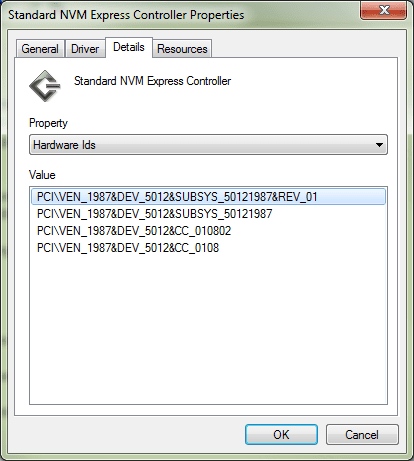
Solved Nvme Driver

Thanks! Just got my Crucial P1 NVMe to work with your Hotfix. However, the performance is pretty crap. It does 450MB/s read and ~50MB/s writes, while in Win10 it does almost 2000/1500MB/s. Any advice?


-- Edit: I've managed to fix by installing the Micron NVMe controller driver for Windows 7. If someone is in the same spot as me, maybe try searching for your SSD flash controller (Marvell, Micron, Lite-On, etc) and install its drivers. I now get around the same speed as in Win 10.
 
Last edited:

My Computer My Computer

OS
Windows 7 Ultimate x64

My Computers My Computers

System One System Two

  • Computer type
    PC/Desktop
    OS
    7 X64
    CPU
    i5 8400
    Motherboard
    gigabyte b365m ds3h
    Memory
    2x8gb 3200mhz
    Hard Drives
    various
    PSU
    pure power 11 400w cm
    Case
    Coolermaster
    Cooling
    cryorig m9i
  • Computer type
    PC/Desktop
    OS
    7x64
    CPU
    g5400
    Motherboard
    ga b365m ds3h
    Memory
    8gb ddr4 2400
    PSU
    xfx pro 450w
I get an error each time...Windows Update Standalone Installer...Installer encountered an error: 0x80240037...etc.

So I unpacked the .msu files with winrar, and using the CMD window, installed the extracted .cab files with the same name with the commands:
dism /online /add-package /packagepath:"C:\Windows6.1-KB3087873-v2-x64\Windows6.1-KB3087873-v2-x64.cab"
dism /online /add-package /packagepath:"C:\Windows6.1-KB2990941-v3-x64\Windows6.1-KB2990941-v3-x64.cab"

This honestly may be a very stupid question, so forgive me in advance.
I have the same error that you had, but when copy and pasting the commands here into cmd it writes: "the system cannot find the path specified".
I've tried: extracting the zip files directly to C: ;Extracting them to a different folder.
What am I doing wrong?
 

My Computer My Computer

Computer type
PC/Desktop
OS
win 7 HP
CPU
i5 8400
Motherboard
z370 a pro
Memory
16 gb 2400hz
Hard Drives
1tb hdd
128 ssd
But, if you want to install win7 onto an nvme device, you will need to integrate the nvme updates into the installation media beforehand.


I'm trying to install Windows 7 Enterprise x64 on a new laptop, and this driver issue is a roadblock for me. How would I integrate the nvme updates into my installation? I'm installing the new OS with a USB as my installation media. The laptop currently has Windows 10 installed, and I'm trying to set it up to dual boot Win10/7.
 

My Computer My Computer

Computer type
PC/Desktop
OS
Windows 7 Enterprise x64
1.Boot into win 10

2.From within win10 Use dism++ to apply the win7 image from install.wim to your target partition.

3.Next use dism++ to integrate the nvme updates into the applied image.

4.Add a boot menu entry pointing at the win7 partition.

5.Boot into your win 7 partition.

View attachment Dism++10.1.1000.100.zip

OR

1.Boot into win 10

2.From within win10 Use winntsetup to apply the win7 image from install.wim to your target partition.
( It will automatically add a boot menu entry using the default settings)
View attachment WinNTSetup4_B5.zip

3.Next use dism++ to integrate the nvme updates into the applied image.

4.Boot into your win 7 partition.


You can use this to deal with ms cpu check for updates
View attachment wuacpufix.zip
 
Last edited:

My Computers My Computers

System One System Two

  • Computer type
    PC/Desktop
    OS
    7 X64
    CPU
    i5 8400
    Motherboard
    gigabyte b365m ds3h
    Memory
    2x8gb 3200mhz
    Hard Drives
    various
    PSU
    pure power 11 400w cm
    Case
    Coolermaster
    Cooling
    cryorig m9i
  • Computer type
    PC/Desktop
    OS
    7x64
    CPU
    g5400
    Motherboard
    ga b365m ds3h
    Memory
    8gb ddr4 2400
    PSU
    xfx pro 450w
Sorry to ask but I need a little bit of hand holding …..

My wife has a Dell XPS 13 9350 which came with a Samsung 1 TB PM 951 NVME SSD and W10. She hated W 10 and asked me to install W7 which I eventually did with Samsung’s NVME drivers. These drivers and W7 are on a USB flash drive. I should have made notes on how I did it but I did not.

She now wants a 2TB drive and I have ordered an addlink s70 from Amazon – only £250! From this excellent forum I understand that these Samsung drivers will not work with the addlink SSD and that I need to use MS NVME drivers.

My plan is to make a system image of the current W7 installation (with all its programmes and files etc etc) and then install the system image onto the new addlink drive using the W7 USB drive.

The question is, where do I place the MS drivers on my USB drive?

Having installed the new addlink SSD, what do I do first then second etc before installing the system image?

Any help greatly appreciated.

Thank you very much.
 

My Computer My Computer

Computer type
PC/Desktop
OS
W 7 Ultimate x64
Might be simplest to integrate MS nvme updates into the current win7 installation.

Then clone it to the new 2tb nvme disk.
 

My Computers My Computers

System One System Two

  • Computer type
    PC/Desktop
    OS
    7 X64
    CPU
    i5 8400
    Motherboard
    gigabyte b365m ds3h
    Memory
    2x8gb 3200mhz
    Hard Drives
    various
    PSU
    pure power 11 400w cm
    Case
    Coolermaster
    Cooling
    cryorig m9i
  • Computer type
    PC/Desktop
    OS
    7x64
    CPU
    g5400
    Motherboard
    ga b365m ds3h
    Memory
    8gb ddr4 2400
    PSU
    xfx pro 450w
SIW2,


Thanks for responding.


My wife's Dell is a laptop so I would be replacing one drive with the new aadlink SSD which should be arriving on Tuesday. I have ordered an NVME enclosure which should arrive one week later which is when I could clone the drive.


If I go down this route, where would I install the MS drivers in my system or would they install in the correct place when I unpacked them?
 

My Computer My Computer

Computer type
PC/Desktop
OS
W 7 Ultimate x64
SIW2,

....If I go down this route, where would I install the MS drivers in my system or would they install in the correct place when I unpacked them?


Having inspected the MS drivers - thanks for them SW12 - it looks as if they will be installed in the correct places by the standalone installers.


Can I wait until the enclosure arrives is another thing!
 

My Computer My Computer

Computer type
PC/Desktop
OS
W 7 Ultimate x64
Thank you very much for the Windows 7 NVMe drivers. I just got a 1 TB TeamGroup M34 NVMe in a Phison E12 PCIe x4 plug in card and with Microsoft pulling the hotfix to attempt to push us all to upgrade to Windows 10 there were a few minutes of frantic googling to find another site to get this driver. Much appreciated.

I have a Dell T3610 computer and as such the BIOS doesn't detect the NVMe SSD (too old). So the solution for this computer is to use the Clover Boot Utility. I created one on a 4 GB flash drive as per the Clover instructions and told the BIOS to boot it. Then Clover will be booted and it will then boot Windows 7 from the NVMe drive. The Dell T3610, T5610, T5810 all have a USB port on the motherboard so I can plug the flash drive inside the computer. This works great. My only problem came after I had plugged my external USB backup drive in and then restarted Windows 7. Clover decided to try to boot from it (which it obviously can't) so the Windows 7 boot loader BSODed. Unplugged the USB drive, rebooted and Clover EFI booted my NVMe Windows 7 Pro correctly. I used the AOMEI Backupper utility to clone my 500 GB Samsung 840 SATA SSD over to the NVMe SSD. Then after Windows 7 Pro was up and running used the Mini Tool Partition Wizard utility to expand the C: drive partition to the full 1 TB capacity of my NVMe drive. All is running perfect and very fast.

Phison E12 PCIe x4 plug in card for M.2280 NVMe SSD
YhUmYtF.png
 
Last edited:

My Computer My Computer

Computer type
PC/Desktop
Computer Manufacturer/Model Number
Dell T3610
OS
FL
CPU
Xeon 1620 v2
Motherboard
Dell T3610
Memory
16 GB DDR3-1600
Graphics Card(s)
Geforce 1060 AMP!
Hard Drives
Samsung 840 SSD 500 GB
Antivirus
Eset Nod32
Browser
Vivaldi
Glad it is working well for you.

Is it not possible to mod the bios on that machine? Using clover is probably easier.


Thank you very much for the Windows 7 NVMe drivers. I just got a 1 TB TeamGroup M34 NVMe in a Phison E12 PCIe x4 plug in card and with Microsoft pulling the hotfix to attempt to push us all to upgrade to Windows 10 there were a few minutes of frantic googling to find another site to get this driver. Much appreciated.

I have a Dell T3610 computer and as such the BIOS doesn't detect the NVMe SSD (too old). So the solution for this computer is to use the Clover Boot Utility. I created one on a 4 GB flash drive as per the Clover instructions and told the BIOS to boot it. Then Clover will be booted and it will then boot Windows 7 from the NVMe drive. The Dell T3610, T5610, T5810 all have a USB port on the motherboard so I can plug the flash drive inside the computer. This works great. My only problem came after I had plugged my external USB backup drive in and then restarted Windows 7. Clover decided to try to boot from it (which it obviously can't) so the Windows 7 boot loader BSODed. Unplugged the USB drive, rebooted and Clover EFI booted my NVMe Windows 7 Pro correctly. I used the AOMEI Backupper utility to clone my 500 GB Samsung 840 SATA SSD over to the NVMe SSD. Then after Windows 7 Pro was up and running used the Mini Tool Partition Wizard utility to expand the C: drive partition to the full 1 TB capacity of my NVMe drive. All is running perfect and very fast.

Phison E12 PCIe x4 plug in card for M.2280 NVMe SSD
YhUmYtF.png
 

My Computers My Computers

System One System Two

  • Computer type
    PC/Desktop
    OS
    7 X64
    CPU
    i5 8400
    Motherboard
    gigabyte b365m ds3h
    Memory
    2x8gb 3200mhz
    Hard Drives
    various
    PSU
    pure power 11 400w cm
    Case
    Coolermaster
    Cooling
    cryorig m9i
  • Computer type
    PC/Desktop
    OS
    7x64
    CPU
    g5400
    Motherboard
    ga b365m ds3h
    Memory
    8gb ddr4 2400
    PSU
    xfx pro 450w
Greetings. I recently acquired a 512GB Gigabyte NVMe SSD...

GIGABYTE NVMe SSD 512GB | Solid State Drive (SSD) - GIGABYTE U.S.A.

It is installed on an MSI mainboard with 7th generation B250M chipset. At the moment I want to use it in parallel with the main storage unit that I have, which is a Kingston Sata3 SSD. The mainboard detects it without problems and I had the system also detect it using the intel drivers provided by SIW2 on page 3.

So far it has no problems, but I would like to use that NVME as the main system unit and I would like to know if there are more specific drivers (Gigabyte's own), because the device manager detects my unit as an SSD 660p intel unit.
 
Last edited:

My Computer My Computer

Computer type
PC/Desktop
OS
Ultimate 64X
Might be simplest to integrate MS nvme updates into the current win7 installation.

Then clone it to the new 2tb nvme disk.


I installed the hotfix drivers on my W7 installation.


I cloned the existing hard drive to the new addlink S70 SSD using Macrium Reflect.


I installed the new hard drive in the Dell XPS 13 9350 but, on boot, Windows would not start normally - the only option is to launch startup repair. No OS can be found. Load drivers from a USB flash drive does not even identify the flash drive.


I shut down, installed the recovery drive with the W7 hotfix drivers and restarted. This time I had access to the W7 hotfix drivers on the flash drive. Two were displayed but selecting either produced an error message: the specified location does not contain information about your hardware.


Addlink does not provide drivers for W7 but state that W10 native drivers will recognise the NVMe SSD.


Other than doing that, anything else I could try?
 

My Computer My Computer

Computer type
PC/Desktop
OS
W 7 Ultimate x64
Possibly something went wrong with the cloning process.

I installed the hotfix drivers on my W7 installation.
I cloned the existing hard drive to the new addlink S70 SSD using Macrium Reflect.
I installed the new hard drive in the Dell XPS 13 9350 but, on boot, Windows would not start normally
 

My Computers My Computers

System One System Two

  • Computer type
    PC/Desktop
    OS
    7 X64
    CPU
    i5 8400
    Motherboard
    gigabyte b365m ds3h
    Memory
    2x8gb 3200mhz
    Hard Drives
    various
    PSU
    pure power 11 400w cm
    Case
    Coolermaster
    Cooling
    cryorig m9i
  • Computer type
    PC/Desktop
    OS
    7x64
    CPU
    g5400
    Motherboard
    ga b365m ds3h
    Memory
    8gb ddr4 2400
    PSU
    xfx pro 450w
I decided that I would try an upgrade from W7 Enterprise to W10 (so that the new addlink NVMe SSD would be recognised) using the W10 media creation tool but the tool tells me that it can only update the files and data but not the apps (of which I have many!!) as the two OS are different. I would prefer to keep my apps.


Head scratching required.
 

My Computer My Computer

Computer type
PC/Desktop
OS
W 7 Ultimate x64
S1W2,

I reinstalled the x64 drivers and recloned the hard drive. Still no joy after putting the new drive in the laptop and booting up.


I was able to read some of the error message on start up:

The digital signature could not be verified.

0xc0000428


Something about a file could not be found: windows\system32\winload.efi

Could it be that this file is in the Hotfix x86 folder? I only installed the x64 folder since my W7 is an x64 version.

In addition,

if I connect the cloned drive via an external enclosure to a W10 laptop, the drive is recognised and Crystaldisk is able to verify the name and size.

If I connect it to my W7 laptop, the drive is recognised but CrystalDisk does not recognise it at all.

Any suggestions gratefully received.
 

My Computer My Computer

Computer type
PC/Desktop
OS
W 7 Ultimate x64
The digital signature could not be verified.

0xc0000428

Something about a file could not be found: windows\system32\winload.efi

That is not connected to the ms nvme updates.


Try wiping the disk and using something else to do the clone.
 

My Computers My Computers

System One System Two

  • Computer type
    PC/Desktop
    OS
    7 X64
    CPU
    i5 8400
    Motherboard
    gigabyte b365m ds3h
    Memory
    2x8gb 3200mhz
    Hard Drives
    various
    PSU
    pure power 11 400w cm
    Case
    Coolermaster
    Cooling
    cryorig m9i
  • Computer type
    PC/Desktop
    OS
    7x64
    CPU
    g5400
    Motherboard
    ga b365m ds3h
    Memory
    8gb ddr4 2400
    PSU
    xfx pro 450w
Thanks; I will give it a try.
 

My Computer My Computer

Computer type
PC/Desktop
OS
W 7 Ultimate x64
I added the drivers to a Windows seven ISO that I previously installed on more than 10 different SSDs without problems; However, in this NVMe Gigabyte nothing works, I create an ISO with MBR and the installation collapses, I install it as UEFI and the installation ends normally, but when you start the system for the first time it restarts continuously, it never passes the windows logo. Has anyone installed this NVMe Gigabyte with Windows Seven?
 

My Computer My Computer

Computer type
PC/Desktop
OS
Ultimate 64X
Back
Top