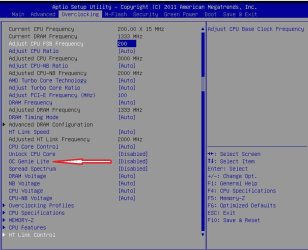
OC Genie II? Anybody get it working?

levelchaser

New member
Member
VIP
Local time
9:58 AM
Messages
119
Location
Brunswick, ME
So my mobo has the OC genie II feature. It is the MSI 990X-GD55. However I searched all over the place, through the bios, in the OS itself and could not find it. My BIOS is flashed and up to date, along with all of the software within my system. Luckily MSI has this convenient tool that scans your system called "Live Update 5"

Anyways, has anybody found this feature and got it to work as advertised?

edit: I've also read through every page in the manual. It speaks of overclocking, but not OC genie II
 

My Computer My Computer

At a glance

Windows 7 Ultimate x64AMD FX 8150 Zambezi 3.6GhzG.SKILL Ares Series 16GB (2 x 8GB) 240-Pin DD...NVIDIA Gigabyte Geforce GTX 560 Fermi
Computer Manufacturer/Model Number
Custom
OS
Windows 7 Ultimate x64
CPU
AMD FX 8150 Zambezi 3.6Ghz
Motherboard
MSI 990XA-GD55 AM3+
Memory
G.SKILL Ares Series 16GB (2 x 8GB) 240-Pin DDR3 1866
Graphics Card(s)
NVIDIA Gigabyte Geforce GTX 560 Fermi
Monitor(s) Displays
Samsung SyncMaster 2494HM
Screen Resolution
1920x1080
Hard Drives
500GB WD don't remember the speed.
PSU
500W Cooler Master
Case
Sentey Extreme Division GS-6510 Burton
Cooling
Stock FX8150 cooler. :( 5+ LED fans on the case.
Keyboard
Wireless Microsoft Keyboard
Mouse
Logitech M510 Wireless Mouse
On page 3-14 of your manuel there is a setting for " OC Genie Lite " which appears to do the same function as the OC Genie II button that is on the intel boards I have seen . From looking at the pictures of your board I cannot see any switches on the board to enable the auto OC .
Hope this helps.......j
 

My Computer My Computer

At a glance

W 7 Ultimate x64 SP-1I7 920 DO 4200mhz 24/76gb G'Skill Trident @ 6,7,6,18,1 1600mhzATI Fire Pro 3700
Computer Manufacturer/Model Number
me JT-X
OS
W 7 Ultimate x64 SP-1
CPU
I7 920 DO 4200mhz 24/7
Motherboard
Gigabut X58A UD3R
Memory
6gb G'Skill Trident @ 6,7,6,18,1 1600mhz
Graphics Card(s)
ATI Fire Pro 3700
Sound Card
mobo
Monitor(s) Displays
Samsung 244t , Viewsonic VG2230wm
Hard Drives
64gb Kingston v100 OS , Programs
250gb Samsung HM User files , Program data
1tb Samsung F3 Storage
PSU
Corsair HX850
Case
CM-690
Cooling
T'Right Ultra Extreme
I don't see the switches that the MSI boards used to have either. But there is a setting in the overclocking Section in BIOS for OC Genie Lite. Select it and see if the bios instructions tell you how to use it.

z1.JPG
 

My Computers My Computers

  • At a glance

    Windows 11 ProRyzen 9 5900X32GB G Skill DDR4-3600EVGA RTX 3080 FTW 3 Ultra
    Computer type
    PC/Desktop
    Computer Manufacturer/Model Number
    ALWAYS UNDER CONSTRUCTION
    OS
    Windows 11 Pro
    CPU
    Ryzen 9 5900X
    Motherboard
    Asus X570 Crosshair Viii Hero
    Memory
    32GB G Skill DDR4-3600
    Graphics Card(s)
    EVGA RTX 3080 FTW 3 Ultra
    Sound Card
    On Board/Sennheiser PC37X Headset
    Monitor(s) Displays
    3 X Asus 27"
    Screen Resolution
    2560x1440
    Hard Drives
    2 X 1 TB NVME drives
    PSU
    EVGA 850
    Case
    Phanteks Eclipse P400A
    Cooling
    EVGA 280 AIO
    Keyboard
    Logitech G510s/ Logitech G13
    Mouse
    Logitech G502
    Internet Speed
    24/1
    Antivirus
    ESET/MBAM Pro/SAS Pro
    Browser
    Chrome/ Firefox/ Edge
  • At a glance

    Windows 11 ProIntel Ultra 9 288V32 GB LPDDR5X 8533
    Computer type
    Laptop
    System Manufacturer/Model Number
    Dell 16 Plus
    OS
    Windows 11 Pro
    CPU
    Intel Ultra 9 288V
    Memory
    32 GB LPDDR5X 8533
    Monitor(s) Displays
    16" Mini-LED HDR600 Touch 90 Hz
    Screen Resolution
    2560X1600
    Hard Drives
    1 TB NVME
I don't see the switches that the MSI boards used to have either. But there is a setting in the overclocking Section in BIOS for OC Genie Lite. Select it and see if the bios instructions tell you how to use it.

View attachment 233987

The manual is incredibly obscure. All it says is "Setting this item to [Enabled allows the system to detect the maximum FSB clock and to overclock it automatically. If overclocking fails to run, you can try the lower FSB clock for overclocking successfully"
 

My Computer My Computer

At a glance

Windows 7 Ultimate x64AMD FX 8150 Zambezi 3.6GhzG.SKILL Ares Series 16GB (2 x 8GB) 240-Pin DD...NVIDIA Gigabyte Geforce GTX 560 Fermi
Computer Manufacturer/Model Number
Custom
OS
Windows 7 Ultimate x64
CPU
AMD FX 8150 Zambezi 3.6Ghz
Motherboard
MSI 990XA-GD55 AM3+
Memory
G.SKILL Ares Series 16GB (2 x 8GB) 240-Pin DDR3 1866
Graphics Card(s)
NVIDIA Gigabyte Geforce GTX 560 Fermi
Monitor(s) Displays
Samsung SyncMaster 2494HM
Screen Resolution
1920x1080
Hard Drives
500GB WD don't remember the speed.
PSU
500W Cooler Master
Case
Sentey Extreme Division GS-6510 Burton
Cooling
Stock FX8150 cooler. :( 5+ LED fans on the case.
Keyboard
Wireless Microsoft Keyboard
Mouse
Logitech M510 Wireless Mouse
Have you clicked it and seen what the options are? Try it, you can always disable it if it does not work. At least that's what I would do. You may have options there.
 

My Computers My Computers

  • At a glance

    Windows 11 ProRyzen 9 5900X32GB G Skill DDR4-3600EVGA RTX 3080 FTW 3 Ultra
    Computer type
    PC/Desktop
    Computer Manufacturer/Model Number
    ALWAYS UNDER CONSTRUCTION
    OS
    Windows 11 Pro
    CPU
    Ryzen 9 5900X
    Motherboard
    Asus X570 Crosshair Viii Hero
    Memory
    32GB G Skill DDR4-3600
    Graphics Card(s)
    EVGA RTX 3080 FTW 3 Ultra
    Sound Card
    On Board/Sennheiser PC37X Headset
    Monitor(s) Displays
    3 X Asus 27"
    Screen Resolution
    2560x1440
    Hard Drives
    2 X 1 TB NVME drives
    PSU
    EVGA 850
    Case
    Phanteks Eclipse P400A
    Cooling
    EVGA 280 AIO
    Keyboard
    Logitech G510s/ Logitech G13
    Mouse
    Logitech G502
    Internet Speed
    24/1
    Antivirus
    ESET/MBAM Pro/SAS Pro
    Browser
    Chrome/ Firefox/ Edge
  • At a glance

    Windows 11 ProIntel Ultra 9 288V32 GB LPDDR5X 8533
    Computer type
    Laptop
    System Manufacturer/Model Number
    Dell 16 Plus
    OS
    Windows 11 Pro
    CPU
    Intel Ultra 9 288V
    Memory
    32 GB LPDDR5X 8533
    Monitor(s) Displays
    16" Mini-LED HDR600 Touch 90 Hz
    Screen Resolution
    2560X1600
    Hard Drives
    1 TB NVME
Back
Top