OCR - office 210 .. how to scan in documents?

Askyn

New member
Local time
2:56 PM
Messages
9
Hi all /wave

I playing around with office 2010, and so far im enjoying it for my use.

I have a question tho, I have a lot of things id like to scan into word and be able to edit etc.

I cannt seem to find a way to do this.

Has this been removed as a option in 2010?

If so, what would be the easist way now to OCR scan documents and get the text into word? Preferably something that does it automatically ( ie button push and sends text to word ), vs having to somehow scan then highlight / copy / paste.

OR, if that isnt really possible, any recommendations on a cheap / open software option that would scan and then save as a document on the pc?

Reason I say cheap is something im doing at home with stuff, not for a office so the budget is way way WAY smaller hehe.
 

My Computer My Computer

At a glance

Windows 7 Home PreiumAMD Athlon 64 x2 Dual Core 4800+ 2.4GHz2gigNvidia 7900gs
Computer Manufacturer/Model Number
Shuttle xpc sn26p
OS
Windows 7 Home Preium
CPU
AMD Athlon 64 x2 Dual Core 4800+ 2.4GHz
Memory
2gig
Graphics Card(s)
Nvidia 7900gs
Monitor(s) Displays
Acer al1916w & Mimo um710 (usb)
what are you using to scan the document..?
 

My Computer My Computer

At a glance

Windows10 Pro - 64Bit vs.10547i7-965 Extreme Edition (8 Cores) at 3.3GHz (n...12G Corsair Dominator DDR3 - tripled2xAMD SapphireNITRO R9 380(4G) crossfire
Computer type
PC/Desktop
Computer Manufacturer/Model Number
benchtec, built to personal specs
OS
Windows10 Pro - 64Bit vs.10547
CPU
i7-965 Extreme Edition (8 Cores) at 3.3GHz (no OC)
Motherboard
BloodRageX58 (Socket1366)
Memory
12G Corsair Dominator DDR3 - tripled
Graphics Card(s)
2xAMD SapphireNITRO R9 380(4G) crossfire
Sound Card
Sonar(SB)X-Fi onboard
Monitor(s) Displays
SyncMaster P2050 20"
Screen Resolution
1600x900 (widescreen)
Hard Drives
480G\OCZSolid3SSD, 64G\OCZVertex3SSD,60G\OCZVertex2SSD, 1TB\spinpointF1SATAHDD
PSU
1200w Power Station Gold
Case
ANTEC 900/2 all blue lights, etc..
Cooling
Noctua SE1366 NH-U12P - a tight fit, but a monster cooler!!
Keyboard
Logitech G19 (wired)
Mouse
Logitech G9 Laser (wired)
Internet Speed
150mb unlimited
Browser
IE11(RP)
Other Info
Xbox One, Nokia735 Windows10 mobile, LG HD/DVD/Blu-Ray r/w, CyberlinkPowerDVD15, LogitechZ5500-SS(5.1), LogitechG35Phones-SS(7.1),MSOffice 2007,CorelDrawX7,Painter2016, Wacom Intuos Pro-SE

My Computer My Computer

At a glance

Windows 7 Home PreiumAMD Athlon 64 x2 Dual Core 4800+ 2.4GHz2gigNvidia 7900gs
Computer Manufacturer/Model Number
Shuttle xpc sn26p
OS
Windows 7 Home Preium
CPU
AMD Athlon 64 x2 Dual Core 4800+ 2.4GHz
Memory
2gig
Graphics Card(s)
Nvidia 7900gs
Monitor(s) Displays
Acer al1916w & Mimo um710 (usb)
the OCR software should already be present, if not make sure you have the latest drivers - available from Canon's support site..

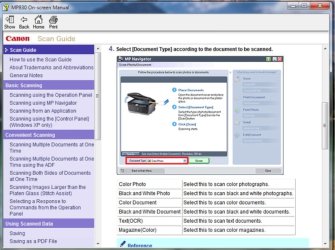
the user manual shows how to obtain OCR scans:

CanonOCR.jpg
 

My Computer My Computer

At a glance

Windows10 Pro - 64Bit vs.10547i7-965 Extreme Edition (8 Cores) at 3.3GHz (n...12G Corsair Dominator DDR3 - tripled2xAMD SapphireNITRO R9 380(4G) crossfire
Computer type
PC/Desktop
Computer Manufacturer/Model Number
benchtec, built to personal specs
OS
Windows10 Pro - 64Bit vs.10547
CPU
i7-965 Extreme Edition (8 Cores) at 3.3GHz (no OC)
Motherboard
BloodRageX58 (Socket1366)
Memory
12G Corsair Dominator DDR3 - tripled
Graphics Card(s)
2xAMD SapphireNITRO R9 380(4G) crossfire
Sound Card
Sonar(SB)X-Fi onboard
Monitor(s) Displays
SyncMaster P2050 20"
Screen Resolution
1600x900 (widescreen)
Hard Drives
480G\OCZSolid3SSD, 64G\OCZVertex3SSD,60G\OCZVertex2SSD, 1TB\spinpointF1SATAHDD
PSU
1200w Power Station Gold
Case
ANTEC 900/2 all blue lights, etc..
Cooling
Noctua SE1366 NH-U12P - a tight fit, but a monster cooler!!
Keyboard
Logitech G19 (wired)
Mouse
Logitech G9 Laser (wired)
Internet Speed
150mb unlimited
Browser
IE11(RP)
Other Info
Xbox One, Nokia735 Windows10 mobile, LG HD/DVD/Blu-Ray r/w, CyberlinkPowerDVD15, LogitechZ5500-SS(5.1), LogitechG35Phones-SS(7.1),MSOffice 2007,CorelDrawX7,Painter2016, Wacom Intuos Pro-SE
yes but it wants to save it as a graphic image.

What is the use in tring to do ocr if its just going to go on and save it as a picture?

Tring to figure out how to have it scan and then import into word so that I can edit the text / reformat etc.
 

My Computer My Computer

At a glance

Windows 7 Home PreiumAMD Athlon 64 x2 Dual Core 4800+ 2.4GHz2gigNvidia 7900gs
Computer Manufacturer/Model Number
Shuttle xpc sn26p
OS
Windows 7 Home Preium
CPU
AMD Athlon 64 x2 Dual Core 4800+ 2.4GHz
Memory
2gig
Graphics Card(s)
Nvidia 7900gs
Monitor(s) Displays
Acer al1916w & Mimo um710 (usb)
fter you scan the document, you can use Microsoft Office Document Imaging to create a version of the document that you can edit....

http://office.microsoft.com/en-us/word/HA102548791033.aspx
Making it tiff, then edit in word, tutorial here:
How to Turn a Scanned Document Into Microsoft Word Document (with pictures) - wikiHow
------------------------------------------------------
Microsoft Office Document Imaging (MODI)

MODI provided a common document imaging and scanning solution for Office. It was also the basis of the Fax feature for Office. When MODI was installed, it was the default handler for .tif, .tiff, and .mdi files. In Office 2010, MODI is fully deprecated. This change also affects the setup tree, which no longer shows the MODI Help, OCR, or Indexing Service Filter nodes on the Tools menu. The Internet Fax feature in Office 2010 uses the Windows Fax printer driver to generate a fixed file format (TIF). MODI and all its components are deprecated for 64-bit Office 2010....
Changes in Word 2010

Hope this helps, cheers
 

My Computer My Computer

At a glance

Windows 7 Ultimate x32DualCore Intel Pentium E2200, 2218 MHz (11 x ...2 GB DDR2-800 DDR2 SDRAMnVIDIA GeForce 9500GT 1GB
Computer Manufacturer/Model Number
Micro-Star International/MS-7529
OS
Windows 7 Ultimate x32
CPU
DualCore Intel Pentium E2200, 2218 MHz (11 x 202)
Motherboard
MSI G31M3 V2 (MS-7529) (2 PCI, 1 PCI-E x16,2 DDR2 DIMM)
Memory
2 GB DDR2-800 DDR2 SDRAM
Graphics Card(s)
nVIDIA GeForce 9500GT 1GB
Sound Card
Realtek ALC888/1200 @ Intel 82801GB ICH7
Monitor(s) Displays
Samsung SyncMaster 2253BW (Digital) 22'' LCD
Screen Resolution
1680x1050
Hard Drives
SAMSUNG HD322IJ ATA Device (298 GB , IDE)
I do thank you for your help, and maybe im just using an over beta version or something.

BUT

I DONT have access to Microsoft Office Document Imaging any were in my tools menu. Nor do i have a option to have it installed when I go to try and add features to my office install.

And, all the tutorials ive found referance using that feature to import into word effectively.

Again, thank you for your help but I havent been able to find any thing yet to do what im tring to do =(
 

My Computer My Computer

At a glance

Windows 7 Home PreiumAMD Athlon 64 x2 Dual Core 4800+ 2.4GHz2gigNvidia 7900gs
Computer Manufacturer/Model Number
Shuttle xpc sn26p
OS
Windows 7 Home Preium
CPU
AMD Athlon 64 x2 Dual Core 4800+ 2.4GHz
Memory
2gig
Graphics Card(s)
Nvidia 7900gs
Monitor(s) Displays
Acer al1916w & Mimo um710 (usb)
MODI and all its components are deprecated for 64-bit Office 2010....
now, english is not my native language but the word deprecated if I'm right is saying a lot here?

Alternatively, you could use OneNote 2010's Insert ribbon to import a Scanner Printout and then use the Copy Text from Picture option when right-clicking on a picture...
In 2007 you could add the Import From Scanner functionality back via creating a macro. I'm NOT sure if this will work under 2010 but it's probably worth a try. :)..... more here:
Initiate scan and OCR in Microsoft Office Word 2010 (Beta) - Super User

Alternative of the alternatively:

When you scan a document directly into a PDF file....
When doing the page recognition in a PDF document, the Paper Capture plug-in offers you a choice between the following three Output Style options:
* Formatted Text & Graphics to make the text in the PDF document both editable and searchable...
more here:Making Scanned Documents Searchable and Editable - For Dummies

Wish you luck with your problem, cheers
 

My Computer My Computer

At a glance

Windows 7 Ultimate x32DualCore Intel Pentium E2200, 2218 MHz (11 x ...2 GB DDR2-800 DDR2 SDRAMnVIDIA GeForce 9500GT 1GB
Computer Manufacturer/Model Number
Micro-Star International/MS-7529
OS
Windows 7 Ultimate x32
CPU
DualCore Intel Pentium E2200, 2218 MHz (11 x 202)
Motherboard
MSI G31M3 V2 (MS-7529) (2 PCI, 1 PCI-E x16,2 DDR2 DIMM)
Memory
2 GB DDR2-800 DDR2 SDRAM
Graphics Card(s)
nVIDIA GeForce 9500GT 1GB
Sound Card
Realtek ALC888/1200 @ Intel 82801GB ICH7
Monitor(s) Displays
Samsung SyncMaster 2253BW (Digital) 22'' LCD
Screen Resolution
1680x1050
Hard Drives
SAMSUNG HD322IJ ATA Device (298 GB , IDE)
thank you for both of your help /bow

I think with information you both have given ill be able to get something up and running.

but .. ggeesss

what ever happened to easy solutions?

I mean it shouldnt require jumping thru hoops to just push a button and have text OCRed into a word processor were you can then edit it =(

Stuff is suppose to be getting EASIER, not more complicated. ( first flatbed i had even had one button OCR and then text was imported into editor .. sigh )

thank you again tho .. just wish there was a way easier way as this will require a lot more work in the long run.
 

My Computer My Computer

At a glance

Windows 7 Home PreiumAMD Athlon 64 x2 Dual Core 4800+ 2.4GHz2gigNvidia 7900gs
Computer Manufacturer/Model Number
Shuttle xpc sn26p
OS
Windows 7 Home Preium
CPU
AMD Athlon 64 x2 Dual Core 4800+ 2.4GHz
Memory
2gig
Graphics Card(s)
Nvidia 7900gs
Monitor(s) Displays
Acer al1916w & Mimo um710 (usb)
I have been facing similar problem of scanning documents in 2010. Some says use netone and insert scanner...... But i figure it out in a very simple way. First i install office 2007 and then 2010 beta. Now for scanning purpose i use 2007 and 2010 for rest. Hope it will help you also
 

My Computer My Computer

At a glance

windows 7 ultimateAMD ATHLON x4 6304GB KINGSTON HYPER X BLU 1600 MhzXFX HD 4670 1 GB DDR3
Computer Manufacturer/Model Number
ASSEMBLED
OS
windows 7 ultimate
CPU
AMD ATHLON x4 630
Motherboard
Asus M5A78L-M/USB 3
Memory
4GB KINGSTON HYPER X BLU 1600 Mhz
Graphics Card(s)
XFX HD 4670 1 GB DDR3
Sound Card
ONBOARD
Monitor(s) Displays
SAMSUNG B2230 22"
Hard Drives
KINGSTON SV 300 120 GB SSD
320 GB SAMSUNG 7200 RPM
PSU
ANTEC VP450P
Cooling
COOLERMASTER TX3
Keyboard
MICROSOFT
Internet Speed
4 MBPS
Back
Top