Odd happenings with two USB's. Can anyone help.

Ukdodger

New member
Member
VIP
Local time
11:20 AM
Messages
178
Location
Surrey England
I have two USB's a Laptop and a Desktop.

One USB works in the Laptop but not in the desktop. The other USB works in both.

In the DT the non working USB comes up as 'unrecognised' . The other USB is recognised and works fine

Tried updating all the drivers. All come up as up to date.

Tried uninstalling and reinstalling.

Tried changing the power plan for USBs

Nothing has worked.

I'm at the end of what I know. Help would be much appreciated. Thanks
 

My Computer My Computer

At a glance

Windows 7 home
Computer type
Laptop
OS
Windows 7 home
When you say "USB" I assume a USB thumb drive? What's the make and model of this problematic "USB" device?
 

My Computer My Computer

At a glance

Windows 7 Ultimate x64
Computer type
PC/Desktop
OS
Windows 7 Ultimate x64
Thanks for the reply. Yes it's a memory stick. I always confuse the two, It's a 64gb Kingston traveller..
 

My Computer My Computer

At a glance

Windows 7 home
Computer type
Laptop
OS
Windows 7 home
What is the make and model of the desktop? How old is it? Does it also run Windows 7? Are the motherboard drivers, particularly the chipset drives for the desktop updated?
 

My Computer My Computer

At a glance

Windows 7 Ultimate x64
Computer type
PC/Desktop
OS
Windows 7 Ultimate x64
On the case it says 'Akasa'. It's quite old About ten years I think. It's running W7 home and it's had all the updates except those that finished when support for W7 ended.

This might be a clue and I should have included it with the question. This started when I attempted to push in a stick upside down. It went in but I immediately got a message saying that port was taking too much power. Looking at the port it looks like some pins were bent.

There are two ports. It's the other undamaged one that wont accept the dodgy stick.
 

My Computer My Computer

At a glance

Windows 7 home
Computer type
Laptop
OS
Windows 7 home
Yeah, based on what you just said, it sounds like perhaps you fried the front header for the USB ports. The message saying the port is using too much power tells me it was a short. In other words, you inadvertently crossed positive (+) with negative (-).

At his point I'd be apt to unplug that USB header and buy a PCI-e USB card. Like these: https://www.ebay.com/sch/i.html?_from=R40&_nkw=pci+usb+card&_sacat=0


Are there any other issues since this issue happened? Because if there is then there could be other damage. Which means a PCI-e USB card may not work at all and would be futile.
 

My Computer My Computer

At a glance

Windows 7 Ultimate x64
Computer type
PC/Desktop
OS
Windows 7 Ultimate x64
Thanks but not sure how they would connect and why does the remaining working port work with any stick except one?.

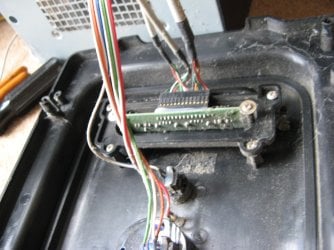
The pic attached is of both ports (excuse the dust) Couldnt I just replace that? The problem with that is I cant find an exact replacement. Those I see have different connectors and less wires?


IMG_3466.JPG
 

My Computer My Computer

At a glance

Windows 7 home
Computer type
Laptop
OS
Windows 7 home
This started when I attempted to push in a stick upside down.

Was it the stick that works sometimes and not others?

There was a short indeed due to the Windows message. Since you said other USB thumb drives still work I'm assuming the problem lies in the thumb drive its self.

There might not be damage to the USB bus and what not after all. I need to be there to see exactly what's going on. Your top connector there looks like the header connector. But your computer looks OEM and doesn't appear you can simply disconnect USB ports without snipping wire. I would refrain from doing any of that if other USB thumb drives work.

There are two ports. It's the other undamaged one that wont accept the dodgy stick.

Now this leads me to believe there IS USB bus issues.

It's very hard for me to say because I literally need to be there and look at the computer.

It could all very well be some kind of driver mess up due to the temporally short that took place as well. You could try and run USBDeview, uninstall all devices and reboot. Be careful because if your mouse and keyboard are USB it'll uninstall those as well. Though, a PC reboot should reinstall those drivers. If you chose to run this utility, I'd first create a system restore point. View any installed/connected USB device on your system

- - - Updated - - -

PS:

You might want to refrain from even using USB sticks if there is USB bus issues. I'm thinking perhaps some, but not all USB thumb drives have internal protections and some don't so if your computer's front USB headers are messed up, it could mess up other USB thumb drives. This I'm not too sure about, but it's something I need to research to see if certain USB thumb drive manufactures have protections in place and what those protections represent and how they work. Busy at the moment so it's on the back burner.

So, I just want to be clear.

The damaged USB port works? The undamaged USB port does not?

This is true for only one USB thumb drive? The Kingston 64 GB thumb drive? Other USB thumb drives work in both ports without issue?

 

My Computer My Computer

At a glance

Windows 7 Ultimate x64
Computer type
PC/Desktop
OS
Windows 7 Ultimate x64
Thanks for your help Simpilot. Just for clarify.

There are/were two working ports on the front of the PC as in the pic. Both worked fine on all sticks until I shorted the left hand port out. That left hand port in now unusable to anything (thanks to my clumsiness). Now the right hand port works with all sticks except the Data Traveller. The other two sticks two fine in that right hand port.

The two working sticks are both are Kingston 32GB

This may be a clue:

The non working stick is a 64GB Kingston Data Traveller. To test I've bought a brand new 64GB Kingston Data Traveller and that doesnt work either. It pops up the same message as the non working one.
 

My Computer My Computer

At a glance

Windows 7 home
Computer type
Laptop
OS
Windows 7 home
The non working stick is a 64GB Kingston Data Traveller. To test I've bought a brand new 64GB Kingston Data Traveller and that doesnt work either. It pops up the same message as the non working one.


So this tells me you have a potential driver issue/hardware ID oddity going on. You can try my instructions on using USBDeview. See video. 2022 02 16 16 20 53 - Sendvid Double click video for full screen. Double click again to minimize.
 

My Computer My Computer

At a glance

Windows 7 Ultimate x64
Computer type
PC/Desktop
OS
Windows 7 Ultimate x64
How do I get to that screen?
 

My Computer My Computer

At a glance

Windows 7 home
Computer type
Laptop
OS
Windows 7 home

My Computer My Computer

At a glance

Win 10 x64, Linux Lite, Win 7 x64, BlackArch,...
Computer type
PC/Desktop
Computer Manufacturer/Model Number
HP Desktop & Compaq Laptop
OS
Win 10 x64, Linux Lite, Win 7 x64, BlackArch, & Kali
Hard Drives
Samsung 850 Pro 256Gb,
Hitachi HDD 1Tb,
Crucial MX SSD 250Gb
Segate 3Tb USB 3.0 Ext. Backup HDD
Internet Speed
150Mbps dn, 20Mbps up
Antivirus
Avast Free, Malwarebytes Anti-Exploit & Anti-Ransomware
Browser
Firefox, Chrome, Opera, & VPN
It's a URL link...
 

My Computer My Computer

At a glance

Windows 7 Ultimate x64
Computer type
PC/Desktop
OS
Windows 7 Ultimate x64
Back
Top